
Introduction
This manual provides comprehensive instructions for the safe and efficient operation of your LUOTWO DG9000 Global Walkie Talkie. Please read this manual thoroughly before using the device to ensure optimal performance and to prevent damage.
The LUOTWO DG9000 is an advanced global walkie talkie featuring 4G PoC technology, national intercom capabilities, long-range communication up to 5000KM, WiFi, Bluetooth, IP67 waterproof rating, Type-C rechargeable battery, and integrated GPS. It is designed for versatile applications including property management, construction sites, logistics, transportation, and hotel management.
Package Contents
Upon opening the package, verify that all items listed below are present and in good condition:
- 1x LUOTWO DG9000 National Intercom Walkie Talkie
- 1x Battery
- 1x Back Clip
- 1x Charger
- 1x Lanyard
- 1x User Manual (this document)

Image: Front view of the LUOTWO DG9000 Global Walkie Talkie, showing its display, keypad, and antennas.
Product Overview and Components
Familiarize yourself with the various parts of your DG9000 walkie talkie:

Image: Detailed diagram illustrating the key components of the LUOTWO DG9000, including the long antenna, short antenna, switch/volume knob, LCD display screen, public network PTT, simulate PTT, interface switching key, group/member key, headphone jack, speaker, microphone, keypad, and USB charge port.
- Long Antenna: For enhanced signal reception and transmission.
- Short Antenna: Secondary antenna for specific frequency bands.
- Switch/Volume Knob: Powers the device on/off and adjusts audio volume.
- LCD Display Screen: Shows status, channel, network mode, and menu options.
- Public Network PTT (Push-to-Talk): Activates communication in public network mode.
- Simulate PTT: Activates communication in simulation mode (traditional RF).
- Headphone Jack: For connecting external audio accessories.
- Speaker: Outputs audio.
- Microphone: Captures voice input.
- Keypad: For navigation, inputting numbers, and accessing functions.
- USB Charge Port (Type-C): For charging the device.
- Back Clip: For attaching the device to clothing or belts.
Setup
1. Battery Installation and Charging
- Ensure the device is powered off.
- Locate the battery compartment on the back of the walkie talkie.
- Insert the provided 6000mAh lithium-ion battery, ensuring proper alignment of the contacts.
- Close the battery compartment securely.
- Connect the Type-C charging cable to the USB charge port on the device and the other end to a compatible USB power adapter.
- Allow the device to fully charge before first use. The charging indicator on the screen will show charging status.
2. Antenna Attachment
- Carefully screw the long and short antennas into their respective ports on the top of the device until finger-tight. Do not overtighten.
3. SIM Card Installation (for Public Network Mode)
The DG9000 supports 4G PoC (Push-to-Talk over Cellular) technology, requiring a compatible SIM card for global communication. Refer to your network provider for SIM card activation and data plan details.
- Power off the device and remove the battery.
- Locate the SIM card slot, typically beneath the battery or on the side.
- Insert the activated SIM card into the slot, ensuring correct orientation as indicated by the diagram near the slot.
- Reinstall the battery and close the compartment.
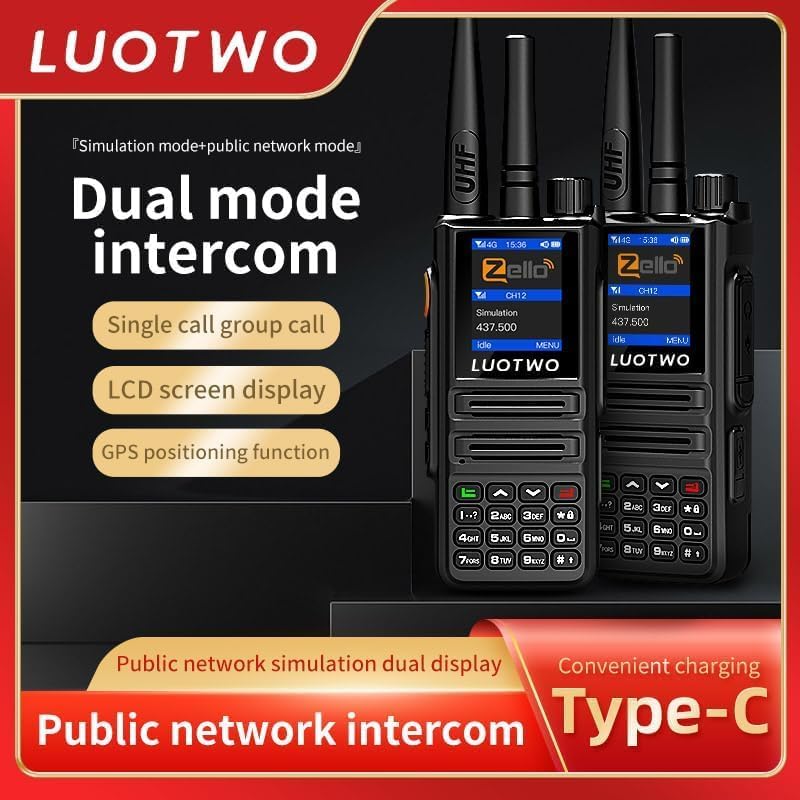
Image: Two DG9000 units highlighting dual mode intercom functionality and the convenience of Type-C charging.
Operating Instructions
1. Power On/Off and Volume Adjustment
- To power on, rotate the Switch/Volume Knob clockwise until the screen illuminates.
- To power off, rotate the Switch/Volume Knob counter-clockwise until the device shuts down.
- Adjust the volume by rotating the Switch/Volume Knob while the device is on.
2. Understanding Communication Modes
The DG9000 supports two primary communication modes:
- Public Network Mode (4G PoC): Utilizes cellular networks for communication, offering unlimited distance and global connectivity (up to 5000KM range). Requires an active SIM card and data plan.
- Simulation Mode (Traditional RF): Operates like a conventional walkie talkie, providing local signal coverage (typically 1-10 kilometers depending on terrain). This mode does not require a SIM card.
Switch between modes using the dedicated interface switching key or through the device menu.

Image: The DG9000 screen showing both "Public network" and "Simulation" modes, indicating its dual-mode capability.
3. Making Calls (PTT Function)
- Single Call: To initiate a private call with a specific contact, select the contact from your list and press the PTT button corresponding to the active communication mode (Public Network PTT or Simulate PTT).
- Group Call: To communicate with a predefined group, select the desired group using the Group/Member Key or menu, then press the appropriate PTT button.
- Release the PTT button to listen for a response.

Image: Visual representation of single call and group call functionalities on the DG9000, emphasizing strong signal and stable transmission.
4. GPS Navigation
The integrated GPS support allows for precise location tracking and route mapping. Access GPS features through the device menu. Ensure GPS is enabled in settings for accurate positioning.
5. Display and Keypad Usage
- The large LCD screen provides clear information at a glance, including network status, battery level, channel, and current mode.
- Use the keypad for navigating menus, entering text (e.g., contact names, Zello credentials), and selecting options. The arrow keys (up/down) are typically used for menu navigation, and the green/red buttons for call/end or confirm/cancel actions.

Image: Close-up view of the DG9000's large screen display, showing clear information for easy readability even in low light conditions.
Maintenance
Proper maintenance ensures the longevity and optimal performance of your DG9000 walkie talkie.
1. Cleaning
- Wipe the device with a soft, damp cloth. Do not use harsh chemicals or abrasive cleaners.
- Ensure the charging port and headphone jack are free of dust and debris.
2. Water Resistance (IP67)
The DG9000 is IP67 waterproof, meaning it is protected against dust ingress and can withstand immersion in water up to 1 meter for 30 minutes. While robust, avoid prolonged submersion or exposure to high-pressure water jets.

Image: The DG9000 walkie talkie depicted in a challenging environment, emphasizing its robust ABS engineering plastic body, dustproof, moisture-proof, and anti-drop features, making it as solid as rocks.
3. Battery Care
- Charge the battery regularly, even if the device is not in frequent use, to maintain battery health.
- Avoid fully discharging the battery frequently.
- Store the device and battery in a cool, dry place when not in use.
Troubleshooting
If you encounter issues with your DG9000, refer to the following common problems and solutions:
| Problem | Possible Cause | Solution |
|---|---|---|
| Device does not power on. | Battery is low or not installed correctly. | Charge the battery. Ensure the battery is properly seated in its compartment. |
| No signal in Public Network Mode. | No active SIM card, poor cellular coverage, or data plan issues. | Ensure SIM card is installed and active. Move to an area with better cellular reception. Check your data plan with your network provider. |
| Cannot hear or transmit in Simulation Mode. | Incorrect channel selected, out of range, or volume too low. | Verify both devices are on the same channel. Ensure devices are within the 1-10km range. Increase volume. |
| Difficulty with Zello sign-in or app navigation. | Unfamiliarity with the Android interface or app-specific navigation. | The DG9000 runs an Android-based system. Use the keypad and screen to navigate. For Zello, ensure you are connected to the internet (via SIM or WiFi) and carefully use the navigation keys to select input fields and the "Sign In" button. Practice navigating the interface. |
| Poor audio quality. | Low signal, microphone/speaker obstructed, or volume settings. | Move to an area with stronger signal. Check for obstructions on the microphone and speaker. Adjust volume. |
Specifications
Detailed technical specifications for the LUOTWO DG9000 Global Walkie Talkie:
| Feature | Detail |
|---|---|
| Model Number | LUOTWO DG9000 -1pcs |
| Dimensions (L x W x H) | 4.84 x 2.28 x 1.49 inches (123 x 58 x 38 mm) |
| Item Weight | 10.6 ounces (300 Grams) |
| Battery Capacity | 6000mAh Lithium-Ion |
| Charging Type | Type-C USB |
| Usage Time | 6-10 days standby time |
| Water Resistance Level | IP67 Waterproof |
| Talking Range (Public Network) | Up to 5000 Kilometers (Network Dependent) |
| Talking Range (Simulation Mode) | 1-10 Kilometers (Environment Dependent) |
| Frequency Range (Simulation Mode) | 136-174 MHz |
| Number of Channels | 1 (Channel selection via network/app) |
| Special Feature | Automatic Squelch, GPS Support, WiFi, Bluetooth |
| Voltage | 3.7 Volts |

Image: A visual representation of the LUOTWO DG9000's key parameters, including call distance, battery capacity, usage time, charge mode, product size, and standard configuration.
Warranty Information
The LUOTWO DG9000 Global Walkie Talkie comes with a 1-year manufacturer's warranty from the date of purchase. This warranty covers defects in materials and workmanship under normal use. It does not cover damage caused by misuse, accidents, unauthorized modifications, or natural disasters.
Please retain your proof of purchase for warranty claims.
Customer Support
For technical assistance, warranty claims, or further inquiries regarding your LUOTWO DG9000 Global Walkie Talkie, please contact LUOTWO customer support through the official brand website or the retailer from whom you purchased the product. Provide your model number and a detailed description of the issue for faster service.
You can visit the official LUOTWO store on Amazon for more information: LUOTWO Store