
Important Safety Information
Always assemble the cabinet according to the provided instructions to prevent injuries. Be cautious when lifting the cabinet, as it weighs approximately 75 pounds. Handle with care due to its design, which may involve heavy components. Always use appropriate safety gear and techniques when assembling, using, or maintaining the cabinet. Ensure the cabinet is placed on a level surface to prevent tipping.
Product Overview
The Itaar 2 Drawer File Cabinet is designed for home office use, offering storage for various document sizes and additional display space. It features two lateral file drawers and an open storage shelf.
Key Features:
- Two lateral file drawers accommodating Letter, Legal, and A4 size hanging file folders.
- Adjustable drawer spaces for flexible organization.
- An open storage shelf suitable for books, a printer, or decorative items.
- Constructed from engineered wood for durability.
- Overall dimensions: 33.8 inches (W) x 15.7 inches (D) x 36 inches (H).
- Weight capacity of the top plate: 300 lbs.
Product Dimensions
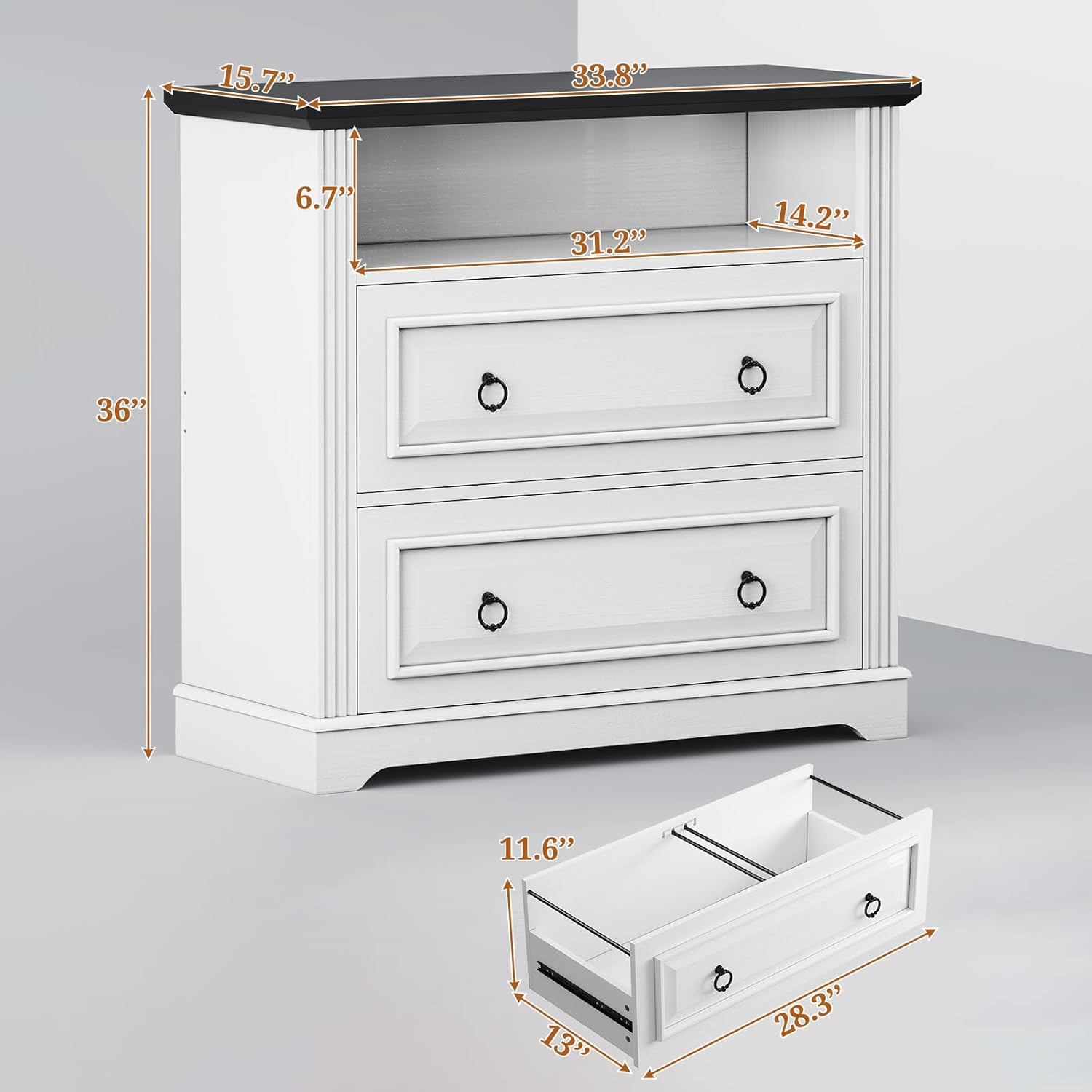
Image: Front view of the Itaar 2 Drawer File Cabinet with measurements indicating a width of 33.8 inches, depth of 15.7 inches, and height of 36 inches. Drawer interior dimensions are also shown.
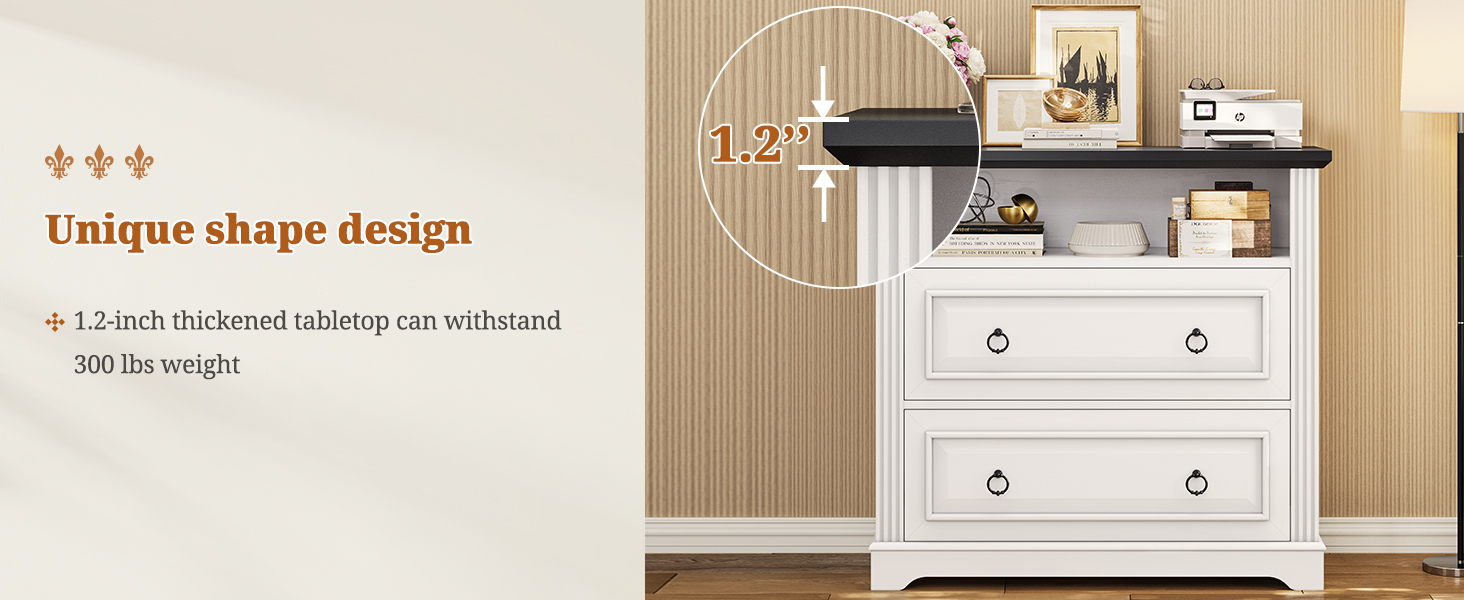
Image: The file cabinet with both drawers open, showcasing the internal filing system and the open shelf above. The image highlights the large storage capacity and the 1.2-inch thick top plate.
Product Video Overview
Video: An overview of the Itaar Farmhouse 2 Drawer Lateral File Cabinet, demonstrating its features and design.
Setup and Assembly Instructions
Assembly of the Itaar 2 Drawer File Cabinet is required. Detailed, step-by-step instructions, along with all necessary hardware, are included in the product packaging. Please refer to the printed manual provided with your purchase for specific assembly steps and diagrams.
It is recommended to lay out all parts before beginning assembly and to follow the instructions carefully to ensure proper construction and stability. Two people may be required for certain assembly steps due to the weight and size of components.
Operating Instructions
Using the File Drawers:
The two lateral file drawers are designed to hold hanging file folders of Letter, Legal, or A4 sizes. Each drawer features adjustable hanging bars to accommodate different document dimensions.
- Adjusting File Bars: Locate the metal hanging bars inside the drawers. These can be repositioned to fit Letter, Legal, or A4 size folders. Refer to the assembly instructions for specific guidance on adjusting these bars.
- Loading Files: Place your hanging file folders onto the adjusted bars. Ensure files are evenly distributed to prevent strain on the drawer slides.
- Opening and Closing: Use the metal ring handles to smoothly open and close the drawers. Avoid forcing drawers if they encounter resistance.

Image: Four examples demonstrating how the lateral file drawers can be configured to hold Letter, Legal, and A4 size documents, including combinations like Letter+Legal, Letter+A4, Letter+Letter, and A4+A4.
Utilizing the Open Storage Shelf:
The open shelf located above the drawers provides additional storage or display space. It is suitable for items such as books, office supplies, or a small printer.
- Weight Capacity: The top surface of the cabinet is designed to support up to 300 lbs. Distribute weight evenly across the shelf and top surface.
- Placement: Position items carefully to avoid obstructing drawer operation or creating instability.

Image: A detailed view of the open storage shelf, showing it filled with books and decorative items, demonstrating its utility.
Drawer Slide Adjustment
Video: A 3D animation demonstrating the features of the Itaar 2 Drawer File Cabinet, including the adjustable drawer spaces and overall design.
Maintenance
To ensure the longevity and appearance of your Itaar 2 Drawer File Cabinet, follow these maintenance guidelines:
- Cleaning: Wipe surfaces with a soft, damp cloth. Avoid harsh chemicals or abrasive cleaners, which can damage the engineered wood finish.
- Spills: Promptly clean up any spills to prevent staining or water damage.
- Sunlight: Avoid prolonged exposure to direct sunlight, which can cause fading or discoloration.
- Humidity: Maintain a stable humidity level in the room to prevent warping or cracking of the wood.
- Hardware: Periodically check and tighten any loose screws or hardware to maintain structural integrity.
Troubleshooting
If you encounter issues with your file cabinet, consider the following:
- Drawers Not Sliding Smoothly:
- Ensure the cabinet is on a level surface. Uneven flooring can cause misalignment.
- Check that the drawer slides are properly installed and free from obstructions. Refer to the assembly instructions to verify correct installation.
- Inspect the drawer slides for any bent or damaged components. If damage is found, contact customer support for replacement parts.
- Stability Issues:
- Verify that all assembly hardware is securely tightened.
- Ensure the cabinet is placed on a flat, stable surface.
- Avoid placing excessively heavy items on the top shelf or in drawers, especially if not evenly distributed.
- Missing or Damaged Parts:
- Before assembly, carefully check all components against the parts list in the instruction manual.
- If any parts are missing or damaged upon arrival, do not proceed with assembly. Contact customer support immediately for assistance.
Specifications
| Feature | Detail |
|---|---|
| Brand | Itaar |
| Model Number | file cabinet |
| Color | White |
| Material | Engineered Wood |
| Product Dimensions (D x W x H) | 15.7"D x 33.8"W x 36"H |
| Item Weight | 75 Pounds |
| Number of Drawers | 2 |
| Number of Shelves | 1 (open shelf) |
| File Sizes Supported | Letter, Legal, A4 |
| Assembly Required | Yes |
| Mounting Type | Freestanding, Floor Mount |
| Top Material Type | Engineered Wood |
| Handle Material | Metal |
Warranty Information
Specific warranty details for the Itaar 2 Drawer File Cabinet are typically included with the product packaging or available on the manufacturer's official website. Please refer to these resources for comprehensive information regarding warranty coverage, terms, and conditions.
Customer Support
For further assistance, questions, or to report missing/damaged parts, please contact Itaar customer support. Contact information can usually be found in the product manual included with your purchase or on the official Itaar website.