
1. Introduction
Thank you for choosing the OUMIFAND H100 Series Variable Frequency Drive (VFD). This manual provides essential information for the safe and efficient operation, installation, and maintenance of your VFD. The H100 series is designed for precise motor speed control and phase conversion in various industrial applications. Please read this manual thoroughly before installation and operation to ensure proper usage and to prevent damage to the equipment or injury to personnel.
2. Safety Information
WARNING: Improper installation or operation may result in electric shock, fire, or serious injury. Always adhere to local electrical codes and safety regulations.
- Only qualified personnel should install, operate, and maintain this equipment.
- Ensure the power supply is disconnected before performing any wiring, inspection, or maintenance. Wait at least 5 minutes after power-off for capacitors to discharge.
- Do not touch the VFD terminals when power is applied or immediately after power-off.
- Ensure proper grounding of the VFD and the motor.
- Do not operate the VFD with damaged cables or if the enclosure is open.
- Protect the VFD from moisture, dust, corrosive gases, and direct sunlight.
3. Product Overview
3.1 Applications
The OUMIFAND H100 Series VFD is suitable for a wide range of industrial applications requiring precise motor speed control and efficient power conversion.

The OUMIFAND H100 Series Variable Frequency Drive is versatile, suitable for various industrial applications such as pharmaceutical equipment, woodworking machinery, and textile machinery, enabling precise motor speed control.
3.2 Key Features
The H100 VFD offers advanced functionalities for optimal performance and control.

This image illustrates the powerful functions of the OUMIFAND H100 VFD, including high accuracy, high moment of force, multiple speed modes (up to 8/16), support for both synchronization and non-synchronization, and a wide speed regulating range for diverse operational needs.
- High Accuracy: Provides precise control over motor speed.
- High Moment of Force: Delivers strong torque output.
- Up to 8/16 Speed Modes Selection: Offers flexibility in speed control.
- Both Synchronization & Non-Synchronization: Adaptable to various motor types.
- Wide Speed Regulating Range Driving: Allows for broad operational adjustments.
3.3 Multiple Safeguards
The H100 VFD is built with robust safety features to protect both the device and the connected equipment.
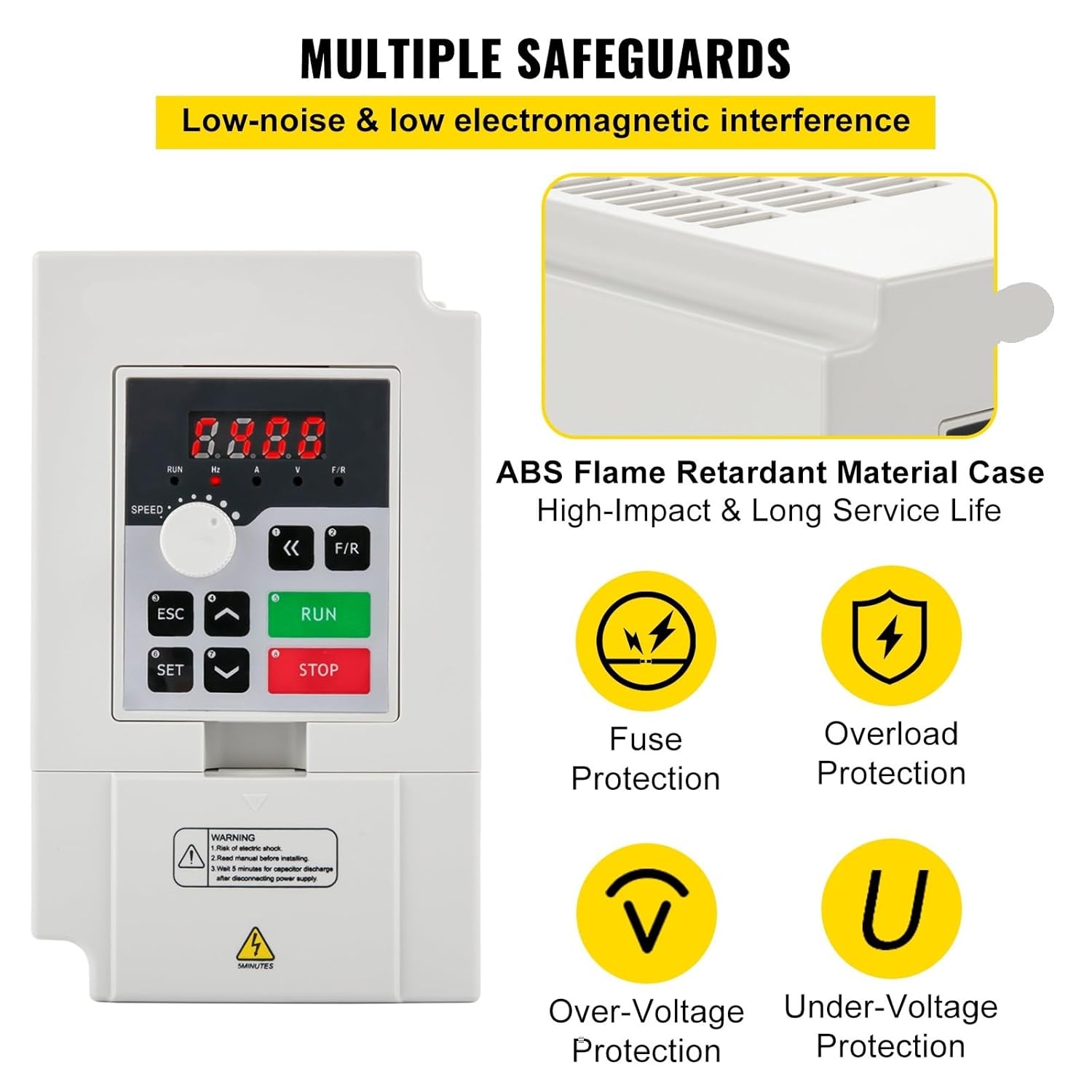
The OUMIFAND H100 VFD is equipped with multiple safeguards for reliable operation, featuring an ABS flame-retardant material case, fuse protection, overload protection, over-voltage protection, and under-voltage protection to ensure user and equipment safety.
- ABS Flame Retardant Material Case: Provides enhanced fire safety and durability.
- Fuse Protection: Safeguards against overcurrents.
- Overload Protection: Prevents damage from excessive loads.
- Over-Voltage Protection: Protects against high voltage spikes.
- Under-Voltage Protection: Ensures stable operation during low voltage conditions.
4. Setup and Installation
4.1 Mounting
- Mount the VFD vertically on a stable, non-flammable surface.
- Ensure adequate ventilation space around the unit (at least 10 cm on all sides) to prevent overheating.
- Avoid locations with direct sunlight, high temperatures, excessive dust, moisture, or corrosive gases.
4.2 Wiring
CAUTION: All wiring must be performed by a qualified electrician. Ensure power is disconnected before wiring.
- Power Input (R, S, T or L1, L2): Connect the main power supply to the input terminals. Refer to the specific model specifications for 1-phase or 3-phase input requirements.
- Motor Output (U, V, W): Connect the three-phase motor to these output terminals. Ensure correct phase sequence.
- Grounding (PE): Connect the ground terminal of the VFD to a reliable earth ground.
- Control Terminals: For external control (e.g., start/stop, speed reference, fault indication), refer to the detailed wiring diagram in the full product manual.
- Use appropriate wire gauges for all connections to handle the rated current.
5. Operating Instructions
5.1 Control Panel Overview
The VFD features a user-friendly control panel for direct operation and parameter setting.
- RUN Button: Starts the motor.
- STOP Button: Stops the motor.
- ESC Button: Exits the current menu or cancels an operation.
- SET Button: Enters parameter setting mode or confirms a selection.
- Up/Down Arrows: Navigate through menus or adjust parameter values.
- F/R Button: Changes the motor's rotation direction (Forward/Reverse).
- Speed Knob: Adjusts the output frequency/motor speed directly.
- Digital Display: Shows current operating status, frequency, or parameter values.
5.2 Basic Operation
- Power On: Connect the VFD to the appropriate power supply. The digital display will light up.
- Start Motor: Press the RUN button. The motor will start accelerating to the set frequency.
- Adjust Speed: Rotate the Speed Knob to increase or decrease the motor speed.
- Change Direction: Press the F/R button to reverse the motor's rotation.
- Stop Motor: Press the STOP button. The motor will decelerate and stop.
5.3 Parameter Settings
The VFD has numerous parameters that can be adjusted to customize its operation for specific applications. Refer to the comprehensive parameter list in the full product manual for detailed descriptions and adjustment procedures. Common parameters include acceleration/deceleration times, maximum/minimum output frequency, motor parameters, and control modes.
- Press SET to enter the parameter menu.
- Use Up/Down Arrows to navigate through parameter groups and individual parameters.
- Press SET again to select a parameter for editing.
- Use Up/Down Arrows to change the parameter value.
- Press SET to save the new value.
- Press ESC to exit the parameter menu.
6. Maintenance
Regular maintenance ensures the longevity and reliable operation of your VFD.
- Daily Inspection: Check for unusual noises, vibrations, or odors. Monitor the display for any error codes.
- Weekly Cleaning: Keep the VFD clean and free from dust and debris. Use a soft, dry cloth. For internal cleaning, disconnect power and use compressed air to clear heat sinks and fans.
- Monthly Check: Inspect all wiring connections for tightness. Ensure cooling fans are operating correctly and are not obstructed.
- Annual Check: Have a qualified technician inspect the VFD's internal components, including capacitors and power modules, for signs of wear or damage.
- Always ensure power is disconnected and capacitors are discharged before any maintenance.
7. Troubleshooting
This section provides solutions to common issues. For complex problems, contact technical support.
| Problem | Possible Cause | Solution |
|---|---|---|
| No power/Display off | No input power; Blown fuse; Loose wiring. | Check power supply; Replace fuse; Inspect and tighten wiring. |
| Motor not running | VFD in stop mode; Incorrect parameter settings; Motor fault. | Press RUN; Verify frequency and control parameters; Check motor connections and integrity. |
| Overcurrent fault (OC) | Motor overload; Short circuit in motor wiring; Rapid acceleration. | Reduce load; Check motor and wiring; Increase acceleration time parameter. |
| Overvoltage fault (OV) | High input voltage; Rapid deceleration; Regenerative load. | Check input voltage; Increase deceleration time parameter; Consider braking resistor if applicable. |
| Overheat fault (OH) | Insufficient ventilation; Ambient temperature too high; Fan failure. | Ensure proper ventilation; Reduce ambient temperature; Check cooling fan operation. |
8. Specifications
The OUMIFAND H100 Series Variable Frequency Drives are available in various power ratings and input voltages. Below are the detailed specifications for common models.
8.1 Model: 2.2KW 3HP 110V (Current Product Variant)
| Parameter | Value |
|---|---|
| Power | 2.2 kW |
| Horsepower | 3 HP |
| Input Voltage | 110 V |
| Output Voltage | 0-110 V |
| Input Phase | 1 or 3 phases |
| Output Phase | 3 phases |
| Input Frequency | 50/60 Hz |
| Output Frequency | 0-1000 Hz |
| Operating Temperature | 23 ~ 104°F (-5 ~ 40°C) |
| Humidity | 0-90% RH (non-condensing) |
| Vibration | Less than 0.5G |
8.2 Model: H100-3S2-1B (3KW 4HP 220V)
| Parameter | Value |
|---|---|
| Power | 3 kW |
| Horsepower | 4 HP |
| Input Voltage | 220 V |
| Output Voltage | 0-220 V |
| Input Current | 0-14A |
| Output Current | 0-14A |
| Input Phase | 1 or 3 phases |
| Output Phase | 3 phases |
| Input Frequency | 50/60 Hz |
| Output Frequency | 0-1000 Hz |
| Operating Temperature | 23 ~ 104°F (-5 ~ 40°C) |
| Humidity | 0-90% RH (non-condensing) |
| Vibration | Less than 0.5G |
| Net Weight | 2.43 lb / 1.1 kg |
| Product Size | 5.9 x 3.54 x 4.6 inches / 150 x 90 x 118 mm |
8.3 Model: H100-4S2-1B (4KW 5.5HP 220V)
| Parameter | Value |
|---|---|
| Power | 4 kW |
| Horsepower | 5.5 HP |
| Input Voltage | 220 V |
| Output Voltage | 0-220 V |
| Input Current | 0-17A |
| Output Current | 0-17A |
| Input Phase | 1 or 3 phases |
| Output Phase | 3 phases |
| Input Frequency | 50/60 Hz |
| Output Frequency | 0-1000 Hz |
| Operating Temperature | 23 ~ 104°F (-5 ~ 40°C) |
| Humidity | 0-90% RH (non-condensing) |
| Vibration | Less than 0.5G |
| Net Weight | 5.73 lb / 2.6 kg |
| Product Size | 8.7 x 4.6 x 5.8 inches / 220 x 118 x 148 mm |
8.4 Model: H100-7.5S2-1B (7.5KW 10HP 220V)
| Parameter | Value |
|---|---|
| Power | 7.5 kW |
| Horsepower | 10 HP |
| Input Voltage | 220 V |
| Output Voltage | 0-220 V |
| Input Current | 0-33A |
| Output Current | 0-33A |
| Input Phase | 1 or 3 phases |
| Output Phase | 3 phases |
| Input Frequency | 50/60 Hz |
| Output Frequency | 0-1000 Hz |
| Operating Temperature | 23 ~ 104°F (-5 ~ 40°C) |
| Humidity | 0-90% RH (non-condensing) |
| Vibration | Less than 0.5G |
| Net Weight | 5.73 lb / 2.6 kg |
| Product Size | 8.7 x 4.6 x 5.8 inches / 220 x 118 x 148 mm |
9. Warranty and Support
OUMIFAND products are manufactured to high-quality standards. For warranty information, technical support, or service inquiries, please refer to the warranty card included with your product or contact your authorized dealer. Please have your model number and purchase date available when contacting support.