
TRAUSI i27
TRAUSI Wireless Earbuds i27 User Manual
Model: i27
Introduction
Thank you for choosing TRAUSI Wireless Earbuds. This manual provides essential information for setting up, operating, and maintaining your new earbuds. Please read it carefully before use to ensure optimal performance and longevity of your device.
Package Contents
- TRAUSI i27 Wireless Earbuds (2)
- Wireless Charging Case (1)
- Eartips with 3 Sizes (S, M, L)
- Type-C Cable (1)
- Owner's Manual (1)
Product Overview
The TRAUSI i27 Wireless Earbuds are designed for a comfortable and secure fit, offering clear sound and robust features for various activities. They feature Bluetooth 5.4 for stable connectivity, IPX7 waterproofing, and intuitive touch controls.
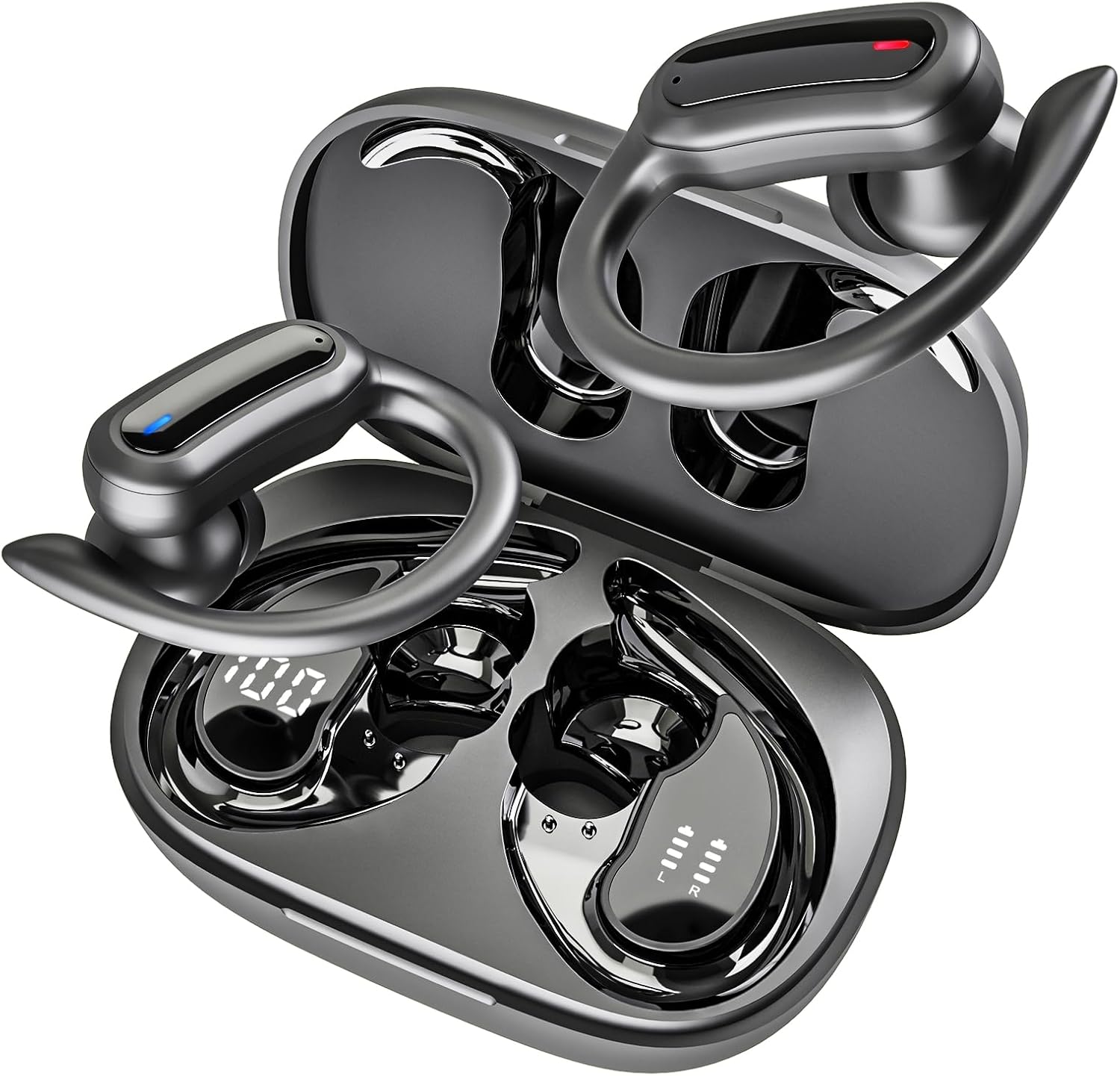
Figure 1: TRAUSI i27 Wireless Earbuds and Charging Case. The image shows the open charging case with both earbuds inside, displaying their sleek design and the digital battery indicator on the case.

Figure 2: Close-up of a single TRAUSI i27 earbud, highlighting its design and the concept of powerful dynamic audio with musical notes emanating from it.
Setup
1. Initial Charge
Before first use, fully charge the earbuds and the charging case. Connect the provided Type-C cable to the charging port on the case and a USB power source.

Figure 3: The charging case displaying its LED percentage display, indicating battery status. The earbuds are shown inside the case.
The LED display on the charging case will show the battery percentage. A 10-minute quick charge provides 2 hours of playback, and a full charge takes approximately 1.5 hours for the case.
2. Pairing with Your Device
- Open the charging case. The earbuds will automatically power on and enter pairing mode.
- On your device (smartphone, tablet, laptop), enable Bluetooth.
- Search for "i27" in the list of available Bluetooth devices and select it to connect.
- Once connected, you will hear a confirmation tone, and the earbud indicator lights will turn off.

Figure 4: An image demonstrating the one-step pairing process, showing the earbuds in their case next to a smartphone with its Bluetooth settings open, ready to connect.
The earbuds support dual-channel transmission for stable connection up to 15m (50ft) without obstacles.
Operating Instructions
Wearing the Earbuds
The i27 earbuds feature a soft, ultra-light earhook design for a secure and comfortable fit. Choose the appropriate silicone earplug size (S/M/L) for personalized comfort.

Figure 5: A person wearing the TRAUSI i27 earbud, demonstrating its secure and comfortable fit with the earhook design. Different ear tip sizes (L, M, S) are also shown.
Touch Controls
The earbuds feature intuitive smart touch controls for easy management of music and calls.
| Function | Action |
|---|---|
| Play/Pause | Single tap on either earbud |
| Next Track | Double tap right earbud |
| Previous Track | Double tap left earbud |
| Volume Up | Triple tap right earbud |
| Volume Down | Triple tap left earbud |
| Answer/End Call | Single tap on either earbud during a call |
| Reject Call | Press and hold on either earbud during an incoming call |
| Activate Voice Assistant (Siri/Google Assistant) | Press and hold on either earbud for 2 seconds |

Figure 6: A visual representation of the touch controls on the TRAUSI i27 earbuds, showing icons for play/pause, previous/next track, answer/end/reject call, volume, and voice assistant.
Battery Life
The earbuds provide up to 6 hours of playtime on a single charge. The 400mAh charging case extends total playtime to 54 hours.
Figure 7: The charging case with earbuds, displaying the LED battery indicator and illustrating the 54-hour total playtime with the case and 6 hours per earbud on a single charge.
Maintenance
Cleaning
Regularly clean the earbuds and charging case with a soft, dry cloth. Avoid using harsh chemicals or abrasive materials. Ensure charging contacts are free of debris.
Water Resistance (IPX7)
The earbuds are IPX7 waterproof, meaning they can resist sweat, rain, and splashes. They are suitable for workouts and outdoor activities. Note: They are not suitable for submersion in water (e.g., swimming or showering).

Figure 8: An earbud shown with water droplets, illustrating its IPX7 waterproof rating, suitable for resisting sweat and splashes.
Troubleshooting
| Problem | Possible Cause | Solution |
|---|---|---|
| Earbuds not pairing | Low battery; out of range; not in pairing mode; previous connection issue. | Ensure earbuds are charged. Place them back in the case and take them out again. Ensure Bluetooth is enabled on your device. Forget "i27" from your device's Bluetooth list and re-pair. |
| No sound from one earbud | Earbud not connected; low battery; audio balance settings. | Check battery level. Place both earbuds back in the case and close it, then reopen. Check your device's audio balance settings. |
| Poor sound quality | Earbuds not properly seated; interference; low quality audio source. | Adjust earbud position and try different ear tip sizes. Move closer to your device. Try a different audio source. |
| Charging case not charging | Cable issue; power source issue; dirty charging port. | Try a different Type-C cable and USB power adapter. Clean the charging port on the case. |
Specifications
- Model: i27
- Connectivity: Bluetooth 5.4
- Wireless Range: Up to 15m (50ft)
- Playtime (Earbuds): Up to 6 hours
- Total Playtime (with Charging Case): Up to 54 hours
- Charging Time (Case): Approx. 1.5 hours (Type-C)
- Water Resistance: IPX7
- Microphone: Noise-cancelling
- Control Type: Touch Control
- Battery Type: Lithium Ion
- Product Dimensions: 3.9 x 7 x 2.8 cm
- Weight: 140 g
Warranty and Support
TRAUSI products come with a standard manufacturer's warranty. For detailed warranty information, technical support, or customer service inquiries, please visit the official TRAUSI website or contact your retailer.
Contact Information: Please refer to the packaging or the official TRAUSI website for the most up-to-date contact details.
Safety Information
- Do not expose earbuds or charging case to extreme temperatures.
- Avoid dropping or subjecting the device to strong impacts.
- Keep out of reach of children and pets.
- Do not attempt to disassemble or repair the device yourself.
- Dispose of the device and its components responsibly according to local regulations.
Official Product Video
Video: TRAUSI i27 Wireless Earbuds Overview. This video provides a visual demonstration of the earbuds' features, including pairing, fit, and controls.
Ask a question about this manual
Ask about setup, troubleshooting, compatibility, parts, safety, or missing instructions. Manuals+ will review the question and use this page’s manual context to help answer it.