
1. Introduction
This manual provides instructions for the Effireli CT-90405 replacement remote control, designed for various Toshiba TV models. This remote offers direct functionality without the need for programming or complex setup. Simply insert batteries and begin operation.
1.1 Compatible TV Models
The CT-90405 remote control is compatible with the following Toshiba TV models:
- 55VL963, 55XL975G
- 32TL933, 32TL963G, 32UL975G
- 40TL933F, 40TL933G, 40TL938, 40TL938F, 40TL938G, 40TL939, 40TL963G, 40TL966, 40TL968, 40TL968G, 40UL975G
- 42VL963G, 42XL975, 42XL975G
- 46TL933F, 46TL933G, 46TL938F, 46TL938G, 46TL966G, 46TL968G, 46UL975G
- 47VL963G, 47WL968B, 47WL968F, 47XL975G, 47YL985G
Note: If your specific TV model number is not listed above, or if your original remote control has a significantly different appearance, please contact customer support to confirm compatibility before use.
2. Setup and First Use
The Effireli CT-90405 remote control is designed for immediate use without any complex programming steps.
2.1 Battery Installation
- Locate the battery compartment cover on the back of the remote control.
- Slide the cover downwards or press the latch to open it.
- Insert two new AAA batteries (not included), ensuring the positive (+) and negative (-) terminals align correctly with the markings inside the compartment.
- Replace the battery compartment cover, ensuring it clicks securely into place.
2.2 Initial Operation
After installing the batteries, the remote is ready for use. Point the remote control directly at your Toshiba TV and press the desired function button. No additional pairing or code entry is required.
3. Operating the Remote Control
This section details the functions of the buttons on your Effireli CT-90405 replacement remote control.
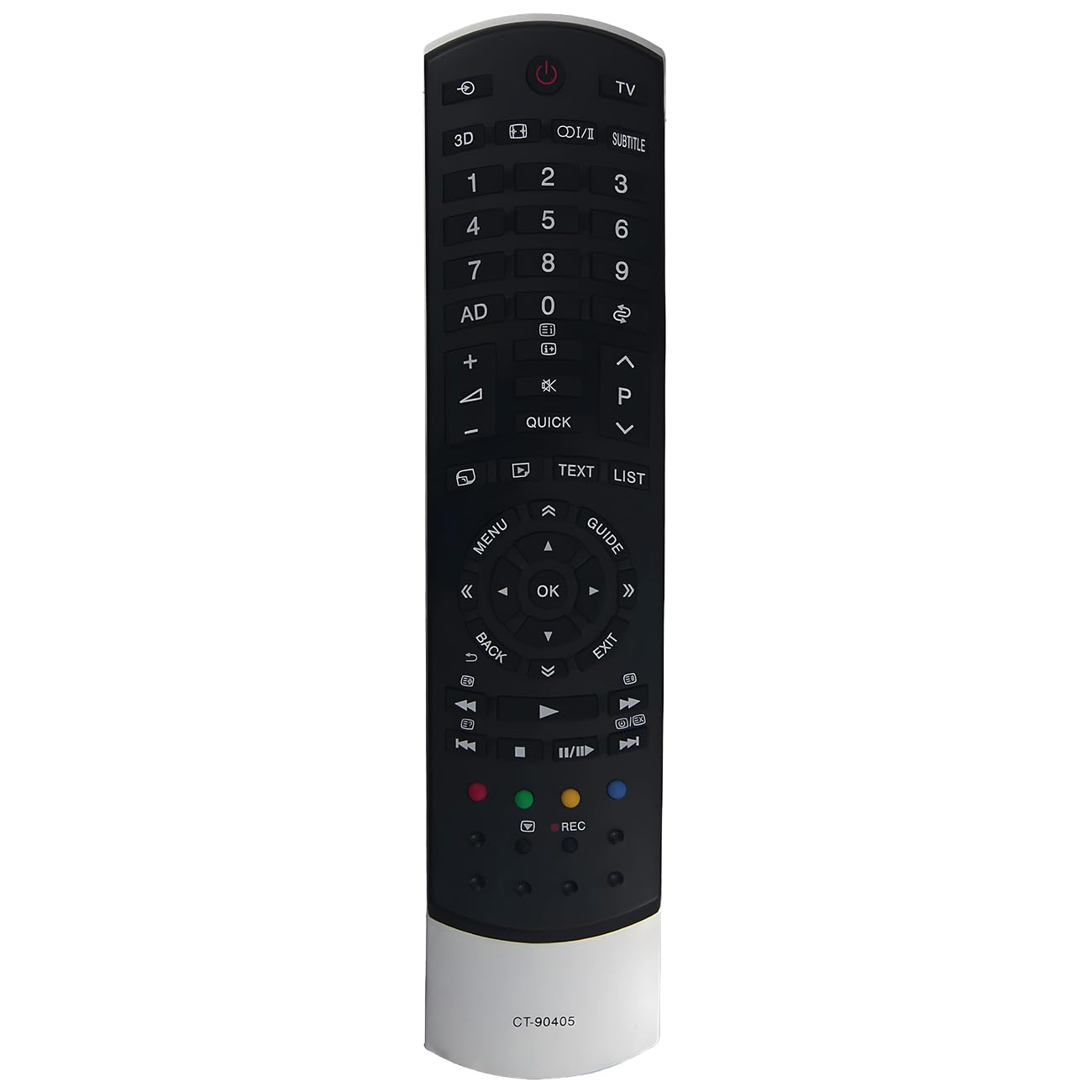
Image: Effireli CT-90405 Replacement Remote Control. This image displays the full layout of the remote control, showing all buttons and their labels for easy identification.
3.1 Power and Input Controls
- Power (Red Circle with Line): Turns the TV on or off.
- TV: Switches to TV mode.
- 3D: Activates or deactivates 3D display mode (if supported by your TV).
- I/II (Input): Cycles through available input sources (HDMI, AV, etc.).
- SUBTITLE: Toggles subtitles on or off.
3.2 Number Pad and Channel/Volume Controls
- 0-9: Direct channel selection or numerical input.
- AD (Audio Description): Activates or deactivates audio description for visually impaired users.
- Mute (Crossed Speaker): Mutes or unmutes the TV audio.
- Volume Up (+): Increases the TV volume.
- Volume Down (-): Decreases the TV volume.
- Channel Up (P^): Changes to the next higher channel.
- Channel Down (Pv): Changes to the next lower channel.
- QUICK: Accesses the quick menu or settings.
3.3 Navigation and Menu Controls
- MENU: Opens the main TV menu.
- GUIDE: Displays the electronic program guide (EPG).
- Directional Arrows (Up, Down, Left, Right): Navigates through menus and options.
- OK: Confirms selections or opens sub-menus.
- BACK: Returns to the previous screen or menu.
- EXIT: Closes the current menu or application.
- TEXT: Accesses teletext services.
- LIST: Displays a list of channels or recorded programs.
3.4 Media Playback and Function Buttons
- Previous Track (Double Left Arrow): Skips to the beginning of the current track or the previous track.
- Rewind (Double Left Arrow with Line): Rewinds media playback.
- Play/Pause (Triangle/Two Vertical Bars): Plays or pauses media playback.
- Fast Forward (Double Right Arrow with Line): Fast forwards media playback.
- Next Track (Double Right Arrow): Skips to the next track.
- Stop (Square): Stops media playback.
- REC (Red Dot): Initiates recording (if supported by your TV and connected device).
- Colored Buttons (Red, Green, Yellow, Blue): These buttons provide context-sensitive functions within menus or applications, as indicated on your TV screen.
4. Maintenance
Proper care will ensure the longevity and optimal performance of your remote control.
- Cleaning: Use a soft, dry cloth to clean the remote control. Do not use liquid cleaners, sprays, or abrasive materials, as these can damage the remote.
- Battery Replacement: Replace batteries when the remote's response becomes sluggish or stops working. Always replace both batteries at the same time with new ones of the same type.
- Storage: If the remote will not be used for an extended period, remove the batteries to prevent leakage and potential damage. Store the remote in a cool, dry place away from direct sunlight and extreme temperatures.
- Avoid Drops: Protect the remote from physical impact, as drops can damage internal components.
5. Troubleshooting
If you encounter issues with your remote control, try the following solutions:
- Remote Not Responding:
- Ensure the remote is pointed directly at the TV's infrared sensor.
- Check if there are any obstructions between the remote and the TV.
- Replace the batteries with new ones. Ensure they are inserted with correct polarity.
- Limited Range:
- Ensure batteries are fresh. Weak batteries can reduce the remote's effective range.
- Avoid strong light sources (like direct sunlight or bright fluorescent lights) that might interfere with the infrared signal.
- Specific Buttons Not Working:
- Clean the remote control, especially around the unresponsive buttons, to remove any dirt or debris that might be preventing proper contact.
- If only a few buttons are affected, and the remote is old, it might indicate wear. Consider replacing the remote if other troubleshooting steps fail.
- TV Not Turning On/Off:
- Verify that the TV is plugged into a working power outlet.
- Try using the power button directly on the TV to confirm the TV itself is functional.
6. Specifications
- Model Number: YK-CT-90405
- Brand: Effireli
- Connectivity Technology: Infrared
- Compatible Devices: Television
- Max Number of Supported Devices: 1
- Special Feature: No Programming Required
- Power Source: 2 x AAA Batteries (not included)
7. Warranty Information
This Effireli CT-90405 replacement remote control comes with a 30-day money-back guarantee from the date of purchase. Additionally, it includes a 12-month warranty covering manufacturing defects. Returns and exchanges are accepted within the warranty period for eligible issues.
8. Customer Support
If you have any questions, require further assistance, or if your TV model is not listed in the compatibility section, please contact the seller or manufacturer directly. Provide your product model number (YK-CT-90405) and your TV's model number for efficient support.