
Seang B0DPB8PQ6Q
Seang Electric Standing Desk User Manual
Model: B0DPB8PQ6Q | Brand: Seang
1. Introduction
Thank you for choosing the Seang Electric Standing Desk. This manual provides detailed instructions for the assembly, operation, and maintenance of your new adjustable height desk. Designed to promote a healthier work environment, this desk allows you to seamlessly switch between sitting and standing positions, reducing physical strain and enhancing productivity. Please read this manual thoroughly before assembly and use to ensure proper function and safety.

Image: The Seang Electric Standing Desk, showcasing its sleek white design and ample workspace for a laptop, monitor, and other office essentials.
2. Safety Information
Always ensure the desk is not overloaded beyond its weight capacity of 176 lbs. Be cautious when adjusting the desk height to prevent injury, especially in the presence of children or pets.
- Keep children and pets away from the desk during operation.
- Ensure no obstacles are in the path of the desk's movement (up or down).
- Do not place liquids directly on the control panel.
- Unplug the desk from the power outlet before cleaning or maintenance.
- Do not disassemble or modify the desk's motor or control system.

Image: Illustration of the desk's robust 176 lbs load capacity, emphasizing its strong frame and ability to support significant weight.
3. Product Features
- Healthy Office Style: Promotes alternating between sitting and standing to relieve body fatigue and improve concentration.
- Quiet & Smooth Height Adjustment: Electric motor allows seamless height transitions between 28.3” and 46.5” with noise levels ≤ 45 dB.
- Strong Frame: Industrial-grade steel frame supports up to 176 lbs, with a wide T-shaped foot design for stability.
- Auto Reset Technology: Features an LED screen and three preset buttons to save and recall desired sit/stand heights.
- Simplified Assembly: Designed for user-friendly assembly with fewer steps and clear instructions.
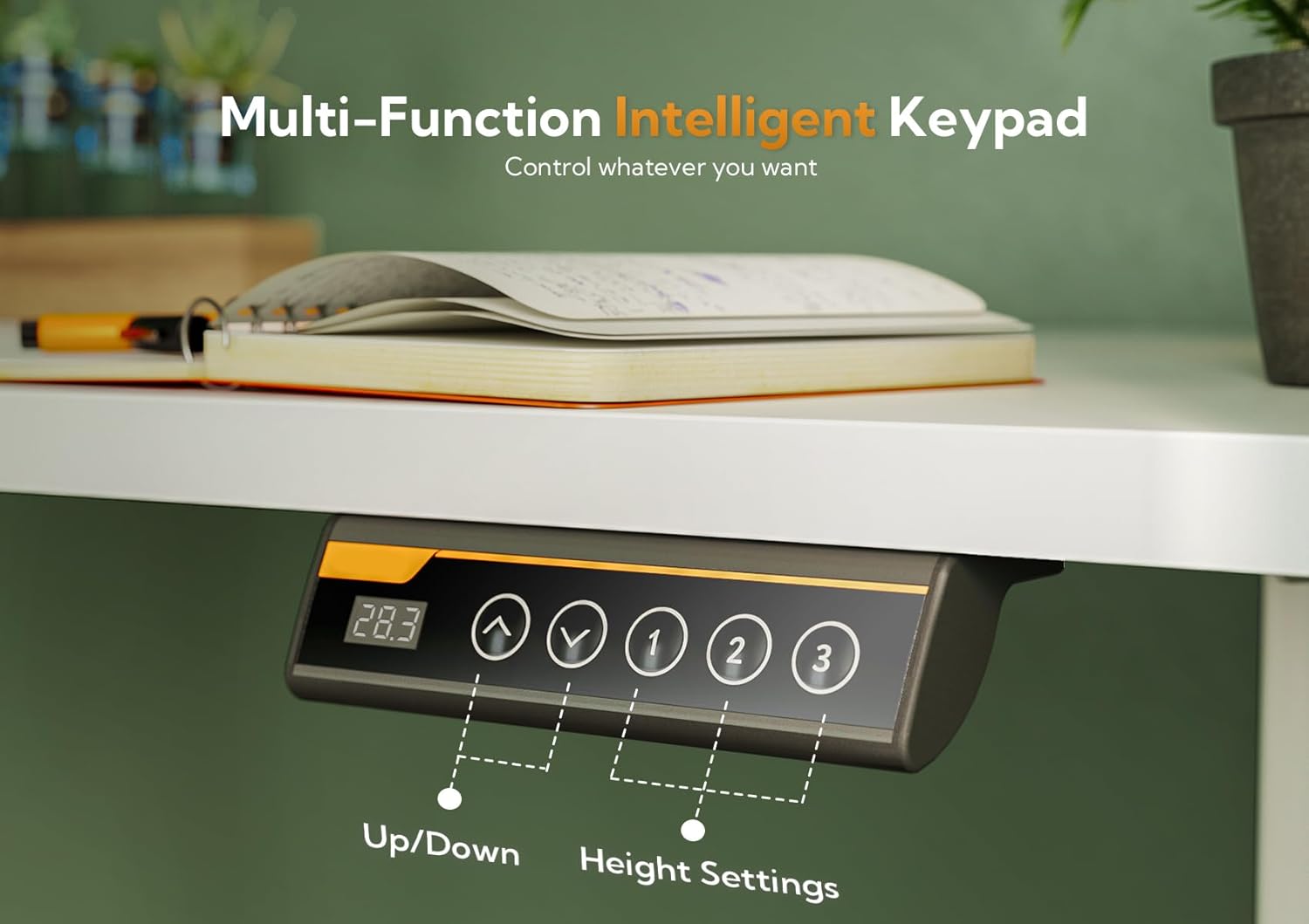
Image: Visual representation of the desk's ultra-quiet operation, highlighting its low noise level (45dB) compared to other common sounds.
4. Specifications
| Attribute | Value |
|---|---|
| Brand | Seang |
| Product Dimensions | 24"D x 48"W x 28.3"H |
| Color | White |
| Style | Modern |
| Base Material | Alloy Steel |
| Top Material Type | Engineered Wood |
| Finish Type | Lacquered |
| Special Feature | Adjustable |
| Recommended Uses | Office, Working |
| Included Components | Desk, Keyboard Tray, Monitor Arm |
| Maximum Height | 46.5 Inches |
| Minimum Height | 28.3 Inches |
| Maximum Weight Recommendation | 176 Pounds |
| Required Assembly | Yes |
| Includes All Assembly Tools | Yes |

Image: Detailed dimensions of the desk, illustrating its 48-inch width, 24-inch depth, and adjustable height range from 28.3 to 46.5 inches.
5. Setup and Assembly
The Seang Electric Standing Desk is designed for simplified assembly. Please follow the included installation instructions carefully. All necessary assembly tools are provided.
5.1. Unpacking and Parts Identification
Carefully unpack all components and verify them against the parts list. Ensure no parts are missing or damaged before proceeding with assembly.
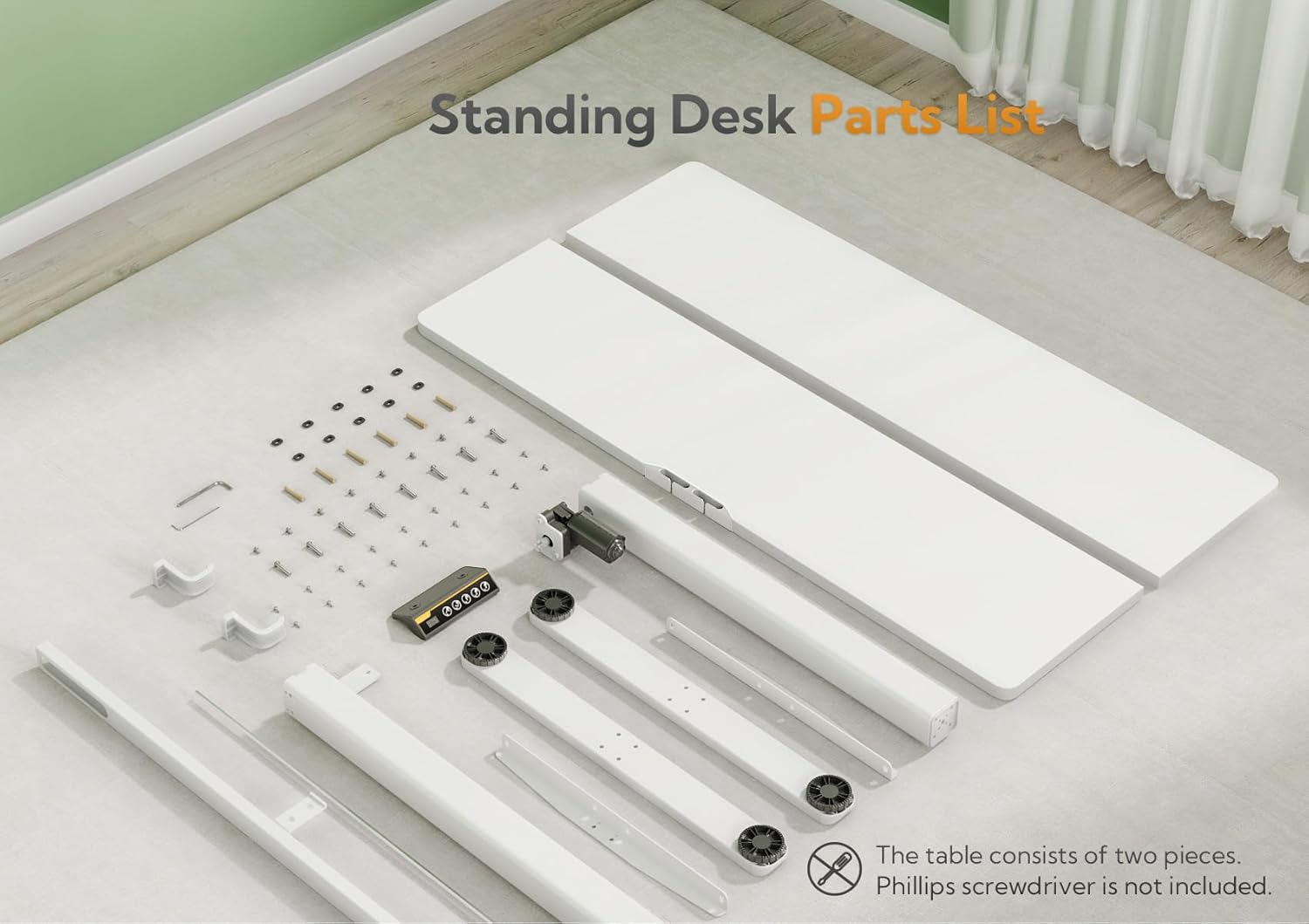
Image: A comprehensive layout of all desk components, including the two-piece tabletop, frame parts, control panel, and hardware, ready for assembly.
5.2. Assembly Steps
- Attach the lifting columns to the desk feet using the provided screws.
- Connect the crossbar to the lifting columns.
- Secure the motor and control box to the frame.
- Place the tabletop onto the assembled frame and secure it with screws.
- Install the control panel in the designated slot on the tabletop.
- Connect all cables according to the wiring diagram in the separate instruction manual.
6. Operating Instructions
Your Seang Electric Standing Desk features an intuitive control panel for easy height adjustment and memory presets.
6.1. Control Panel Overview

Image: The multi-function intelligent keypad, showing the LED display for height, up/down adjustment buttons, and three programmable height preset buttons.
6.2. Adjusting Height
- Press the Up Arrow button to raise the desk.
- Press the Down Arrow button to lower the desk.
- Release the button at your desired height. The desk will stop smoothly.
6.3. Setting Memory Presets
The desk allows you to save three preferred height settings for quick adjustments.
- Adjust the desk to your desired height using the Up/Down arrows.
- Press the M button (or similar memory set button, if present). The LED display may flash.
- Within 3 seconds, press one of the preset buttons (1, 2, or 3) to save the current height to that position.
- To recall a saved height, simply press the corresponding preset button (1, 2, or 3). The desk will automatically move to the saved position.
7. Maintenance
Regular maintenance ensures the longevity and smooth operation of your standing desk.
- Cleaning: Use a soft, damp cloth to wipe down the desk surface and frame. Avoid abrasive cleaners or solvents.
- Cable Management: Periodically check and organize cables to prevent tangles and damage.
- Lubrication: The lifting mechanism is generally maintenance-free. Do not apply lubricants unless specifically instructed by customer support.
- Inspection: Regularly inspect all screws and connections to ensure they are tight. Retighten if necessary.
8. Troubleshooting
If you encounter any issues with your Seang Electric Standing Desk, please refer to the following common troubleshooting steps:
| Problem | Possible Cause | Solution |
|---|---|---|
| Desk does not move | Power cable disconnected; Overload; Motor error | Check power connection; Reduce weight on desk; Unplug for 10 seconds and replug. |
| Desk moves unevenly | Uneven load; Obstruction | Distribute weight evenly; Check for obstructions under the desk. |
| Noise during operation | Normal operation sound; Loose components | A slight motor hum is normal (≤ 45 dB); Check and tighten all screws. |
| Memory presets not working | Incorrect saving procedure | Refer to Section 6.3 for correct saving steps. |
If the problem persists after attempting these solutions, please contact Seang customer support for further assistance.
9. Warranty and Support
Seang provides a limited warranty for this product. Please refer to the warranty card included in your packaging for specific terms and conditions. For technical support, replacement parts, or any other inquiries, please contact Seang customer service through the retailer's platform or the official Seang website.
When contacting support, please have your product model number (B0DPB8PQ6Q) and purchase date ready.
Related Documents - B0DPB8PQ6Q
 |
Arozzi Arena Moto: Operation Manual and User Guide Comprehensive operation manual for the Arozzi Arena Moto gaming desk, detailing height adjustment, memory position settings, zero reset procedures, and error code troubleshooting. |
 |
Furmax Electric Height Adjustable Standing Desk Instruction Manual Comprehensive instruction manual for the Furmax Electric Height Adjustable Standing Desk, detailing assembly, operation, and features for home and office use. Includes parts list and step-by-step assembly guide. |
 |
SONGMICS Standing Desk Assembly and Operation Manual Comprehensive guide for assembling and operating the SONGMICS electric height-adjustable standing desk (Model LSD136). Includes parts list, assembly steps, operating instructions for the control panel, memory functions, child lock, energy saving mode, charging, menu options, troubleshooting, and fault/alarm codes. |
 |
Electric Standing Desk User Guide User guide for the Electric Standing Desk, covering component identification, hardware assembly, and controller operation. |
 |
SANODESK L-Shaped Electric Standing Desk Assembly and Operation Manual Comprehensive assembly instructions and user manual for the SANODESK L-Shaped Dual Motor Electric Standing Desk. Learn how to assemble, operate memory presets, and maintain your height-adjustable desk. |
 |
Flexispot E7 Operation Instructions User manual for the Flexispot E7 height adjustable desk controller, detailing its functions, buttons, memory presets, child lock, USB charging, collision prevention, and troubleshooting. |
Ask a question about this manual
Ask about setup, troubleshooting, compatibility, parts, safety, or missing instructions. Manuals+ will review the question and use this page’s manual context to help answer it.