
Introduction
This manual provides instructions for the assembly, operation, and maintenance of your Lufeiya Small Desk. Please read these instructions carefully before assembly and retain for future reference.

Image: The Lufeiya Small Desk, black, with a laptop, plant, and clock, positioned in a room next to a white office chair.
Safety Information
Warning:
- This desk is designed for small spaces and may not be suitable for larger, more active users.
- Always ensure the desk is properly assembled and stable before use.
- When children are using the desk, ensure it is stable and supervised.
- Do not exceed the weight limit of 9.6 pounds on the desktop to prevent damage or injury.
Package Contents
Before beginning assembly, verify that all parts are present and undamaged. All necessary assembly tools are included.
- Desktop (1)
- Leg Frames (2)
- Crossbars (2)
- Adjustable Leg Pads (4)
- Removable Storage Bag (1)
- Iron Hooks (2)
- Assembly Hardware (screws, bolts, etc.)
- Assembly Tool (Allen wrench, etc.)
Assembly Instructions
Follow these steps for quick and easy assembly. It is recommended to assemble the desk on a soft, clean surface to prevent scratches.
- Unpack Components: Carefully remove all parts from the packaging and lay them out. Check against the package contents list.
- Attach Leg Frames: Secure the leg frames to the underside of the desktop using the provided screws and assembly tool. Ensure the holes align correctly.
- Install Crossbars: Connect the crossbars between the leg frames to enhance stability. Tighten all screws firmly.
- Attach Adjustable Leg Pads: Screw the adjustable leg pads into the bottom of each leg frame. These can be adjusted later to level the desk on uneven surfaces.
- Install Storage Bag: Attach the removable storage bag to the side of the desk as desired.
- Attach Headphone Hooks: Secure the iron hooks to the side of the desk frame.
- Final Check: Once assembled, gently shake the desk to ensure all connections are secure and the desk is stable. Adjust leg pads if necessary.
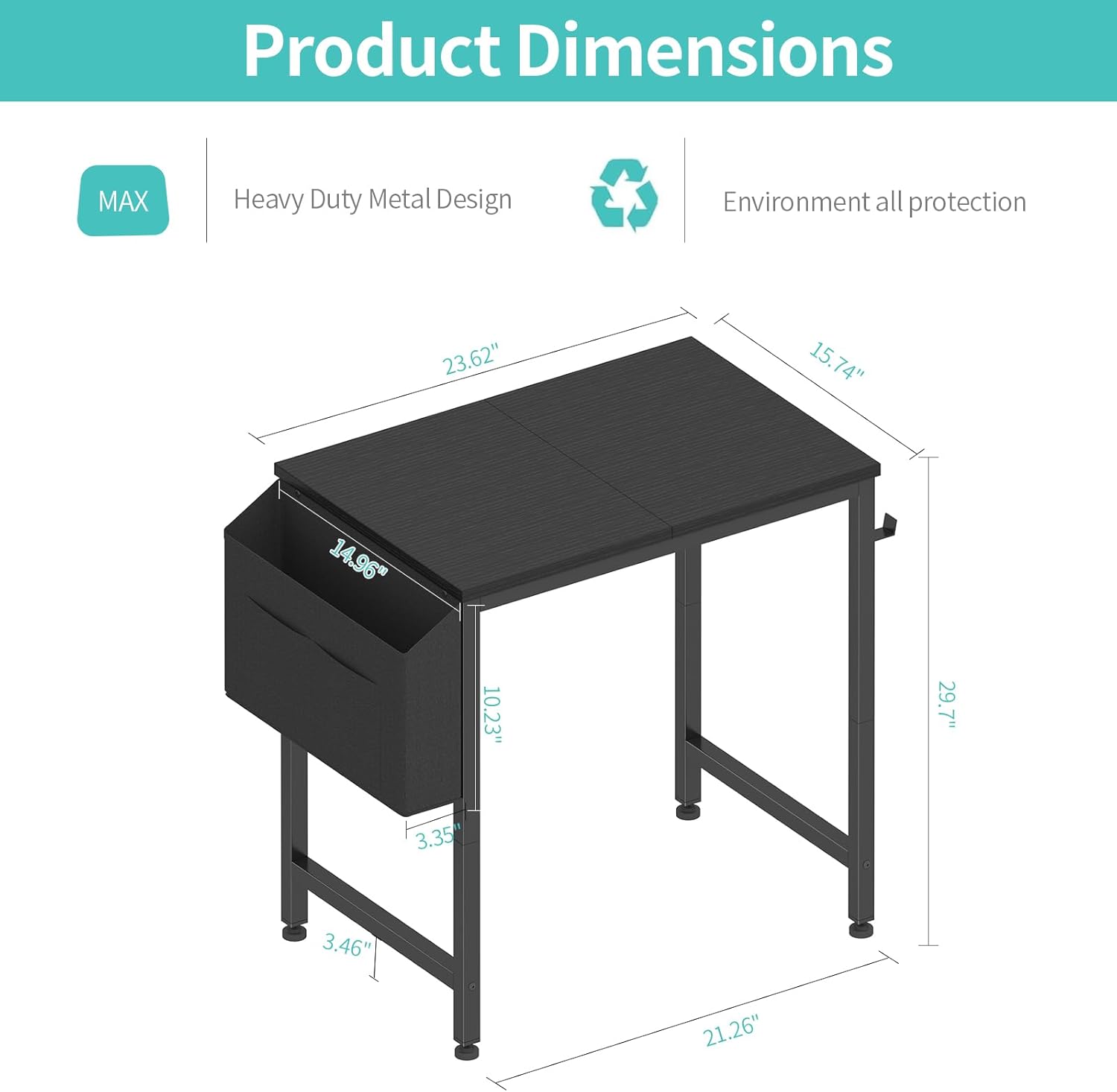
Image: A diagram illustrating the product dimensions of the Lufeiya Small Desk, including length, width, and height measurements.

Image: A close-up view of the removable storage bag attached to the side of the desk, shown holding books and office supplies.

Image: A close-up view of the two removable iron hooks attached to the desk frame, with headphones and a bag hanging from them.
Operation and Use
The Lufeiya Small Desk is designed for versatile use in various small spaces.
- Placement: Position the desk in your desired location, ensuring it is on a flat, stable surface. Use the adjustable leg pads to compensate for any unevenness in the floor.
- Desktop Use: The desktop provides a surface for studying, working with a laptop or PC, or other light tasks. Avoid placing excessively heavy items on the desktop to prevent damage.
- Storage Bag: Utilize the removable storage bag for organizing books, notebooks, pens, and other small items.
- Headphone Hooks: The iron hooks are suitable for hanging headphones, bags, or other lightweight accessories, keeping your workspace tidy.

Image: The Lufeiya Small Desk, black, placed in a bedroom next to a bed, with a laptop and a plant on its surface.
Maintenance and Care
Proper care will ensure the longevity of your Lufeiya Small Desk.
- Cleaning: The desktop is made of thick particle board with scratch-resistant, anti-collision, and waterproof properties. Wipe the surface with a damp cloth and mild cleaner. Avoid abrasive cleaners.
- Spills: Promptly wipe up any spills to prevent water damage, despite its waterproof coating.
- Stability Check: Periodically check all screws and connections to ensure they remain tight. Retighten if necessary.
- Leg Pads: Ensure the adjustable leg pads are correctly positioned and adjusted to maintain desk stability and protect your floor from scratches.

Image: A graphic illustrating key features: waterproof desktop, enhanced structural metal design, and adjustable leg pads for stability.
Troubleshooting
| Problem | Possible Cause | Solution |
|---|---|---|
| Desk is wobbly. | Loose screws or uneven floor. | Tighten all assembly screws. Adjust the leg pads to level the desk. |
| Parts missing or damaged upon arrival. | Shipping damage or packaging error. | Contact customer service for a quick replacement. |
| Difficulty assembling. | Incorrect part orientation or unclear instructions. | Review the assembly instructions carefully. Ensure parts are oriented as shown in diagrams. |
Specifications
| Feature | Detail |
|---|---|
| Brand | Lufeiya |
| Model Number | LFY-SD24-BK |
| Color | Black |
| Product Dimensions (D x W x H) | 15.75"D x 23.6"W x 29.5"H |
| Item Weight | 9.6 Pounds |
| Top Material Type | FSC-Certified Wood (Engineered Wood) |
| Base Material | Metal (Steel) |
| Finish Type | Powder Coated |
| Special Features | Compact, Removable Storage Bag, 2 Iron Hooks, Adjustable Leg Pads, Waterproof, Scratch-resistant, Anti-collision |
| Assembly Required | Yes (DIY, tools included) |
| Maximum Desktop Weight Capacity | 9.6 pounds (as per safety information) |
Warranty and Support
The Lufeiya Small Desk comes with a limited warranty.
- Warranty: A limited warranty covers manufacturing defects and quality issues.
- Customer Service: For any quality issues, missing parts, or assembly assistance, please contact Lufeiya customer service. We are committed to providing professional support and quick replacements.
- Contact Information: Refer to your purchase documentation or the Lufeiya brand store on Amazon for specific contact details.


