
1. Introduction
The PROAIM Wave Fold Jib Crane (Model: JB-WVFD-01) is designed for smooth, ergonomic camera movements in various studio and outdoor environments. This manual provides essential information for safe and effective use of your equipment.
2. Safety Information
WARNING
Do not attempt to disassemble, modify, or repair the product yourself to avoid personal injury or equipment damage. Not suitable for children.

Image: Warning label indicating not to disassemble, modify, or repair the product, and that it is not suitable for children. Text is repeated in multiple languages.
- Always ensure the jib is properly balanced with counterweights before mounting a camera.
- Verify all locking mechanisms are secure before operation.
- Do not exceed the maximum load capacity of 15kg (33lb).
- Operate the jib on a stable, level surface.
- Keep hands and loose clothing clear of moving parts.
3. What's in the Box
The PROAIM Wave Fold Jib package includes the following components:
- Proaim Wave Fold Jib
- 100mm Bowl
- Bag
Note: Supportive accessories such as cameras, tripods, and weight bars are sold separately and are for demonstration purposes only.
4. Setup
Follow these steps to assemble and prepare your PROAIM Wave Fold Jib for operation.
4.1. Unboxing and Initial Inspection
Carefully remove all components from the packaging. Inspect for any signs of damage during transit. Ensure all listed parts are present.
Video: Unboxing and initial setup of the Proaim Jib. This video demonstrates the unpacking process and initial assembly steps, including attaching the jib arm to a tripod stand and adding counterweights.
4.2. Attaching to a Tripod
- Place your compatible 100mm tripod on a stable, level surface.
- Mount the jib's central fork mechanism onto the tripod. Ensure it is securely fastened.
- Use the built-in bubble leveler on the jib to ensure accurate alignment.

Image: The PROAIM Wave Fold Jib Crane securely mounted on a tripod, ready for use. This image highlights the stable base and the jib's main structure.
4.3. Adjusting Telescopic Arm Length
The jib arm is telescopic, allowing adjustment from 5.2ft to 7.2ft. Loosen the locking levers, extend or retract the arm to the desired length, and then securely tighten the levers.

Image: Illustration showing the telescopic front and rear pivot adjustments of the jib arm, extending its reach for varied shot compositions.
4.4. Mounting the Camera
The jib features a 100mm bowl head with a dovetail mechanism for quick camera mounting. It supports various camera setups up to 15kg (33lb).
- Attach your camera to the 100mm bowl head.
- Utilize the innovative dovetail mechanism to switch between underslung and overslung configurations as needed for creative shots.
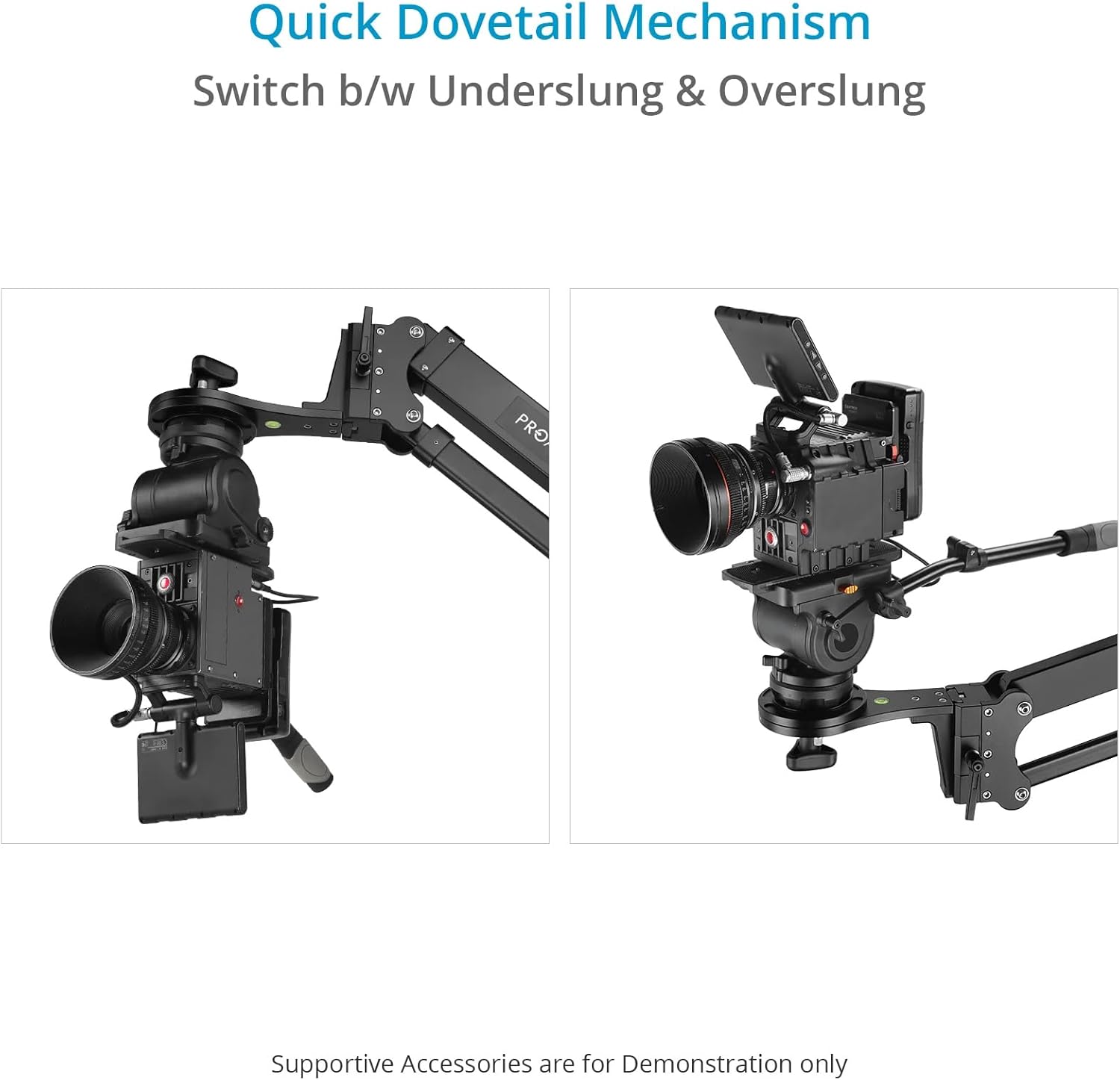
Image: Demonstrates the quick dovetail mechanism, allowing seamless switching between underslung and overslung camera configurations on the jib.
4.5. Adding Counterweights
For perfect balance and smooth operation, add standard weight bars (sold separately) to the rear of the jib. Adjust the weights until the jib is balanced with your camera setup.

Image: The PROAIM Wave Fold Jib Crane, showcasing its high-grade CNC aluminum build and the counterweight system for balancing camera payloads up to 15kg/33lb.
5. Operating Instructions
The PROAIM Wave Fold Jib is designed for precise and smooth camera movements.
5.1. Pan and Tilt Movements
The central fork mechanism ensures ultra-smooth pan-tilt movements, eliminating unwanted vibrations. Use the integrated pan and tilt lock system for easy control over horizontal and vertical movements, ensuring repeatable and smooth shots.

Image: Close-up view of the jib's central mechanism, highlighting the pan and tilt locks for precise control over camera movements.
5.2. Achieving Smooth Shots
The robust construction and balanced design contribute to jerk-free movements. Practice gentle and consistent pressure when operating the jib to achieve cinematic results.

Image: Detailed view of the sturdy central fork mechanism, designed to ensure smooth, jerk-free camera movements during operation.
Video: Official product video demonstrating the PROAIM 7.2ft Wave Fold Video Camera Jib Crane in action, showcasing its smooth movements and versatility in various shooting scenarios.
6. Maintenance
- Regularly check all screws and fasteners to ensure they are tight.
- Keep the jib clean and free from dust and debris. Wipe with a soft, dry cloth.
- Store the jib in its provided bag in a dry, cool place when not in use.
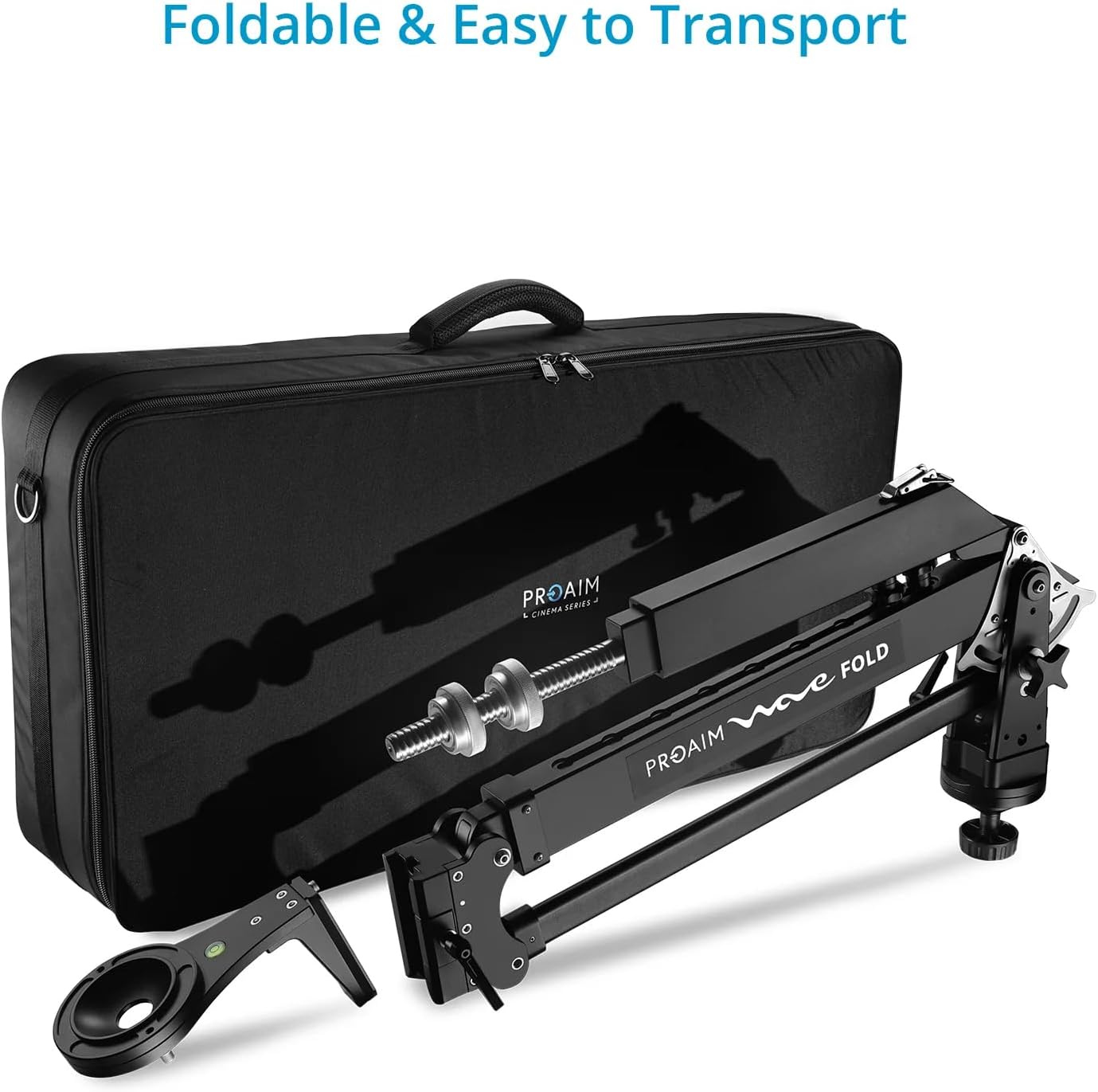
Image: The jib crane in its folded, compact state, alongside its carrying bag, emphasizing its portability and ease of transport and storage.
7. Troubleshooting
| Problem | Possible Cause | Solution |
|---|---|---|
| Jib feels unstable or wobbly. | Tripod not securely mounted or on uneven ground. | Ensure tripod is on a level surface and all mounting points are tightened. Use the bubble leveler. |
| Jerky movements during operation. | Insufficient or incorrect counterweight. | Adjust counterweights to achieve proper balance with the camera setup. Apply smooth, consistent pressure. |
| Camera not level. | Jib not level or camera not properly seated. | Check the jib's bubble leveler. Re-seat the camera on the bowl head and ensure it's level. |
8. Specifications
| Feature | Detail |
|---|---|
| Construction | High-Grade CNC Aluminum |
| Load Capacity | Up to 15kg / 33lb |
| Camera Mount | 100mm Bowl Head (Dovetail Mechanism) |
| Tripod Mount | 100mm Diameter |
| Telescopic Range | 5.2ft to 7.2ft |
| Foldable Length | 2.5ft (Without 100mm bowl adapter) |
| Pan Radius | 360° |
| Pan Lock | Yes |
| Tilt Lock | Yes |
| Bubble Leveler | Yes |
| Product Weight (Without Packaging) | 12.1kg / 26.7lb |
| Product Dimensions | 86 x 12 x 10 inches |
| Item Model Number | JB-WVFD-01 |
| UPC | 728204491850 |

