
1. Introduction
This manual provides essential information for the assembly, operation, and maintenance of your DEVAISE 55 x 28 Inch Electric Standing Desk. Designed for ergonomic comfort and productivity, this desk features adjustable height settings and memory presets to seamlessly transition between sitting and standing positions. Please read these instructions carefully before use to ensure proper function and safety.

The DEVAISE 55 x 28 Inch Electric Standing Desk, showcasing its spacious black desktop and sturdy frame.
2. Safety Information
- Always keep children and pets away from the desk when it is in motion.
- Utilize the child lock feature to prevent unintended height adjustments.
- Be aware of the anti-collision feature; do not force the desk to move if it encounters an obstacle.
- Ensure all cables are properly managed to avoid entanglement during height adjustments.
- Do not overload the desk beyond its maximum weight capacity of 180 pounds.
3. Package Contents
Before assembly, verify that all components are present and undamaged. The package should include:
- Desktop sections (typically two pieces for 55-inch models)
- Desk legs (2)
- Crossbar/Frame components
- Control panel with LED display
- Power adapter and cables
- Headphone hook
- Assembly hardware (screws, dowels, tools)
- Instruction manual
4. Setup and Assembly
Assembly of the DEVAISE Electric Standing Desk is designed to be straightforward, with pre-drilled holes and labeled parts. An estimated assembly time is 15 minutes. A Phillips head screwdriver is recommended for certain screw placements.
- Unpack Components: Carefully remove all parts from the packaging and lay them out on a clean, soft surface to prevent scratches.
- Assemble Frame: Attach the crossbar components to the desk legs according to the detailed instructions provided in the separate assembly guide. Ensure all connections are secure.
- Attach Desktop: Secure the desktop sections to the assembled frame using the provided screws and dowels. For enhanced stability, some users may opt to apply wood glue to the dowel connections.
- Install Control Panel: Mount the control panel to the underside of the desktop in the designated area.
- Connect Cables: Connect the motor cables and power cable to the control box and power adapter. Ensure all connections are firm.
- Final Checks: Before plugging in, double-check all screws and connections for tightness.

Visual guide to the quick installation process, showing all major components.
5. Operating Instructions
Height Adjustment
The desk features a tri-motor system for smooth and quiet height transitions. The adjustable height range is from 28.35 inches (sitting) to 46.45 inches (standing).
- To Raise: Press and hold the 'Up' arrow button on the control panel.
- To Lower: Press and hold the 'Down' arrow button on the control panel.
- Release the button at your desired height. The LED display will show the current height.

The adjustable height range of the DEVAISE Electric Standing Desk, from 28.35 to 46.45 inches.
Memory Presets
The control panel allows you to save up to three preferred height settings for quick recall.
- Set a Height: Adjust the desk to your desired height using the Up/Down buttons.
- Save Preset: Press the 'S' button, then immediately press one of the numbered memory buttons (1, 2, or 3). The LED display will confirm the setting.
- Recall Preset: To move the desk to a saved height, simply press the corresponding numbered memory button (1, 2, or 3). The desk will automatically adjust to that height.

The multi-function control panel with LED display and memory preset buttons.
6. Maintenance
Regular maintenance ensures the longevity and optimal performance of your standing desk.
- Cleaning: Wipe the desktop and frame with a soft, damp cloth. Avoid harsh chemicals or abrasive cleaners.
- Cable Management: Periodically check and organize cables to prevent snagging or damage during height adjustments.
- Fastener Check: Every few months, inspect all screws and bolts to ensure they remain tight. Tighten if necessary.
- Motor Inspection: Listen for any unusual noises during operation. If you detect any, discontinue use and contact support.
7. Troubleshooting
If you encounter issues with your DEVAISE Electric Standing Desk, refer to the following common solutions:
| Problem | Possible Cause | Solution |
|---|---|---|
| Desk does not move | Power cable disconnected, motor error, child lock engaged. | Check power connections. Refer to the specific assembly guide for error codes. Disengage child lock if active. |
| Uneven height adjustment | Obstruction, uneven load, motor synchronization issue. | Remove any obstructions. Ensure weight is evenly distributed. Perform a reset procedure (refer to assembly guide). |
| Desk stops mid-movement | Anti-collision activated, motor overheating. | Remove any detected obstacles. Allow the motor to cool down for 20 minutes before resuming operation. |
| Unusual noise during operation | Loose fasteners, internal component issue. | Check and tighten all assembly fasteners. If noise persists, contact customer support. |
For issues not listed here or if solutions do not resolve the problem, please contact DEVAISE customer support.
8. Specifications
| Feature | Detail |
|---|---|
| Model Number | ASJZ023 |
| Product Dimensions (D x W x H) | 27.63"D x 55.11"W x 28.42"H |
| Minimum Height | 28.35 inches |
| Maximum Height | 46.45 inches |
| Weight Capacity | 180 Pounds |
| Desktop Material | Engineered Wood |
| Base Material | Iron |
| Color | Black |
| Motor Type | Electric Tri-motor system |
| Noise Level | <50dB |
| Memory Presets | 3 |
| Included Components | Headphone Hook |
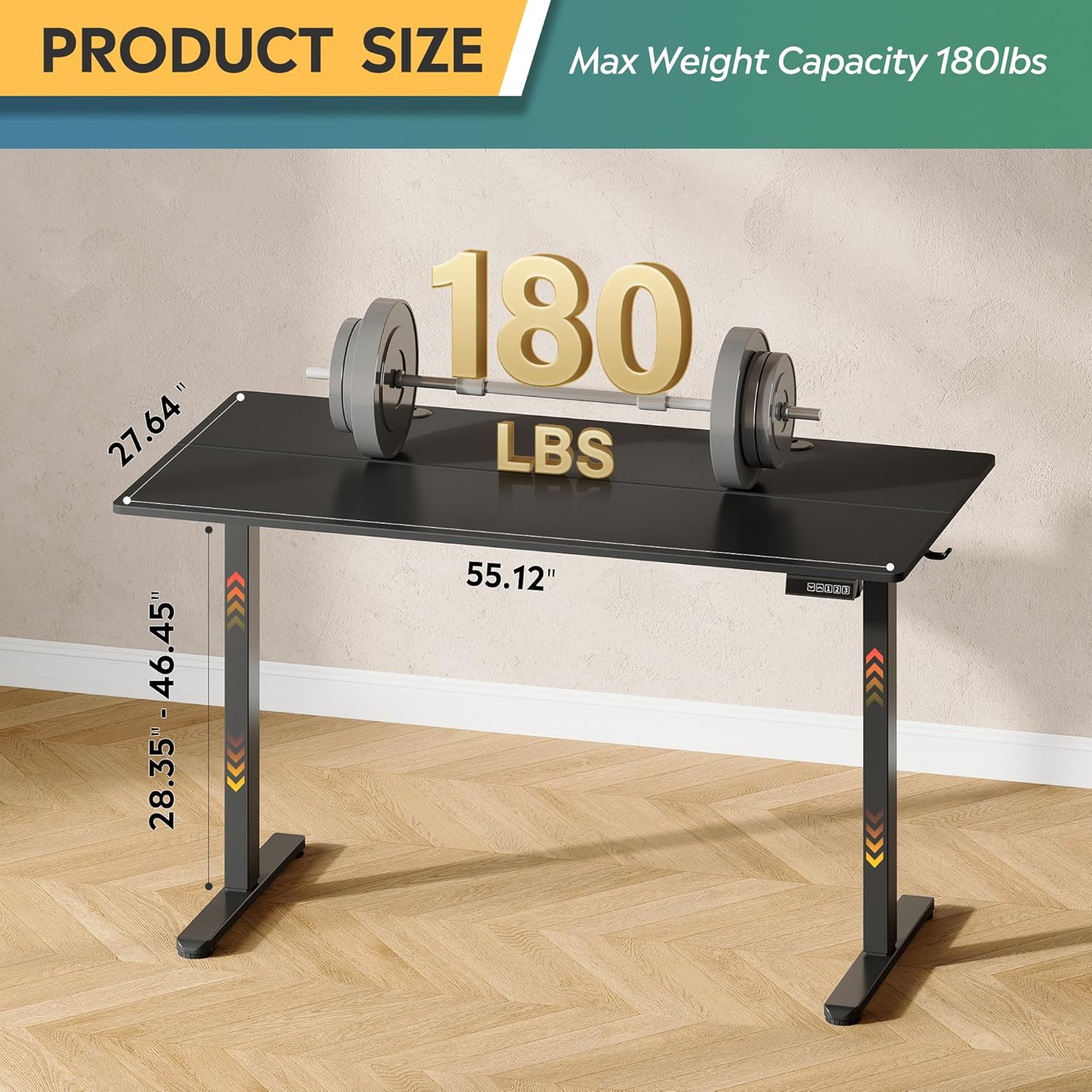
Key dimensions and weight capacity of the DEVAISE Electric Standing Desk.
9. Warranty and Support
DEVAISE provides customer support for its products. If you have any questions regarding desk assembly, product selection, or require assistance with troubleshooting, please contact our U.S.-based product support team. Information on specific warranty terms and conditions can be found on the DEVAISE official website or by contacting customer service directly.
Contact Information: Refer to your purchase documentation or the DEVAISE official website for the most current customer support contact details.
