
DEVAISE ASJZ022
DEVAISE 48 Inch Electric Standing Desk Instruction Manual
Model: ASJZ022
1. Introduction
Thank you for choosing the DEVAISE 48 Inch Electric Standing Desk. This manual provides detailed instructions for assembly, operation, and maintenance to ensure optimal performance and longevity of your desk. This ergonomic sit-stand desk is designed to enhance your home or office workspace with adjustable height settings, memory presets, and a stable structure.
2. Important Safety Information
- Ensure all components are securely fastened before use.
- Do not overload the desk. The maximum weight capacity is 180 lbs.
- Keep children and pets away from the desk during height adjustments.
- The desk features an anti-collision system. If the desk encounters an obstacle during adjustment, it will move back approximately 1 inch to prevent damage or injury.
- A child lock feature is available for added safety.
- Use only the provided power adapter.
3. Package Contents
Please verify that all parts are present before beginning assembly. Refer to the assembly instructions for a complete list of components and hardware.

Image: All components of the DEVAISE Electric Standing Desk laid out for assembly, including desktop panels, leg frames, motor, control panel, and hardware.
4. Assembly Instructions
Setting up your DEVAISE Electric Standing Desk is designed to be straightforward with pre-drilled screw holes and clear instructions. A detailed installation video is also available for visual guidance.
4.1. Assembly Video Guide
Video: A comprehensive guide demonstrating the step-by-step assembly process of the DEVAISE Electric Standing Desk.
4.2. Step-by-Step Assembly
- Assemble the Leg Frames: Attach the crossbar to the two leg columns using the provided screws. Ensure all connections are secure.

Image: Exploded view showing the main components of the desk frame and desktop for quick installation.
- Attach the Feet: Secure the feet to the bottom of each leg column using the appropriate screws.
- Install the Drive Rod: Insert the drive rod into the motor mechanism and connect it to the opposite leg column. This rod synchronizes the movement of both legs.
- Assemble the Desktop: If your desktop comes in multiple pieces, align them using the wooden dowels and secure them with the connecting plates and screws.
- Mount the Frame to the Desktop: Carefully place the assembled frame onto the underside of the desktop, aligning the pre-drilled holes. Secure the frame to the desktop using the provided screws.
- Connect the Control Panel and Power: Attach the LED touchscreen control panel to the designated area under the desktop. Connect the motor cables and power adapter to the control box. Use the provided cable management clips to organize wires.
- Insert Cable Grommets: Place the cable grommets into the pre-drilled holes on the desktop for cable organization.
- Attach Headphone Hook: Secure the headphone hook to the side of the desk using the provided screws.
5. Operating Instructions
5.1. Height Adjustment
The DEVAISE Electric Standing Desk features a smooth and quiet tri-motor system for height adjustments. The desk can be adjusted from 28.35 inches to 46.45 inches.
- Use the Up (▲) and Down (▼) arrow buttons on the LED touchscreen to manually adjust the desk height.
- The current height will be displayed on the LED screen.
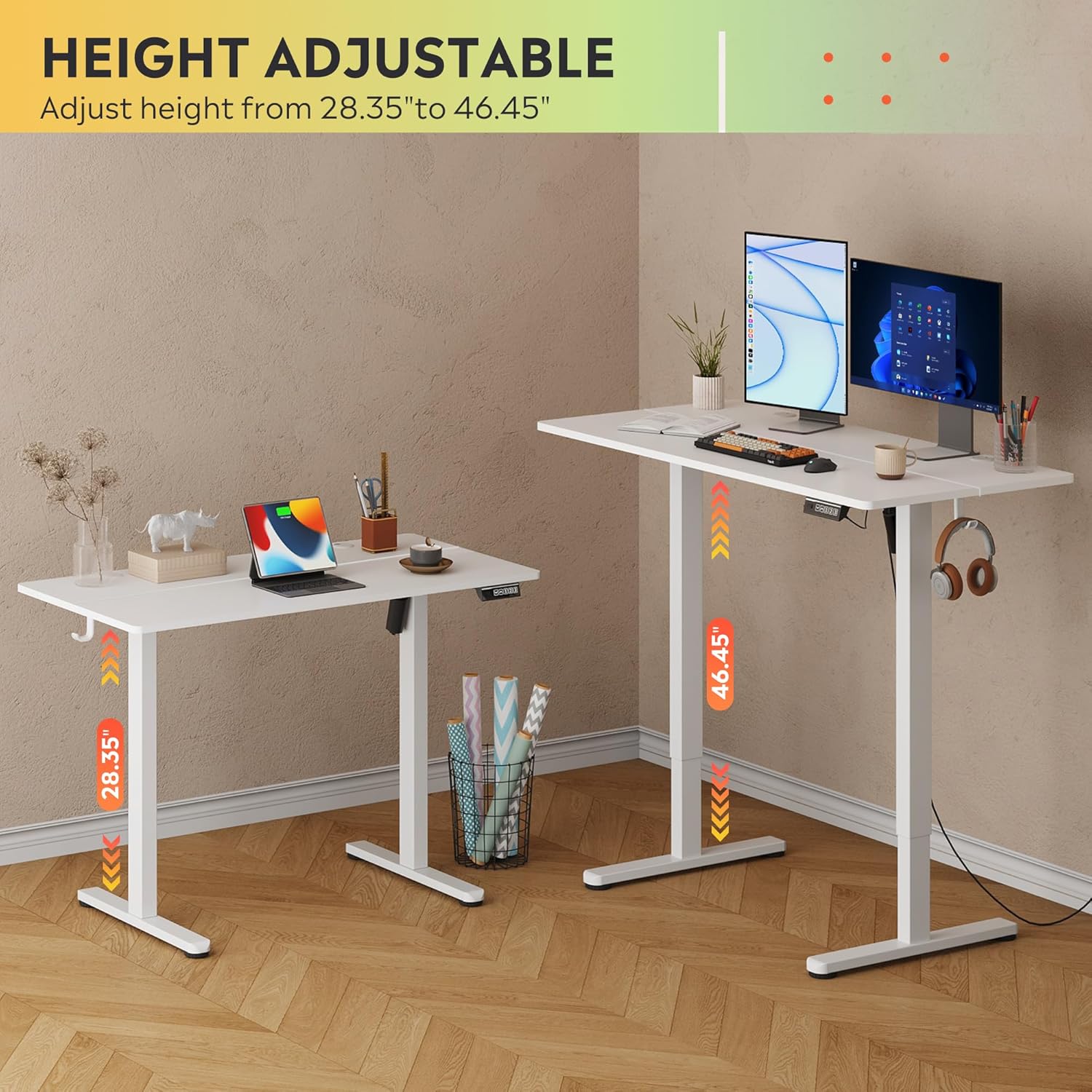
Image: The DEVAISE Electric Standing Desk illustrating its adjustable height range from 28.35 inches to 46.45 inches.
5.2. Memory Presets
The control panel allows you to save up to three personalized height settings for quick recall.
- To Save a Preset: Adjust the desk to your desired height. Press the 'S' button, then press one of the number buttons (1, 2, or 3) within 3 seconds. The height is now saved to that number.
- To Recall a Preset: Simply press the corresponding number button (1, 2, or 3). The desk will automatically move to the saved height.
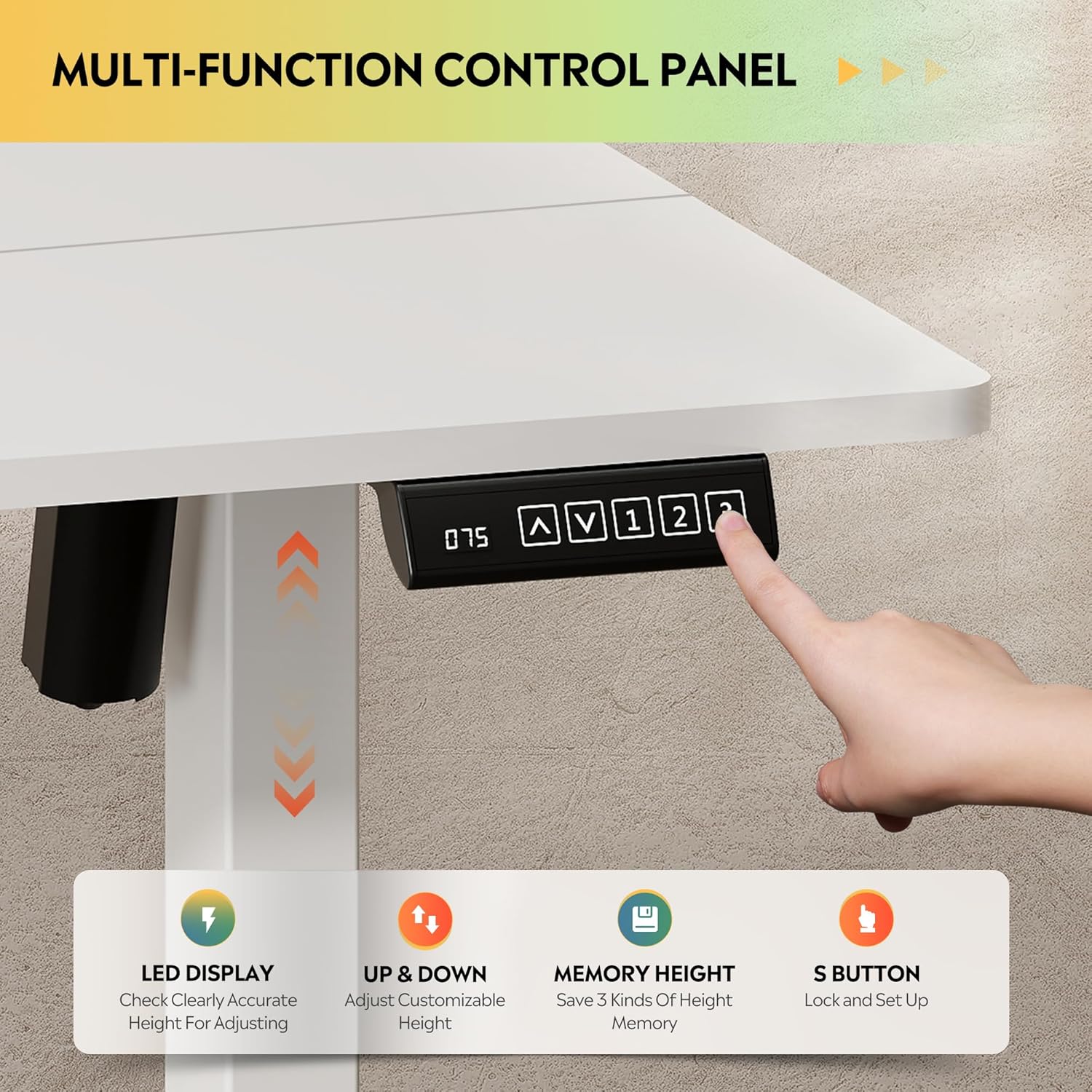
Image: Close-up view of the LED touchscreen control panel, highlighting the up/down arrows, memory preset buttons (1, 2, 3), and the 'S' button for saving settings.
5.3. Anti-Collision System
For safety, the desk is equipped with an anti-collision feature. If the desk encounters an obstruction during movement, it will automatically reverse its direction by approximately 1 inch to prevent damage or injury.
6. Key Features
- Rock-Solid Stability: Heavy-duty solid steel frame with aerospace-grade connectors, tested for 100,000 cycles. Designed to eliminate wobble even at full height.
- Optimal Workspace: 48x24 inch desktop accommodates multiple monitors and accessories, with a 28-inch ergonomic depth to prevent shoulder fatigue.
- Premium & Safe Material: Eco-engineered thickened desktop made of FSC-Certified wood, with 78% lower VOC emissions. Supports up to 180 lbs.
- Quiet & Smooth Operation: Tri-motor system ensures whisper-quiet (<50dB) height transitions.
- Smart Control: LED touchscreen with 3 memory presets for one-tap height recall.
- Hassle-Free Installation: Less labeled parts, pre-drilled screw holes, and detailed instructions for quick setup.
- Headphone Hook: Conveniently located hook for headphones or bags.
Video: An overview of the DEVAISE Electric Standing Desk highlighting its features and benefits in a home office setting.
7. Specifications
| Attribute | Detail |
|---|---|
| Brand | DEVAISE |
| Model Number | ASJZ022 |
| Product Dimensions | 23.62"D x 47.24"W x 28.34"H |
| Color | White |
| Top Material Type | Engineered Wood |
| Base Material | Iron |
| Maximum Weight Recommendation | 180 Pounds |
| Minimum Height | 28.35 Inches |
| Maximum Height | 46.45 Inches |
| Special Features | Adjustable Height, Electric, Ergonomic, LED Touchscreen |
| Included Components | Headphone Hook |
8. Maintenance
- Regularly check all screws and connections to ensure they remain tight.
- Clean the desktop surface with a soft, damp cloth. Avoid harsh chemicals that may damage the finish.
- Keep the motor and electrical components free from dust and moisture.
9. Troubleshooting
If you encounter any issues with your desk, please refer to the following common solutions:
- Desk not moving: Check all power connections and ensure the power adapter is securely plugged into a working outlet.
- Uneven movement: Ensure the desk is placed on a flat, level surface. Check that all leg components are correctly assembled and tightened.
- Error code on LED display: Refer to the specific error codes in the full product manual (if provided separately) or contact customer support.
- Anti-collision system activating frequently: Ensure there are no obstructions above or below the desk during height adjustments.
10. Warranty and Support
DEVAISE offers a limited warranty on this product. For any questions regarding assembly, product selection, or warranty claims, please feel free to contact our U.S.-based product support team.
Contact information can typically be found on the product packaging or the official DEVAISE website.
Related documentsASJZ022

Ask a question about this manual
Ask about setup, troubleshooting, compatibility, parts, safety, or missing instructions. Manuals+ will review the question and use this page’s manual context to help answer it.