1. Introduction
The SNAKOL SK-216B is a versatile 2-in-1 pen-type digital multimeter designed for accurate electrical measurements. It combines the functions of a multimeter with a voltage test pen, allowing for easy measurement of AC/DC voltage, resistance, capacitance, frequency, and diode/continuity tests. Additionally, it features Non-Contact Voltage (NCV) detection and live wire recognition, making it an ideal tool for electricians and general household electrical maintenance. Its compact and portable design, along with a backlit LCD display, ensures clear readings in various conditions.
2. Safety Information
Please read and understand all safety instructions before using this device. Failure to follow these instructions may result in electric shock, fire, or personal injury.
- Always ensure the multimeter is in the correct function mode before connecting to a circuit.
- Do not attempt to measure voltages or currents exceeding the specified maximum limits (e.g., 600V).
- Exercise extreme caution when working with live circuits. Always assume circuits are live until proven otherwise.
- Do not use the device if it appears damaged or if the test leads are compromised.
- Keep fingers behind the finger guards on the test probes during measurements.
- Replace batteries promptly when the low battery indicator appears to ensure accurate readings and uninterrupted operation.
- Avoid using the multimeter in wet environments or during electrical storms.
3. Product Overview
Familiarize yourself with the components of your SNAKOL SK-216B Pen Type Digital Multimeter.
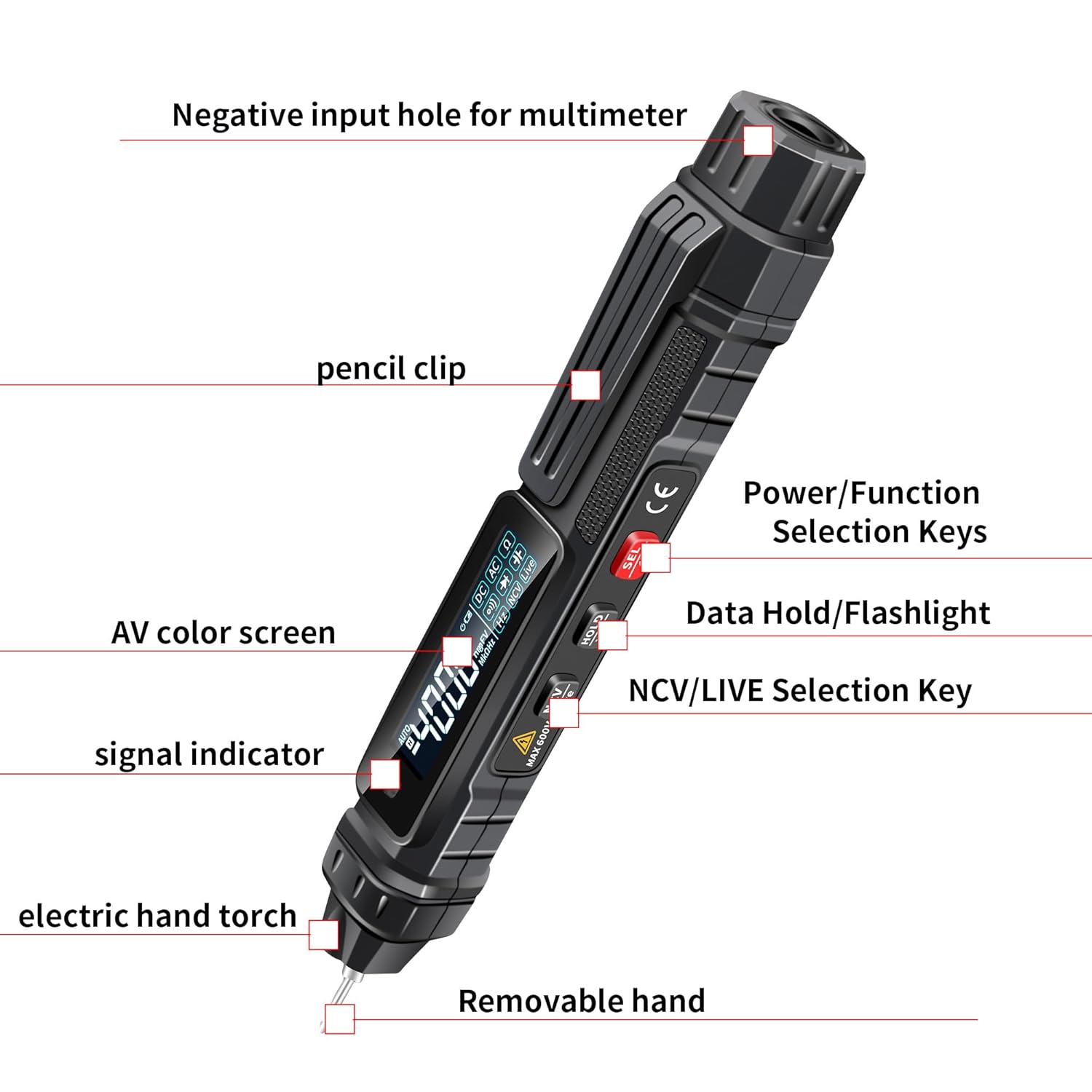
Figure 3.1: SNAKOL SK-216B Multimeter with labeled components.
This image displays the SNAKOL SK-216B Pen Type Digital Multimeter with its key parts clearly labeled. These include the Negative input hole for the multimeter, a convenient pencil clip, the AV color screen for displaying readings, a signal indicator, an electric hand torch for illumination, and a removable hand (positive probe). On the side, you can see the Power/Function Selection Keys, Data Hold/Flashlight button, and the NCV/LIVE Selection Key. Understanding these components is essential for proper operation.
- Negative Input Hole: Connects the black test lead.
- Pencil Clip: For convenient carrying and securing the device.
- AV Color Screen: Displays measurement readings and function indicators.
- Signal Indicator: Provides visual feedback, especially during NCV detection.
- Electric Hand Torch: Built-in light for illuminating work areas in low-light conditions.
- Removable Hand (Positive Probe): The red test probe, which can be removed or protected with a cap.
- Power/Function Selection Keys: Used to turn the device on/off and select different measurement modes.
- Data Hold/Flashlight Button: Press to hold the current reading on the display; long press to activate/deactivate the flashlight.
- NCV/LIVE Selection Key: Activates Non-Contact Voltage detection or Live wire detection mode.
4. Setup: Battery Installation
The SNAKOL SK-216B requires two 1.5V AAA batteries for operation. Batteries are included with the kit.

Figure 4.1: Battery compartment with AAA batteries installed.
This image illustrates the battery compartment of the SNAKOL SK-216B multimeter, showing two 1.5V AAA batteries correctly inserted. The compartment is typically located on the back or side of the device and secured with a cover. Ensure correct polarity when inserting batteries.
- Locate the battery compartment cover on the back of the multimeter.
- Use a screwdriver (if necessary) to open the battery compartment.
- Insert two 1.5V AAA batteries, ensuring correct polarity (+ and -) as indicated inside the compartment.
- Securely close the battery compartment cover.
- The device is now ready for use. Replace batteries when the low battery indicator appears on the display.
5. Operating Instructions
To operate the SNAKOL SK-216B, press the Power/Function Selection Key to turn it on. Use the same key to cycle through different measurement functions.
5.1. AC/DC Voltage Measurement

Figure 5.1: Measuring AC voltage in an electrical panel.
This image shows the SNAKOL SK-216B multimeter in use, measuring AC voltage within an electrical panel. The display clearly shows a reading of "223.1V AC". The positive probe (pen tip) is inserted into a terminal, and the negative probe (black lead) is connected to another point, demonstrating a typical voltage measurement setup. The device is capable of measuring both AC and DC voltages up to 600V.
- Turn on the multimeter. Select the AC Voltage (V~) or DC Voltage (V-) mode using the Power/Function Selection Key.
- Connect the positive probe (pen tip) to the positive point of the circuit and the negative probe (black lead) to the negative or common point.
- Read the voltage value displayed on the AV color screen.
- The device automatically detects AC or DC voltage in auto-ranging mode.
5.2. Resistance, Diode, Capacitance, and Frequency Measurement
Cycle through the functions using the Power/Function Selection Key until the desired mode (Ω for resistance, ⟷ for diode, F for capacitance, Hz for frequency) is displayed.
- Resistance (Ω): Connect the probes across the component to measure its resistance.
- Diode (⟷): Connect the probes across the diode. The display will show the forward voltage drop.
- Capacitance (F): Connect the probes across the capacitor. Ensure the capacitor is discharged before testing.
- Frequency (Hz): Connect the probes to the signal source to measure its frequency.
5.3. Continuity Test
The continuity test checks for an unbroken path in a circuit. A built-in buzzer sounds if the resistance is less than 50Ω.
- Select the continuity mode (often indicated by a speaker icon) using the Power/Function Selection Key.
- Connect the probes to the two points of the circuit you wish to test.
- If there is continuity (low resistance), the buzzer will sound.
5.4. Non-Contact Voltage (NCV) Detection

Figure 5.2: NCV Non-Contact Sensing in action.
This image demonstrates the NCV (Non-Contact Voltage) sensing capability of the SNAKOL SK-216B multimeter. The device is held near a bundle of electrical wires, and a red indicator light is flashing, accompanied by visual representations of "di di di" sounds, indicating the detection of AC voltage. The closer the meter tip is to the power source, the more urgent the alarm sound and the more analog bars appear on the LCD display, signifying stronger electric field detection.

Figure 5.3: Line Break Detection using NCV mode.
This image illustrates the line break detection feature of the SNAKOL SK-216B multimeter in NCV non-contact voltage detection mode. It shows two segments of a single-stranded wire, one electrified and one not. The multimeter is shown detecting the presence of electrification along the wire, and the absence of a signal beyond a certain point helps identify the location of a break in the line. This is a useful feature for quickly diagnosing cable faults.
- Press the NCV/LIVE Selection Key to enter NCV mode.
- Move the tip of the multimeter close to the conductor you suspect has AC voltage.
- If AC voltage is detected, the red indicator light will flash, and an audible alarm will sound. The frequency of the alarm and the number of analog bars on the display will increase as you get closer to the voltage source.
- This mode can also be used for line break detection in energized wires.
5.5. Live Wire Detection
This function helps identify live (hot) wires from neutral wires.
- Press the NCV/LIVE Selection Key to cycle to LIVE mode.
- Touch the positive probe (pen tip) to the wire you want to test.
- The display will indicate if the wire is live, often with a specific symbol or reading.
5.6. Data Hold and Flashlight

Figure 5.4: Reflective screen and torch illumination.
This image highlights two key features of the SNAKOL SK-216B multimeter: its reflective screen and built-in torch illumination. The reflective screen provides clear and accurate readings even in low-light conditions, enhancing visibility. The integrated torch light, emanating from the tip of the pen, improves visibility in dark environments, reducing the risk of electrical shock by allowing users to see their measurement points clearly.
- Data Hold: Briefly press the "HOLD" button to freeze the current reading on the display. Press again to release.
- Flashlight: Long press the "HOLD" button to turn the built-in flashlight on or off. This improves visibility in dimly lit work areas.
6. Maintenance
- Cleaning: Wipe the device with a dry, clean cloth. Do not use abrasive cleaners or solvents.
- Battery Replacement: Replace batteries when the low battery indicator appears. Refer to Section 4 for instructions.
- Storage: Store the multimeter in a cool, dry place away from direct sunlight and extreme temperatures. If storing for extended periods, remove the batteries to prevent leakage.
- Probe Inspection: Regularly inspect the test probes and leads for any signs of damage, such as cracks or frayed insulation. Replace damaged leads immediately.
7. Troubleshooting
| Problem | Possible Cause | Solution |
|---|---|---|
| Device does not turn on. | Dead or incorrectly installed batteries. | Check battery polarity; replace batteries. |
| Inaccurate readings. | Low battery; incorrect function selected; damaged probes. | Replace batteries; ensure correct mode; inspect and replace probes if damaged. |
| NCV not detecting voltage. | Not close enough to the source; NCV mode not activated. | Ensure tip is close to the conductor; activate NCV mode. |
| Buzzer not sounding in continuity test. | No continuity (open circuit); resistance too high. | Verify circuit path; check for breaks or high resistance components. |
8. Specifications
- Model: SK-216B
- Brand: SNAKOL
- Power Source: 2 x 1.5V AAA Batteries (included)
- Max. AC/DC Voltage: 600V
- Resistance Range: 4kΩ ~ 40MΩ
- Continuity Buzzer: Sounds if resistance is less than 50Ω
- Functions: AC/DC Voltage, Resistance, Capacitance, Frequency, Diode, Continuity, NCV, Live Wire Detection
- Display: Reflective LCD with backlight
- Illumination: Built-in flashlight
- Dimensions (L x W x H): 18.5 x 2.5 x 3 cm (approx. 7.28 x 0.98 x 1.18 inches)
- Item Weight: 118 g (approx. 4.16 oz)
- Certifications: CE, RoHS
9. What's in the Box
Your SNAKOL SK-216B Pen Type Digital Multimeter kit includes the following items:
- 1 x Pen Type Multimeter (SNAKOL SK-216B)
- 1 x Probe (black test lead)
- 1 x User Manual (this document)
- 2 x 1.5V AAA Batteries
10. Warranty and Support
SNAKOL is committed to providing high-quality products and customer satisfaction. For any questions, concerns, or technical support regarding your SK-216B Pen Type Digital Multimeter, please refer to the contact information provided with your purchase or visit the official SNAKOL website. Please retain your proof of purchase for warranty claims.