
Introduction
This manual provides detailed instructions for the safe and effective use of your WARSUN 1000 Lumens Rechargeable Work Light, Model G600. Please read this manual thoroughly before operating the device and retain it for future reference.
Product Overview
The WARSUN G600 is a versatile and portable LED work light designed for various outdoor and indoor applications. It features multiple lighting modes, a magnetic base, a hanging hook, and a tripod mount for flexible positioning.

Figure 1: WARSUN G600 Rechargeable Work Light, Khaki color.
Key Features:
- Up to 1000 lumens brightness.
- Rechargeable 3000mAh battery with 4-48 hour runtime.
- 6 lighting modes, including 4 color temperatures, red, and red flashing.
- Integrated magnetic base for hands-free attachment.
- Hanging hook and tripod mount compatibility.
- Lightweight and portable design.

Figure 2: The WARSUN G600 is lighter than a smartphone, with dimensions of 3.74 x 3.74 inches (front), 3.35 x 3.35 inches (light frame), and 1.38 inches (thickness). It weighs 187g / 6.6 oz. It features 360-degree smooth rotation, a metal opening for hanging, and a magnetic base.

Figure 3: The WARSUN G600 features dual light sources with independent control. (1) The COB Panel has 41 LEDs, 4 color temperatures (6500K-5500K-4500K-3500K), can be dimmed by holding the button (up to 1000 lumens), and turns off with a double click. (2) The Ring Light offers Red and Red Strobe modes.
What's in the Box
Verify that all items are present in the package:
- WARSUN G600 Work Light
- Charging Cable (USB Type-C)
- 1 Lithium Ion Battery (pre-installed)
Setup
Charging the Device
Before first use, fully charge the WARSUN G600 work light. The device is equipped with a 3000mAh rechargeable battery.
- Locate the USB Type-C charging port, typically covered by a protective flap.
- Connect the provided USB Type-C charging cable to the port on the device.
- Connect the other end of the cable to a compatible USB power source (e.g., wall adapter, power bank, computer USB port).
- The battery indicator lights will illuminate to show the charging progress. Four green lights indicate a full charge.
A full charge can provide 4-48 hours of runtime depending on the selected brightness and mode. The device can also function as an outdoor power backup to charge other devices via its USB-A output port (not shown in detail, but mentioned in specifications).
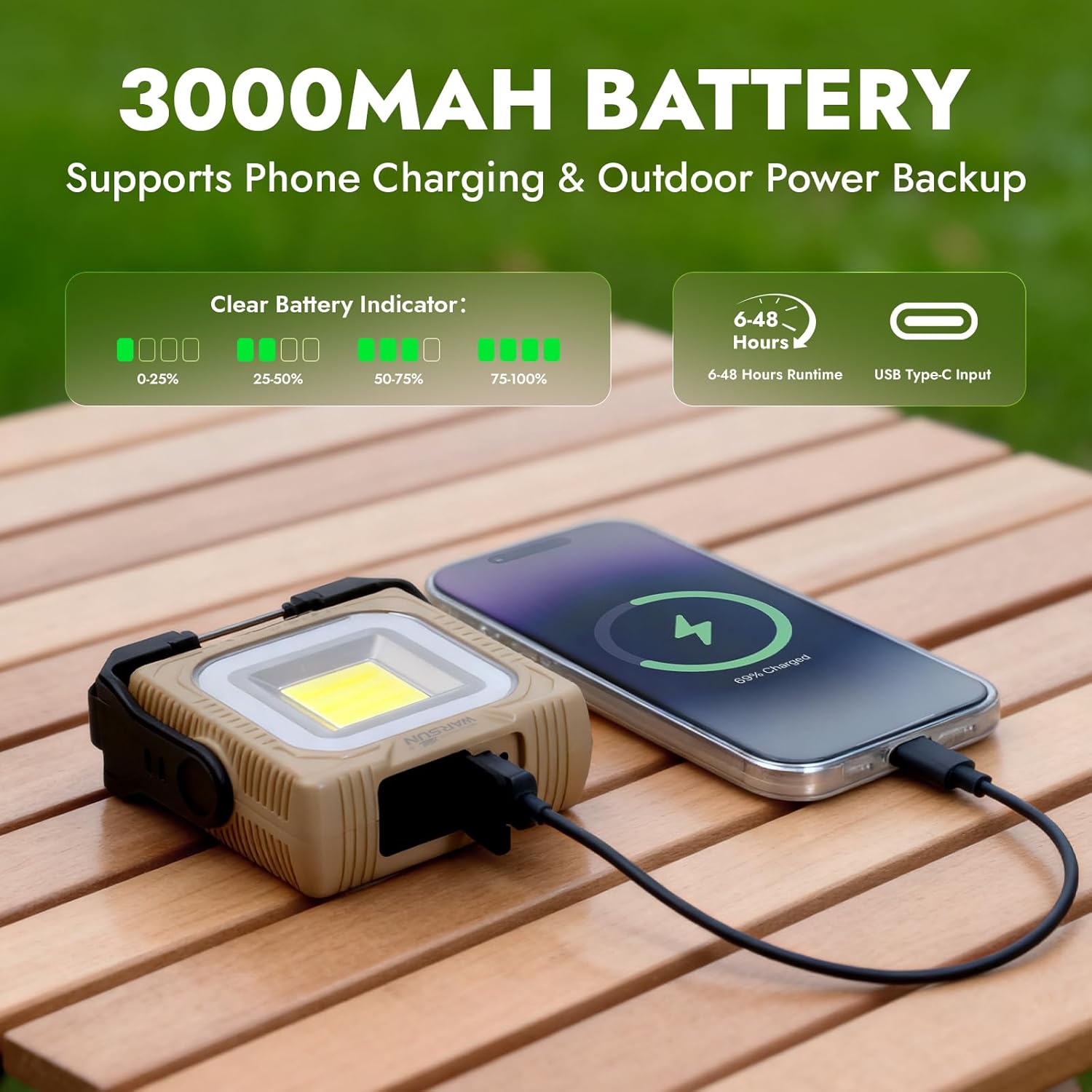
Figure 4: The WARSUN G600 features a 3000mAh battery. The clear battery indicator shows charge levels (0-25%, 25-50%, 50-75%, 75-100%). It supports 4-48 hours runtime and has a USB Type-C input for charging. It can also charge other devices.
Operating Instructions
Powering On/Off and Adjusting Main Light Modes
The WARSUN G600 has two main control buttons, located on the top panel (refer to Figure 3). The button with the light beam icon controls the main COB panel light.
- To Turn On: Press the main light button once. The light will turn on at its brightest setting.
- To Cycle Color Temperatures: Press the main light button repeatedly to cycle through the 4 available color temperatures (6500K, 5500K, 4500K, 3500K).
- To Adjust Brightness (Dimming): While the main light is on, press and hold the main light button. The brightness will gradually dim. Release the button at your desired brightness level. To increase brightness, press and hold the button again.
- To Turn Off: Double-click the main light button quickly.
Operating Red Light Modes
The button with the square icon controls the red ring light.
- To Turn On Red Light: Press the red light button once. The red light will illuminate.
- To Activate Red Strobe: Press the red light button a second time to activate the red flashing (strobe) mode for emergency signaling.
- To Turn Off Red Light: Press the red light button a third time to turn off the red light.
Mounting Options
The WARSUN G600 offers multiple ways to position the light for optimal illumination.

Figure 5: The WARSUN G600 offers four mounting options: Desktop (using the integrated stand), Hanging (using the hook), Magnetic (attaching to metal surfaces), and Tripod (using the tripod mount).
- Desktop Use: Utilize the integrated 360-degree rotating stand to place the light on any flat surface.
- Hanging: Extend the metal opening (hook) from the stand and hang the light from tent loops, branches, or other suitable fixtures.
- Magnetic Attachment: The strong magnetic base allows the light to be securely attached to metal surfaces, such as vehicle hoods, poles, or metal shelving.
- Tripod Mount: The light includes a standard tripod mounting point for attachment to a camera tripod or similar stand for elevated or wide-area illumination.
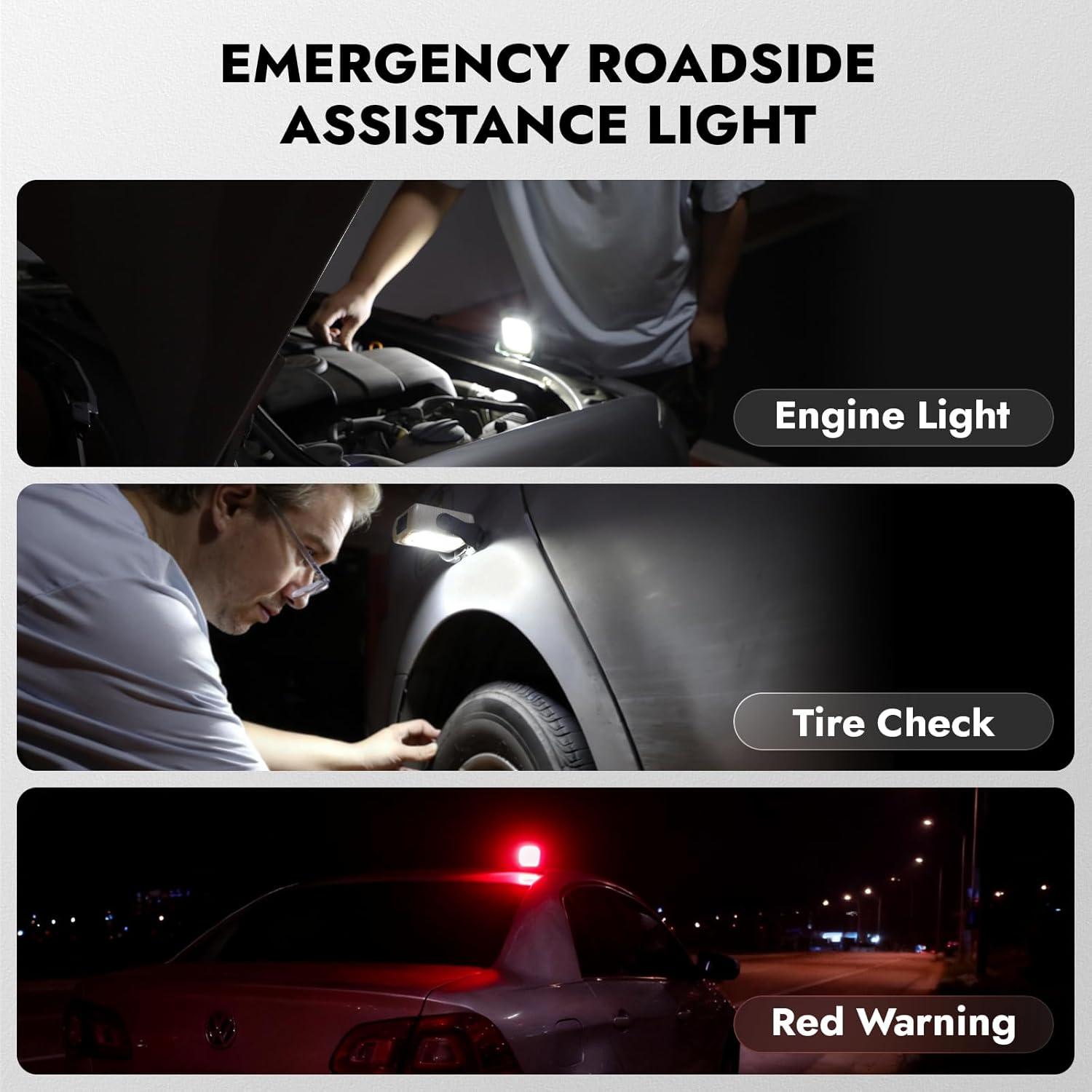
Figure 6: The WARSUN G600 can be used as an emergency roadside assistance light. Examples include an engine light for under-hood illumination, a tire check light for inspecting vehicle tires, and a red warning light for roadside emergencies.
Maintenance
Cleaning
To clean the device, wipe it with a soft, damp cloth. Do not use abrasive cleaners or solvents, as these may damage the surface or internal components.
Battery Care
To prolong battery life, charge the device regularly, even if not in frequent use. Avoid fully discharging the battery for extended periods. Store the device in a cool, dry place.
Water Resistance
The WARSUN G600 is water-resistant, making it suitable for outdoor use in various weather conditions. However, it is not designed for submersion. Ensure the charging port cover is securely closed to maintain water resistance.

Figure 7: The WARSUN G600 is water-resistant and outdoor-ready, built to withstand splashes and rainy weather, making it reliable for camping, hiking, and emergency use.
Troubleshooting
Light Not Turning On
- Ensure the battery is charged. Connect the device to a power source and check the battery indicator.
- Verify that the correct button is being pressed for the desired light mode.
- If the device does not respond, try charging it for at least 30 minutes before attempting to turn it on again.
Charging Issues
- Check the charging cable for damage and ensure it is securely connected to both the device and the power source.
- Try using a different USB power adapter or port.
- Ensure the charging port is free of debris.
Light Modes Not Changing
- Ensure you are pressing the correct button for the desired light mode (main light vs. red light).
- For brightness adjustment, remember to press and hold the button.
Specifications
| Feature | Specification |
|---|---|
| Model Number | G600 |
| Light Source Type | Light Emitting Diode (LED) |
| Brightness | 1000 Lumens |
| Battery Capacity | 3000mAh Lithium-Ion |
| Battery Life | 4-48 Hours (depending on mode) |
| Charging Port | USB Type-C |
| Output Port | USB-A (for charging other devices) |
| Material | Acrylonitrile Butadiene Styrene (ABS) |
| Water Resistance Level | Water Resistant |
| Item Dimensions (L x W x H) | 1.57"L x 4.33"W x 3.94"H |
| Item Weight | 0.05 Pounds (approx. 22.68g) |
Warranty and Support
For warranty information or technical support, please refer to the contact details provided with your purchase or visit the official WARSUN website. Keep your purchase receipt as proof of purchase.


