
OHYEAHSPIN 360 photobooth
OHYEAHSPIN 360 Photo Booth User Manual
Model: 360 photobooth (27 inch) | Brand: OHYEAHSPIN
1. Introduction
The OHYEAHSPIN 360 Photo Booth is an innovative system designed to capture dynamic 360-degree videos and photos, perfect for parties, large events, weddings, exhibitions, and professional photography. This automatic rotating camera video booth allows users to stand on a platform while a camera arm rotates around them, creating immersive content. It supports HD slow motion, photo, and video capture, enabling you to record and share memorable moments. This manual provides detailed instructions for the setup, operation, and maintenance of your 360 Photo Booth.

Figure 1.1: OHYEAHSPIN 27-inch 360 Photo Booth in operation.
This image displays the complete 360 Photo Booth setup, featuring the rotating platform, the adjustable camera arm with a ring light, and a flight case in the background. A couple is shown posing on the platform, demonstrating its use for capturing dynamic video content.
2. Safety Information
Please read and understand all safety instructions before operating the 360 Photo Booth to prevent injury or damage to the equipment.
- Weight Capacity: The 27-inch (68cm) model is designed for 1-2 people with a maximum weight capacity of 330 lbs (150 kg). Do not exceed this limit.
- Stable Surface: Always place the photo booth on a flat, stable, and level surface to ensure safe operation and prevent tipping.
- Clearance: Ensure adequate clear space around the rotating arm to prevent collisions with objects or people.
- Electrical Safety: The ring light requires a power bank (not included). Use only compatible power sources and avoid overloading electrical outlets. Keep all electrical components dry.
- Supervision: Children and pets should be supervised at all times when near the photo booth.
- Emergency Stop: Familiarize yourself with the remote control's ON/OFF button for immediate cessation of rotation if needed.
3. Package Contents
Verify that all components are present in your package:

Figure 3.1: Packaging Options and Product Size Overview.
This image illustrates the different sizes of the 360 Photo Booth and their corresponding user capacities, along with the two packaging options: a flight case and a honeycomb box with a trolley. It provides a visual guide to the product's physical dimensions and transport solutions.

Figure 3.2: Accessories Content Diagram.
This diagram provides a comprehensive visual list of all accessories included with the 360 Photo Booth, detailing each item and its quantity, such as the ring light, Bluetooth shutter, phone holders, and installation tools.
- 360 Photo Booth Platform
- Rotating Arm Assembly
- Ring Light (x1)
- Bluetooth Shutter (x1)
- Metal Head (x2)
- Phone Holder (x2)
- Tablet Stand (x1)
- Phone Bracket (x2)
- Installation Tools (x1 set)
- Foot Cup (x8)
- Angle Adjuster (x1)
- Fixing Screw (x2)
- Air Box / Flight Case (depending on packaging option)
- Accessories Bag (x2)
- Motor Control and AC-DC Adapter (x1)
- Light Strip & Remote & USB Charger (x1)
- Handheld Remote Controller
4. Setup
Follow these steps to assemble your 360 Photo Booth:
- Unpack Components: Carefully remove all parts from the packaging.
- Position the Platform: Place the main 360 photo booth platform on a flat, stable, and level surface.
- Install Foot Cups: Attach the 8 foot cups to the bottom of the platform for stability.
- Assemble Rotating Arm: Connect the rotating arm components. Ensure all connections are secure.
- Attach Ring Light: Mount the ring light to the top of the rotating arm. The ring light requires a power bank (not included) for operation.
- Mount Device Holders: Attach the phone holders, tablet stand, or camera bracket to the rotating arm as needed. The system supports cameras, GoPros, iPhones, and tablets.
- Adjust Arm Angle and Length: Use the angle adjuster to set the desired shooting angle (36° to 156°) and the telescopic pole to adjust the arm's length (0-15 inches) for optimal recording.
- Connect Power: Connect the motor control and AC-DC adapter to the platform and a power source.
- Install LED Strip Light: If desired, attach the multicolor LED strip light around the base of the platform and connect its power.

Figure 4.1: Camera Arm Adjustments.
This image highlights the adjustable features of the 360 Photo Booth's camera arm, including the adjustable angle from 36° to 156°, adjustable length, and the adjustable foot cups for platform leveling.
5. Operating Instructions
The 360 Photo Booth offers flexible control options and lighting features.
5.1 Control Methods
You can control the 360 Photo Booth using either the Chacktok App or the handheld remote control.

Figure 5.1: Button or APP Control.
This image illustrates the two primary control methods for the 360 Photo Booth: a physical digital remote controller with buttons for ON/OFF, reverse, speed down, and speed up, and a smartphone screen displaying the Chacktok App interface for wireless control.
5.1.1 Chacktok App Control
Download the Chacktok App from the App Store or Google Play. The app allows for wireless control and advanced features:
- Rotation Speed: Adjust the speed of the rotating arm.
- Direction: Control clockwise or counter-clockwise spin.
- Auto Slow Motion: Enable automatic slow-motion recording.
- Special Effects & Editing: Shoot preprocessed videos and photos, then edit them with special effects directly within the app.
- Event Management: Create and manage events, including switching event types and sharing options.
- Sharing: Share content directly to social media platforms or with friends.

Figure 5.2: Chacktok APP Interface.
This image displays various screens of the Chacktok APP, showcasing its functionalities including controller interface, video editing capabilities, event creation, and social sharing options. It also indicates download availability on the App Store and Google Play.
5.1.2 Handheld Remote Control
The included handheld remote control provides basic functions:
- ON/OFF: Start or stop the rotation.
- REVERSE: Change the direction of rotation.
- SPEED DOWN: Decrease the rotation speed.
- SPEED UP: Increase the rotation speed.
5.2 Ring Light Operation
The ring light enhances video and photo quality with adjustable lighting modes and brightness.

Figure 5.3: Ring Light with Multifunctional Selfie Stick.
This image details the ring light's features, including its ability to hold phones, GoPros, iPads, and cameras. It also illustrates the three lighting modes (Cold Light, White Light, Warm Light) and their 10 adjustable brightness levels, enhancing photo and video quality.
- Lighting Modes: The ring light offers 3 color lighting modes: Cold Light, White Light, and Warm Light.
- Brightness Adjustment: Adjust the brightness to 10 different levels to suit your environment and desired effect.
- Power: The ring light requires a power bank (not included) for operation.
5.3 Multicolor LED Strip Light
The optional LED strip light adds ambiance and visual appeal to your photo booth setup.
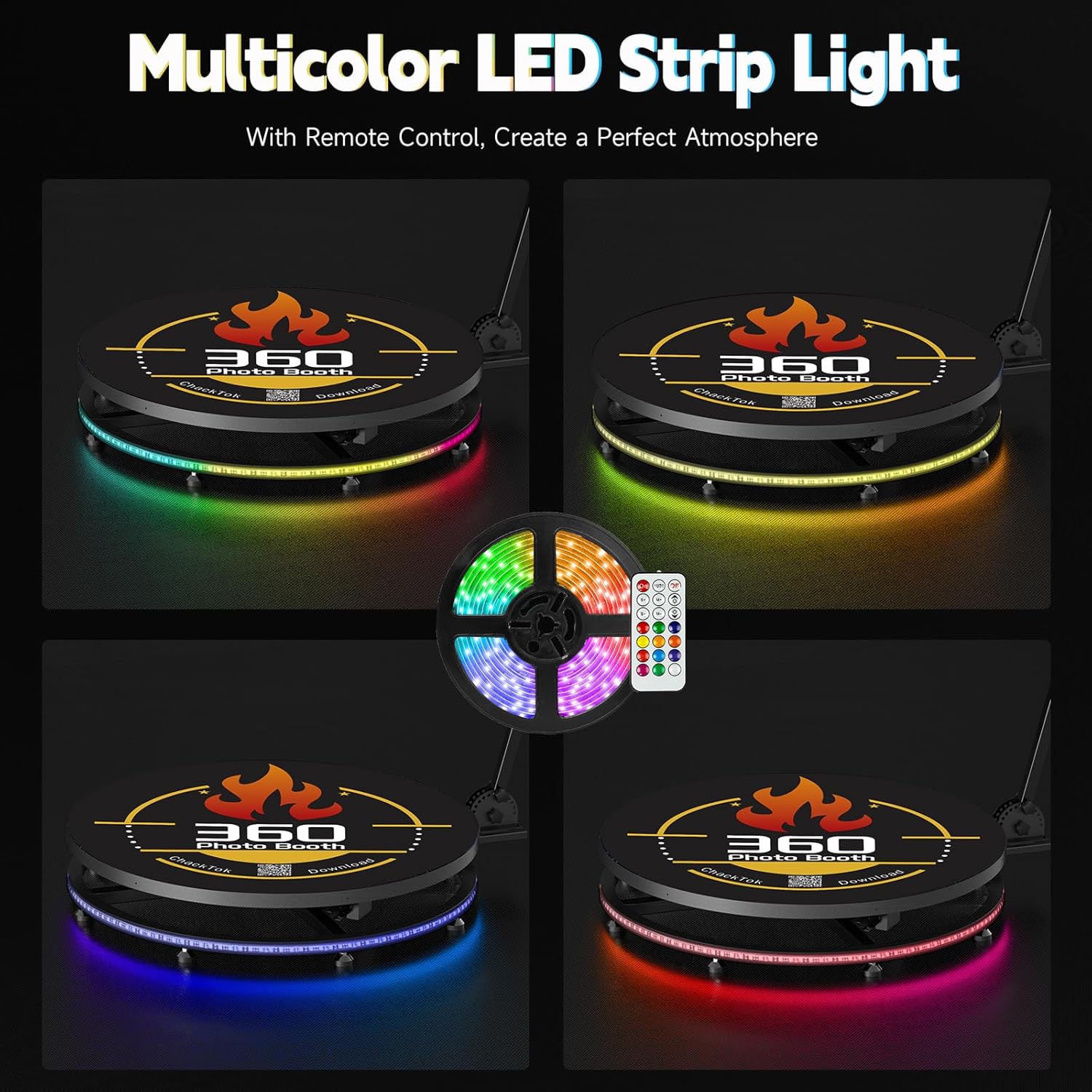
Figure 5.4: Multicolor LED Strip Light.
This image showcases the multicolor LED strip light, which can be installed around the base of the 360 Photo Booth. It includes a remote control for changing colors and creating different atmospheric effects, with examples of various color settings.
- Remote Control: Use the dedicated remote to change colors and lighting patterns.
- Atmosphere Creation: Create a perfect atmosphere for your events with various lighting effects.
6. Maintenance
Proper maintenance ensures the longevity and optimal performance of your 360 Photo Booth.
- Cleaning: Regularly wipe down the platform and rotating arm with a soft, damp cloth. Avoid abrasive cleaners or solvents that could damage the finish.
- Storage: When not in use, store the photo booth in its flight case or original packaging in a dry, cool place to protect it from dust and damage.
- Cable Management: Ensure all cables are neatly organized and not pinched or tangled to prevent wear and tear.
- Battery Check: Periodically check the batteries in the remote control and ensure the ring light's power bank is charged if in use.
7. Troubleshooting
If you encounter issues with your 360 Photo Booth, refer to the following common problems and solutions:
| Problem | Possible Cause | Solution |
|---|---|---|
| Photo booth not rotating. | Power not connected; Remote control battery low; App not connected; Obstruction. | Check power adapter connection. Replace remote battery. Ensure Bluetooth connection to app. Remove any obstructions around the arm. |
| Ring light not turning on. | Power bank not connected or discharged; Ring light cable damaged. | Connect and charge power bank. Check ring light cable for damage. |
| Rotation speed inconsistent. | Platform not level; Overload; Motor issue. | Ensure platform is on a flat, level surface. Do not exceed weight capacity. Contact customer support if issue persists. |
| App connectivity issues. | Bluetooth off; App outdated; Interference. | Ensure Bluetooth is enabled on your device. Update Chacktok App to the latest version. Move away from other wireless devices. |
If you cannot resolve the issue using the above steps, please contact OHYEAHSPIN customer support for assistance.
8. Specifications
Key technical specifications for the OHYEAHSPIN 27-inch 360 Photo Booth:
| Feature | Detail |
|---|---|
| Model Name | 360 Photo Booth |
| Item Model Number | 360 photobooth |
| ASIN | B0DP79G1L2 |
| Platform Size (27 inch model) | 26.8 inches / 68 cm |
| Recommended Capacity (27 inch model) | 1-2 people |
| Max Weight Capacity (27 inch model) | 330 lbs (150 kg) |
| Package Dimensions | 31 x 30.75 x 12 inches |
| Item Weight | 89.8 pounds |
| Special Features | Auto Exposure, Compact, Timer, Waterproof |
| Included Components | Camera Body Only (refer to Package Contents for full list) |
| Manufacturer | Marvel Technology CO.,LTD (MWE) / OHYEAHSPIN |

Figure 8.1: Model Comparison.
This table provides a detailed comparison between the Standard Model and the CD Model of the 360 Photo Booth, highlighting differences in body material, control technology, accessories number, mean time between failures (MTBF), noise level, software control, flight case material, ease of maintenance, and included accessories like battery pack, power bank, and customized logo service.
9. Warranty and Support
OHYEAHSPIN, manufactured by Marvel Technology Co., Ltd. (MWE), stands behind the quality of its products.
- Warranty: Enjoy peace of mind with a 3-year warranty for products with quality defects.
- Technical Support: Lifetime technical support is provided. The professional technical team at MWE offers online support and provides quick help and solutions to questions or problems.
- Resources: Installation and usage videos are available on the product page, and this user manual is included in the packaging for easy setup and use.
For any inquiries or support needs, please contact OHYEAHSPIN customer service.