
1. Introduction
Thank you for choosing the UML0 V11 Cordless Vacuum Cleaner. This manual provides essential information for the safe and efficient operation, maintenance, and troubleshooting of your new appliance. Please read it thoroughly before first use and keep it for future reference.
The UML0 V11 is a powerful and versatile cleaning solution, featuring 45Kpa suction, a 300W brushless motor, and a 10-cell 4000mAh rechargeable battery providing up to 60 minutes of runtime. Its LED touch display offers intuitive control over three power modes, while the 5-stage high-efficiency filtration system captures 99.99% of particles. Designed for multi-surface cleaning, it is effective on tiles, carpets, and hard floors.
2. Package Contents
Carefully unpack all components and ensure all items are present. If any parts are missing or damaged, please contact customer support.
- Main Motor (Motor & Dust Cup)
- Retractable Metal Tube
- Motorized Brush Head
- Battery Pack (10-cell 4000mAh)
- Power Adapter
- 2-in-1 Brush
- Long Crevice Tool
- Wall Mount with Screws
- Cleaning Gadget
- User Manual & Quick Start Guide
- Extra Sponge Filter

Image: UML0 V11 Cordless Vacuum Cleaner showing main unit, extension tube, motorized brush head, and various accessories.
Video: Unboxing and quick look at the UML0 V11 Cordless Vacuum Cleaner, detailing all included components.
3. Assembly & Setup
- Attach the Battery: Slide the battery pack into the slot on the main motor unit until it clicks securely into place.
- Assemble the Vacuum:
- For stick vacuum mode: Connect the retractable metal tube to the main motor unit. Then, attach the motorized brush head to the other end of the metal tube.
- For handheld mode: Directly attach desired cleaning tools (2-in-1 brush or long crevice tool) to the main motor unit.
- Adjust Tube Length: Press the button on the retractable metal tube to extend or shorten it to a comfortable length for your height.
- Wall Mount Installation: Choose a suitable location for the wall mount. Use the provided screws to securely attach the mount to the wall. This allows for convenient storage and charging.

Image: The UML0 V11 vacuum cleaner shown in stick and handheld configurations with different attachments for flexible cleaning.
4. Operating Instructions
4.1 Powering On/Off and Mode Selection
- Power On: Press the power button on the handle to turn on the vacuum. The LED touch display will illuminate.
- Change Power Modes: Use the '+' and '-' buttons on the LED display to cycle through the three suction modes:
- Eco Mode: For light cleaning and extended runtime (up to 60 minutes).
- Standard Mode: For everyday cleaning tasks.
- Max Mode: For powerful suction on stubborn dirt and deep cleaning (up to 20 minutes).
- Power Off: Press the power button again to turn off the vacuum.
4.2 LED Touch Display
The intuitive LED touch display provides real-time information:
- Battery Indicator: Shows remaining battery life.
- Power Mode Indicator: Displays the current suction mode.
- Roller Tangled Alert: Notifies if the brush roller is obstructed.
- Filter Clogged Alert: Indicates when the filter needs cleaning.

Image: Detailed view of the UML0 V11 LED Touch Display, showing battery, power mode, and alert indicators.
4.3 Using Attachments
- Motorized Brush Head: Ideal for multi-surface cleaning on carpets, hard floors, and tiles. The LED lights on the brush head illuminate dust and debris in dark areas.
- 2-in-1 Brush: Use the brush bristles for dusting delicate surfaces like keyboards or furniture. Retract the bristles for a wider nozzle to clean upholstery or car interiors.
- Long Crevice Tool: Perfect for reaching tight spaces, corners, and gaps between furniture or car seats.

Image: The UML0 V11 vacuum cleaner showcasing its versatility with various attachments for different cleaning scenarios, including pet hair, crevices, and high areas.
5. Maintenance
5.1 Emptying the Dustbin
- Hold the main motor unit over a trash can.
- Press the dustbin release button located on the side of the dust cup. The bottom flap will open, allowing debris to fall out.
- Close the dustbin flap securely after emptying.

Image: Illustration of how to easily empty the dustbin and detach components for cleaning.
5.2 Cleaning Filters
The UML0 V11 features a 5-stage high-efficiency filtration system. Regular cleaning ensures optimal performance.
- Twist and pull to remove the filter assembly from the dust cup.
- Separate the HEPA filter, sponge filter, and stainless steel strainer.
- Rinse all filter components under running water until clean. Do not use detergent.
- Allow all parts to air dry completely for at least 24 hours before reassembling and placing back into the vacuum.
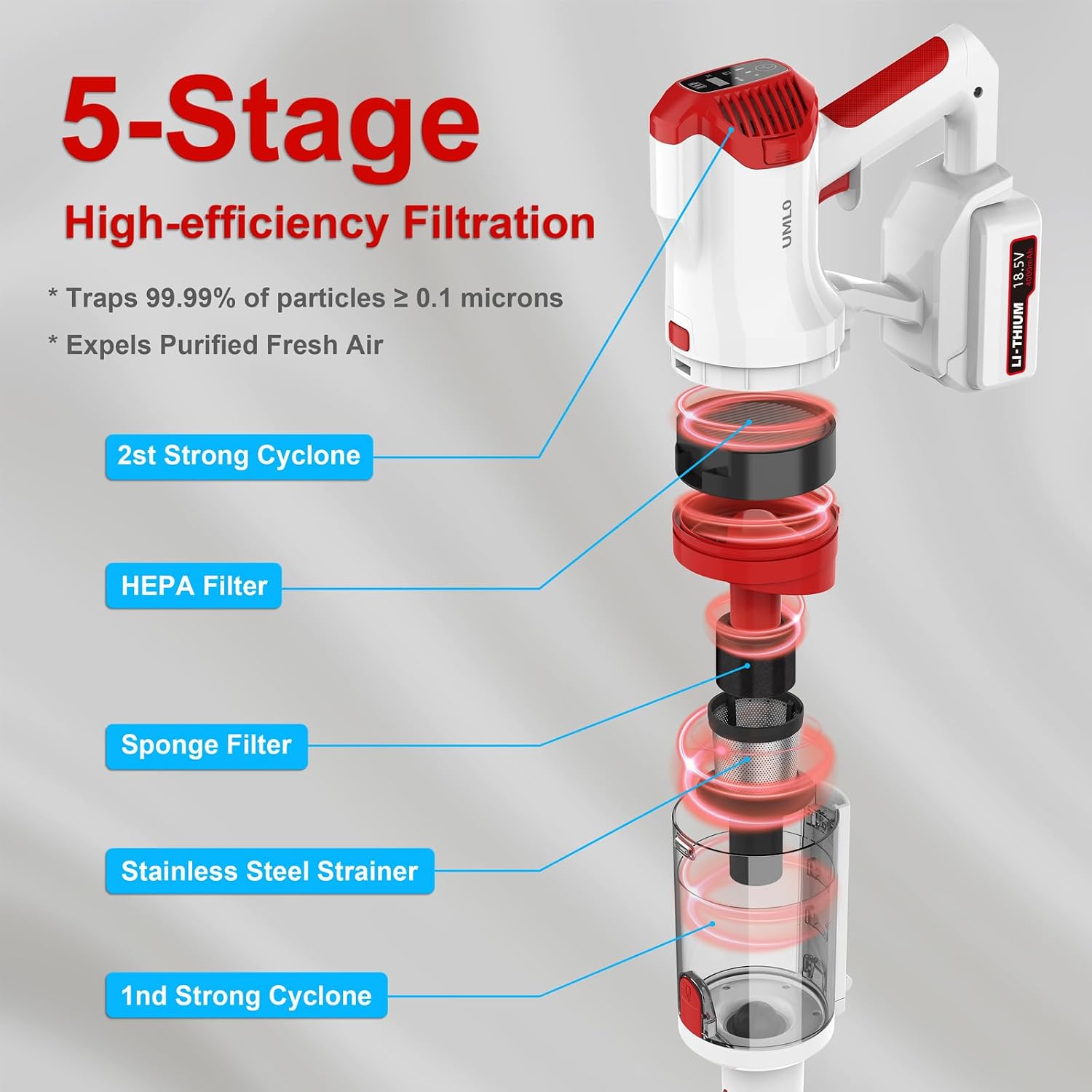
Image: Diagram illustrating the 5-stage high-efficiency filtration system, including the HEPA filter, sponge filter, and stainless steel strainer.
5.3 Cleaning the Brush Roll
- Turn off the vacuum and detach the motorized brush head.
- Locate the release tab on the side of the brush head and open it to remove the brush roll.
- Remove any tangled hair or debris from the brush roll using the provided cleaning gadget or scissors.
- Reinsert the clean brush roll and close the release tab securely.
6. Charging
- Connect the power adapter to the charging port on the battery pack.
- Plug the power adapter into a wall outlet.
- The LED display will show charging progress. A full charge typically takes approximately 4 hours.
- You can charge the battery while it's attached to the vacuum or separately.

Image: The UML0 V11 vacuum cleaner charging on its wall mount, illustrating convenient storage and power connection.
7. Troubleshooting
| Problem | Possible Cause | Solution |
|---|---|---|
| Vacuum not turning on | Low battery; Battery not properly installed | Charge the battery; Reinstall battery securely |
| Low suction power | Dustbin full; Filters clogged; Brush roll tangled | Empty dustbin; Clean filters; Clear brush roll |
| Brush roll not rotating | Hair/debris tangled; Brush head obstructed | Clear brush roll; Check for obstructions in brush head |
| Battery not charging | Power adapter not connected; Faulty outlet | Ensure secure connection; Try a different outlet |
8. Specifications
- Model: V11
- Brand: UML0
- Suction Power: 45Kpa
- Motor: 300W Brushless Motor
- Battery: 10-cell 4000mAh Rechargeable Battery
- Max Runtime: Up to 60 minutes
- Power Modes: 3 (Eco, Standard, Max)
- Filtration System: 5-Stage High-Efficiency (captures 99.99% of particles ≥ 0.1 microns)
- Display: LED Touch Screen
- Form Factor: Stick
- Product Dimensions: 17.3 x 11.8 x 7.5 inches
- Item Weight: 9.42 pounds
9. Warranty & Support
For warranty information, technical support, or any inquiries regarding your UML0 V11 Cordless Vacuum Cleaner, please refer to the warranty card included in your package or visit the official UML0 website. You may also contact customer support directly via the contact information provided in the Quick Start Guide.