
1. Introduction and Overview
The CORSAHD HDMI Matrix 4 in 2 Out is designed to manage and distribute HDMI signals from up to four source devices to two separate displays. This device supports high-resolution video up to 4K@60Hz with 4:4:4 chroma subsampling, HDR, and Dolby Vision. It also features advanced audio capabilities including ARC, Dolby Atmos, DTS:X, Dolby True HD, and DTS-HD Master Audio. Integrated EDID management, a downscaler function, and multiple control options (IR remote, panel buttons, RS232) provide flexible operation for various home theater and professional setups.

Image 1.1: The CORSAHD HDMI Matrix 4x2 connected to a display, audio system, and gaming console.
2. Product Features
- 4x2 HDMI Matrix: Connects four HDMI sources to two HDMI displays, allowing independent or mirrored output.
- High Resolution Support: Supports 4K@60Hz (4:4:4 8bit), 1080p@120Hz/60Hz 3D, 3840x2160@60Hz, 1440p@60Hz.
- Advanced Video Technologies: Compatible with HDR, Dolby Vision, HDCP2.2, and HDCP2.3 bypass.
- Lossless Audio Formats: Supports ARC, Dolby Atmos, Digital 7.1CH, DTS:X, Dolby True HD, DTS-HD Master Audio.
- Audio Extraction: Converts HDMI audio to Optical S/PDIF (5.1CH) or 3.5mm stereo (2.1CH) audio output.
- EDID Management: Features 16 EDID settings for optimal compatibility.
- Downscaler Function: Can downscale 4K/HDR 10 signals to 1080p60Hz for each output independently.
- Control Options: Includes IR remote control, front panel buttons, and RS232 for flexible operation.
- Plug and Play: Easy setup with 5V/2A power supply.

Image 2.1: Visual representation of the HDMI Matrix's key features including 4K 60Hz, HDR10+, Dolby Atmos, and 18Gbps bandwidth.
3. Package Contents
Please ensure all items are present upon unpacking:
- CORSAHD HDMI Matrix 4x2 Unit
- IR Remote Control
- IR Extension Cable
- 5V/2A Power Adapter
- User Manual (this document)
4. Setup Instructions
Follow these steps to set up your HDMI Matrix:
- Power Connection: Connect the provided 5V/2A power adapter to the HDMI Matrix and then to a power outlet.
- HDMI Source Connection: Connect your HDMI source devices (e.g., PC, game console, Blu-Ray player) to the HDMI Input ports (HDMI IN 1-4) on the matrix using HDMI 2.0 cables (less than 3 meters for optimal performance).
- Display Connection: Connect your HDMI displays (TVs, monitors) to the HDMI Output ports (HDMI OUTPUT 1 and HDMI OUTPUT 2) on the matrix.
- Audio Output Connection (Optional):
- For 5.1CH audio, connect an optical cable from the SPDIF OUT port to your audio receiver or soundbar.
- For 2.1CH stereo audio, connect a 3.5mm audio cable from the L/R OUT port to your stereo system or headphones.
- IR Extension (Optional): If using the IR remote and the matrix is out of direct line of sight, connect the IR extension cable to the IR EXT port and position the IR receiver in a visible location.

Image 4.1: Diagram illustrating the connection of an Xbox console to the HDMI Matrix, with two displays receiving output and the downscaler function enabled for one display.
5. Operating Instructions
5.1 Switching HDMI Sources
You can switch between the four HDMI input sources using either the front panel buttons or the IR remote control.
- Front Panel: Press the 'HDMI OUTPUT1' or 'HDMI OUTPUT2' buttons to cycle through the input sources (1, 2, 3, 4) for the respective output. The LED indicator will show the active input.
- IR Remote: Use the dedicated input selection buttons (IN1, IN2, IN3, IN4) on the IR remote to select the desired source for the currently active output.
5.2 EDID and Scaler Settings
The HDMI Matrix features DIP switches for EDID management and downscaling. These switches are located on the side or rear panel of the device.
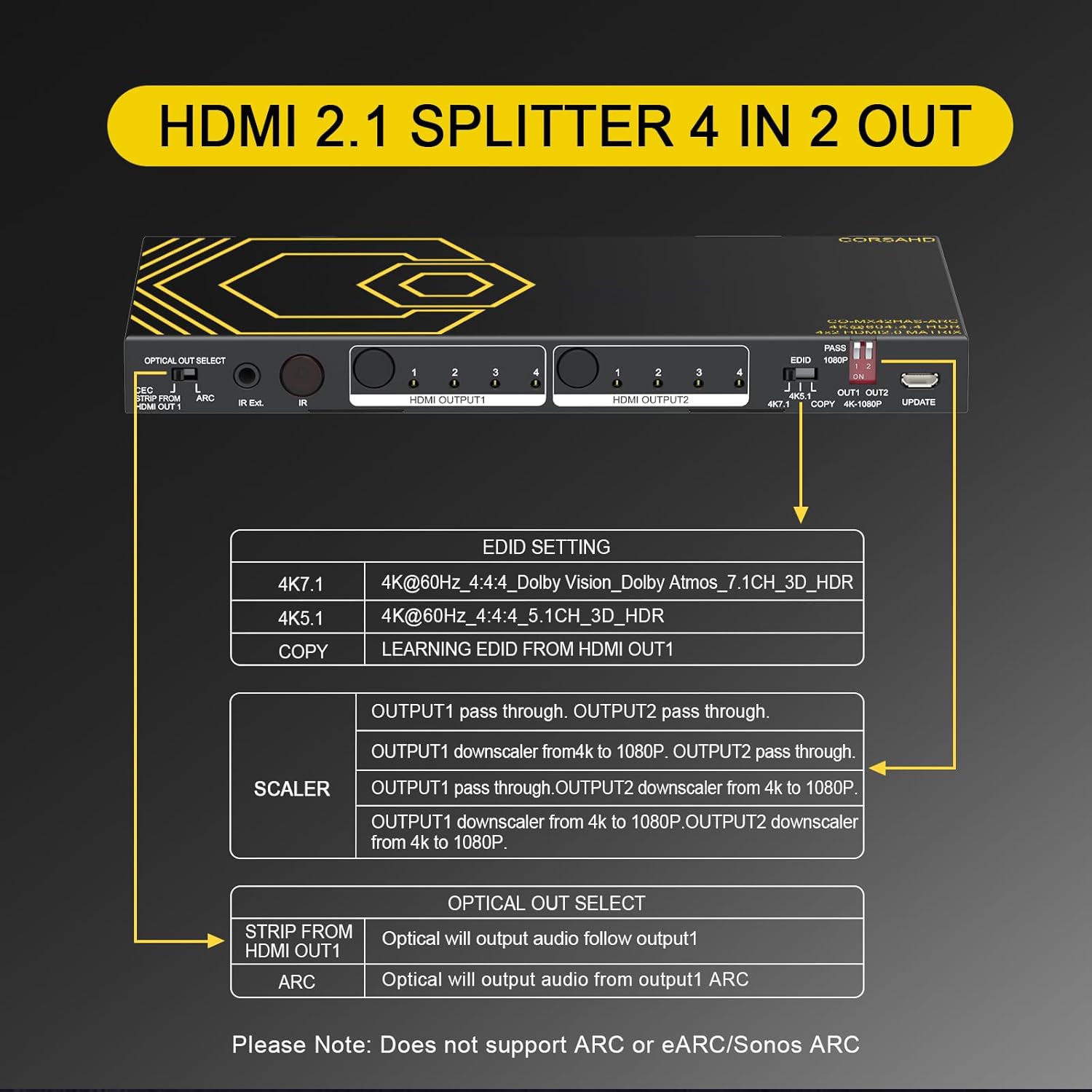
Image 5.1: Close-up view of the EDID and Scaler DIP switches, detailing their functions and settings.
EDID Setting (DIP Switch)
EDID (Extended Display Identification Data) settings ensure compatibility between the source and display. Adjust these switches according to your display's capabilities and desired audio/video format.
| Setting | Description |
|---|---|
| 4K7.1 | 4K@60Hz 4:4:4, Dolby Vision, Dolby Atmos 7.1CH 3D HDR |
| 4K5.1 | 4K@60Hz 4:4:4, 5.1CH 3D HDR |
| COPY | Learns EDID from HDMI OUTPUT1. |
Scaler Setting (DIP Switch)
The scaler function allows you to downscale 4K signals to 1080p for displays that do not support 4K resolution. This can be set independently for each output.
| Setting | Description |
|---|---|
| PASS | Output 1 and Output 2 pass through the original signal (e.g., 4K to 4K). |
| OUT1 1080P | Output 1 downscales 4K to 1080p. Output 2 passes through. |
| OUT2 1080P | Output 2 downscales 4K to 1080p. Output 1 passes through. |
| OUT1/OUT2 4K-1080P | Both Output 1 and Output 2 downscale 4K to 1080p. |
Note: Downscaling 4K HDR Dolby Vision (4K60Hz 4:2:2) or VRR content may result in screen washout. Avoid downscaling these specific formats.
5.3 Audio Output Selection (Optical Out Select)
The 'OPTICAL OUT SELECT' switch controls the behavior of the SPDIF optical audio output.
| Setting | Description |
|---|---|
| CEC/STRIP FROM HDMI OUT1 | Optical output will follow the audio from HDMI OUTPUT1. This setting is required for CEC functionality. |
| ARC | Optical output will provide audio from HDMI OUTPUT1's Audio Return Channel (ARC). |
Important: This device does not support e-ARC or Sonos ARC.
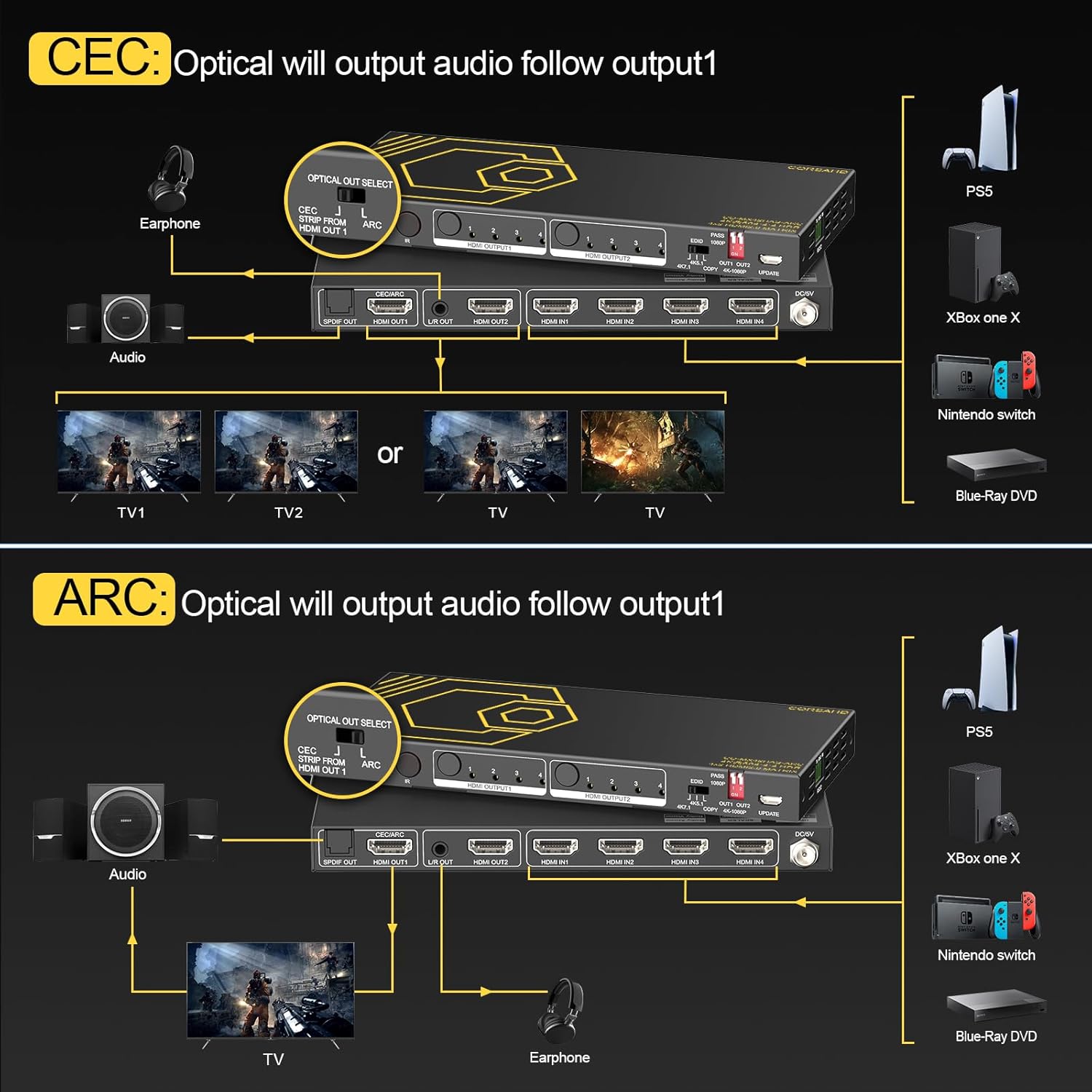
Image 5.2: Visual guide for configuring CEC and ARC audio output, showing connections for various devices.
6. Troubleshooting
If you encounter issues, please refer to the following common problems and solutions:
- No Video/Audio Output:
- Ensure all HDMI cables are securely connected and are HDMI 2.0 compliant.
- Verify the power adapter is correctly connected and the unit is powered on.
- Check the selected input source on the matrix matches your active source device.
- Adjust EDID settings to match your display's capabilities. Try 'COPY' EDID from OUTPUT1.
- Screen Washout/Incorrect Colors when Downscaling:
- The matrix does not support downscaling 4K HDR Dolby Vision (4K60Hz 4:2:2) or VRR content without potential screen issues. Ensure these formats are not being downscaled.
- No Audio from Optical/3.5mm Output:
- Ensure the 'OPTICAL OUT SELECT' switch is set correctly (e.g., 'CEC/STRIP FROM HDMI OUT1' or 'ARC').
- Verify your audio receiver/soundbar is set to the correct input.
- Check audio settings on your source device to ensure it's outputting a compatible format.
- Remote Control Not Working:
- Ensure there are no obstructions between the remote and the matrix's IR receiver.
- Replace the remote control batteries.
- If using the IR extension cable, ensure it is securely plugged in and the receiver is positioned correctly.
- General Limitations:
- Does NOT support e-ARC/Sonos ARC, VRR, 4K@120Hz, or Upscaling.
- The HDMI Matrix does NOT extend the screen; it only duplicates/copies/mirrors the signal to two displays.
- EDID is pass-through only; the device does not create EDID.
- Does NOT downscale to 4:2:2 chroma subsampling.
7. Specifications
| Feature | Detail |
|---|---|
| Brand | CORSAHD |
| Model | HDMI Matrix 4x2 |
| Color | Black |
| Connector Type | HDMI |
| Number of Ports | 6 (4 HDMI In, 2 HDMI Out) |
| Compatible Devices | Blu-Ray Player, PC, Game Consoles, etc. |
| Video Resolution | Up to 4K@60Hz (4:4:4 8bit), 1080p@120Hz |
| HDR Support | HDR, Dolby Vision |
| HDCP Compliance | HDCP2.2, HDCP2.3 bypass |
| Audio Formats | ARC, Dolby Atmos, Digital 7.1CH, DTS:X, Dolby True HD, DTS-HD Master Audio |
| Audio Output | SPDIF (Optical 5.1CH), 3.5mm Stereo (2.1CH) |
| Power Supply | DC 5V/2A |
| UPC | 635403250730 |
| ASIN | B0DP73J718 |
8. Maintenance
To ensure the longevity and optimal performance of your HDMI Matrix, follow these maintenance guidelines:
- Cleaning: Use a soft, dry cloth to clean the exterior of the device. Do not use liquid cleaners or aerosols.
- Ventilation: Ensure the device is placed in a well-ventilated area to prevent overheating. Do not block any ventilation openings.
- Environment: Avoid exposing the device to extreme temperatures, humidity, or direct sunlight.
- Cable Management: Keep cables organized and avoid sharp bends or excessive tension on connectors.
9. Warranty and Support
9.1 Warranty Information
The CORSAHD HDMI Matrix 4x2 comes with a 1-year limited warranty from the date of purchase. This warranty covers manufacturing defects and malfunctions under normal use. It does not cover damage caused by misuse, accidents, unauthorized modifications, or improper installation.
9.2 Customer Support
For any questions, concerns, or technical assistance regarding your CORSAHD HDMI Matrix, please contact the seller directly through your order number on the platform where the purchase was made. Providing your order number will help expedite the support process.