
1. Introduction
Thank you for choosing the WEIBEIQI YYK-Q16S Pro Open-Ear Bluetooth Headphones. This manual provides essential information for setting up, operating, and maintaining your new headphones. Please read it carefully before use to ensure optimal performance and longevity of your device.
The YYK-Q16S Pro headphones feature an open-ear design for comfort and situational awareness, Bluetooth 5.4 connectivity for stable audio, an intelligent touch screen for intuitive control, and extended battery life for prolonged use.

Image 1.1: WEIBEIQI YYK-Q16S Pro Open-Ear Bluetooth Headphones and their intelligent touch screen charging case.
2. What's in the Box
Please check the package contents to ensure all items are present:
- 2 x WEIBEIQI YYK-Q16S Pro Open-Ear Headphones
- 1 x Intelligent Touch Screen Charging Case
- 1 x Charging Cable
- 1 x User Manual (this document)
3. Setup
3.1. Charging the Headphones and Case
Before first use, fully charge the headphones and the charging case.
- Connect the provided charging cable to the charging port on the case and to a USB power source.
- The intelligent touch screen on the case will display the charging status.
- Place the headphones into the charging case. Ensure they are correctly seated; the indicator lights on the headphones will show charging status.
- A full charge provides approximately 13.5 hours of continuous playback for the headphones, and the charging case extends total playtime up to 80 hours.

Image 3.1: The charging case displaying battery levels and charging status for the headphones.
3.2. Bluetooth Pairing
Follow these steps to pair your headphones with a Bluetooth-enabled device:
- Open the charging case. The headphones will automatically enter pairing mode.
- On your device (smartphone, tablet, etc.), go to the Bluetooth settings and ensure Bluetooth is enabled.
- Search for available devices. You should see "Q16S Pro" or a similar name appear in the list.
- Select "Q16S Pro" to connect. Once connected, a voice prompt will confirm successful pairing.
- The headphones utilize Bluetooth 5.4 for a stable connection up to 33 feet (10 meters).
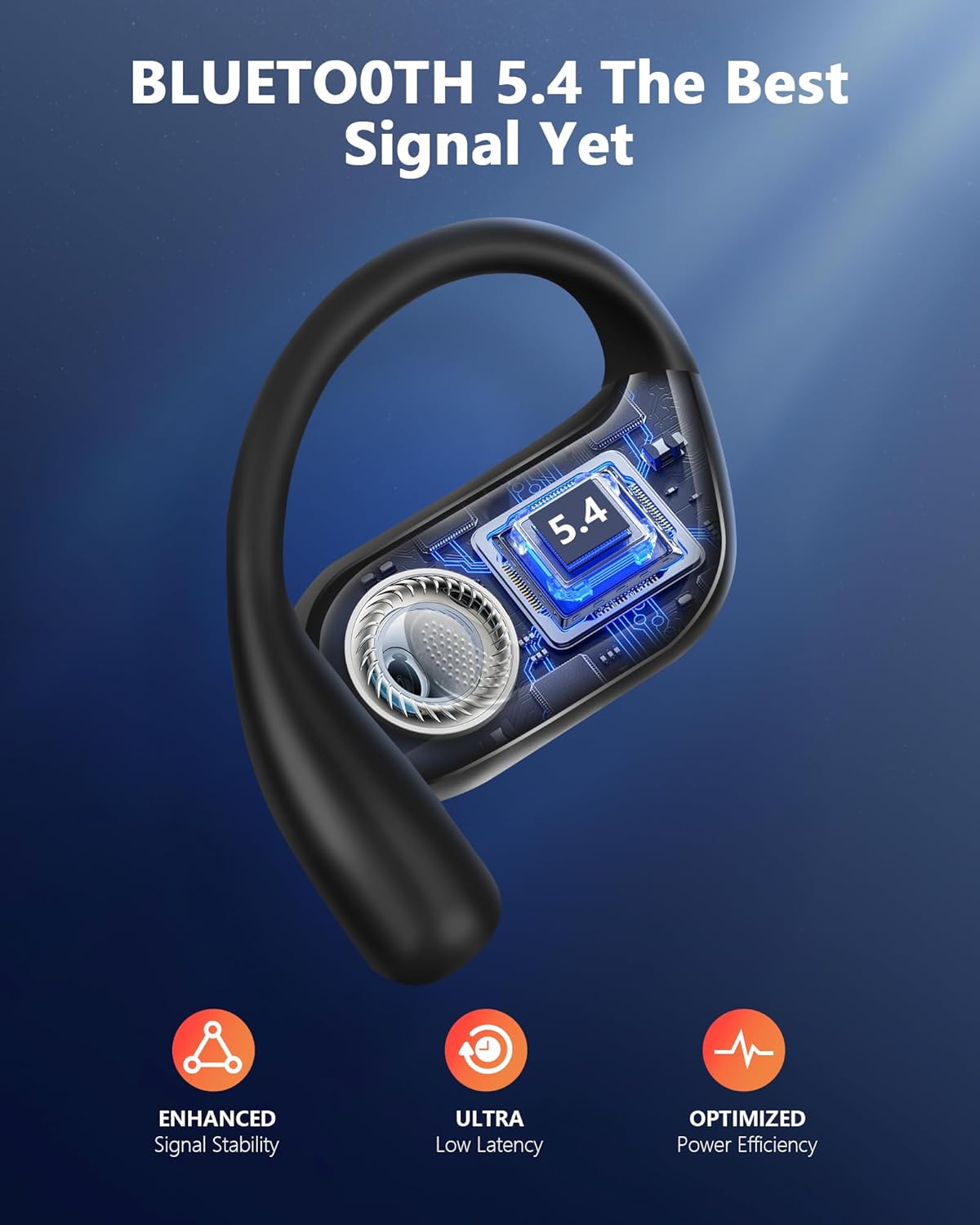
Image 3.2: An internal view of the earbud highlighting the Bluetooth 5.4 chip for enhanced connectivity.
4. Operating Instructions
4.1. Wearing the Headphones
The YYK-Q16S Pro headphones feature an open-ear design with soft silicone ear hooks for a secure and comfortable fit, allowing you to remain aware of your surroundings.
- Identify the left (L) and right (R) headphones.
- Gently place the ear hook over your ear, positioning the speaker unit just outside your ear canal.
- Adjust the hook until the headphone feels secure and comfortable without applying pressure to your ear canal.

Image 4.1: Diagram showing the ergonomic open-ear design and how it sits comfortably without entering the ear canal.

Image 4.2: A person wearing the open-ear headphones, demonstrating the comfortable and secure fit.
4.2. Intelligent Touch Screen Controls
The charging case features an intelligent touch screen for managing various functions. The headphones themselves also have touch controls.
Charging Case Touch Screen Functions:
The touch screen on the charging case allows you to:
- View battery levels of both earbuds and the case.
- Control music playback (play/pause, skip tracks).
- Manage calls (answer/end).
- Access various settings and modes (e.g., music, game, timer, alarm, sound effects, noise reduction if applicable).

Image 4.3: The intelligent touch screen interface on the charging case, showing various control options and information.
Headphone Touch Controls:
The earbuds themselves have touch-sensitive areas for basic controls:
- Single Tap: Play/Pause music, Answer/End call.
- Double Tap (Left/Right): Previous/Next track.
- Triple Tap (Left/Right): Volume down/up.
- Long Press: Activate voice assistant, Reject call.
Note: Specific touch functions may vary slightly. Refer to the on-screen prompts on the charging case or your device for detailed control mapping.
4.3. Water Resistance
The headphones are rated IPX7 waterproof, making them resistant to sweat and rain. They are suitable for sports and outdoor activities. However, they are not designed for swimming or prolonged submersion in water.
5. Maintenance
5.1. Cleaning
- Wipe the headphones and charging case with a soft, dry, lint-free cloth.
- Do not use abrasive cleaners, alcohol, or chemical solvents.
- Ensure the charging contacts on both the headphones and the case are clean and dry.
5.2. Storage
- Store the headphones in their charging case when not in use to protect them and keep them charged.
- Avoid storing in extreme temperatures or high humidity.
6. Troubleshooting
If you encounter any issues, please refer to the following common solutions:
| Problem | Possible Cause | Solution |
|---|---|---|
| Headphones not turning on | Low battery | Place headphones in the charging case and charge fully. |
| Cannot pair with device | Bluetooth off, out of range, or already paired to another device | Ensure Bluetooth is on, headphones are in pairing mode, and within 33 feet. Disconnect from other devices. |
| No sound or low volume | Volume too low, headphones not properly seated, or connection issue | Adjust volume on both headphones and device. Re-seat headphones. Re-pair if necessary. |
| Charging case not charging | Cable issue, power source issue | Try a different charging cable or USB power adapter. Ensure connections are secure. |
If the problem persists, please contact customer support.
7. Specifications
| Feature | Detail |
|---|---|
| Model Name | YYK-Q16S Pro |
| Brand | WEIBEIQI |
| Connectivity Technology | Bluetooth |
| Bluetooth Version | 5.4 |
| Bluetooth Range | 33 Feet (10 meters) |
| Battery Life (Headphones) | Up to 13.5 Hours (single charge) |
| Total Playtime (with Case) | Up to 80 Hours |
| Control Type | Intelligent Touch Screen (case), Touch (headphones) |
| Water Resistance Level | IPX7 Waterproof |
| Earpiece Shape | Hook (Over Ear) |
| Material | Plastic |
| Item Weight | 0.19 Kilograms (6.7 ounces) |
| Included Components | 2 * Over Open Headphones, Box, Cable, Intelligent Touch Screen Charging Case, User Manual |
8. Warranty and Support
For warranty information and customer support, please refer to the documentation included with your purchase or contact the seller directly through the platform where the product was purchased. Keep your proof of purchase for any warranty claims.