
Introduction
This manual provides detailed instructions for the XHDATA D808 Radio and XHDATA E100 Walkie Talkie. The D808 is a versatile world band FM/AM/SW/SSB/AIR DSP receiver, offering broad frequency coverage and advanced features. The E100 is a powerful triple-band walkie-talkie designed for reliable communication across various frequency bands.
Key features include:
- D808 Radio: FM Stereo, LW/MW/SW/SSB/AIR band reception, DSP technology for enhanced sensitivity, and a clear display.
- E100 Walkie Talkie: 6W output power, support for VHF, UHF, FM, aviation, and NOAA bands, one-key frequency copy, one-key reverse repeater frequency, and 999 programmable channels.
- Both devices feature long-lasting rechargeable batteries for extended use.
Setup
1. Battery Installation and Charging
The D808 Radio and E100 Walkie Talkie are equipped with rechargeable batteries. For initial use, ensure the battery is properly installed and fully charged.
- D808 Radio: Open the battery compartment on the back. Insert the provided 18650 Li-ion 3.7V battery, ensuring correct polarity as indicated. Close the compartment.
- E100 Walkie Talkie: The E100 comes with a removable 3000mAh rechargeable battery. Ensure it is securely attached.
- Charging: Connect the supplied Type-C charging cable to the device's charging port and to a compatible 5V USB power source. The charging indicator will show charging status (e.g., red for charging, green for fully charged).

Figure 1: D808 Radio battery installation and charging via Type-C.
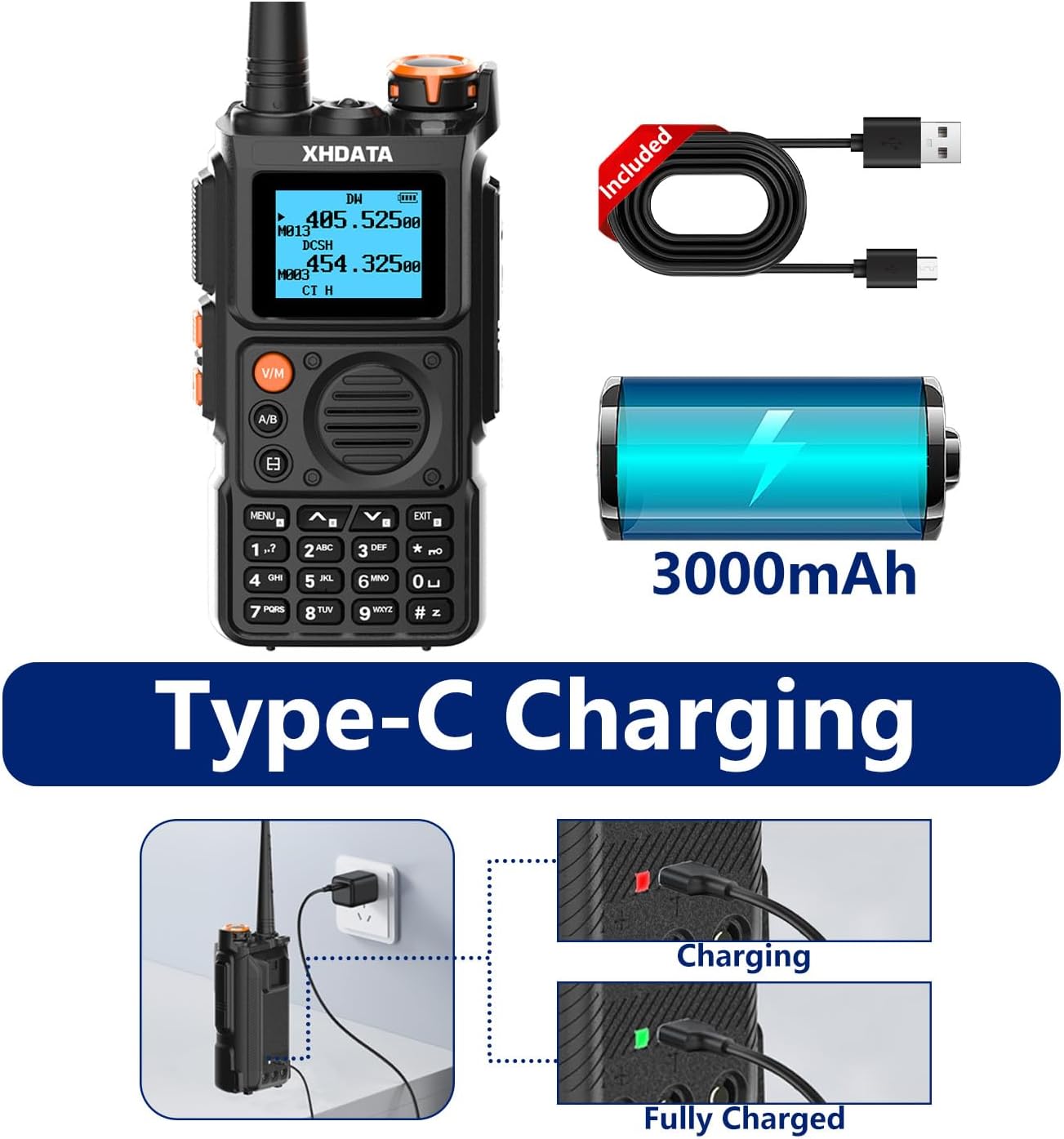
Figure 2: E100 Walkie Talkie Type-C charging.
2. Antenna Setup
Proper antenna setup is crucial for optimal reception.
- D808 Radio: Extend the telescopic whip antenna for FM, SW, and AIR bands. For enhanced reception on SW/FM/AIR, an external wire antenna (included) can be connected to the ANT. jack.
- E100 Walkie Talkie: Ensure the provided antenna is securely screwed onto the top of the device.
Operating Instructions
1. Power On/Off
Press the red power button on the D808 Radio or the power knob on the E100 Walkie Talkie to turn the device on or off.
2. Band Selection (D808 Radio)
Press the 'FM SET' button to cycle through FM, AM, SW, and AIR bands. For SSB (Single Side Band) reception, press the 'SSB' button.

Figure 3: D808 Radio frequency bands.
3. Tuning and Frequency Entry (D808 Radio)
- Tuning Knob: Rotate the 'TUNING' knob on the right side to adjust the frequency. Press the knob to switch between step tuning and squelch.
- Fine Tune: Use the 'FINE TUNE' slider for precise frequency adjustments, especially useful for SSB.
- Direct Frequency Entry: Use the numeric keypad to directly enter a desired frequency. Press 'FREQ' to confirm.
- Auto Tune Storage (ATS): Long-press the 'FM' button (or corresponding band button) to activate ATS. The radio will automatically scan and store strong stations into memory.
4. Memory System (D808 Radio)
The D808 can store up to 500 memory locations (100 for each band, organized into 10 pages with 10 memory locations each).
- Saving a Station: Tune to the desired station. Long-press the 'PAGE' button until 'SAVE' appears, then press a number (0-9) to save it.
- Recalling a Station: Press 'PAGE' to select the memory page, then press the corresponding number (0-9) to recall the station.
5. Display Information (D808 Radio)
Press the 'DISPLAY' button to cycle through different display modes, including time, temperature (Celsius), signal strength, and RDS (Radio Data System) information (if available on FM stations).
6. Alarm Function (D808 Radio)
The D808 features an alarm mode. Press the 'ALARM' button to set or activate the alarm.
7. E100 Walkie Talkie Functions
The E100 offers advanced communication features:
- One Key Frequency Copy: Easily copy frequencies between two E100 units for quick group calling.
- One Key Reverse Repeater Frequency: Swaps transmit and receive frequencies with a single press.
- NOAA Weather Radio: Long press the '0' button to access NOAA weather channels for emergency alerts.
- 999 Channels: Store a large number of frequencies for various uses.
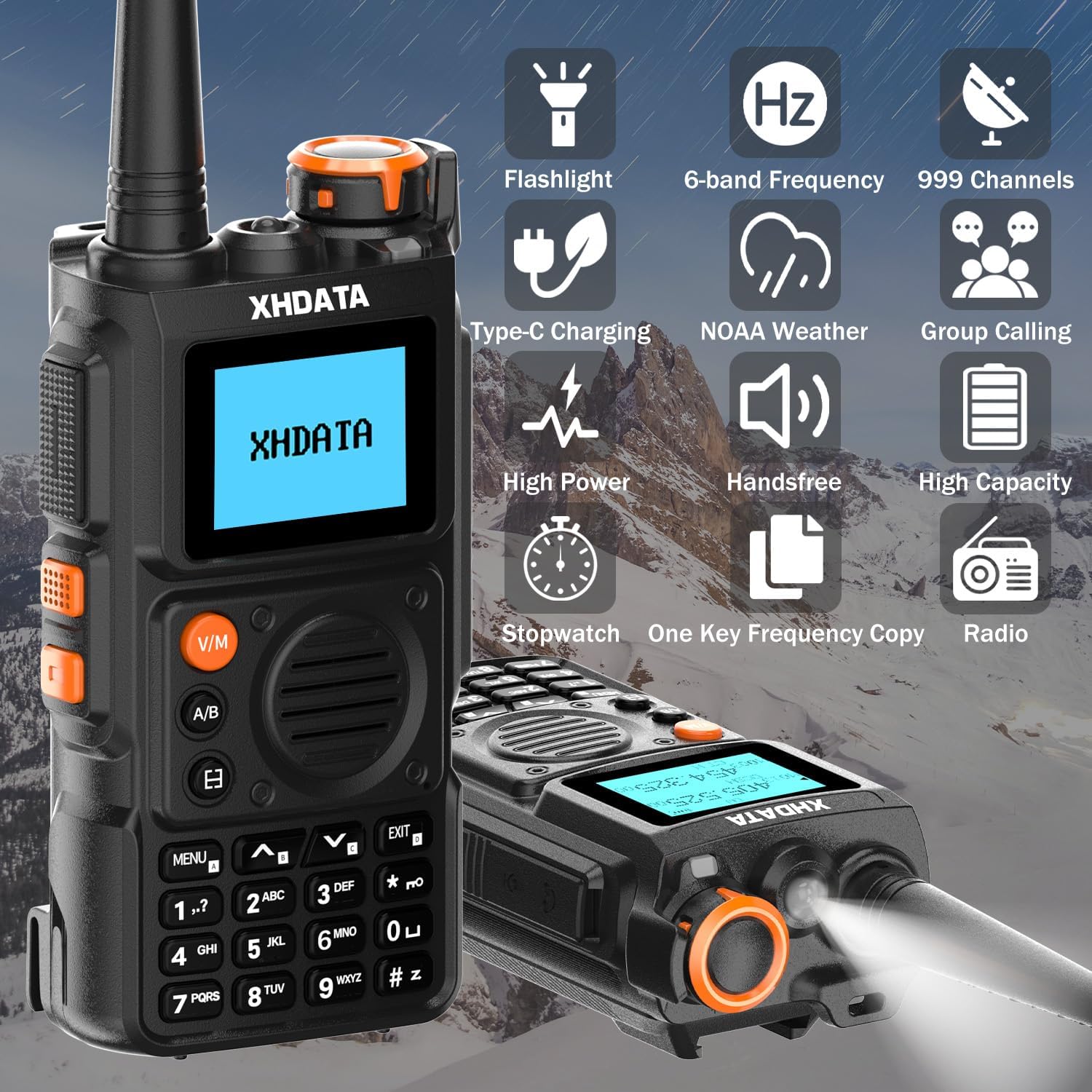
Figure 4: E100 Walkie Talkie key features.

Figure 5: E100 Walkie Talkie NOAA Weather Radio function.
Maintenance
- Cleaning: Use a soft, dry cloth to clean the device. Avoid abrasive cleaners or solvents.
- Storage: Store the radio and walkie talkie in a dry place, away from direct sunlight and extreme temperatures.
- Battery Care: For prolonged storage, it is recommended to fully charge the battery and then remove it from the device to prevent discharge.
Troubleshooting
| Problem | Possible Cause | Solution |
|---|---|---|
| No power / Device won't turn on | Low battery; Battery not installed correctly; Device reset needed. | Charge the battery; Ensure correct battery polarity; Press the reset button (D808) or remove/reinsert battery (E100). |
| Poor reception / Static | Antenna not extended; Weak signal area; Interference. | Fully extend the antenna; Try an external antenna (D808); Move to a different location; Adjust fine tune. |
| Cannot save/recall stations | Incorrect memory operation. | Refer to the 'Memory System' section for correct steps. |
| E100 not transmitting | Out of range; Incorrect frequency; FCC certification required for transmitting. | Ensure within range; Verify frequency settings; Obtain valid radio compliance certificate if transmitting. |
Specifications
XHDATA D808 Radio
- FM: 87.5-108 MHz (64-108 MHz)
- AM (MW): 520-1710 KHz (10K), 522-1620 KHz (9K)
- SW: 1711-29999 KHz
- LW: 150-450 KHz
- AIR: 118-137 MHz
- Speaker: 8Ω1W
- Charging Voltage: DC 5V
- Earphone Jack: 3.5mm
- Dimensions: 157 x 92 x 32 mm
- Battery: 18650 Li-ion 3.7V
XHDATA E100 Walkie Talkie
- Output Power: 6W
- Frequency Range: VHF, UHF, FM, Aviation, NOAA bands
- Number of Channels: 999
- Battery: 3000mAh Rechargeable Battery
- Charging: Type-C port
- Water Resistance Level: Not Water Resistant (IPX4 rating, but not fully water resistant)
Warranty and Support
XHDATA provides a 1-year after-sales service for this product. For any inquiries or support needs, please contact our customer service team, available 24/7.
For further assistance, please refer to the full user manual included in the product packaging or visit the official XHDATA website.