
Introduction
This manual provides essential information for the installation, operation, and maintenance of your fanxiang S880E 4TB NVMe SSD. The S880E is a high-performance PCIe Gen 4 x 4 M.2 2280 solid-state drive designed for demanding applications, including gaming on PS5, and use in desktops and laptops. It supports NVMe 2.0 technology, offering sequential read/write speeds of up to 7000/6000 MB/s.
Please read this manual thoroughly before installation and use to ensure optimal performance and longevity of your device.
Package Contents
The fanxiang S880E 4TB NVMe SSD package typically includes:
- fanxiang S880E PCIe 4.0 SSD M.2 2280 (4TB capacity)
- Installation screw (may be included, or provided by your device manufacturer)
- User Manual (this document)
Setup and Installation
The fanxiang S880E SSD is compatible with PlayStation 5 consoles, desktops, and laptops that support M.2 2280 NVMe PCIe Gen 4 SSDs. Ensure your device has a compatible M.2 slot before proceeding.
General Installation Steps (for Desktops/Laptops)
- Power Off and Disconnect: Completely shut down your computer and disconnect all power cables. For laptops, remove the battery if possible.
- Open Case: Open your computer case or laptop's back panel to access the motherboard. Refer to your computer's manual for specific instructions.
- Locate M.2 Slot: Identify an available M.2 2280 slot on your motherboard. It is typically labeled "M.2" or "NVMe".
- Insert SSD: Gently insert the fanxiang S880E SSD into the M.2 slot at a 30-degree angle. Push it in until it is fully seated.
- Secure SSD: Press the SSD down and secure it with the provided screw (or the screw from your motherboard/laptop).
- Close Case: Reassemble your computer or laptop.
- Power On: Reconnect power and boot your system. You may need to initialize and format the SSD through your operating system's disk management tools.

Image: Installation of the fanxiang S880E NVMe SSD into a compatible M.2 slot, demonstrating its fit for PS5, PC, and laptops.
Video: A demonstration of installing the S880E SSD into a PC motherboard. This video illustrates the physical steps involved in securing the M.2 drive.
PlayStation 5 Installation
For PS5 installation, please refer to the official PlayStation 5 expansion slot guide for detailed, step-by-step instructions. The fanxiang S880E meets the performance requirements for PS5 expansion.
- Ensure your PS5 system software is updated to the latest version.
- Power off your PS5 and disconnect all cables.
- Remove the console covers and the expansion slot cover.
- Insert the S880E SSD into the expansion slot and secure it with the screw.
- Reattach the covers and power on your PS5. The system will guide you through formatting the new SSD.
Operating the SSD
Once installed and formatted, the fanxiang S880E SSD operates as a high-speed storage device. It is designed for rapid data access, quick application loading, and efficient file processing.
- Gaming: Experience faster game loads and smoother gameplay. The S880E is compatible with DirectStorage for enhanced gaming performance.
- Professional Workloads: Ideal for tasks requiring high data throughput, such as video editing, 3D rendering, and large file transfers.
- System Drive: Can be used as a primary boot drive for faster operating system startup and overall system responsiveness.

Image: The fanxiang S880E NVMe SSD positioned next to a PS5 controller, symbolizing its role in enhancing gaming experiences.

Image: A professional working on video editing, highlighting the S880E SSD's capability for heavy workloads and faster rendering.
Maintenance
Solid State Drives generally require less maintenance than traditional hard disk drives. However, following these guidelines can help ensure optimal performance and longevity:
- Firmware Updates: Periodically check the fanxiang official website for any available firmware updates for the S880E SSD. Firmware updates can improve performance, stability, and compatibility.
- TRIM Command: Ensure your operating system has TRIM enabled. TRIM helps maintain the performance of SSDs over time by allowing the operating system to inform the SSD which data blocks are no longer in use and can be wiped internally.
- Avoid Full Capacity: While SSDs can be filled to capacity, maintaining some free space (e.g., 10-15%) can help sustain performance, especially for write-intensive tasks.
- Temperature Management: The S880E features an efficient thermal control design with a graphite coated copper foil layer and an aluminum foil layer. For systems with poor airflow or sustained heavy workloads, consider additional cooling solutions like a dedicated M.2 heatsink to prevent thermal throttling.
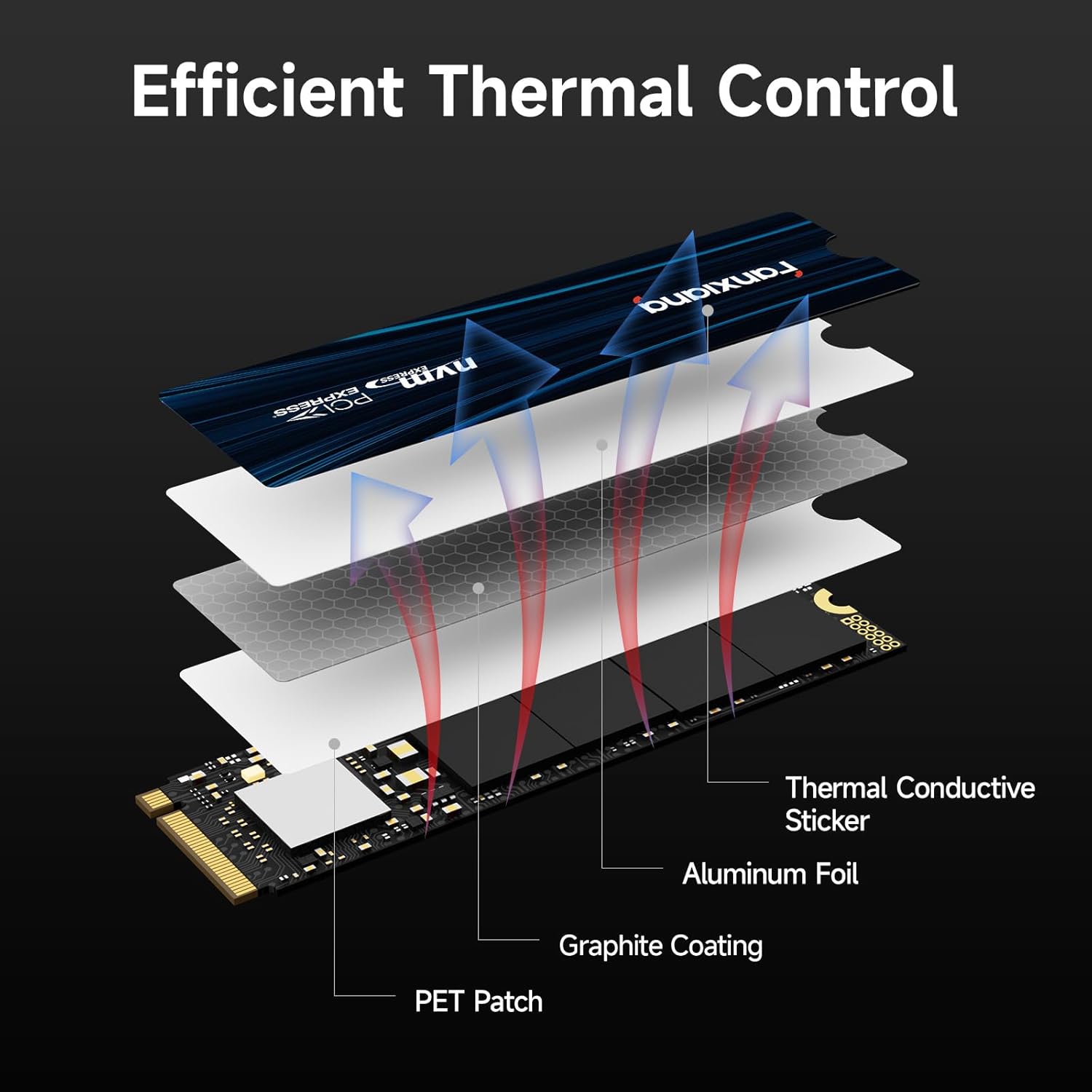
Image: An exploded view diagram illustrating the efficient thermal control layers of the S880E SSD, including the thermal conductive sticker, aluminum foil, graphite coating, and PET patch.
Troubleshooting
| Problem | Possible Cause | Solution |
|---|---|---|
| SSD not detected by system. |
|
|
| Slow performance. |
|
|
| PS5 reports incompatible SSD. |
|
|
If you encounter issues not listed here, please contact fanxiang customer support for assistance.
Specifications
| Feature | Detail |
|---|---|
| Model | S880E |
| Digital Storage Capacity | 4 TB |
| Hard Disk Interface | PCIe Gen 4 x 4 |
| Connectivity Technology | M.2 |
| Form Factor | M.2 2280 |
| Read Speed (Sequential) | Up to 7000 MB/s |
| Write Speed (Sequential) | Up to 6000 MB/s |
| Compatible Devices | Desktop, Laptop, PlayStation 5 |
| Special Features | Backward Compatible, Hardware Encryption, Efficient Thermal Control (Graphite coated copper foil, Aluminum foil) |
| NAND Flash | 3D NAND |
| Data Integrity Features | HMB, S.M.A.R.T., ECC, AES |
| Item Weight | 8 Grams |
| Dimensions (L x W x Thickness) | 3.15"L x 0.87"W x 0.1"Th |

Image: Visual representation of the fanxiang S880E NVMe SSD highlighting its PCIe 4.0 lightning-fast data speeds, with read speeds up to 7000 MB/s and write speeds up to 6000 MB/s.

Image: A detailed view of the fanxiang S880E NVMe SSD installed on a motherboard, emphasizing its 3D NAND PCIe Gen 4 technology and M.2 2280 form factor.

Image: Icons representing the enhanced data integrity and stability features of the S880E SSD, including HMB, S.M.A.R.T., ECC, and AES.
Warranty and Support
The fanxiang S880E NVMe SSD comes with a 5-year manufacturer's warranty. This warranty covers defects in materials and workmanship under normal use.
For technical support, warranty claims, or any questions regarding your fanxiang product, please contact fanxiang customer service through their official website or the retailer where you purchased the product.
- Manufacturer: fanxiang
- Warranty Period: 5 Years
- Technical Support: Lifetime technical support is provided.

Image: The fanxiang S880E NVMe SSD accompanied by a shield graphic, indicating the 5-year service and support provided by the manufacturer.