Introduction
This manual provides detailed instructions for the proper use and maintenance of your Apkezel Wireless Smart Meat Thermometer HK300. This device features 100% wireless operation, dual temperature probes, IP67 waterproofing, and smart app connectivity for precise temperature monitoring during cooking.

Image: The Apkezel HK300 thermometer package includes the main display unit, two wireless probes, and a view of the accompanying smartphone application.
Setup
1. Unboxing and Components
Carefully unpack all items. The package should contain:
- 1 x Apkezel HK300 Main Display Unit
- 2 x Wireless Temperature Probes
- 1 x USB Charging Cable
- 1 x User Manual (this document)

Image: Detailed diagram illustrating the components of the Apkezel HK300 main unit, including the display, probe charging slots, control buttons, and USB-C charging port.
2. Charging the Device
Before first use, fully charge both the main display unit and the wireless probes.
- Main Unit: Connect the USB charging cable to the Type-C charging port on the main unit and to a suitable USB power adapter. A full charge provides approximately 120 hours of use.
- Probes: Place the probes into their designated charging compartments on the main unit. A 30-minute charge provides approximately 24 hours of operation.

Image: The main unit charging, indicating extended battery life, and a probe being cleaned under running water, highlighting its waterproof feature.
3. App Installation and Bluetooth Pairing
- Download the "CHEFBBQ" application from your smartphone's app store (iOS or Android).
- Ensure Bluetooth is enabled on your smartphone.
- Power on the Apkezel HK300 main unit by pressing the power button.
- Open the CHEFBBQ app. The app will automatically search for and connect to the thermometer.
- Once connected, the app will display real-time temperature data.

Image: The thermometer unit and probes demonstrating long-range wireless monitoring capabilities, with the smartphone app displaying real-time cooking data.
Operating Instructions
1. Inserting Probes
Insert the stainless steel tip of the probe into the thickest part of the meat, avoiding bone. The probe features dual sensors:
- Internal Temperature Sensor: Monitors the core temperature of the food (-20°C to 100°C / -4°F to 212°F).
- Ambient Temperature Sensor: Monitors the surrounding cooking temperature (0°C to 275°C / 32°F to 527°F).
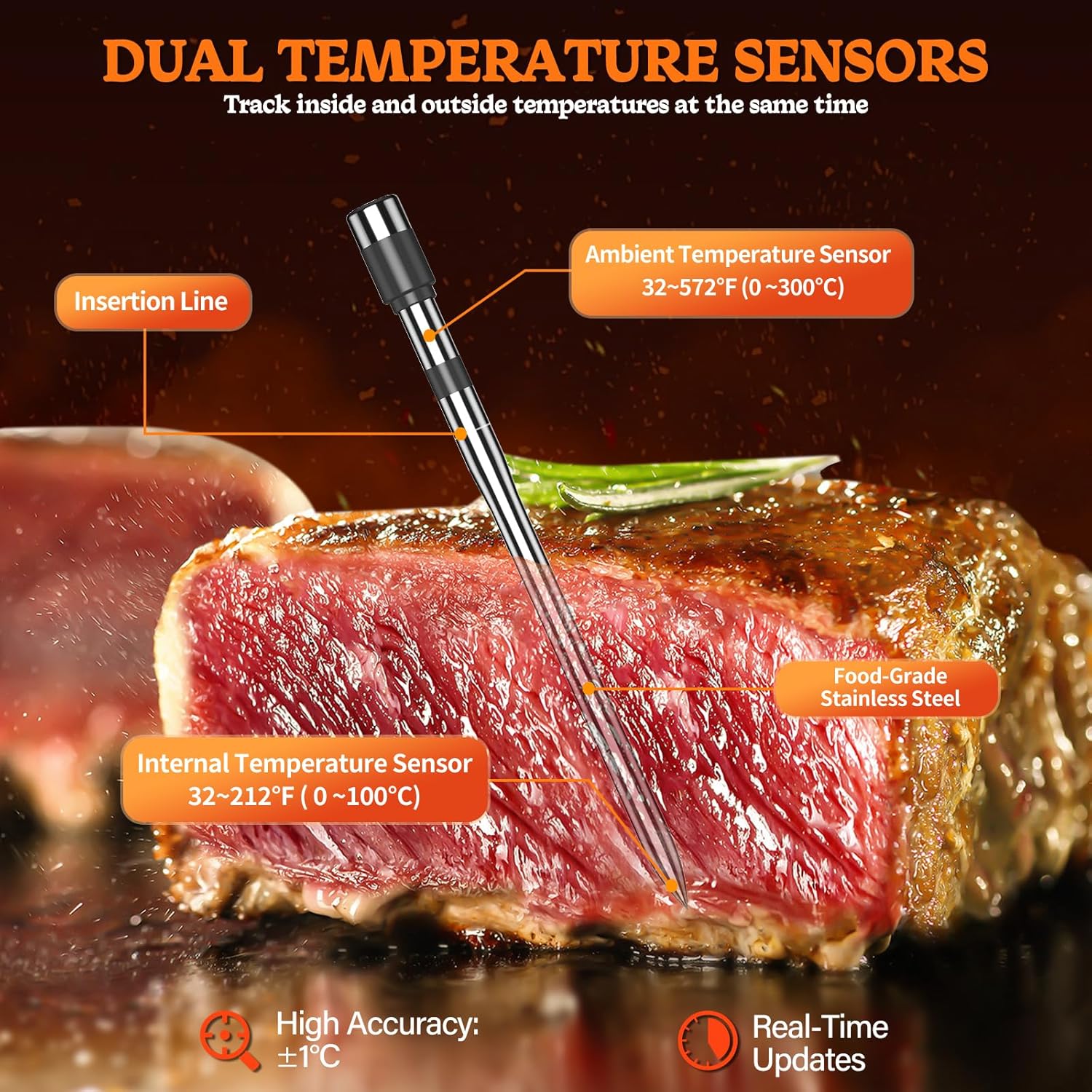
Image: A detailed view of the dual temperature probe, highlighting its internal and ambient temperature sensors for comprehensive monitoring.
2. Using the CHEFBBQ App
The app provides a user-friendly interface for monitoring and controlling your cooking process:
- Select Meat Type: Choose from various pre-set meat types (e.g., Beef, Chicken, Pork, Fish, Lamb, Deer, Duck) and desired doneness levels (e.g., Rare, Medium Rare, Medium, Medium Done, Well Done).
- Set Target Temperature: The app will suggest an optimal target temperature based on your selection. You can also manually set a custom target temperature.
- Real-time Monitoring: View current internal and ambient temperatures, cooking progress, and estimated remaining cooking time directly on your phone.
- Temperature Alarms: The app will send notifications and an audible alarm when the target temperature is reached.

Image: The CHEFBBQ app interface displaying options for customizing cooking settings based on meat type and desired doneness, illustrated with various cuts of meat.
3. Main Display Unit Functions
The main unit provides direct temperature readings and basic controls:
- P1/P2 Button: Switch between displaying data for Probe 1 and Probe 2.
- +/- Buttons: Adjust target temperature settings directly on the unit (if not using the app for full control).
- Mute Button: Silence audible alarms.
- °C/°F Button: Toggle between Celsius and Fahrenheit temperature units.

Image: The Apkezel HK300 main unit displaying temperature readings, with alarm icons indicating that the target temperature has been reached for a roasted chicken.
Maintenance
1. Cleaning
- Probes: The probes are IP67 waterproof and can be washed under running water or are dishwasher safe. Do not fully immerse the ceramic handle in water.
- Main Unit: Wipe the main unit with a damp cloth. Do not immerse the main unit in water.

Image: A close-up of a probe being cleaned under running water, emphasizing its IP67 waterproof rating for easy maintenance.
2. Storage
Store the thermometer and probes in a clean, dry place when not in use. Ensure the main unit is powered off to conserve battery life. Periodically charge the probes and main unit even during extended storage to maintain battery health.
Troubleshooting
1. No Bluetooth Connection
- Ensure the main unit is powered on and fully charged.
- Verify Bluetooth is enabled on your smartphone.
- Restart the CHEFBBQ app and try reconnecting.
- Move closer to the main unit. The Bluetooth range is up to 152 meters (500 feet) in open areas, but obstacles can reduce this.
2. Inaccurate Temperature Readings
- Ensure the probe is inserted correctly into the thickest part of the meat, avoiding bone.
- Verify the probe is clean and free of debris.
- Check if the probe or main unit has been damaged.
3. Short Battery Life
- Ensure the main unit and probes are fully charged before use.
- Power off the main unit when not in use.
- Avoid extreme temperatures during storage, which can affect battery performance.
Specifications
| Feature | Detail |
|---|---|
| Model Number | HK300 |
| Brand | Apkezel |
| Connectivity Technology | Bluetooth |
| Bluetooth Range | Up to 152 meters (500 feet) in open areas |
| Internal Temperature Range | -20°C to 100°C (-4°F to 212°F) |
| Ambient Temperature Range | 0°C to 275°C (32°F to 527°F) |
| Accuracy | ±1°C |
| Waterproof Rating | IP67 (Probes) |
| Probe Material | Food-grade Stainless Steel |
| Power Source | Rechargeable Battery (1 A - included) |
| Battery Life (Main Unit) | Approx. 120 hours (2-hour charge) |
| Battery Life (Probes) | Approx. 24 hours (30-minute charge) |
| Dimensions (L x W x H) | 17 x 10.6 x 4.2 cm |
| Weight | 320 grams |
| Display Type | Digital |
| Certifications | CE |
Warranty and Support
Warranty Information
Specific warranty details may vary by region and retailer. Please refer to the documentation provided at the time of purchase or contact your retailer for warranty information. Keep your proof of purchase for any warranty claims.
Customer Support
For technical assistance, troubleshooting, or inquiries regarding your Apkezel Wireless Smart Meat Thermometer HK300, please contact Apkezel customer support through the contact information provided on the product packaging or the official Apkezel website. Information regarding spare parts availability is not provided.