
1. Introduction
This manual provides detailed instructions for the installation, operation, and maintenance of your Eonon UA13SK-PLUS 10.1 Inch Android 13 Double Din Car Stereo. Please read this manual thoroughly before using the product to ensure proper functionality and safety. Keep this manual for future reference.
2. Safety Information
- Professional Installation Recommended: Due to the complexity of car audio systems, professional installation is highly recommended to prevent damage to the unit or your vehicle.
- Power Supply: Ensure the unit is connected to a 12V DC power supply with negative grounding. Incorrect voltage can cause damage.
- Wiring: Always refer to the wiring diagram provided. Incorrect wiring can lead to malfunctions or electrical hazards.
- Driving Safety: Do not operate the unit in a way that distracts you from driving. Always prioritize road safety.
- Temperature: Avoid exposing the unit to extreme temperatures or direct sunlight for prolonged periods.
- Moisture: Keep the unit away from water and excessive moisture.
3. Package Contents
Verify that all items listed below are included in your package:
- Eonon UA13SK-PLUS Car Stereo Unit
- Backup Camera x 1
- Power Cord x 1
- GPS Antenna x 1
- 4G Antenna x 2
- USB Adapter Cable x 2
- Audio and Video Adapter Cable x 2
- Reverse Video Input Cable x 1
- 15A Spare Fuse x 1
- SIM Card Holder x 1
- External Microphone x 1
- Screws x 8
- Instruction Manual x 1
- Panel Disassembly Instructions x 1

4. Installation
4.1 Wiring Diagram
Refer to the following diagram for correct wiring connections. Ensure all connections are secure before powering on the unit.

4.2 Physical Installation
The Eonon UA13SK-PLUS is designed for universal double-din mounting. The adjustable panel allows for optimal viewing angles.
4.2.1 Screen Disassembly and Assembly
- Install the car stereo to the car's console.
- Open the back cover of the flexible flat cable interface.
- Insert the flexible flat cable into the panel. Ensure the cable is well-connected.
- Pull the two clips (A&B) on the back of the screen to both sides.
- Connect the panel to the car stereo.
- Install the back cover of the panel.

4.2.2 New Design for Screen Connection
The UA13SK-PLUS features a redesigned screen connection for a sturdier physical structure and simpler installation.

5. Setup
5.1 Initial Power On
After successful installation, turn on your vehicle's ignition. The stereo should power on automatically. Follow any on-screen prompts for initial setup.
5.2 Network Connectivity (Wi-Fi & 4G)
The unit supports Wi-Fi 6 and has a built-in 4G module. You can insert a Micro-SIM (3FF) card (not included) for direct internet access. Note that the 4G module supports internet access but not telephone calls.

5.3 Bluetooth Pairing
The stereo features Bluetooth 5.1 for fast and stable connections. To pair your device:
- Go to the Bluetooth settings on your car stereo.
- Enable Bluetooth on your mobile device.
- Search for available devices on your mobile device and select the Eonon stereo.
- Confirm the pairing code on both devices.

5.4 Apple CarPlay / Android Auto / Screen Mirroring
The unit supports both wireless and wired Apple CarPlay and Android Auto, as well as screen mirroring (Airplay/Android Cast).

6. Operating Instructions
6.1 Basic Controls
The unit features a physical rotary knob and touch buttons for intuitive control.
- Volume Knob: Rotate to adjust volume up or down.
- Short Press (Knob): Mute On/Off.
- Long Press (Knob): Power On/Off.

6.2 Touchscreen Operation
The 10.1-inch QLED HD display (1280x720 resolution) offers a multi-touch capacitive touchscreen for effortless interaction.

6.3 System UI Navigation
The unit features a new UI designed for a smarter, cleaner, and faster user experience. You can customize the UI with different themes, button colors, boot logos, and wallpapers.


6.4 Split-Screen Mode
Utilize the split-screen feature to run two applications simultaneously, such as navigation and music playback.

6.5 Audio Settings (DSP & Equalizer)
The RHOM 32107 DSP audio processing chip and 48-band equalizer allow for precise sound customization. Access these settings through the audio menu to adjust sound fields, time delays, and equalizer presets.
6.6 Brightness Mode
The screen brightness can be set to Day, Night, or Auto mode. In Auto mode, the brightness adjusts automatically based on your car's headlight status.

6.7 Steering Wheel Controls
The unit supports steering wheel controls, allowing you to manage audio and calls without taking your hands off the wheel. Configuration may be required in the system settings.

6.8 OTA Software Updates
The system supports Over-The-Air (OTA) software updates to enhance stability and optimize performance. Regularly check for new versions and install them as prompted.

7. Advanced Features
7.1 Mirror Link
Mirror Link allows you to display your smartphone's screen directly on the car stereo, enabling access to your favorite apps, music, and media content.
7.2 Backup Camera (Included)
The package includes a 1080P AHD rearview camera for enhanced safety and convenience when reversing. The system automatically displays the camera feed when shifting into reverse.
7.3 Optional Accessories
Enhance your driving experience with compatible Eonon accessories (sold separately):
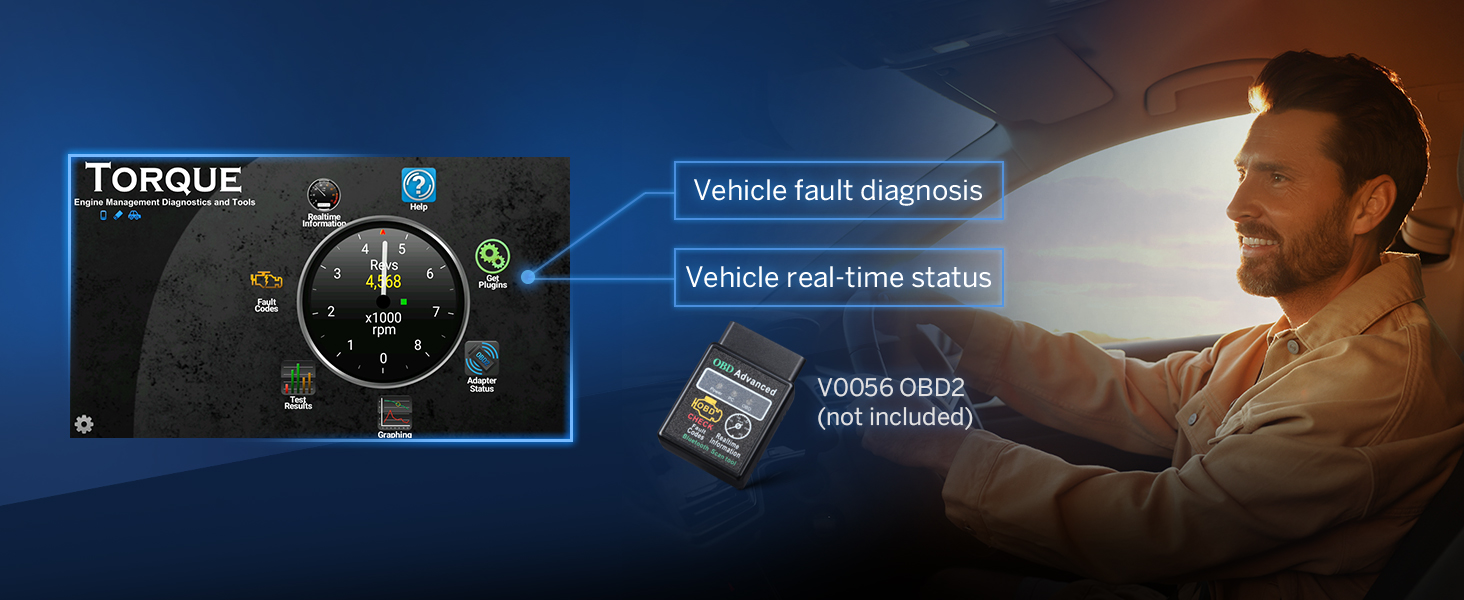
- OBD2 Diagnostic Scanner (V0056): Connect an OBD2 scanner to monitor vehicle fault diagnosis and real-time status.
- Dash Camera Recorder (A100): Record your journeys with a compatible dash cam, offering a 120-degree viewing angle and 720P HD video playback.
- DSP Amplifier (A303): Upgrade your audio system with the A303 DSP Amplifier for enhanced sound quality, featuring 4x50W power, smart EQ modes, and custom sound tuning.


8. Specifications
| Feature | Specification |
|---|---|
| Model Number | UA13SK-PLUS |
| Operating System | Android 13 |
| Processor | Qualcomm QCM6225 (Quad-core ARM Cortex-A73 2.4GHz + Quad-core ARM Cortex-A53 1.9GHz) |
| RAM | 8GB LPDDR4 |
| ROM | 128GB |
| Display Size | 10.1 Inch |
| Display Type | QLED HD, Multi-touch Capacitive Touchscreen |
| Resolution | 1280x720 |
| Connectivity | Bluetooth 5.1, Wi-Fi 6, Built-in 4G Module, USB |
| Car Integration | Wireless & Wired Apple CarPlay, Android Auto, Screen Mirroring |
| Audio Processor | RHOM 32107 DSP |
| Equalizer | 48-band |
| Amplifier | ST TDA7851, 4x48W Surround Sound Output |
| Radio Module | ST TDA7708 |
| Audio Output Type | Optical, Coaxial, Speakers |
| Video Encoding Support | H.264, H.265/HEVC, MPEG-4, MPEG-2, AVC, MJPEG, DIVX, 3GP, WMV |
| Included Accessories | Backup Camera, GPS Antenna, 4G Antennas, External Microphone, etc. |
9. Troubleshooting
If you encounter issues with your Eonon UA13SK-PLUS, refer to the following common problems and solutions:
- No Power:
- Check all power connections according to the wiring diagram.
- Verify the vehicle's fuse box and the stereo's inline fuse (15A spare fuse included).
- Ensure the ignition is on.
- No Radio Signal:
- Confirm the radio antenna is properly connected to the unit.
- Check for any damage to the antenna cable.
- Ensure you are in an area with adequate radio reception.
- Slow/Laggy Android Auto/CarPlay:
- Ensure your smartphone's operating system is up to date.
- Try restarting both your phone and the car stereo.
- If using a wired connection, try a different USB cable.
- Close unnecessary applications running on your phone.
- Touchscreen Unresponsive:
- Restart the car stereo by long-pressing the physical knob.
- Ensure the screen's flexible flat cable is securely connected (refer to installation section).
- If the issue persists, contact customer support.
- Unit Runs Hot / Random Reboots:
- Ensure adequate ventilation around the unit.
- Avoid operating the unit in extremely high ambient temperatures.
- If frequent, this may indicate an internal issue; contact support.
10. Maintenance
- Cleaning the Screen: Use a soft, lint-free cloth to gently wipe the touchscreen. For stubborn smudges, slightly dampen the cloth with water or a screen-safe cleaner. Avoid harsh chemicals.
- General Cleaning: Keep the unit free from dust and debris. Use a soft brush or compressed air to clean vents and button areas.
- Software Updates: Regularly check for and install OTA software updates to ensure optimal performance and access to new features.
11. Warranty and Support
11.1 Warranty Information
Your Eonon UA13SK-PLUS car stereo comes with a 2-Year Manufacturer Warranty. This warranty covers defects in materials and workmanship under normal use. Please retain your proof of purchase for warranty claims.
11.2 Customer Support
For technical assistance, troubleshooting, or warranty inquiries, please contact Eonon customer support through their official channels. You can find more information and support resources on the Eonon website or through your purchase platform.
Eonon Official Website: www.eonon.com


