
1. Introduction
This user manual provides detailed instructions for the JNOEEDWN Multifunction Steering Wheel Control Switch, model 84250-60180. This product is designed as an aftermarket replacement part for compatible vehicles, enabling control over audio and Bluetooth functions directly from the steering wheel. Please read this manual thoroughly before installation and operation to ensure proper function and safety.
1.1 Product Overview
The steering wheel control switch integrates various functions, including volume adjustment, mode selection, and Bluetooth audio controls. It is constructed from durable ABS plastic with a silver and black finish, designed for a direct fit replacement.
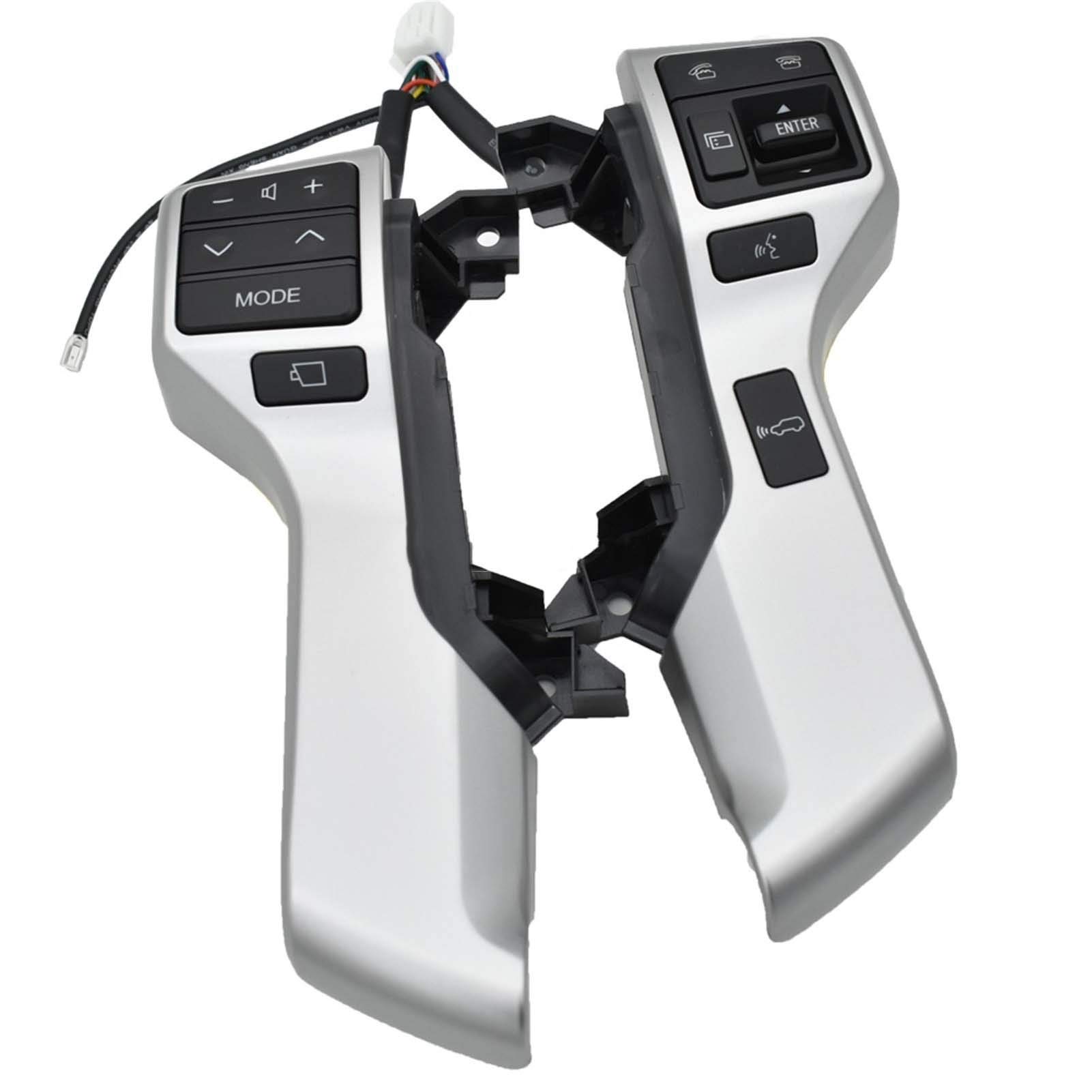
Figure 1: JNOEEDWN Steering Wheel Control Switch units and an example of installation on a steering wheel.
1.2 Package Contents
- 1x Left Steering Wheel Control Switch Unit (Model 84250-60180)
- 1x Right Steering Wheel Control Switch Unit (Model 84250-60180)
- Integrated wiring harness
2. Compatibility
This steering wheel control switch is compatible with the following vehicle models:
- Land Cruiser Prado KDJ150L (Model Years: 2010-2013)
- Land Cruiser Prado GRJ150L (Model Years: 2010-2013)
Important: Please verify that this product matches your vehicle's model and year before proceeding with installation. Refer to your vehicle's existing part number (e.g., 84250-60180 or 84250-60160) for confirmation.
3. Safety Information
Observe the following safety precautions during installation and operation:
- Professional Installation Recommended: Due to the nature of automotive electrical systems and airbag components, professional installation by a qualified technician is highly recommended.
- Disconnect Battery: Always disconnect the vehicle's negative battery terminal before beginning any electrical work to prevent accidental short circuits or airbag deployment.
- Airbag System: Exercise extreme caution when working near the airbag system. Improper handling can lead to serious injury.
- Tool Use: Use appropriate tools for the task. Incorrect tools can damage components.
- Vehicle Manual: Consult your vehicle's service manual for specific instructions regarding steering wheel and airbag removal.
4. Installation
This product is designed as a direct replacement for the original steering wheel control switches. The installation process typically involves removing the existing switches and connecting the new units. The following steps are general guidelines; specific procedures may vary by vehicle model. Refer to your vehicle's service manual for precise instructions.
4.1 Pre-Installation Steps
- Park the vehicle on a level surface and engage the parking brake.
- Turn off the ignition and remove the key.
- Disconnect the negative terminal of the vehicle's battery. Wait at least 10-15 minutes to allow the airbag system's backup power to dissipate.
- Carefully remove the airbag module from the steering wheel according to your vehicle's service manual.
- Disconnect the wiring harnesses from the existing steering wheel control switches.
4.2 Installing the New Switches
- Remove the old steering wheel control switches from their mounting points.
- Position the new JNOEEDWN control switches into the designated slots on the steering wheel. Ensure they fit securely.
- Connect the integrated wiring harness of the new switches to the corresponding connectors in the steering wheel. Ensure all connections are firm and correctly seated.

Figure 2: Rear view of the steering wheel control switches showing wiring connections.
4.3 Post-Installation Steps
- Reinstall the airbag module onto the steering wheel, ensuring all clips and fasteners are properly secured.
- Reconnect the negative terminal of the vehicle's battery.
- Test the functionality of the new steering wheel controls.
5. Operation
The JNOEEDWN Steering Wheel Control Switch provides convenient access to various audio and communication functions without removing your hands from the steering wheel. The controls are typically located on the left and right sides of the steering wheel.
5.1 Left-Side Controls (Audio/Mode)

Figure 3: Left-side control unit.
- Volume Up/Down (+ / -): Press to increase or decrease the audio volume.
- Track/Station Up/Down (^ / v): Press to change audio tracks, radio stations, or navigate menus.
- MODE: Press to cycle through audio sources (e.g., FM, AM, CD, Bluetooth Audio, USB).
- Mute/Hang Up (button with phone hang-up symbol): Press to mute audio or end a phone call.
5.2 Right-Side Controls (Bluetooth/Display)

Figure 4: Right-side control unit.
- Call Answer/Voice Command (button with phone answer symbol): Press to answer an incoming call or activate the vehicle's voice command system.
- ENTER: Used for confirming selections in menus or display screens.
- Display/Menu Navigation (button with display screen symbol): Used to navigate through vehicle information displays or menus.
- Bluetooth Audio/Voice Command (button with Bluetooth symbol): May activate Bluetooth audio streaming or a specific voice command function.
Note: The exact functionality of each button may depend on your vehicle's specific audio system and trim level. Refer to your vehicle's owner's manual for detailed instructions on pairing Bluetooth devices and using the infotainment system.
6. Maintenance
The JNOEEDWN Steering Wheel Control Switch requires minimal maintenance.
- Cleaning: Wipe the surface with a soft, damp cloth. Avoid using harsh chemicals or abrasive cleaners, as these can damage the plastic finish.
- Inspection: Periodically check for any loose connections or physical damage.
7. Troubleshooting
If you experience issues with your steering wheel control switch, consider the following:
- Controls Not Responding:
- Ensure all wiring connections are secure and properly seated.
- Check the vehicle's fuses related to the audio system or steering wheel controls.
- Verify compatibility with your specific vehicle model and year.
- Intermittent Functionality:
- Inspect wiring for any signs of damage or loose connections.
- Ensure the switches are correctly installed and not obstructed.
If troubleshooting steps do not resolve the issue, it is recommended to consult a professional automotive technician.
8. Specifications
| Feature | Detail |
|---|---|
| Model Number | 84250-60180 |
| Material | ABS Plastic |
| Color | Silver with Black buttons |
| Item Weight | 1.76 ounces (approximately 50 grams) |
| Package Dimensions | 1.18 x 0.79 x 0.39 inches (approximate) |
| Compatibility | Land Cruiser Prado KDJ150L GRJ150L (2010-2013) |
9. Warranty and Support
For warranty information or technical support, please contact the manufacturer or your point of purchase. Keep your purchase receipt as proof of purchase.