1. Introduction
This manual provides comprehensive instructions for the ALLIMITY TS7010 Replacement Remote Control. This remote is designed as a direct replacement for the original remote control of the TCL Alto 7 SoundBar Speaker System, specifically compatible with models TS7000 and TS7010. Please read this manual carefully to ensure proper setup and operation of your new remote control.

Image 1.1: Angled view of the ALLIMITY TS7010 Replacement Remote Control. This image displays the remote from an elevated angle, highlighting its sleek black finish and the arrangement of its primary control buttons, including power, volume, playback, and mode selection.
2. Product Features
- Direct Replacement: Functions identically to the original remote for TCL Alto 7 SoundBar models TS7000 and TS7010.
- Ergonomic Design: Comfortable to hold and easy to use.
- Durable Construction: Made from high-quality plastic for longevity.
- No Programming Required: Ready to use immediately after battery installation.
3. Setup: Battery Installation
The ALLIMITY TS7010 remote control requires two AAA batteries (not included) for operation. Follow these steps to install the batteries:
- Locate the battery compartment on the back of the remote control.
- Press down on the tab and slide the battery cover downwards to open it.
- Insert two AAA batteries, ensuring the positive (+) and negative (-) terminals align correctly with the markings inside the compartment.
- Slide the battery cover back into place until it clicks securely.

Image 3.1: Battery compartment of the remote control. This image shows the rear of the remote with the battery cover detached, revealing the empty slots for two AAA batteries and their polarity indicators.
Important: Always use fresh batteries. If the remote control is not used for an extended period, remove the batteries to prevent leakage and damage.
4. Operating Instructions
To operate your TCL Alto 7 SoundBar Speaker System with the ALLIMITY TS7010 remote control, ensure a clear line of sight between the remote and the soundbar's infrared (IR) sensor. Avoid any obstacles that may block the signal.
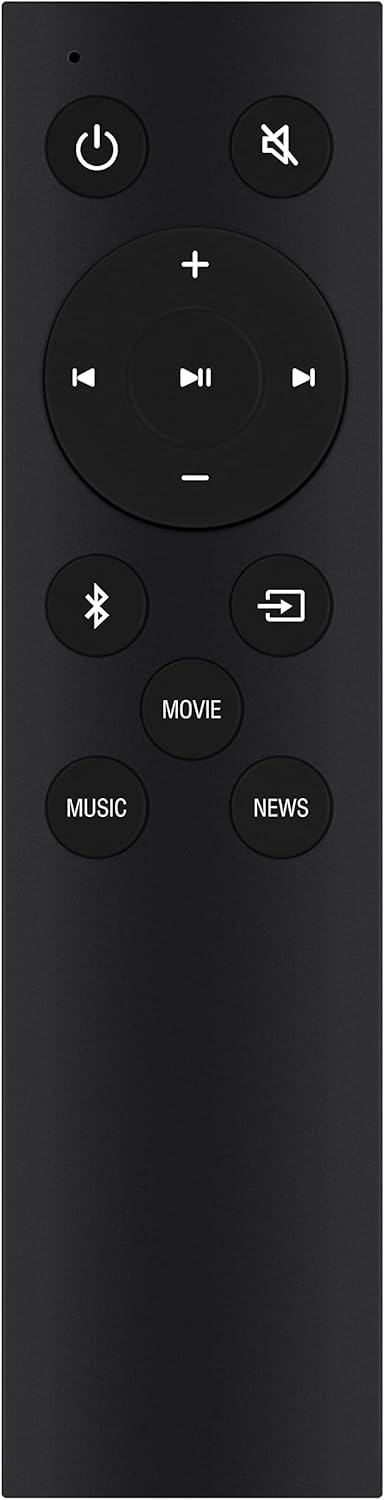
Image 4.1: Front view of the ALLIMITY TS7010 Remote Control. This image provides a clear view of the remote's front face, detailing the layout and function of each button, including power, mute, volume controls, playback buttons, Bluetooth, input selection, and sound modes (Movie, Music, News).
Button Functions:
- Power (⏻): Turns the soundbar on or off.
- Mute (🔇): Mutes or unmutes the sound.
- Volume Up (+): Increases the soundbar volume.
- Volume Down (-): Decreases the soundbar volume.
- Play/Pause (⏸): Plays or pauses media playback.
- Previous Track (⏮): Skips to the beginning of the current track or the previous track.
- Next Track (⏭): Skips to the next track.
- Bluetooth (☤): Switches the soundbar to Bluetooth input mode.
- Input (↷): Cycles through available input sources (e.g., HDMI, Optical, AUX).
- MOVIE: Activates Movie sound mode for enhanced cinematic audio.
- MUSIC: Activates Music sound mode for optimized music playback.
- NEWS: Activates News sound mode for clearer dialogue.
5. Compatibility
This ALLIMITY TS7010 Replacement Remote Control is fully compatible with the following TCL Alto 7 SoundBar Speaker System models:
- TCL Alto 7 SoundBar Speaker System TS7000
- TCL Alto 7 SoundBar Speaker System TS7010
No additional programming or setup is required for these models. Simply insert batteries and begin use.
6. Specifications
| Product Dimensions | 5 x 1 x 0.5 inches |
| Item Weight | 1 ounces |
| Model Number | TS7010 (Internal: YH-T-CL-5-TS7010-MMN) |
| Brand | ALLIMITY |
| Manufacturer | YUEHAI INC |
| Special Feature | Ergonomic |
| Color | Black |
| Max Supported Devices | 1 |
| Compatible Devices | Home Theater (TCL Alto 7 SoundBar) |
7. Troubleshooting
If you experience issues with your ALLIMITY TS7010 Replacement Remote Control, please refer to the following common problems and solutions:
- Remote is not responding:
- Ensure batteries are inserted correctly with the correct polarity (+/-).
- Replace old batteries with new AAA batteries.
- Check for any obstructions between the remote control and the soundbar's IR sensor.
- Ensure you are within the effective operating range of the soundbar.
- Specific buttons are not working:
- This may indicate a faulty button or low battery power. Try replacing the batteries.
- Ensure the remote is pointed directly at the soundbar's sensor.
8. Maintenance
To ensure the longevity and optimal performance of your remote control, follow these maintenance guidelines:
- Cleaning: Wipe the remote control with a soft, dry cloth. Do not use liquid cleaners or abrasive materials.
- Storage: Store the remote in a cool, dry place away from direct sunlight and extreme temperatures.
- Battery Care: Remove batteries if the remote will not be used for an extended period to prevent corrosion.
- Avoid Drops: Protect the remote from physical impact, as drops can damage internal components.
9. Warranty and Support
For any questions, technical assistance, or warranty inquiries regarding your ALLIMITY TS7010 Replacement Remote Control, please contact the seller or manufacturer directly through your purchase platform. Please refer to your purchase documentation for specific warranty terms and contact information.


