Introduction
This manual provides detailed instructions for the installation, operation, and maintenance of your Faeymth Zigbee Smart Switch with Temperature Sensor. This device is designed to integrate into your smart home system, offering intelligent control over electrical appliances based on temperature and scheduled timings. Please read this manual thoroughly before use to ensure proper functionality and safety.

Image 1: The Faeymth Zigbee Smart Switch module with its connected waterproof temperature sensor probe. The module displays its model number, input voltage, max current, wireless protocol, temperature range, and radio frequency.
Product Overview and Features
The Faeymth Zigbee Smart Switch is a versatile device that combines a smart relay with a high-precision temperature sensor. It allows for remote control and automation of electrical appliances, making your home smarter and more energy-efficient.
- Integrated Temperature Sensor: Features a waterproof stainless steel temperature probe for accurate real-time temperature monitoring.
- Automatic Control: Configure the switch to automatically turn connected devices on or off when the temperature falls within or outside a specified range.
- Manual Control: Instantly switch devices on or off via the mobile application.
- Smart Scene Activation: Use temperature values as triggers for smart scenes within the Tuya Smart/Smart Life app to control other smart devices.
- Remote On/Off: Control electrical equipment from anywhere using the mobile application.
- Scheduled Timings: Supports up to 8 scheduled countdown, single, or repeat tasks for automated operation.
- Real-time Status: Provides real-time device status updates to the application.
- Shared Control: Easily share control of your smart home devices with family members.
- Voice Control Compatibility: Works with popular voice assistants such as Alexa, Google Home, and Yandex.
- Zigbee Gateway Required: This device requires a Tuya Zigbee gateway for all smart functions to operate.

Image 2: Overview of the Faeymth Zigbee Smart Switch's key features, including APP remote control, temperature monitoring, timer & schedule, temperature statistics, shared control, and smart scene integration.

Image 3: Diagram illustrating how the Zigbee Smart Switch can control various appliances and lighting within a smart home environment, making your home smarter.

Image 4: Illustration showing how one person can control multiple smart switches, and how multiple people can share control over a single smart switch using a mobile application.
Specifications
| Model | TYZGTH1CH-D1RF |
| Input Voltage | AC 85V-250V or USB 5V |
| Max. Current | 10A |
| Max. Load | 2200W |
| Wireless Connectivity | Zigbee |
| Radio Frequency | 433 MHz |
| Temperature Sensor Measurement Range | -40 ℃ to +80 ℃ |
| Display Resolution | 0.1 ℃ |
| Working Temperature | -20 ℃ to +70 ℃ |
| Dimensions | 8 x 6 x 5 cm |
| Weight | 83 g |
| Color | White |

Image 5: Detailed view of the smart switch showing its model number, input voltage, max current, wireless protocol (Zigbee), temperature range, and radio frequency.
Setup and Installation
1. Safety Precautions
- Ensure the power supply is disconnected before any installation or wiring work.
- Installation should be performed by a qualified electrician if you are unsure about electrical wiring.
- Do not exceed the maximum current (10A) or load (2200W) specified for the device.
2. Wiring Diagram
The Faeymth Zigbee Smart Switch supports both AC 85-250V and USB 5V input. The output is a dry contact relay, meaning it provides a switch closure without supplying power itself. You will need to supply power to the appliance separately.

Image 6: Wiring diagram illustrating how to connect the smart switch for controlling an appliance. It shows connections for AC 85-250V input (Neutral Wire, Live Wire) and the dry contact output (NO, COM, NC) for controlling an external appliance's power supply.
- Power Input (AC 85-250V): Connect the AC Neutral Wire to the 'N' terminal and the AC Live Wire to the 'L' terminal on the input side of the switch. Alternatively, for USB 5V input, connect a 5V USB power source to the USB port.
- Appliance Connection (Dry Contact): The switch provides Normally Open (NO), Common (COM), and Normally Closed (NC) terminals. Connect the power supply for your appliance through the COM and NO terminals to control its ON/OFF state. For example, connect the Live wire of your appliance's power supply to COM and the appliance's Live input to NO.
- Temperature Sensor: Plug the waterproof temperature sensor into the dedicated port on the switch.
3. Pairing with Zigbee Gateway
This device requires a Tuya Zigbee gateway (hub) to function. Ensure your Zigbee gateway is powered on and connected to your network.
- Open the Tuya Smart or Smart Life application on your mobile device.
- Add a new device and select your Zigbee gateway.
- Follow the app's instructions to put the gateway into pairing mode.
- Power on the Faeymth Zigbee Smart Switch. The indicator light on the switch should start blinking, indicating it's in pairing mode.
- Once detected, confirm the device in the app and assign it a name and location.
Operating Instructions
1. App Control
After successful pairing, you can control the switch and monitor temperature via the Tuya Smart/Smart Life app.
- Manual On/Off: Tap the switch icon in the app to toggle the connected appliance on or off.
- Temperature Monitoring: View the real-time temperature reading from the sensor within the device interface in the app.
- Automatic Mode: Set temperature thresholds for automatic operation. For example, turn on a heater if the temperature drops below 20°C and turn it off when it reaches 22°C.
- Scheduling: Create schedules for the switch to turn on/off at specific times or days.
- Countdown Timer: Set a countdown for the switch to turn off after a set duration.
- Smart Scenes: Create advanced automation rules using temperature, time, or other smart devices as triggers.
2. Voice Control
Integrate the Tuya Smart/Smart Life app with your preferred voice assistant (Alexa, Google Home, Yandex) to control the switch using voice commands.
- Ensure your voice assistant is linked to your Tuya Smart/Smart Life account.
- Use commands such as: "Alexa, turn on [Device Name]", "Hey Google, what's the temperature of [Device Name]?", or "Yandex, turn off [Device Name]".
Maintenance
- Keep the device clean and free from dust. Use a soft, dry cloth for cleaning.
- Do not expose the main switch unit to water or excessive humidity. The temperature probe is waterproof, but the main unit is not.
- Regularly check wiring connections to ensure they are secure.
- Ensure your Tuya Smart/Smart Life app and Zigbee gateway firmware are up to date for optimal performance and security.
Troubleshooting
| Problem | Possible Cause | Solution |
|---|---|---|
| Device not pairing with Zigbee gateway. | Switch not in pairing mode; Gateway not in pairing mode; Distance too far; Interference. | Ensure switch indicator is blinking. Put gateway into pairing mode. Move switch closer to gateway. Reduce wireless interference. |
| Appliance not turning on/off. | Incorrect wiring; Appliance power issue; Switch malfunction. | Check wiring according to diagram. Test appliance directly. Contact support if switch is faulty. |
| Temperature reading is inaccurate. | Sensor not properly connected; Sensor damaged; External heat source. | Ensure sensor is fully plugged in. Inspect sensor for damage. Relocate sensor away from direct heat/cold sources. |
| Voice control not working. | Voice assistant not linked to Tuya app; Incorrect device name; Internet connectivity issues. | Verify linking in voice assistant app. Use the exact device name. Check Wi-Fi and internet connection. |
Application Scenarios
The Faeymth Zigbee Smart Switch with Temperature Sensor is suitable for a wide range of applications where temperature-based control and remote switching are beneficial.
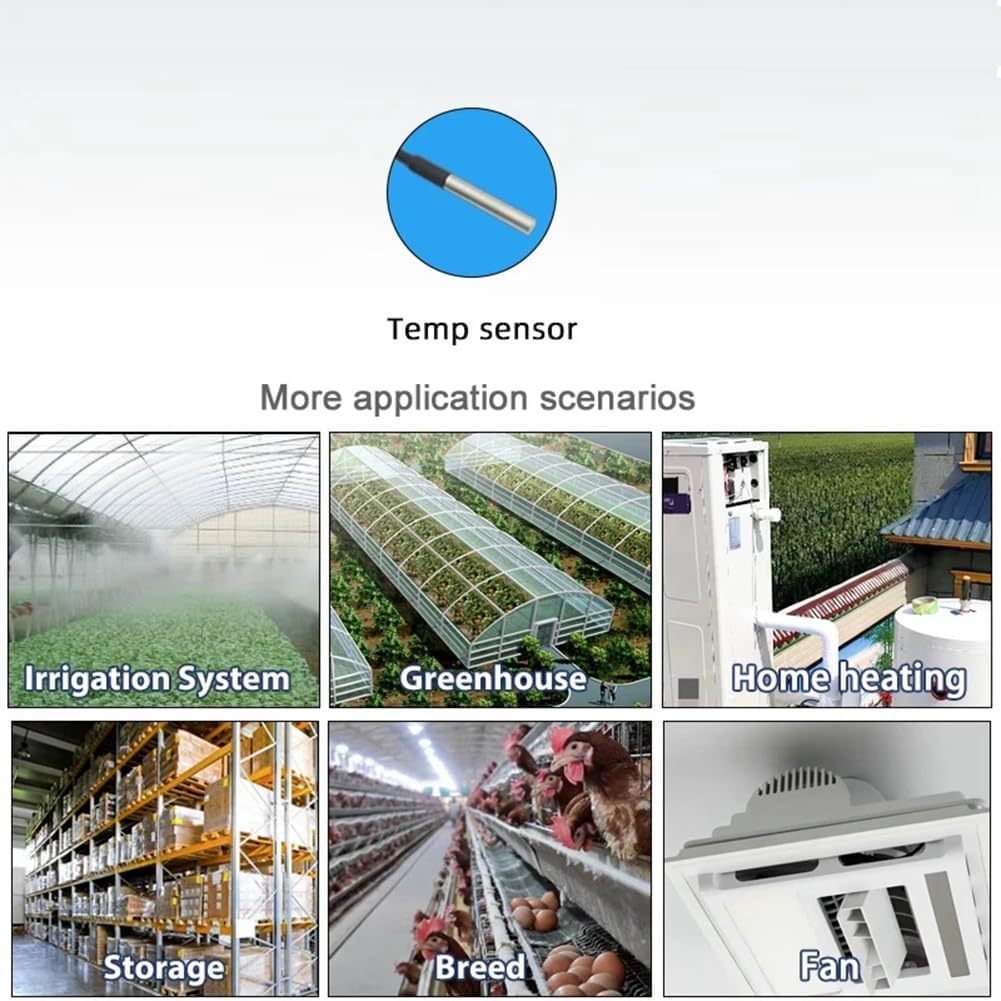
Image 7: Examples of various application scenarios for the temperature sensor, including irrigation systems, greenhouses, home heating, storage facilities, breeding environments, and fan control.
- Greenhouses: Automate ventilation or heating based on internal temperature.
- Home Heating/Cooling: Control electric heaters, fans, or other climate control devices.
- Aquariums/Terrariums: Maintain stable temperatures for aquatic or reptile habitats.
- Storage Facilities: Monitor and control environmental conditions for sensitive goods.
- Breeding Environments: Regulate temperature for optimal animal or plant growth.
- Irrigation Systems: Potentially integrate with temperature data for smarter watering.
Warranty Information
Specific warranty details are not provided in the product description. Please refer to your purchase documentation or contact the retailer/manufacturer for warranty terms and conditions. Typically, electronic devices come with a standard manufacturer's warranty against defects in materials and workmanship for a period of one year from the date of purchase.
Support
For technical support, troubleshooting assistance, or further inquiries, please contact your retailer or the manufacturer directly. Ensure you have your product model number (TYZGTH1CH-D1RF) and purchase details available when seeking support.
You can also refer to the Tuya Smart website for general information regarding the Tuya Smart/Smart Life platform and compatible devices.