
Crecolife PD22SA-12L
Contents
Crecolife 12L Electric Dehumidifier User Manual
Model: PD22SA-12L
Introduction
Thank you for choosing the Crecolife 12L Electric Dehumidifier. This manual provides essential information for the safe and efficient operation of your new appliance. Please read it thoroughly before use and keep it for future reference.
This dehumidifier is designed to effectively remove excess moisture from indoor environments, helping to prevent mold, mildew, and other humidity-related issues in spaces up to 25 square meters. It features a digital display, touch control panel, multiple operating modes, and convenient drainage options.
Safety Instructions
To reduce the risk of fire, electric shock, or injury, always follow these basic precautions:
- Ensure the power supply matches the voltage specified on the rating label.
- Do not operate the dehumidifier with a damaged cord or plug.
- Keep the appliance away from water and other liquids. Do not immerse it in water.
- Do not block air inlets or outlets. Maintain at least 20 cm clearance from walls and furniture.
- Unplug the unit before cleaning or performing any maintenance.
- This appliance is for indoor use only.
- Do not allow children to play with the appliance.
- Always place the unit on a stable, level surface.
Product Overview
Components
- Air Inlet Grille
- Air Outlet Grille
- Control Panel
- Water Tank (2.5L capacity)
- Continuous Drainage Outlet
- Power Cord
- Handle
- Universal Wheels
Control Panel
The Crecolife dehumidifier features an intuitive touch control panel with a digital display. Refer to the image below for button identification and functions.
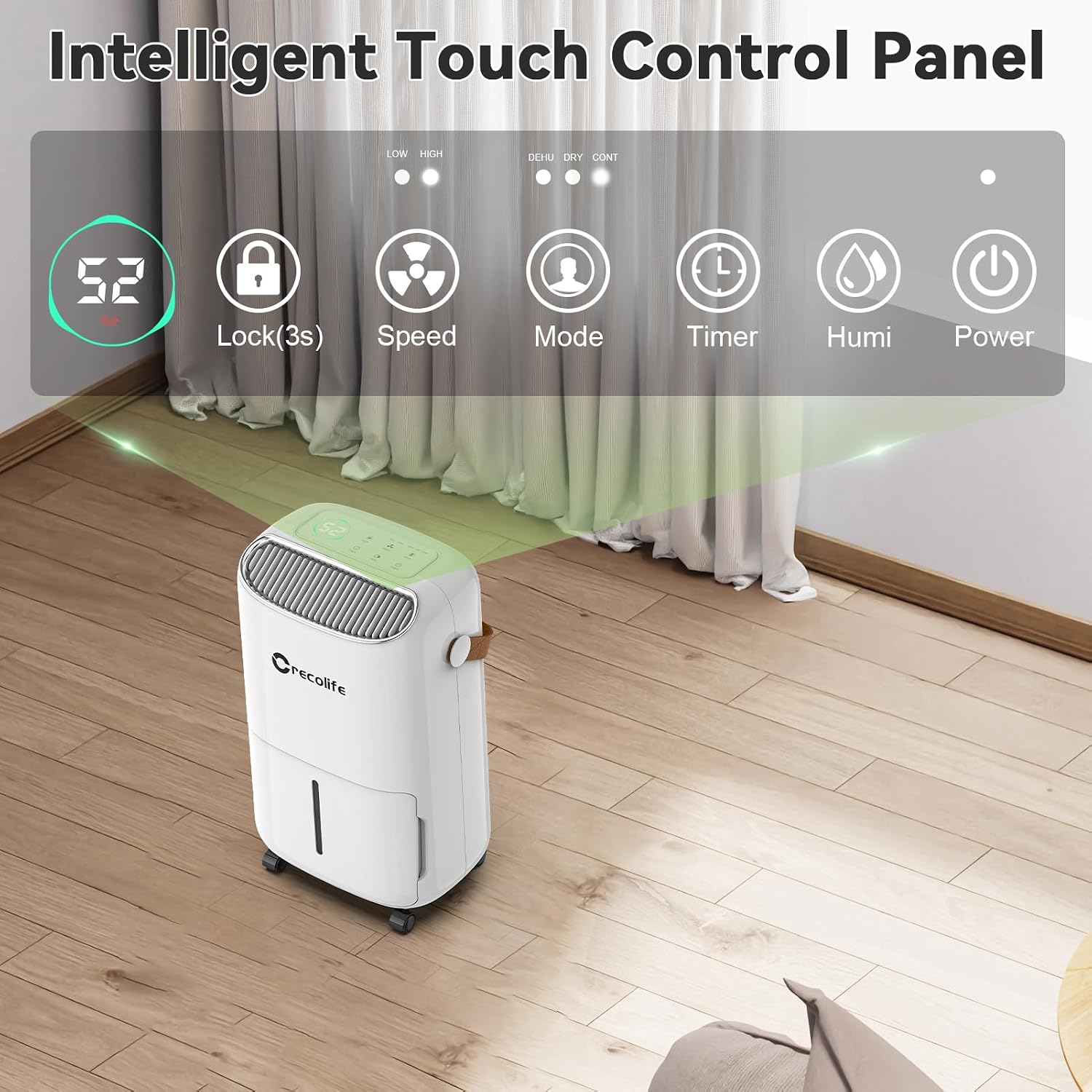
Image: Intelligent Touch Control Panel. This image shows the digital display and touch buttons for Lock, Speed (Low/High), Mode (DEHU, DRY, CONT), Timer, Humidity setting, and Power.
- Power Button: Turns the unit ON/OFF.
- Mode Button: Cycles through Dehumidification (DEHU), Dry (DRY), and Continuous (CONT) modes.
- Speed Button: Adjusts fan speed (Low/High) in Dehumidification mode.
- Humi Button: Sets the desired humidity level (30% to 80% RH) in Dehumidification mode.
- Timer Button: Sets the 24-hour timer for automatic ON/OFF.
- Lock Button (3s): Press and hold for 3 seconds to lock/unlock the control panel.
- Digital Display: Shows current humidity, timer settings, and error codes.
Setup
- Unpacking: Carefully remove the dehumidifier from its packaging. Retain packaging for future storage or transport.
- Placement: Place the unit upright on a firm, level surface. Ensure there is at least 20 cm (8 inches) of space around all sides for proper airflow. The unit is equipped with universal wheels for easy movement.
- Power Connection: Plug the power cord into a grounded electrical outlet. Ensure the outlet voltage matches the unit's requirements.
- Initial Use: For optimal performance, allow the unit to stand upright for at least 2 hours before plugging it in if it was transported on its side.

Image: Crecolife Dehumidifier. This image shows the overall design of the dehumidifier, highlighting its compact size and wheels for portability.
Operating Instructions
Turning On/Off
Press the Power button to turn the dehumidifier ON or OFF.
Operating Modes
Press the Mode button to cycle through the following modes:

Image: Three Dehumidification Modes. This image illustrates the three operating modes: Dehumidification mode (for general use), Dry dehumidification mode (for drying clothes), and Continuous dehumidification.
- Dehumidification Mode (DEHU): The unit will operate to reach and maintain your set humidity level. You can adjust the fan speed in this mode.
- Dry Mode (DRY): Ideal for drying clothes. The unit will operate continuously at a fixed low humidity level (around 30% RH) until manually turned off or the tank is full. Fan speed is not adjustable.
- Continuous Mode (CONT): The unit will operate continuously regardless of the ambient humidity level. Fan speed is not adjustable.
Setting Humidity Level (DEHU Mode Only)
In Dehumidification mode, press the Humi button to set your desired humidity level from 30% to 80% Relative Humidity (RH) in 5% increments. The unit will automatically turn ON/OFF to maintain this level.

Image: Automatic Humidity Control. This image demonstrates how the dehumidifier automatically starts when humidity is above 80% and stops when it reaches below 30%, maintaining optimal humidity levels.
Fan Speed Adjustment (DEHU Mode Only)
In Dehumidification mode, press the Speed button to switch between Low and High fan speeds.
Timer Function
Press the Timer button to set a delay for the unit to turn ON or OFF. You can set the timer from 1 to 24 hours. Each press increases the time by 1 hour. The display will show the set time. After setting, the display will revert to showing the current humidity.

Image: 24-Hour Timer. This image illustrates the quiet operation of the dehumidifier (42.2dB) compared to normal breathing (10dB) and air conditioning (49dB), emphasizing its suitability for use with the 24-hour timer, even during sleep.
Maintenance
Emptying the Water Tank
When the water tank is full, the unit will automatically stop operating, and an indicator light will illuminate. Carefully remove the water tank from the front of the unit and empty the collected water. Reinsert the tank firmly until it clicks into place. The unit will resume operation.

Image: Visible Water Tank. This image shows the transparent 2.5L water tank, allowing easy monitoring of the water level.
Continuous Drainage
A drainage hose is typically included with the unit for continuous drainage. Connect one end of the hose to the continuous drainage outlet on the back of the dehumidifier and direct the other end to a suitable drain or large container. Ensure the hose is positioned downwards to allow for gravity flow and prevent water backup.

Image: Two Optional Drainage Methods. This image illustrates both the manual water tank emptying method and the continuous drainage method using a hose connected to the back of the unit.
Cleaning the Air Filter
The air filter should be cleaned every two weeks or more frequently if the unit is used in a dusty environment. A dirty filter can reduce efficiency. To clean:
- Unplug the dehumidifier.
- Remove the air filter (location typically behind the air inlet grille).
- Wash the filter with warm, soapy water. Rinse thoroughly.
- Allow the filter to air dry completely before reinserting it.
Cleaning the Unit
Wipe the exterior of the unit with a soft, damp cloth. Do not use harsh chemicals, abrasives, or solvents.
Troubleshooting
Before contacting customer support, please refer to the following common issues and solutions:
| Problem | Possible Cause | Solution |
|---|---|---|
| Unit does not turn on. | No power; Power cord not plugged in; Water tank full or not properly seated. | Check power outlet; Ensure cord is securely plugged in; Empty and re-seat water tank. |
| No water collected. | Room humidity too low; Temperature too low; Air filter clogged; Unit in Continuous mode with hose connected. | Increase desired humidity setting; Ensure room temperature is above 5°C (41°F); Clean air filter; Check continuous drainage setup. |
| Unit is noisy. | Unit not on a level surface; Air filter clogged; Obstruction in fan. | Place on a flat surface; Clean air filter; Check for and remove any obstructions. |
| Dehumidification is slow. | Room size too large; Doors/windows open; Air filter clogged; Low fan speed. | Ensure unit is suitable for room size; Close doors/windows; Clean air filter; Select High fan speed. |
Specifications
| Feature | Detail |
|---|---|
| Model Number | PD22SA-12L |
| Brand | Crecolife |
| Dehumidification Capacity | 12 Liters/day |
| Power Consumption | 220 Watts |
| Recommended Room Size | Up to 25 m² |
| Water Tank Capacity | 2.5 Liters |
| Dimensions (L x W x H) | 25 x 30 x 45 cm |
| Weight | 7.5 kg |
| Control Type | Digital Display, Touch Control Panel |
| Operating Modes | Dehumidification, Dry, Continuous |
| Drainage Options | Manual Tank, Continuous Drainage |
| Timer | 24-hour programmable |
Warranty and Support
For warranty information and customer support, please refer to the documentation included with your purchase or contact Crecolife customer service directly. Keep your proof of purchase for warranty claims.
Manufacturer: Crecolife
Model: PD22SA-12L
ASIN: B0DP4XZXCJ
Documents and downloads
Ask a question about this manual
Ask about setup, troubleshooting, compatibility, parts, safety, or missing instructions. Manuals+ will review the question and use this page’s manual context to help answer it.