MANKIW X22

MANKIW Bone Conduction Swimming Headphones

Model: X22

User Manual

1. Introduction

Thank you for choosing the MANKIW Bone Conduction Swimming Headphones. This device is designed to provide a high-quality audio experience for various activities, including swimming, running, and daily use, thanks to its IPX8 waterproof rating, dual Bluetooth and MP3 modes, and innovative bone conduction technology. This manual will guide you through the setup, operation, and maintenance of your new headphones.

What's in the Box

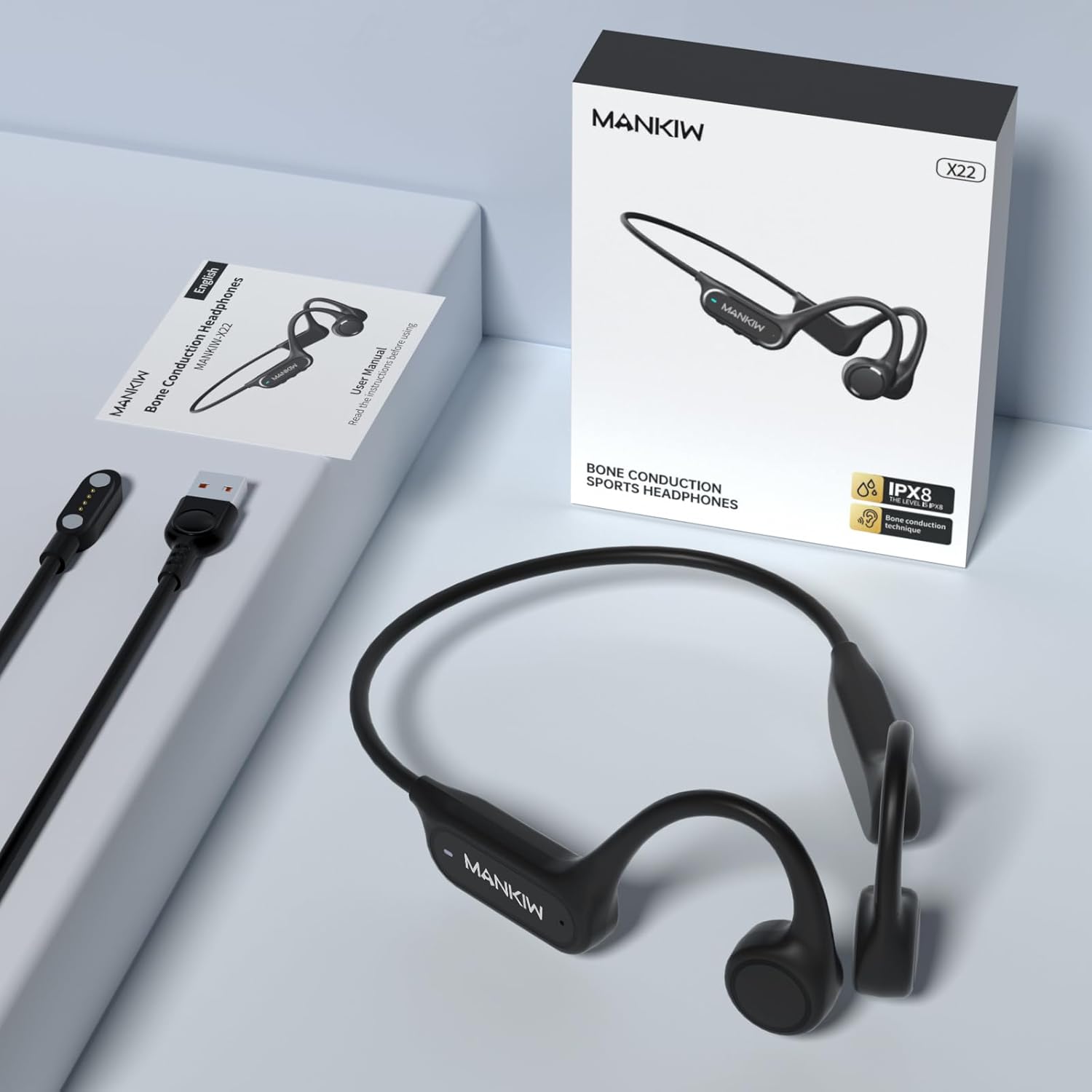
MANKIW Bone Conduction Headphones, packaging, and accessories

Image: MANKIW Bone Conduction Headphones, showing the product, its retail box, and the included magnetic charging cable.

2. Key Features

IPX8 Professional Waterproofing

Certified with an IPX8 rating and tested to a depth of up to 9 feet (approximately 2.7 meters), these headphones are ideal for swimming, surfing, or showering. Please note that Bluetooth signals cannot be received underwater. For underwater use, download your favorite tracks in MP3 mode beforehand to enjoy uninterrupted audio.

Woman swimming underwater wearing MANKIW Bone Conduction Headphones, highlighting IPX8 waterproof feature

Image: A woman swimming in a pool, wearing the MANKIW headphones, illustrating their IPX8 waterproof capability.

Dual Mode: Bluetooth and MP3

The headphones feature a built-in 32GB memory, providing space for up to 9000 songs or audiobooks. They also incorporate the latest Bluetooth 5.4 chip for a stable and low-latency connection, allowing seamless switching between modes.
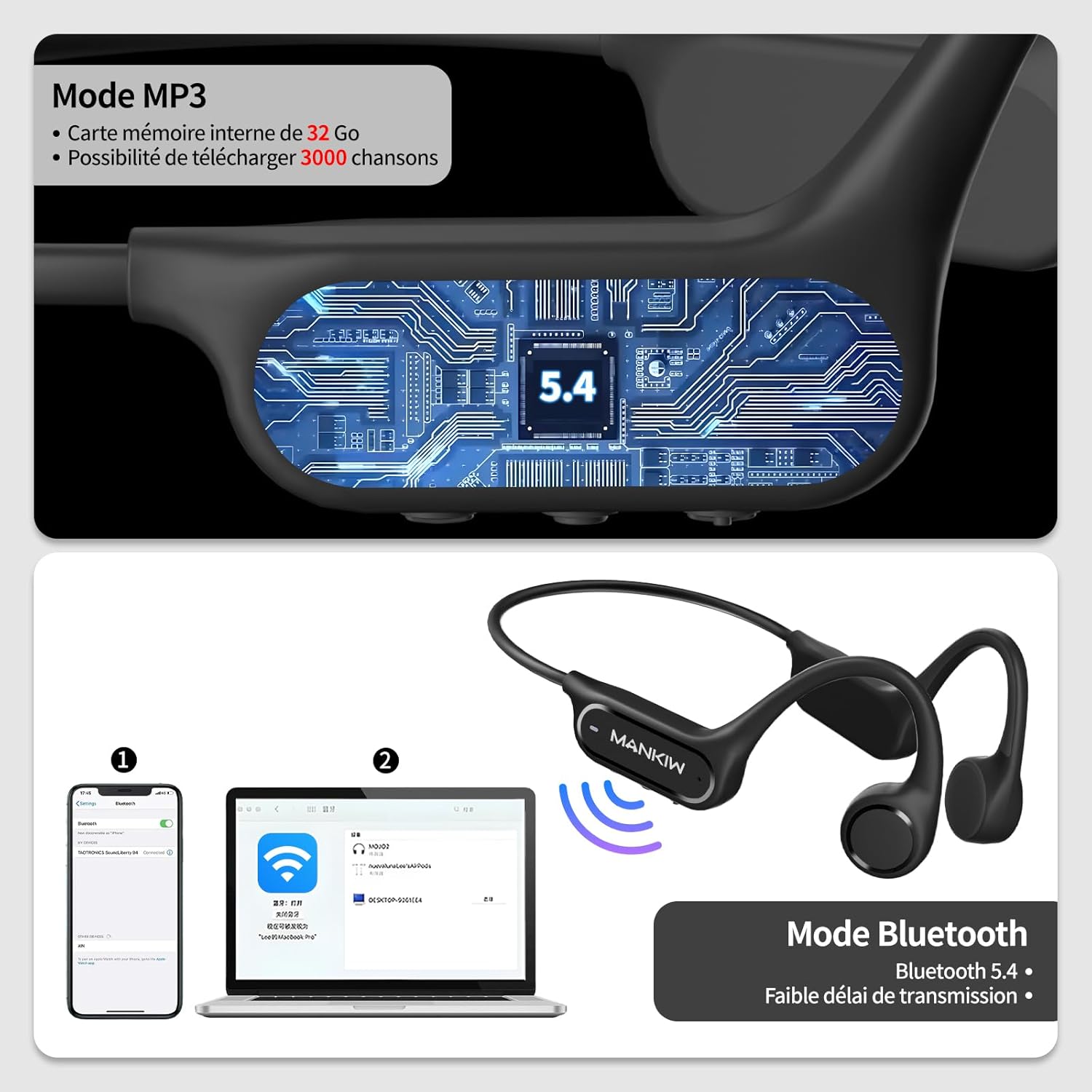
Diagram showing MANKIW headphones with Bluetooth and MP3 mode indicators, and connection to phone and laptop

Image: A diagram illustrating the dual Bluetooth and MP3 modes, showing connectivity options with a smartphone and a laptop.

Advanced Bone Conduction Technology

Experience superior sound quality through sound transmission via your cheekbones. This technology keeps your ears open, enhancing listening comfort and allowing you to remain aware of your surroundings, which is ideal for increased safety during outdoor activities.

Man on a skateboard wearing MANKIW Bone Conduction Headphones, emphasizing open-ear safety and lightweight design

Image: A man on a skateboard wearing the headphones, demonstrating the open-ear design that allows awareness of surroundings.

Durability and Flexibility

Constructed from a 360° flexible titanium alloy, these headphones are exceptionally robust yet remarkably lightweight, weighing only 32 grams. With up to 8 hours of battery life and fast magnetic charging technology, they are ready for any adventure.

Diagram showing MANKIW headphones battery life of 8 hours and charging time of 1.5 hours

Image: A visual representation of the headphones' battery life (8 hours usage) and charging time (1.5 hours).

Maximum Comfort and Personalized Design

Thanks to their lightweight open-ear design with adjustable bands, the headphones adapt perfectly to all head shapes. They offer maximum all-day comfort without pressure, allowing you to listen to music while remaining aware of your environment.

3. Setup Guide

Charging the Headphones

Connect the magnetic charging cable to the charging port on the headphones and plug the USB end into a power source (e.g., computer USB port, wall adapter). The LED indicator will show red during charging and turn blue when fully charged. A full charge takes approximately 1.5 hours.

Power On/Off

Bluetooth Pairing

  1. Ensure the headphones are powered off.
  2. Press and hold the MFB for 5 seconds until the LED indicator flashes red and blue alternately. This indicates pairing mode.
  3. On your device (smartphone, tablet, computer), enable Bluetooth and search for available devices.
  4. Select "MANKIW X22" from the list of found devices.
  5. Once connected, the LED indicator will flash blue slowly.

MP3 Mode and File Transfer

4. Operating Instructions

Button Controls

The MANKIW X22 headphones feature intuitive button controls located on the side of the device. Familiarize yourself with the Multi-Function Button (MFB) and the Volume +/- buttons.

FunctionAction
Power On/OffPress and hold MFB for 3 seconds
Enter Pairing ModePress and hold MFB for 5 seconds (from off)
Switch Bluetooth/MP3 ModeDouble-click MFB
Play/Pause MusicSingle-click MFB
Volume Up/DownSingle-click "+" / "-" button
Next TrackDouble-click "+" button
Previous TrackDouble-click "-" button
Answer/End CallSingle-click MFB
Reject CallPress and hold MFB for 2 seconds
Activate Voice Assistant (Siri)Press and hold "+" for 3 seconds

5. LED Indicator Status

The LED indicator provides visual cues about the headphone's status:

Indicator StatusMeaning
Red and Blue alternately flashingPairing Mode
Slow Blue flashConnected (Bluetooth)
Solid RedCharging
Solid BlueFully Charged
Flashing BlueData Transfer Mode (when connected to PC)

6. Care and Maintenance

7. Troubleshooting

ProblemPossible CauseSolution
Headphones do not power on.Low battery.Charge the headphones fully.
No sound from headphones.Volume too low; Incorrect mode; Not connected.Increase volume; Double-click MFB to switch modes; Re-pair Bluetooth or check MP3 files.
Bluetooth connection unstable or fails.Too far from device; Interference; Pairing issue.Move closer to the device; Avoid strong electromagnetic interference; Delete previous pairing and re-pair.
Cannot transfer files to MP3 player.Incorrect connection; Unsupported file format.Ensure headphones are connected to PC and in data transfer mode; Check file formats (MP3, WAV, FLAC, APE are supported).
Sound quality is poor.Improper fit; Low battery; Source quality.Adjust headphones for optimal fit on cheekbones; Charge headphones; Ensure audio source quality is good.

8. Technical Specifications

SpecificationValue
Model NameMANKIW-X22
Connectivity TechnologyWireless (Bluetooth 5.4)
Waterproof RatingIPX8
Internal Memory32 GB
Battery LifeUp to 8 hours
Charging TimeApprox. 1.5 hours
Weight32 grams
Frequency Range20 Hz to 20,000 Hz
Control TypeButton Control
Ear PlacementOpen Ear
Form FactorCircum-Aural
Battery TypeLithium Metal
ColorBlack

9. Warranty and Support

For warranty information and customer support, please refer to the warranty card included with your product or contact the seller/manufacturer directly. Keep your purchase receipt as proof of purchase for any warranty claims.

If you encounter any issues not covered in this manual, please reach out to MANKIW customer service for assistance. Contact details are typically available on the product packaging or the official MANKIW website.

Related Documents - X22

Preview MANKIW AM108 Magnetic Wireless Car Charger User Manual
Detailed user manual for the MANKIW AM108 15W Magnetic Wireless Car Charger, covering installation, operation, indicator status, specifications, and troubleshooting for MagSafe-compatible iPhones.
Preview Shenzhen Senyang Zhiyuan X22 Wireless Headset User Manual and Specifications
User manual and technical specifications for the Shenzhen Senyang Zhiyuan X22 Wireless Headset, featuring FCC ID and regulatory information.
Preview RAB Field-Adjustable X22™ LED Floodlight Installation Instructions
Detailed installation guide for RAB Field-Adjustable X22™ LED floodlights (X22-20, X22-35, X22-60, X22-80, X22-150). Covers various mounting methods, beam angle and field adjustments, wiring, maintenance, and troubleshooting. Ensures safe and proper installation.
Preview 2K Smart Home Security Camera Quick Start Guide and FAQ
This document provides a quick start guide and frequently asked questions for the 2K Smart Home Security Camera, covering setup, installation, light indicators, firmware upgrades, and troubleshooting.
Preview ADICOS HOTSPOT-X22/X2 IR-Temperaturmelder Zusatzanleitung
Diese Zusatzanleitung bietet detaillierte Informationen zur Installation, Sicherheit, technischen Daten und zum Aufbau des ADICOS HOTSPOT-X22/X2 IR-Temperaturmelders von GTE Industrieelektronik GmbH, konzipiert für explosionsgefährdete Bereiche.