
DEWENWILS AL300-12-S
Contents
DEWENWILS 300W Low Voltage Landscape Transformer User Manual
Model: AL300-12-S
Your guide to safe and efficient outdoor lighting control.
Product Overview
The DEWENWILS 300W Low Voltage Landscape Transformer is designed to safely convert 120V AC household power to a safer 12V/14V AC output for your outdoor landscape lighting systems. This unit features multiple lighting modes, robust weather resistance, and advanced safety protections, making it ideal for various outdoor applications such as spotlights, pathway lights, deck lights, and pool lights.
Key Features:
- Five Lighting Modes: Manual ON/OFF, Dusk-to-Dawn, Dusk-to-Countdown (2/3/4/6/8 hours), Dusk-to-Timer OFF, and Timer ON/OFF for flexible control.
- Weather Resistant Design: Constructed from durable stainless steel with a downward-opening cover for superior protection against rain, snow, and dust.
- Safety Protection: Built-in automatic circuit breaker provides reliable overcurrent and short-circuit protection.
- Easy Installation: Features built-in hanging holes and includes necessary accessories for quick and simple setup.
- Wide Application: Supports 12V/14V AC LED lighting up to 300W, suitable for various outdoor lighting needs.
- Multi-Zone Output: Provides both 12V and 14V AC output options to accommodate different cable lengths and lighting requirements.
Safety Information
Please read and understand all safety instructions before installing or operating this transformer. Failure to follow these instructions may result in electric shock, fire, or serious injury.
- Always disconnect power at the circuit breaker before installing or servicing the transformer.
- This transformer is designed for outdoor use. Ensure it is mounted in a location that allows for proper ventilation and drainage.
- Do not immerse the transformer in water.
- Ensure all wire connections are secure and properly insulated to prevent short circuits.
- Do not overload the transformer. The maximum output is 300W. Calculate the total wattage of your connected lights to ensure it does not exceed this limit.
- Use only low voltage landscape lighting fixtures with this transformer.
- Keep children and pets away from the transformer during operation.
- If any damage is observed, discontinue use immediately and contact customer support.
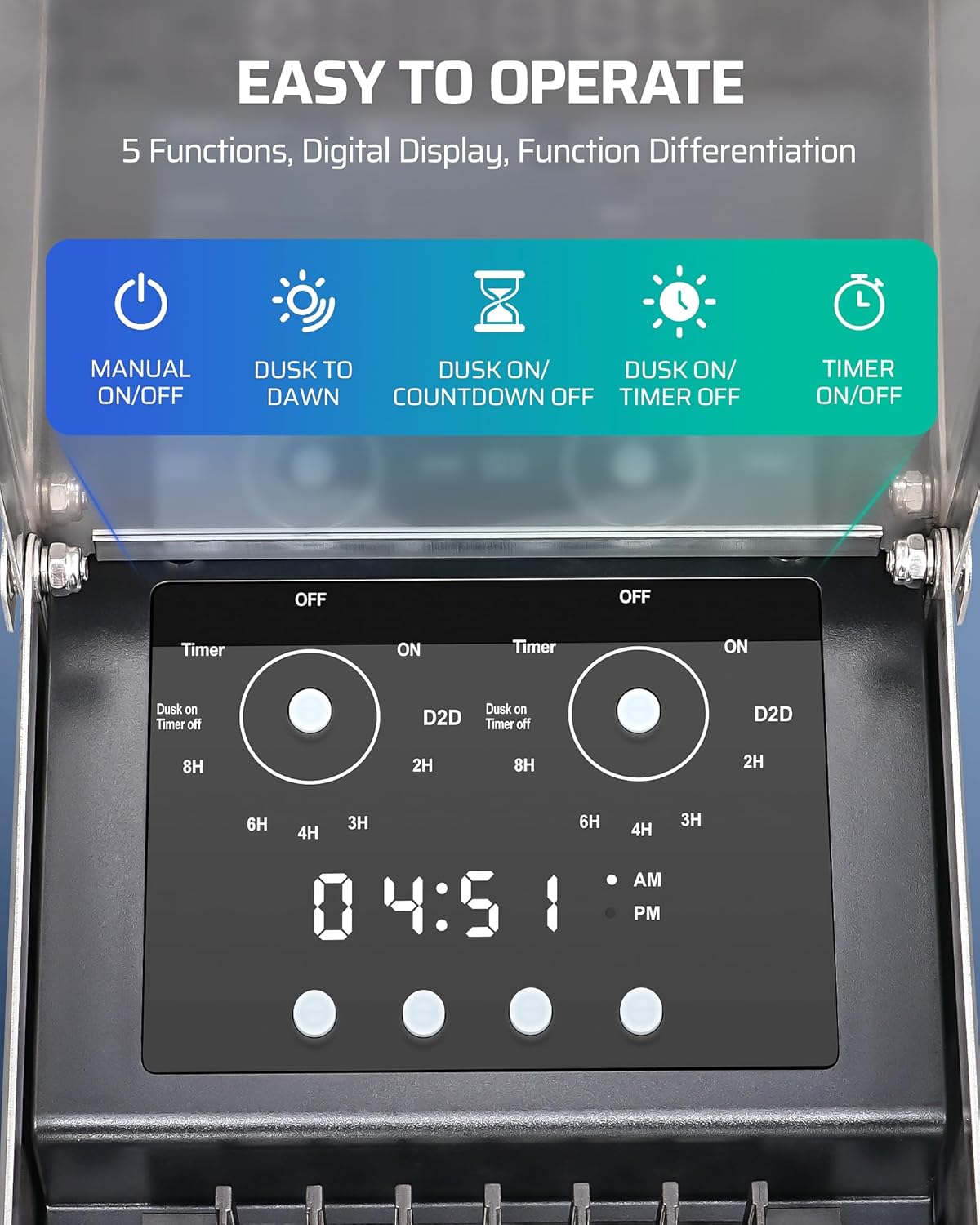
Figure 1: The transformer incorporates multiple safety features such as short circuit, overcurrent, overload, over-voltage, and high temperature protection to ensure safe operation.
What's in the Box
Upon opening the package, please verify that all components are present and undamaged:
- 1 x DEWENWILS Low Voltage Landscape Transformer (300W)
- Mounting Screws and Wall Anchors
- User Manual (this document)

Figure 2: Main components of the DEWENWILS 300W Low Voltage Landscape Transformer, including the unit itself, power cord, and detachable photocell sensor.
Setup and Installation
Follow these steps for proper installation of your landscape transformer:
- Choose a Mounting Location: Select a flat, vertical surface near a 120V AC grounded outlet. The location should be protected from direct water spray and allow for proper ventilation. Ensure the minimum mounting height is 12 inches from the ground.
- Mount the Transformer: Use the built-in hanging holes on the back of the transformer as a template. Mark the positions for the mounting screws. Drill pilot holes if necessary and insert wall anchors. Secure the transformer to the wall using the provided screws.
- Connect Landscape Lighting Wires:
- Open the front cover of the transformer.
- Locate the terminal blocks labeled "COM 12V" and "COM 14V" for Zone 1 and Zone 2.
- Strip approximately 1/2 inch of insulation from the ends of your landscape lighting wires.
- Connect the common wire (usually black or marked) from your lighting system to the "COM" terminal.
- Connect the positive wire (usually red or unmarked) to either the "12V" or "14V" terminal, depending on your voltage requirement. Use 14V for longer cable runs to compensate for voltage drop.
- Ensure all connections are tight and secure.
- Connect Photocell Sensor: Plug the photocell sensor cable into the designated port on the transformer. Position the sensor in a location that receives natural light, away from artificial light sources that could interfere with its operation.
- Plug in the Transformer: Once all wiring is complete and secure, plug the transformer's power cord into a grounded 120V AC outlet.

Figure 3: Step-by-step visual guide for connecting the landscape lighting wires and mounting the transformer securely on a wall.

Figure 4: Physical dimensions of the transformer and length of the power cord, useful for planning installation space.
Operating Instructions
The DEWENWILS transformer offers five distinct operating modes to suit your lighting schedule needs. Use the control panel buttons to navigate and select your desired mode.

Figure 5: The digital display and control buttons for selecting the five available lighting modes.
Setting the Clock:
Press the "CLOCK" button to enter clock setting mode. Use the arrow buttons to adjust the hour and minute, then press "ENTER" to confirm.
Operating Modes:
- Manual ON/OFF: Press the "ON/OFF" button to manually turn the lights on or off. This mode overrides any programmed settings.
- Dusk-to-Dawn (D2D): The lights will automatically turn on at dusk and turn off at dawn, detected by the photocell sensor. This is an energy-efficient option for continuous night lighting.
- Dusk-to-Countdown OFF: Lights turn on at dusk and remain on for a set duration (2, 3, 4, 6, or 8 hours) before turning off. Select the desired countdown duration using the control buttons.
- Dusk-to-Timer OFF: Lights turn on at dusk and turn off at a specific programmed time.
- Timer ON/OFF: Allows you to set specific ON and OFF times for your lights, independent of the photocell sensor.
Independent Zone Control:
The transformer supports two independent zones (Zone 1 and Zone 2), each with its own 12V/14V output. This allows you to program different lighting modes or schedules for different areas of your landscape.

Figure 6: The photocell sensor enables automatic dusk-to-dawn operation, and the independent zones allow for customized lighting schedules in different areas.
Maintenance
Regular maintenance ensures the longevity and optimal performance of your DEWENWILS landscape transformer.
- Cleaning: Periodically wipe the exterior of the transformer with a soft, damp cloth to remove dust and debris. Do not use abrasive cleaners or solvents.
- Photocell Sensor: Ensure the photocell sensor is clean and unobstructed. Dust, dirt, or overgrown foliage can interfere with its light detection capabilities.
- Wire Connections: Annually inspect all wire connections to ensure they remain tight and free from corrosion. Loose connections can lead to voltage drops or overheating.
- Drainage: Verify that the area around the transformer allows for proper water drainage to prevent standing water.
- Weather Protection: While the unit is weatherproof, extreme weather conditions (e.g., heavy snow accumulation, prolonged submersion) should be avoided. Ensure the downward-opening cover is always properly closed.

Figure 7: The robust stainless steel construction and downward-opening cover provide excellent weather resistance, protecting internal components from the elements.
Troubleshooting
If you encounter issues with your transformer, refer to the following common problems and solutions:
| Problem | Possible Cause | Solution |
|---|---|---|
| Lights not turning on. |
|
|
| Lights flickering or dim. |
|
|
| Timer/Photocell not working correctly. |
|
|
| Transformer making unusual noises. |
|
|
If the problem persists after attempting these solutions, please contact DEWENWILS customer support for further assistance.
Specifications
| Attribute | Detail |
|---|---|
| Brand | DEWENWILS |
| Model Number | AL300-12-S |
| Power Source | Corded Electric |
| Input Voltage | 120V AC |
| Output Voltage | 12V/14V AC |
| Maximum Wattage | 300W |
| Maximum Frequency | 60 Hz |
| Product Dimensions | 13"D x 5"W x 7"H (13 x 5 x 7 inches) |
| Item Weight | 11.22 Pounds |
| Mounting Type | Wall Mount |
| Date First Available | May 5, 2025 |
Warranty and Support
DEWENWILS stands behind the quality of its products. This transformer comes with a standard manufacturer's warranty covering defects in materials and workmanship under normal use. For specific warranty terms and conditions, please refer to the warranty card included with your product or visit the official DEWENWILS website.
For technical support, troubleshooting assistance, or warranty claims, please contact DEWENWILS customer service. You can find contact information on the product packaging or by visiting the DEWENWILS Store on Amazon.
Ask a question about this manual
Ask about setup, troubleshooting, compatibility, parts, safety, or missing instructions. Manuals+ will review the question and use this page’s manual context to help answer it.