1. Introduction
This user manual provides comprehensive instructions for the operation, maintenance, and troubleshooting of the AISITESY Digital Lensmeter Auto Lensmeter LM-900. This advanced ophthalmic equipment is designed for precise and efficient measurement of various lens parameters, including spherical degree, cylindrical degree, axis for astigmatism, prism degree, and UV transmissivity.
The LM-900 features a high-speed processing system, automatic recognition capabilities, and a user-friendly 7-inch display, making it an essential tool for optometry professionals.

Figure 1: The AISITESY Digital Lensmeter Auto Lensmeter LM-900, a sophisticated device for optical measurements.
2. Product Overview and Components
The LM-900 is engineered with advanced technology and high-quality materials to ensure excellent performance and reliability. Familiarize yourself with the main components of the device:

Figure 2: Diagram illustrating the key structural components of the LM-900, including the LCD Display Screen, Pressure Lens Holder, Lens Holder, Memory Key, Pointing Components, Lens Stage Knob, and Printer Unit.
- LCD Display Screen: High-definition 7-inch screen for displaying measurement data and interface.
- Pressure Lens Holder: Secures the lens during measurement.
- Lens Holder: Position for placing the lens to be measured.
- Memory Key: Button for accessing or saving measurement data.
- Pointing Components: Used for precise alignment during measurement.
- Lens Stage Knob: Adjusts the position of the lens stage.
- Printer Unit: Integrated thermal printer for printing measurement results.
3. Key Features
The AISITESY LM-900 offers a range of features designed to enhance efficiency and accuracy in optical measurements:

Figure 3: Visual representation of the LM-900's core features: HD Touchscreen Display, Portable Operation, Precision Focusing, and Thermal Printing.
- Multi-functional Optometry: Capable of measuring various lens types, including single-optical, double-optical, triple-optical, and progressive multifocal lenses.
- High-Speed Processing: Utilizes a scalable integrated high-speed processing system with computing power up to 4000dmips, ensuring rapid image acquisition and data processing (less than 80ms).
- Automatic Recognition: The system can automatically recognize lens types and switch to the appropriate measurement mode, streamlining the process.
- 7-inch HD Display: A responsive, high-definition screen with adjustable viewing angle for comfortable use while sitting or standing. Displays intuitive data, including pupil height, pupil distance, and prism data.
- UV and Blue Light Test: Quickly measures the UV and blue light passage rate of lenses, providing essential information for lens assessment.
- Integrated Printer: Features a built-in thermal printer for convenient printing of measurement results.
- QR Code Data Access: Option to scan a QR code to obtain test data, promoting an environmentally friendly workflow by reducing paper usage.
4. Setup
- Unpacking: Carefully remove the LM-900 from its packaging. Retain all packaging materials for future transport or storage.
- Placement: Place the device on a stable, flat surface in a well-lit area, away from direct sunlight or strong vibrations.
- Power Connection: Connect the provided power cord to the power input port on the back of the LM-900 and then plug it into a compatible AC 100-220V power outlet.
- Dust Cover Removal: Important: Before powering on, ensure the dust cover is removed from the lens measurement area. Failure to do so may cause power-on initialization errors.
- Initial Power On: Press the power button to turn on the device. The system will perform an initialization sequence.
5. Operating Instructions
5.1. Screen Adjustment
The LM-900 features a rotating screen for optimal viewing angles, whether you are sitting or standing during refraction procedures.
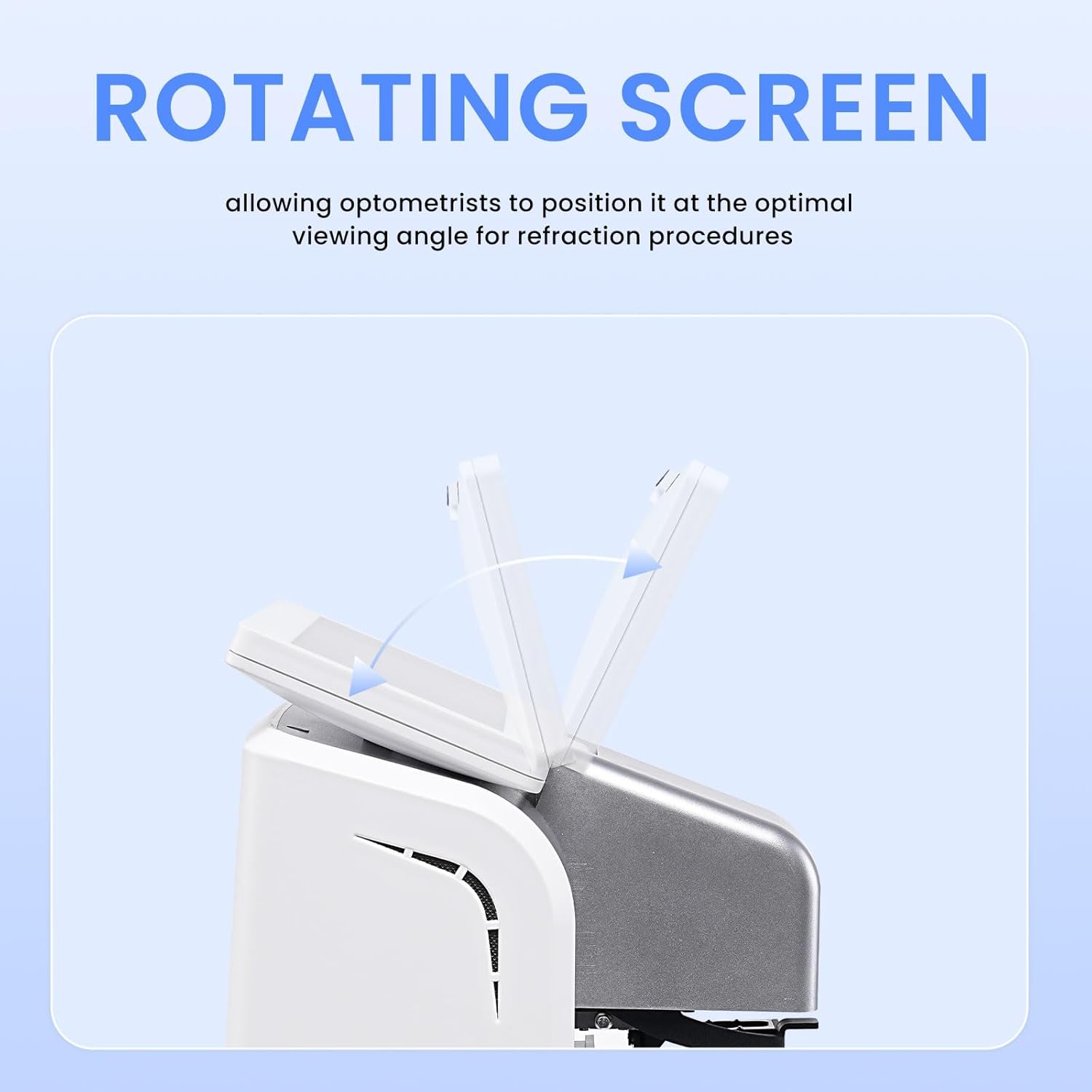
Figure 4: The LM-900's screen can be tilted to provide an optimal viewing angle for the operator.
5.2. Main Interface Overview
The main interface displays both left (L) and right (R) lens measurements simultaneously, facilitating rapid lens alignment and data interpretation.

Figure 5: Detailed view of the LM-900's main interface, showing measurement parameters for both left and right lenses, along with various control buttons.
- Target Reticle: Central crosshair for lens alignment.
- Timer Display: Shows the current time.
- Measurement Data (L/R): Displays Spherical (S), Cylindrical (C), Axis (A), Prism Horizontal (H), Prism Vertical (V), and Add (AD) values for both eyes.
- Lens Mode Switch: Toggles between different lens measurement modes.
- PD/Height Display: Shows Pupillary Distance and Pupil Height.
- Print Button: Initiates printing of current measurement data.
- Lens Bank Switch: Switches between different lens data banks.
- Menu Button: Accesses system settings and advanced options.
- Clear Button: Clears current measurement data.
- OD/OS Toggle: Switches between Right Eye (OD) and Left Eye (OS) display.
5.3. Lens Measurement Procedure
- Prepare the Lens: Ensure the lens to be measured is clean and free of smudges or dust.
- Place the Lens: Carefully place the lens on the Lens Holder. Use the Pressure Lens Holder to secure it gently.
- Align the Lens: Adjust the lens position using the Lens Stage Knob and Pointing Components until the target reticle on the LCD Display Screen is centered on the lens.
- Automatic Recognition: The system will automatically detect the lens type (single-vision, bifocal, progressive, etc.) and adjust the measurement mode.
- Read Measurements: The Spherical, Cylindrical, Axis, Prism, and Add values will be displayed on the screen.
- UV and Blue Light Test: To perform a UV and blue light test, select the corresponding option from the menu. The device will display the transmission rate.
- Record/Print Data:
- Press the Print Button to print the results via the integrated thermal printer.
- Alternatively, scan the QR code displayed on the screen (if available) to transfer data to a compatible device.
- Use the Memory Key to save the measurement data.
- Repeat for Other Lenses: Remove the measured lens and repeat the process for additional lenses as needed.
6. Maintenance
- Cleaning the Display: Use a soft, lint-free cloth slightly dampened with a non-abrasive screen cleaner to wipe the LCD display. Do not spray cleaner directly onto the screen.
- Cleaning the Lens Holder: Regularly clean the lens holder and surrounding areas with a soft brush or compressed air to remove dust and debris that could affect measurements.
- Exterior Cleaning: Wipe the exterior surfaces of the device with a soft, dry cloth. Avoid using harsh chemicals or abrasive materials.
- Dust Cover: Always place the dust cover over the lens measurement area when the device is not in use to prevent dust accumulation.
- Power Off: Turn off the device and unplug it from the power source before performing any cleaning or maintenance.
7. Troubleshooting
| Problem | Possible Cause | Solution |
|---|---|---|
| Device does not power on. | Power cord not connected properly; Power outlet issue. | Check power cord connection. Try a different power outlet. |
| Initialization error after power on. | Dust cover not removed. | Ensure the dust cover is completely removed before powering on the device. |
| Inaccurate measurements. | Lens not properly aligned; Lens holder dirty; Device needs calibration. | Re-align the lens. Clean the lens holder. If issues persist, contact customer support for calibration. |
| Printer not working. | No paper; Paper jammed; Printer unit malfunction. | Check and replace thermal paper. Clear any paper jams. If problem persists, contact customer support. |
If you encounter any problems during use, please contact AISITESY customer support. A professional team of experts is available to assist you.
8. Specifications
- Spherical Degree: 0 ~ +25.00D
- Cylindrical Degree: 0 ~ ±10.00D
- Under Plus Degree: 0 ~ 10.00D
- Axis for Astigmatism: 0° ~ 180°
- Prism Basal Angle: 0° ~ 360°
- Prism Degree: 0° ~ 180°, step 1°
- Lens Size: Horizontal direction 15Δ, Vertical direction 20Δ
- Lens Thickness: 7 ~ 110mm
- Measurable Lens Leg Thickness: ≤20mm
- UV Transmissivity: Yes
- Range of PD (Pupillary Distance): 30 ~ 100mm
- Range of PH (Pupil Height): 4 ~ 55mm
- Power: AC100 ~ 220V, 25VA
- Product Dimensions: 255mm x 212mm x 473mm
- Package Dimensions: 22.83 x 16.54 x 14.17 inches
- Product Weight: 17.64 Pounds
- Manufacturer: AISITESY
9. What's in the Box
Upon unpacking, ensure all the following items are present:
- 1 x AISITESY Digital Lensmeter Auto Lensmeter LM-900
- 1 x Power Cord
10. Warranty and Support
AISITESY provides a standard warranty for the LM-900. For detailed warranty terms and conditions, please refer to the warranty card included with your product or visit the official AISITESY website.
For technical support, troubleshooting assistance, or any inquiries regarding your device, please contact AISITESY customer service. Our professional team is dedicated to providing prompt and effective solutions.
You can find contact information on the official AISITESY website or through your purchase platform.
Visit the AISITESY Store: AISITESY Official Store


