Product Overview
The NEUMITECH PJ300 is an ultra-portable, high-performance smart projector designed for versatile use. It delivers vibrant HD visuals with 4K decoding support, offering a display range from 40 to 130 inches. Key features include automatic keystone correction for perfectly aligned images, and seamless connectivity through Wi-Fi 6 and Bluetooth 5.2.
- Ultra-Bright Clarity: Enjoy native 1280x720p resolution with 4K decoding and 1500 lumens brightness.
- Auto Keystone Correction: Automatically adjusts image distortion for a clear, aligned picture.
- Seamless Connectivity: Features Wi-Fi 6 for fast streaming and Bluetooth 5.2 for audio pairing.
- Multiple Inputs: Includes USB, HDMI, and analog audio output for various external devices.
What's in the Box
Upon unboxing your NEUMITECH PJ300, you should find the following items:
- NEUMITECH PJ300 Smart Projector
- Remote Control (AAA Batteries Required, Not Included)
- Power Cable
- HDMI Cable
- Cleaning Kit
- User's Manual
Setup Guide
- Power Connection: Connect the power cable to the projector and then to a power outlet. The power indicator light will illuminate.
- Remote Control: Insert two AAA batteries (not included) into the remote control.
- Placement: Place the projector on a stable, flat surface or mount it using a compatible tripod. Ensure the lens is facing the desired projection surface (wall or screen).
- Power On: Press the power button on the projector or the remote control to turn on the device.
- Focus Adjustment: Use the focus ring near the lens to sharpen the projected image until it is clear.
- Keystone Correction: The PJ300 features automatic keystone correction. If manual adjustment is needed, use the keystone control to correct any trapezoidal distortion.
- Network Connection (Wi-Fi 6): Navigate to the settings menu, select 'Network' or 'Wi-Fi', and connect to your preferred Wi-Fi 6 network.
- Bluetooth Pairing (Bluetooth 5.2): In the settings menu, select 'Bluetooth' and pair with your desired external audio devices for enhanced sound.
Operating Instructions
The NEUMITECH PJ300 offers various ways to display content:
- Connecting External Devices:
- HDMI: Connect your laptop, gaming console, or other HDMI-enabled devices using the provided HDMI cable. Select 'HDMI' as the input source.
- USB: Insert a USB drive into the USB port for media playback (photos, videos, music). Select 'USB' as the input source and browse your files.
- Analog Audio Output: Connect external speakers or sound systems via the 3.5mm audio jack for a customized audio experience.
- Wireless Screen Mirroring: Utilize the built-in Wi-Fi 6 for screen mirroring from compatible iOS, Android, or Windows devices. Follow the on-screen instructions for casting.
- Navigating the Interface: Use the directional buttons and 'OK' button on the remote control or the projector's top panel to navigate through menus and select options.
Maintenance
- Lens Cleaning: Use the provided cleaning kit to gently wipe the projector lens. Avoid using abrasive materials or harsh chemicals that could damage the lens.
- Ventilation: Ensure the projector's ventilation vents are clear and unobstructed to prevent overheating. Do not block the air inlets or outlets.
- Storage: When not in use, store the projector in a cool, dry place, away from direct sunlight and extreme temperatures. Use the provided carrying case for protection during transport or storage.
Troubleshooting
- No Image or Blurry Image:
- Check the focus ring to ensure the image is sharp.
- Verify keystone correction is properly set.
- Ensure the correct input source (HDMI, USB, etc.) is selected.
- No Sound:
- Adjust the volume on the projector and any connected external audio devices.
- Check Bluetooth connection if using wireless speakers.
- Ensure cables are securely connected for wired audio.
- Connectivity Issues (Wi-Fi/Bluetooth):
- Restart the projector and your network router.
- Ensure the projector is within range of your Wi-Fi network or Bluetooth device.
- Check for any interference from other electronic devices.
Specifications
| Brand: | NEUMITECH |
| Model Number: | PJ300 |
| Product Dimensions: | 6.9” (W) x 2.7” (H) x 4.9” (D) |
| Item Weight: | 1.49 lb |
| Display Resolution: | Native 1280 x 720p (Supports 4K Decoding) |
| Brightness: | 1500 Lumens |
| Connectivity Technology: | Wi-Fi 6, Bluetooth 5.2, HDMI, USB, 3.5mm Jack |
| Special Features: | Built-In Speaker, Digital Keystone Correction, Portable, Smart Features |
| Power: | 100-240V AC |
Product Media

Image Description: Rear view of the NEUMITECH PJ300 projector, showcasing the USB, HDMI, and IR ports, along with the speaker grille.

Image Description: An illustration demonstrating the flexible projection sizes of the PJ300, ranging from 40 inches at 1 meter distance to 130 inches at 3 meters distance, suitable for various room setups.

Image Description: A user wirelessly casting content from a smartphone to the PJ300 projector, highlighting compatibility with PC, Android, and iOS devices for effortless sharing.

Image Description: Visual representation of the projector's Auto Keystone feature, which automatically adapts the screen, and Electric Focus, which brings clarity to every image.
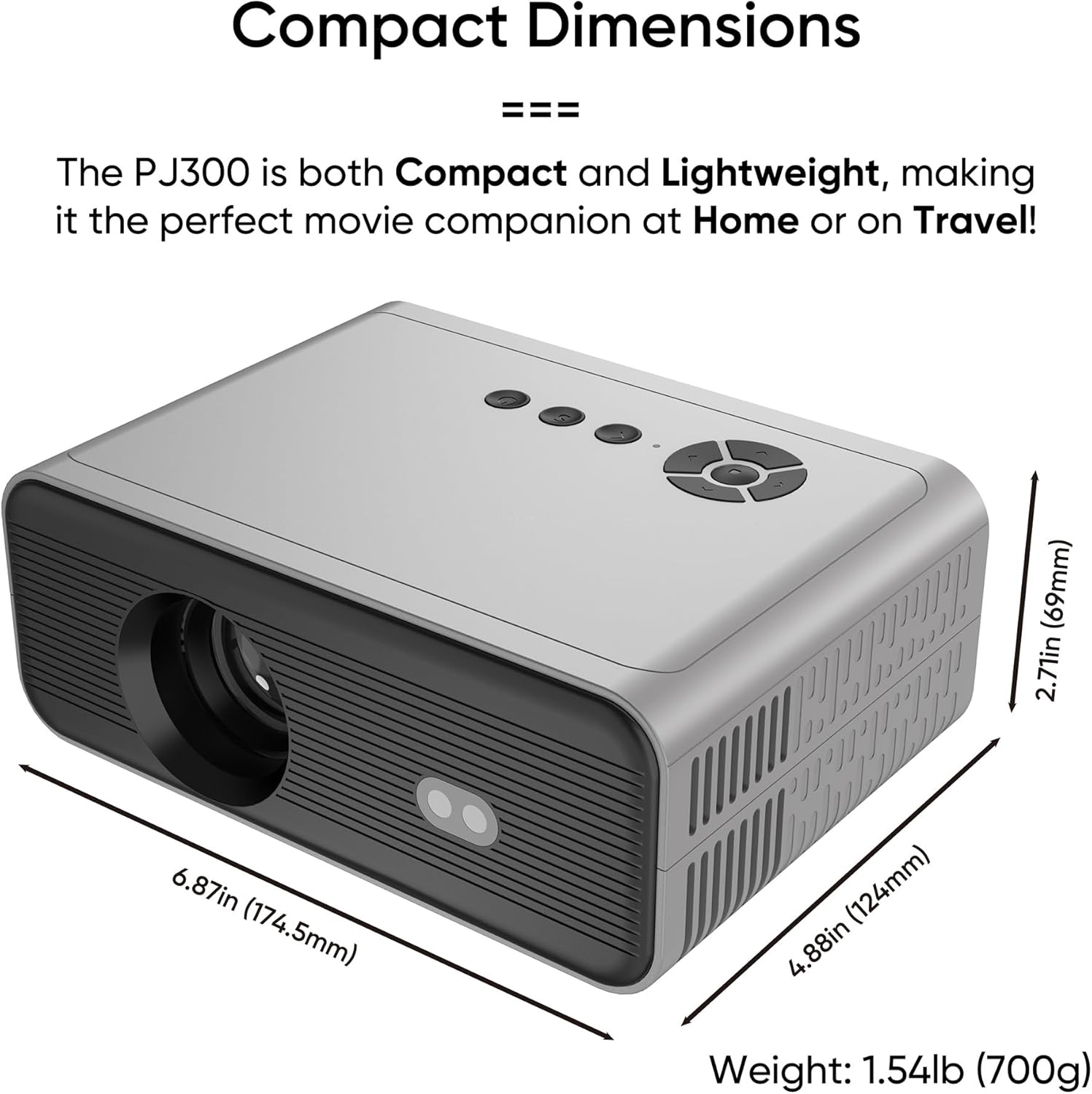
Image Description: A diagram illustrating the compact dimensions of the PJ300 projector: 6.87 inches (174.5mm) width, 2.71 inches (69mm) height, and 4.88 inches (124mm) depth, with a weight of 1.54lb (700g).
Official Product Videos
Video Description: An official unboxing video of the NEUMITECH PJ300 Portable Smart Projector, demonstrating its contents and compact design.
Warranty and Support
The NEUMITECH PJ300 comes with a standard manufacturer's warranty. For specific details regarding warranty coverage, duration, and terms, please refer to the warranty card included in your product packaging or contact NEUMITECH customer support.
For technical assistance, troubleshooting, or any product-related inquiries, please visit the NEUMITECH official website or contact their customer service team. Keep your purchase receipt and product model number handy for faster service.


