
1. Introduction
Thank you for choosing the INIU P21 3-in-1 Portable Charger. This device combines a 10000mAh power bank, a 30W foldable AC wall charger, and a built-in USB-C cable, offering a versatile and compact charging solution for your electronic devices. This manual provides essential information for safe and efficient use of your new charger.
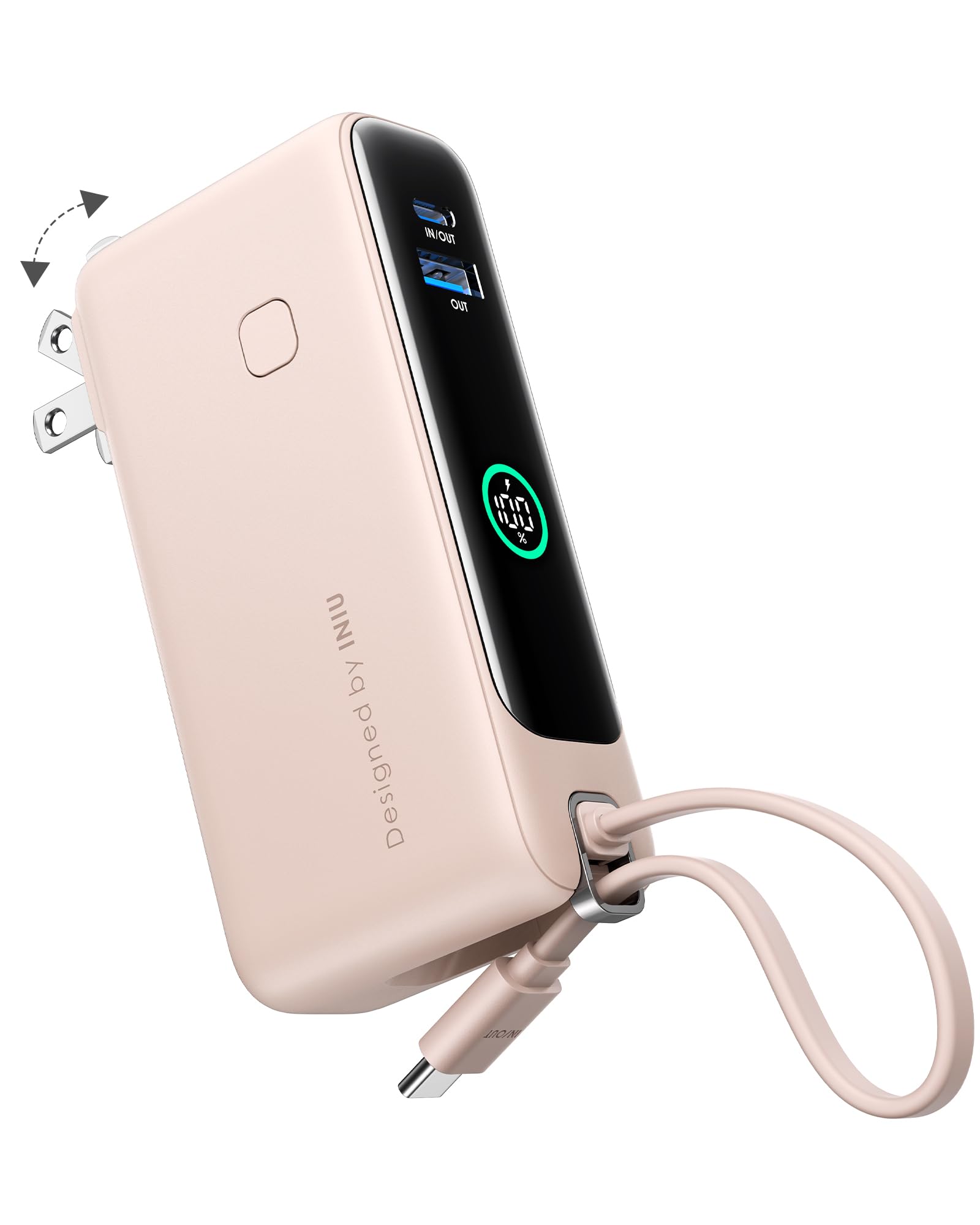
Figure 1: The INIU P21 3-in-1 Portable Charger (Pink variant).
2. Product Overview
The INIU P21 is designed for convenience and efficiency, integrating multiple charging functions into a single, portable unit. Key features include:
- 10000mAh Power Bank: Provides ample power to charge your devices on the go.
- 30W Foldable AC Plug: Allows direct wall charging and recharging of the power bank.
- Built-in USB-C Cable: Eliminates the need to carry extra cables for USB-C devices.
- Additional Ports: Includes one USB-C (In/Out) port and one USB-A (Out) port for broad compatibility.
- Digital Display: Shows the remaining battery percentage.

Figure 2: Close-up view of the INIU P21's ports and digital display.
3. Setup and First Use
3.1 Recharging the Power Bank
Before first use, it is recommended to fully charge your INIU P21. To do this:
- Fold out the integrated AC plug from the side of the charger.
- Plug the charger directly into a standard wall outlet.
- The digital display will show the charging progress. The power bank is fully charged when the display shows 100%.

Figure 3: The INIU P21 with its foldable AC plug extended for wall charging.
4. Operating Instructions
4.1 Charging Devices Using the Built-in USB-C Cable
For convenient charging of USB-C compatible devices:
- Unclip the built-in USB-C cable from its storage slot.
- Connect the USB-C end of the cable to your device's charging port.
- The power bank will automatically begin charging your device. The digital display will show the power bank's remaining charge.

Figure 4: Charging a smartphone using the built-in USB-C cable.
4.2 Charging Devices Using USB-A or Additional USB-C Ports
To charge devices requiring a USB-A or an external USB-C cable:
- Connect your device to the appropriate USB-A (OUT) or USB-C (IN/OUT) port on the charger using your own charging cable.
- The charger will detect the device and begin charging.
4.3 Charging Multiple Devices Simultaneously
The INIU P21 can charge up to four devices at once (one via built-in USB-C, one via USB-A, one via external USB-C, and one via AC plug if connected to a wall outlet). When connected to a wall outlet, the power bank will also recharge itself after your devices are fully charged.

Figure 5: The INIU P21 charging multiple devices while plugged into a wall outlet.
4.4 Digital Display
Press the power button on the side of the charger to activate the digital display, which shows the remaining battery percentage of the power bank.
5. Key Features and Benefits
The INIU P21 is engineered for maximum utility and portability:
- Fast Charging: Delivers up to 30W of power, allowing quick charging for compatible smartphones, tablets, and even some laptops. For example, it can charge an iPhone 16 to 80% in 30 minutes or a MacBook Air to 60% in 30 minutes.
- High Capacity: The 10000mAh battery can provide approximately 1-2 full charges for most smartphones, depending on the model.
- Travel-Friendly Design: Its compact size (4.3"L x 2"W x 1.2"Th) and lightweight nature (160 grams) make it easy to carry in small bags or pockets. The foldable AC plug ensures no snags or damage during transport.

Figure 6: Size comparison of the INIU P21 charger, highlighting its compact design.
5.1 Product Demonstration Videos
For a visual guide on the product's features and usage, please refer to the following official videos:
Video 1: A detailed overview of the INIU 3-in-1 Portable Charger, explaining its various functionalities and benefits.
Video 2: A review of the INIU 3-in-1 Portable Charger, highlighting its 10000mAh capacity and 30W fast charging capabilities.
6. Maintenance
To ensure the longevity and optimal performance of your INIU P21 charger:
- Keep the device dry and away from moisture.
- Avoid extreme temperatures.
- Clean the device with a soft, dry cloth. Do not use harsh chemicals or abrasive materials.
- Store in a cool, dry place when not in use.
- Avoid dropping or subjecting the device to strong impacts.
7. Troubleshooting
If you encounter issues with your INIU P21 charger, please consider the following:
- Device not charging: Ensure the charger has sufficient power (check digital display). Verify that cables are securely connected to both the charger and the device. Try a different cable or port.
- Charger not recharging: Ensure the foldable AC plug is fully extended and securely plugged into a live wall outlet.
- Slow charging: Ensure your device supports fast charging and that you are using a compatible cable. Charging multiple devices simultaneously may reduce individual charging speeds.
- Overheating: It is normal for the charger to become slightly warm during use. If it becomes excessively hot, disconnect all devices and the power source immediately. Allow it to cool down before resuming use.
If problems persist, please contact INIU customer support.
8. Specifications
| Feature | Detail |
|---|---|
| Model Number | P21 |
| Battery Capacity | 10000 Milliamp Hours |
| Max Output Power | 30W |
| Connector Type | Output: USB-C*1 + USB-A*1 (plus built-in USB-C cable and foldable AC plug) |
| Battery Cell Type | Lithium Polymer |
| Item Dimensions L x W x Thickness | 4.3"L x 2"W x 1.2"Th |
| Battery Weight | 160 Grams |
| Power Source | Corded Electric (AC plug) / Battery |
| Manufacturer | Shenzhen Topstar Industry Co.,Ltd. |
9. Warranty and Support
INIU provides an industry-leading 3-year INIU Care warranty for this product. For warranty claims, technical support, or any inquiries, please visit the official INIU website or contact their customer service directly. Keep your purchase receipt as proof of purchase.


