
1. Safety Information
Please read and understand all instructions before beginning assembly and use. Failure to follow these instructions may result in injury or damage.
- Keep all small parts and packaging materials away from children and pets.
- Always use the anti-tipping device provided to secure the dresser to a wall. This is crucial to prevent serious injury from tipping furniture.
- Do not overload drawers. Distribute weight evenly to maintain stability.
- Ensure all connections are securely fastened before use. Periodically check and re-tighten as necessary.
- Place the dresser on a level surface to prevent wobbling and ensure proper drawer function.

2. Product Overview
The chartustriable 70-inch 10-Drawer Dresser is designed for versatile storage and convenience, featuring a built-in charging station. Its antique white finish with a dark wood top complements various room decors.

Key Features:
- Spacious Storage: Features 10 drawers, including 4 deep 9.8-inch drawers and 6 standard 5.4-inch drawers, offering ample space for various items.
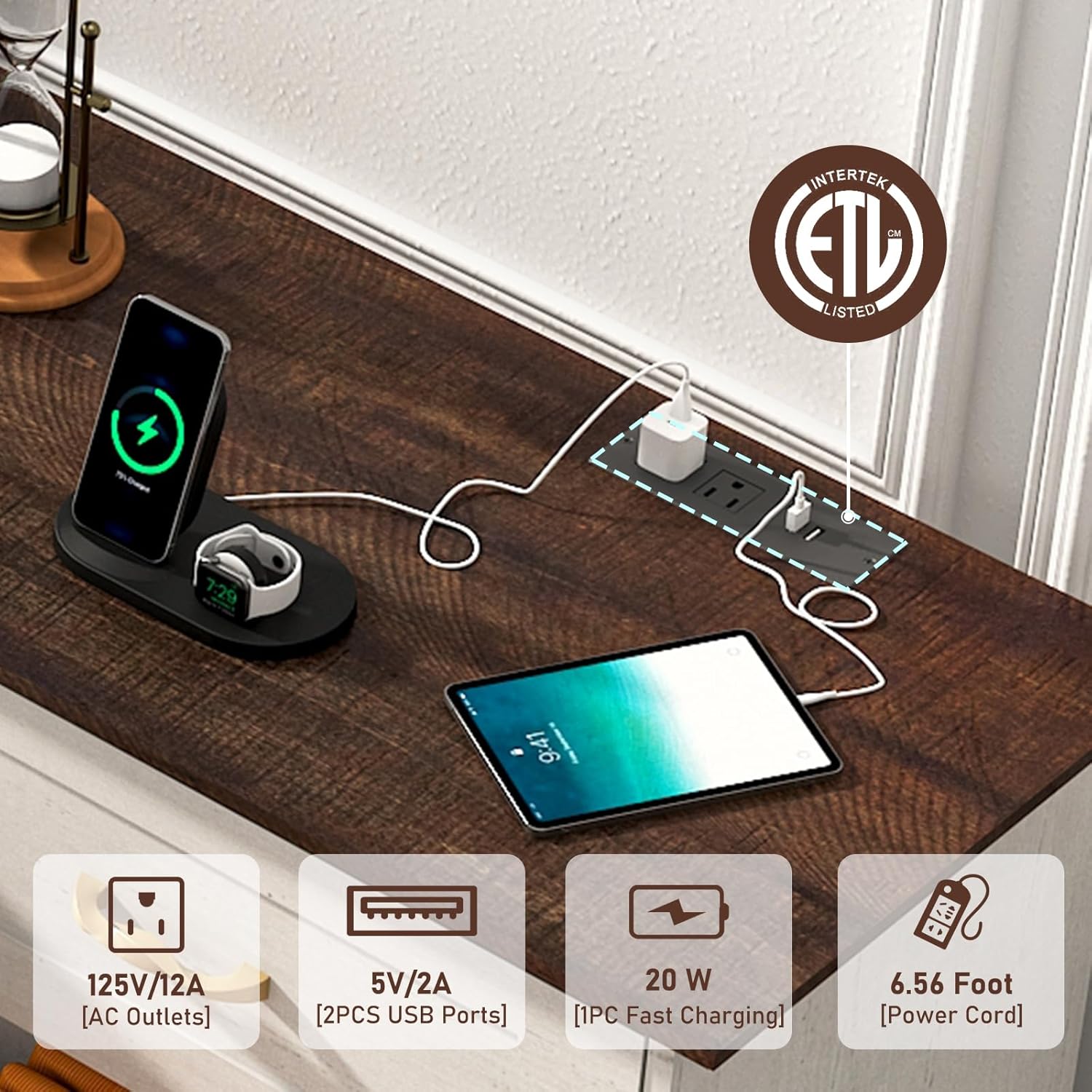
- Integrated Charging Station: Equipped with 2 AC outlets, 1 USB port, and 1 fast-charging USB port for convenient device charging.
- Versatile Design: Can function as a dresser, a TV stand for up to 80-inch televisions, or general storage in bedrooms, living rooms, or entryways.
- Durable Construction: Made from engineered wood with sturdy support for long-term use.

3. Setup and Assembly
Assembly is required for this dresser. It is recommended to have at least two people for assembly. Please ensure you have adequate space and all parts are accounted for before beginning.
Tools Required:
- Phillips Head Screwdriver
- Hammer (for dowels)
- Small battery-powered drill (recommended for screws)
Assembly Video Guide:
For a detailed visual guide, please refer to the official assembly video:
General Assembly Steps (Refer to included manual for detailed diagrams):
- Unpack all components and verify against the parts list.
- Attach drawer slides to the side panels of the dresser frame.
- Assemble the main frame of the dresser using cam locks and dowels.
- Secure the top panel to the assembled frame.
- Assemble each drawer individually, attaching handles and drawer slides.
- Insert assembled drawers into the dresser frame.
- Install the anti-tipping device to a wall stud for safety.
4. Operating Instructions
Using the Drawers:
- Gently pull the handles to open drawers. Avoid excessive force.
- Push firmly to close drawers completely.
- Distribute items evenly within drawers to prevent strain on the slides and maintain smooth operation.
Using the Charging Station:
- Plug the dresser's power cord into a wall outlet.
- Connect your devices to the available AC outlets, USB port, or fast-charging USB port on the dresser top.
- Ensure devices are compatible with the power output specifications.
5. Maintenance and Care
- Cleaning: Wipe surfaces with a soft, damp cloth. Avoid harsh chemicals or abrasive cleaners that may damage the finish.
- Dusting: Regularly dust with a dry, soft cloth to prevent buildup.
- Spills: Immediately wipe up spills to prevent moisture damage to the engineered wood.
- Hardware: Periodically check all screws and fasteners for tightness and re-tighten if necessary to ensure stability.
- Drawer Slides: If drawers become stiff, apply a small amount of silicone-based lubricant to the drawer slides.
6. Troubleshooting
Common Issues and Solutions:
- Drawers not closing smoothly:
- Check if the drawer slides are properly aligned and securely attached to both the drawer and the dresser frame.
- Ensure drawers are not overloaded or unevenly weighted.
- Verify that all assembly screws for the drawer slides are fully tightened.
- Dresser wobbles:
- Ensure the dresser is placed on a completely level surface.
- Check and tighten all cam locks and screws in the main frame.
- Confirm the anti-tipping device is correctly installed and secured to the wall.
- Charging station not working:
- Verify the dresser's power cord is securely plugged into a functional wall outlet.
- Check if the device being charged is properly connected and functional.
7. Specifications
| Feature | Detail |
|---|---|
| Brand | chartustriable |
| Model Name | Dresser |
| Color | Antique White |
| Material | Engineered Wood |
| Finish Type | Painted |
| Product Dimensions (D x W x H) | 15.7"D x 70"W x 36"H |
| Number of Drawers | 10 (4 x 9.8" deep, 6 x 5.4" deep) |
| Item Weight | 193 Pounds |
| Charging Station | 2 AC Outlets, 1 USB Port, 1 Fast Charging USB Port |
| Room Type | Bedroom, Living Room, Study Room, Entryway |
| Assembly Required | Yes |
8. Warranty and Support
For specific warranty details and customer support, please refer to the documentation included with your purchase or contact chartustriable directly through their official channels. You can also visit the chartustriable Store on Amazon for more information.
If you encounter any issues during assembly or use, please reach out to customer service for assistance.