
Product Overview
The ResMed AirTouch N30i Frame System offers a softer, gentler sleep experience. It features a flexible, comfortable fabric-wrapped frame and the innovative ComfiSoft nasal cushion, which fuses fabric with silicone for an exceptionally soft and natural feel. This system is designed to provide a secure seal and enhanced comfort for CPAP users.
Key features include a tube-up design that keeps tubing out of your way, allowing for various sleeping positions, and a Quick-release elbow for easy disconnection from tubing.

Image: The ResMed AirTouch N30i Frame System, showcasing its soft fabric-wrapped frame and nasal cushion.
Setup and Fitting
Proper fitting of your AirTouch N30i Frame System is crucial for comfort and effective therapy. The SpringFit frame is designed to adjust to your face and head shape for an easy and secure fit.
- Check Cushion and Frame Size: Ensure you have the correct cushion and frame size for optimal comfort and seal. The system is available in various sizes to accommodate different users.
- Positioning the Nasal Cushion: The ComfiSoft nasal cushion is designed to rest gently under your nose, providing a seal without inserting into the nostrils. Position it so that it comfortably covers the nasal opening.
- Adjusting the Headgear: While this system is primarily the frame, if you are attaching headgear (not included), ensure it is adjusted to hold the frame securely but without excessive tightness. The fabric-wrapped frame should sit comfortably on your cheeks and forehead.
- Connecting to Tubing: Attach your CPAP tubing to the Quick-release elbow located at the top of the frame. The tube-up design helps keep the tubing out of your way during sleep.

Image: Visual guide to checking the frame and cushion size for proper fit.

Image: A user demonstrating the comfortable fit of the SpringFit frame, designed to adapt to facial contours.
Operating Instructions
Once your AirTouch N30i Frame System is properly fitted and connected to your CPAP device, you are ready to begin therapy. The mask's design prioritizes comfort and flexibility during use.
- Sleeping Position Flexibility: The tube-up design ensures that the CPAP tubing remains out of your way, allowing you to sleep comfortably in various positions, including on your side or stomach, without dislodging the mask or experiencing discomfort from the hose.
- Quick Disconnection: Should you need to get up during the night, the Quick-release elbow allows for easy and swift disconnection of the mask from the CPAP tubing without removing the entire mask system. Simply press the release button on the elbow to detach.
- Maintaining Seal: Ensure the nasal cushion maintains a consistent seal throughout the night. Minor adjustments to the headgear may be necessary if you experience air leaks.
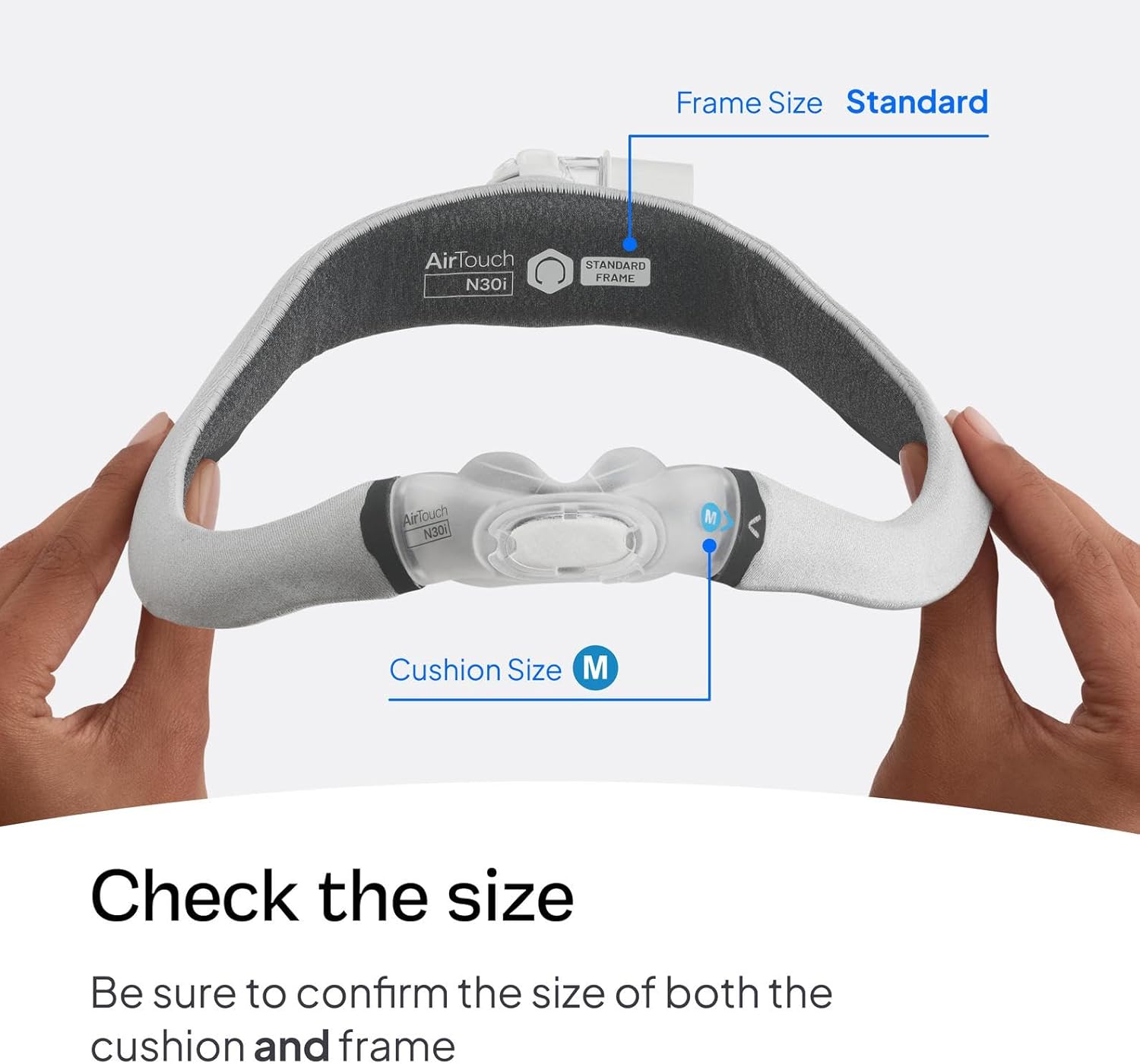
Image: Components of the AirTouch N30i Frame System, highlighting the quick-release elbow for easy detachment.
Maintenance and Cleaning
Regular cleaning and maintenance of your AirTouch N30i Frame System are essential for hygiene and prolonging the life of your product. Follow these steps for proper care:
- Soak the components in warm water with a mild liquid detergent. Ensure that there are no air bubbles while soaking.
- Hand wash the cushion.
- Hand wash the frame, elbow, and QuietAir vent with a soft, non-metallic bristle brush (e.g., soft bristle toothbrush).
- Thoroughly rinse the components under running water.
- Squeeze the fabric components (frame and cushion) with a clean towel to remove excess water. Shake the QuietAir vent to remove any excess water.
- Leave the components to air dry out of direct sunlight.
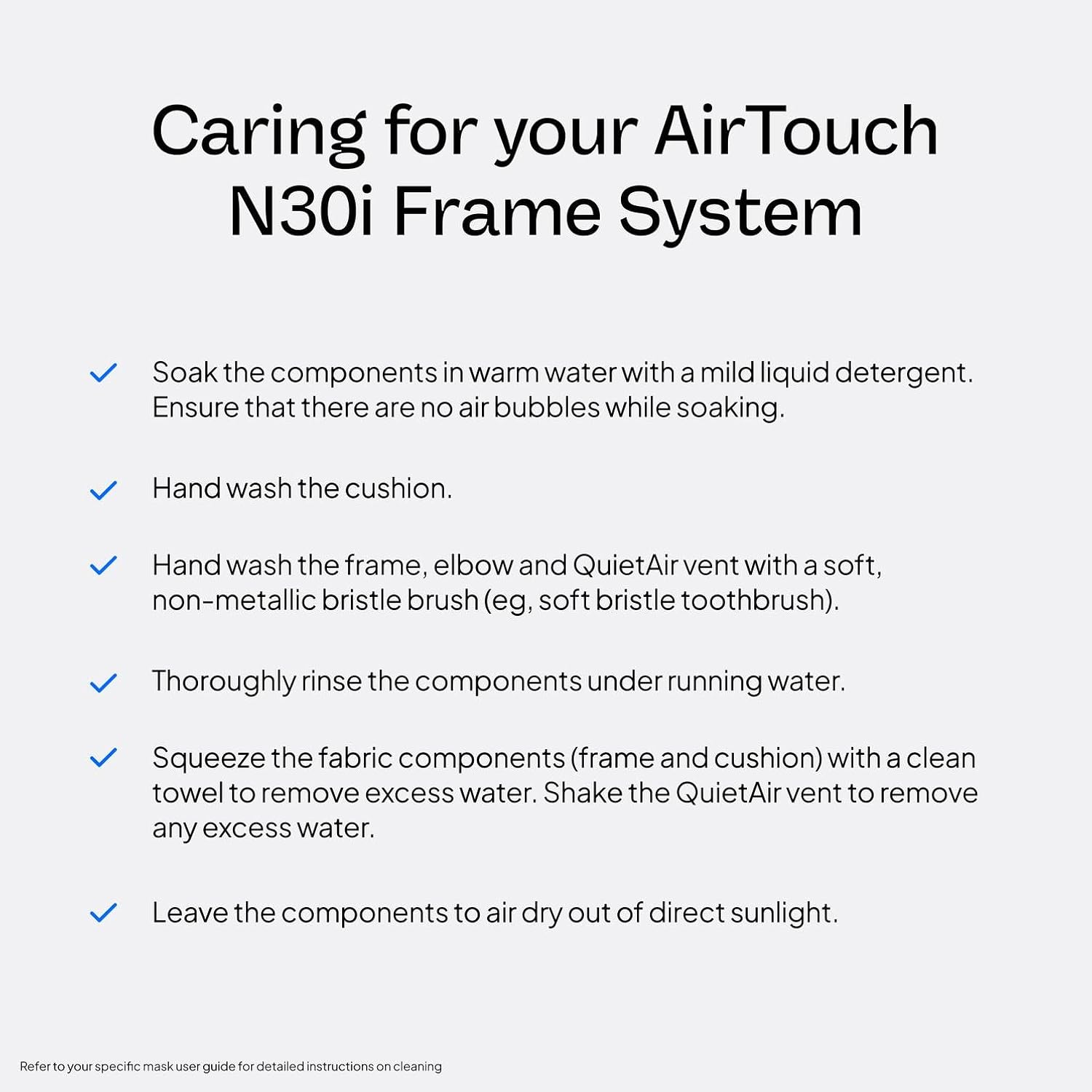
Image: Detailed steps for cleaning and caring for your AirTouch N30i Frame System.
Replacement Tip
We recommend replacing your frame system every three months to ensure optimal performance and hygiene. Signs it might be time to replace your frame system include:
- Cracks
- Tears
- Other visible signs of deterioration

Image: Visual reminder for replacing the frame system every three months, showing signs of wear.
Troubleshooting
While the AirTouch N30i Frame System is designed for comfort and reliability, occasional issues may arise. Here are some common concerns and potential solutions:
- Air Leaks: If you experience air leaks, first check that the nasal cushion is properly seated under your nose and that the headgear is adjusted snugly but not too tightly. Ensure the quick-release elbow is fully connected. Over-tightening can also cause leaks by distorting the cushion.
- Discomfort or Irritation: If the mask causes discomfort or skin irritation, ensure the fabric-wrapped frame is positioned correctly and not rubbing against your skin. Regular cleaning as per the maintenance section can also prevent irritation from accumulated oils or debris. If discomfort persists, consult your healthcare provider or equipment supplier to confirm proper fit and size.
- Difficulty Breathing: If you feel restricted breathing, check for any obstructions in the mask or tubing. Ensure the QuietAir vent is clear. If the issue persists, it may indicate a need for professional assessment of your CPAP pressure settings or mask fit.
- Dry Mouth: Dry mouth can sometimes occur with CPAP therapy. While not directly related to the mask frame, ensuring a good seal can help prevent air from escaping through the mouth. If dry mouth is a persistent issue, discuss it with your healthcare provider, as it might require humidifier adjustments or other solutions.
Specifications
| Product Dimensions | 12 x 8.5 x 2 inches; 4.16 ounces |
| Manufacturer | ResMed |
| ASIN | B0DP3CWJL3 |
| First Available | November 26, 2024 |
Warranty and Support
For detailed warranty information and additional support, please refer to the official user manual provided by ResMed. You can often find this document on the manufacturer's website or through your equipment supplier.
- Official User Manual: For comprehensive instructions and safety information, please download the User Manual (PDF).
- Return Policy: This product is eligible for a 30-day refund/replacement return policy. Please check with your seller for specific terms and conditions.
- Manufacturer Support: For further assistance or to explore other ResMed products, visit the ResMed Store.