
GenMachine Ren4000
GenMachine Mini PC AMD Ryzen 3 4300U (Ren4000) Instruction Manual
Model: Ren4000
1. Introduction
Thank you for choosing the GenMachine Mini PC AMD Ryzen 3 4300U. This compact and high-performance mini computer is designed for both home and office use, offering efficient multitasking, 4K visuals, and advanced connectivity. This manual provides essential information for setting up, operating, and maintaining your device.
2. What's in the Box
Verify that all items are present in your package:
- GenMachine Mini PC (R3 4300U 8G 256G)
- User Manual
- Power Adapter
- HDMI Cable
- Mounting Bracket (for VESA mounting)

3. Product Overview (Hardware)
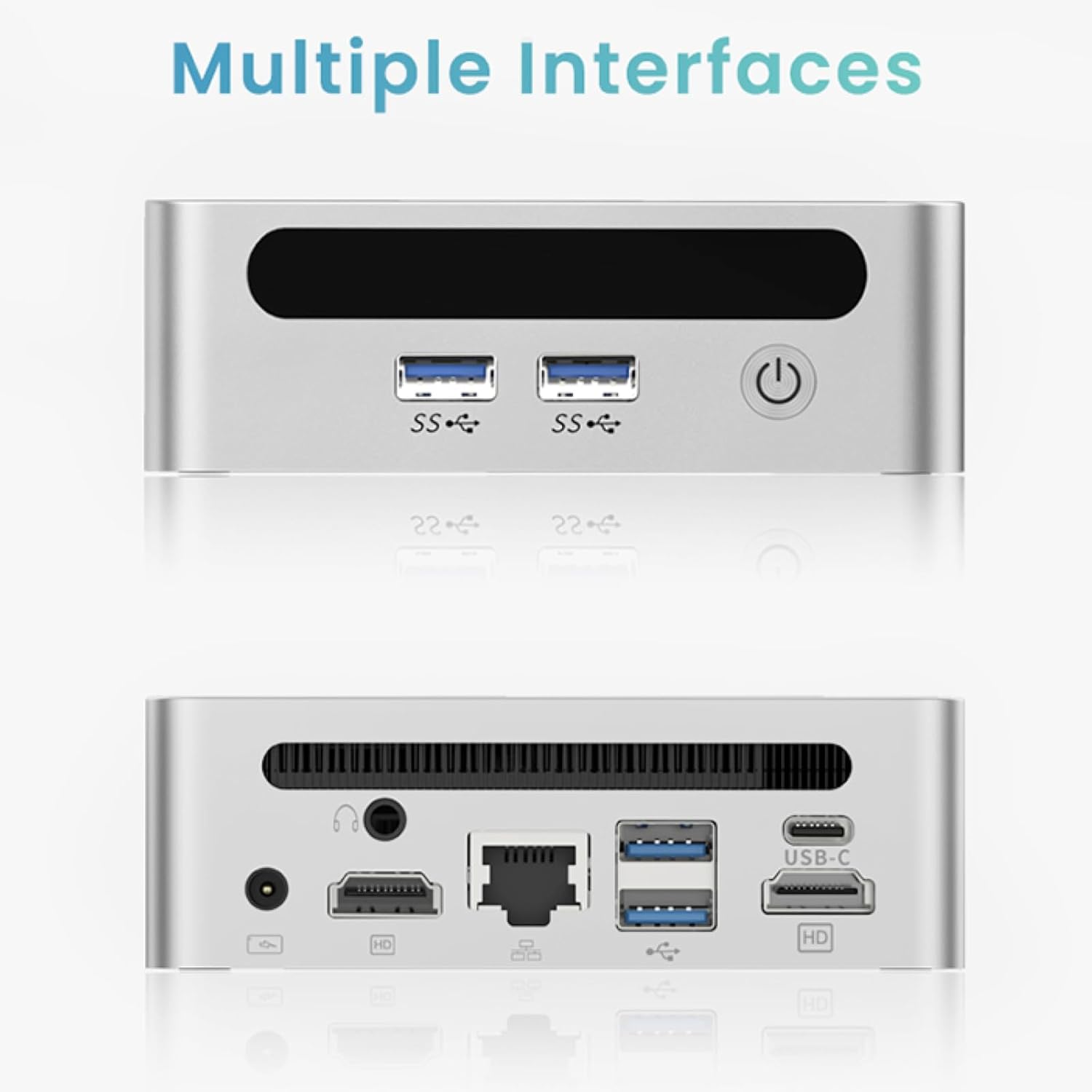
The GenMachine Mini PC features a compact design with various ports for connectivity and expansion.
Front Panel
- Power Button: To power on/off the device.
- USB 3.0 Ports (x2): For high-speed data transfer and peripheral connections.
- USB 2.0 Port (x1): For standard peripheral connections.
Rear Panel
- DC Power Input: Connect the provided power adapter here.
- USB 2.0 Port (x1): For standard peripheral connections.
- HDMI Ports (x2): For connecting displays, supporting up to 4K resolution.
- Ethernet (LAN) Port: For wired network connection.
- 3.5mm Audio Jack: For headphones or speakers.
- Kensington Lock Slot: For securing the device.
4. Setup Guide
Initial Connection
- Power off the Mini PC and disconnect all cables.
- Connect your monitor(s) to the HDMI port(s) on the rear panel.
- Connect your keyboard and mouse to the available USB ports.
- (Optional) For a wired network connection, plug an Ethernet cable into the LAN port.
- Connect the power adapter to the DC input port and then to a power outlet.
- Press the power button on the front panel to turn on the Mini PC.
Operating System Setup (Windows 11)
Your GenMachine Mini PC comes with Windows 11 pre-installed. Upon first boot, you will be guided through the initial Windows setup process, including:
- Region and keyboard layout selection.
- Network connection (Wi-Fi 6 or Ethernet).
- Microsoft account sign-in or local account creation.
- Privacy settings configuration.
Follow the on-screen instructions to complete the setup.
5. Performance and Usage
The AMD Ryzen 3 4300U processor, combined with 8GB DDR4 RAM and a 256GB SSD, provides robust performance for various tasks.
Key Features:
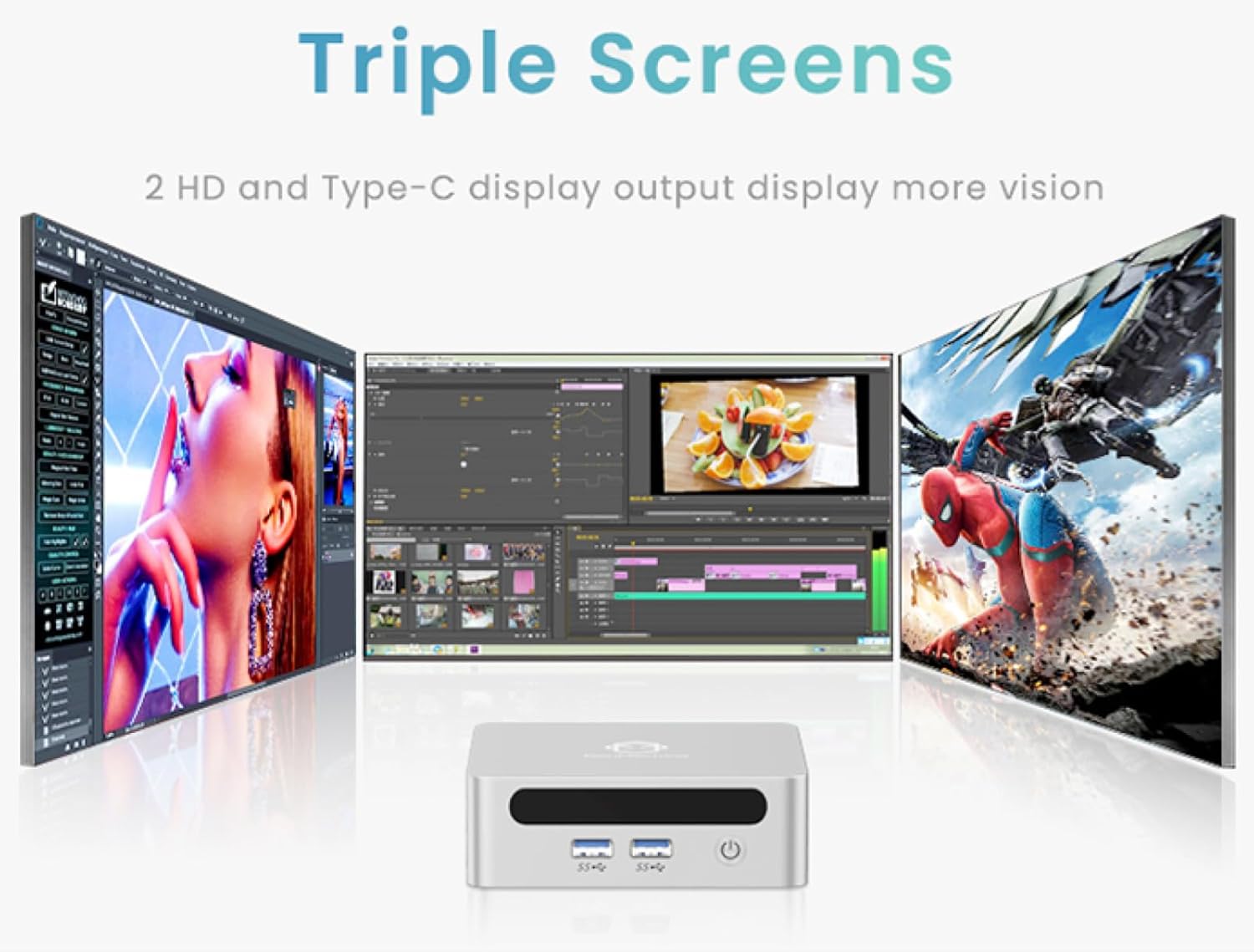
- 4K Ultra HD Visuals & Dual Display Support: Connect up to two 4K monitors for enhanced productivity or immersive entertainment.
- Wi-Fi 6 & Bluetooth 5.2: Enjoy faster and more stable wireless internet and seamless connectivity with Bluetooth peripherals.
- Compact and Quiet Design: Its small footprint and ultra-quiet cooling system make it suitable for any workspace without distraction.

6. Upgrading Components (Maintenance)
The GenMachine Mini PC allows for easy upgrades of its RAM and SSD to further enhance performance or storage capacity.
Tools Required:
- Small Phillips head screwdriver
- Plastic pry tool (optional, for opening the case)
- New SSD (M.2 2280 NVMe or 2.5-inch SATA SSD)
- New RAM (DDR4 SODIMM)
Procedure:
- Power off the Mini PC and disconnect all cables.
- Carefully remove the four rubber foot pads on the bottom of the Mini PC to reveal the hidden screws.
- Unscrew the four screws.
- Gently pry open the bottom plate along the edges. Be careful with the internal clips.
- Locate the existing SSD and RAM modules.
- To remove the SSD: If fixed by screws, unscrew them. If by clips, open the clips and pull out the original SSD.
- To remove RAM: Open the clips at both ends of the memory slot and pull out the original memory vertically.
- Insert the new SSD/RAM into the respective slots, ensuring they are properly seated and secured.
- Replace the bottom plate, aligning it with the clips and screw holes.
- Screw on the previously removed screws and reattach the foot pads.
7. Mounting Options
The GenMachine Mini PC can be mounted behind a VESA-compatible monitor using the included mounting bracket, saving desk space and creating a clean setup.

8. Specifications
| Feature | Detail |
|---|---|
| Processor | AMD Ryzen 3 4300U (2.7 GHz) |
| RAM | 8GB DDR4 SDRAM |
| Storage | 256GB 2280 SSD (PCIE x 16 interface) |
| Graphics | Integrated AMD Radeon Graphics |
| Operating System | OS (Windows 11 pre-installed) |
| Connectivity | Wi-Fi 6, Bluetooth 5.2, Ethernet |
| Video Output | 2x HDMI (4K @ 60Hz), USB-C (DisplayPort Alt Mode) |
| USB Ports | 2x USB 3.0, 2x USB 2.0, 1x USB-C |
| Dimensions | 6.26 x 6.26 x 3.6 inches |
| Weight | 2 pounds |
9. Troubleshooting
- No Power: Ensure the power adapter is securely connected to both the Mini PC and a working power outlet.
- No Display: Verify that the HDMI cable(s) are correctly connected to the monitor(s) and the Mini PC. Check monitor input source settings.
- No Internet (Wi-Fi): Ensure Wi-Fi is enabled in Windows settings and you are connected to the correct network.
- No Internet (Wired): Check the Ethernet cable connection and ensure your router is functioning correctly.
- Slow Performance: Close unnecessary applications. Check for background updates. Consider upgrading RAM or SSD if issues persist.
10. Warranty and Support
For warranty information, technical support, or service inquiries, please refer to the contact details provided in your product packaging or visit the official GenMachine website. Keep your purchase receipt for warranty claims.
Related documentsRen4000


Ask a question about this manual
Ask about setup, troubleshooting, compatibility, parts, safety, or missing instructions. Manuals+ will review the question and use this page’s manual context to help answer it.