1. Introduction
The ATLETICA MagnaCurve Slat Treadmill is a high-quality, motorless curved treadmill designed for effective cardio and High-Intensity Interval Training (HIIT). This innovative design allows the user to control speed solely through their stride frequency and position, providing a realistic and challenging running experience without the need for electrical power. This manual provides essential information for the safe assembly, operation, maintenance, and troubleshooting of your MagnaCurve treadmill.

Figure 1: ATLETICA MagnaCurve Slat Treadmill, front-side view.
2. Safety Information
Please read all safety instructions carefully before assembling or operating the ATLETICA MagnaCurve Slat Treadmill. Failure to follow these instructions may result in injury or damage to the equipment.
- Consult a Physician: Before starting any new exercise program, consult with a healthcare professional, especially if you have pre-existing medical conditions.
- Assembly: Ensure all components are correctly assembled and tightened according to the instructions. Do not use the treadmill if it is not fully assembled or appears damaged.
- Clearance Area: Maintain a clear area of at least 2 meters (6.5 feet) behind the treadmill and 0.6 meters (2 feet) on each side for safe operation.
- Weight Limit: Do not exceed the maximum user weight of 150 kg (330 lbs).
- Children and Pets: Keep children and pets away from the treadmill during operation and when unattended.
- Proper Attire: Wear appropriate athletic footwear and clothing. Avoid loose clothing that could get caught in moving parts.
- Stable Surface: Place the treadmill on a flat, stable, and non-slip surface.
- Handrails: Use the handrails for balance, especially when starting or stopping your workout.
- Emergency Stop: Familiarize yourself with how to safely stop your workout by slowing your pace and stepping off the curved surface.
- Maintenance: Perform regular maintenance as described in this manual to ensure safe and optimal performance.
3. Setup and Assembly
The ATLETICA MagnaCurve Treadmill requires assembly. It is recommended that two people assemble the unit. Ensure you have sufficient space and all components before beginning.
3.1 Unpacking and Component Check
- Carefully remove all components from the packaging.
- Place all parts on a clean, flat surface.
- Verify that all parts listed in the assembly guide (provided separately with the product) are present and undamaged. Contact customer support immediately if any parts are missing or damaged.
3.2 Assembly Steps
Refer to the detailed assembly instructions and diagrams included in the separate assembly manual for step-by-step guidance. General steps include:
- Attaching the main frame components.
- Securing the uprights and handrails.
- Mounting the console and connecting any necessary cables.
- Ensuring all bolts and nuts are securely tightened.
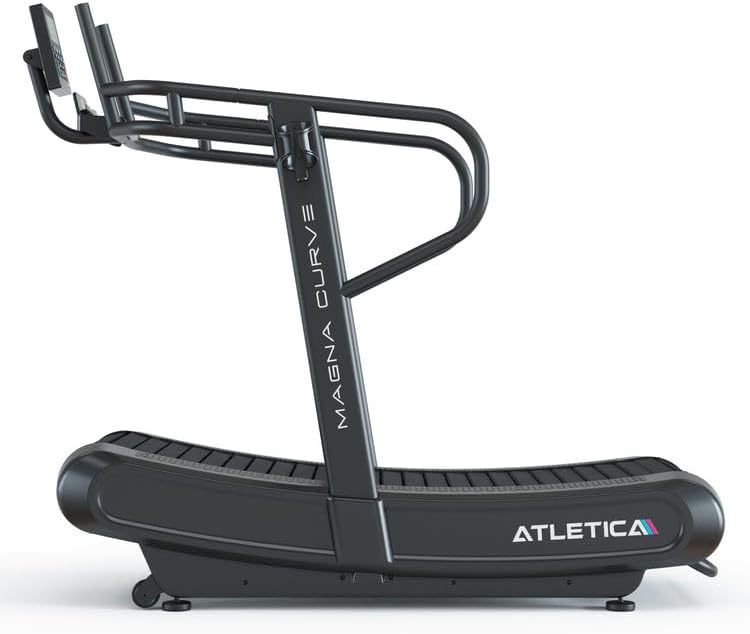
Figure 2: Side view of the ATLETICA MagnaCurve Slat Treadmill, showing the curved running surface.
3.3 Placement
Place the assembled treadmill on a level, solid surface. Ensure adequate space around the unit for safe use and access. The treadmill dimensions are 195 cm (L) x 95 cm (W) x 156 cm (H).
4. Operating Instructions
The MagnaCurve treadmill is motorless, meaning your workout intensity and speed are entirely controlled by your own effort and body position.
4.1 Starting a Workout
- Step onto the treadmill, holding the handrails for support.
- Begin walking or running. The slats will move as you push them with your feet.
- To increase speed, move towards the front (higher curve) of the running surface and increase your stride frequency.
- To decrease speed, move towards the back (flatter part) of the running surface and reduce your stride frequency.
4.2 Console Operation
The 5-inch LCD console displays key workout metrics and offers various functions:

Figure 3: The 5-inch LCD console with integrated smartphone holder.
- Display: Shows time, distance, speed, calories burned, and other relevant data.
- Programs: The console includes interval training programs. Refer to the console manual (if separate) for detailed program instructions.
- Bluetooth Connectivity: Connect your device via Bluetooth for data tracking or entertainment.
- Smartphone Holder: Use the integrated holder to secure your smartphone during workouts.
- Water Bottle Holder: A convenient holder is provided for your water bottle.

Figure 4: Integrated water bottle holder for convenience during workouts.
4.3 Resistance Adjustment
The MagnaCurve treadmill features a resistance adjustment mechanism to vary the difficulty of your workout.
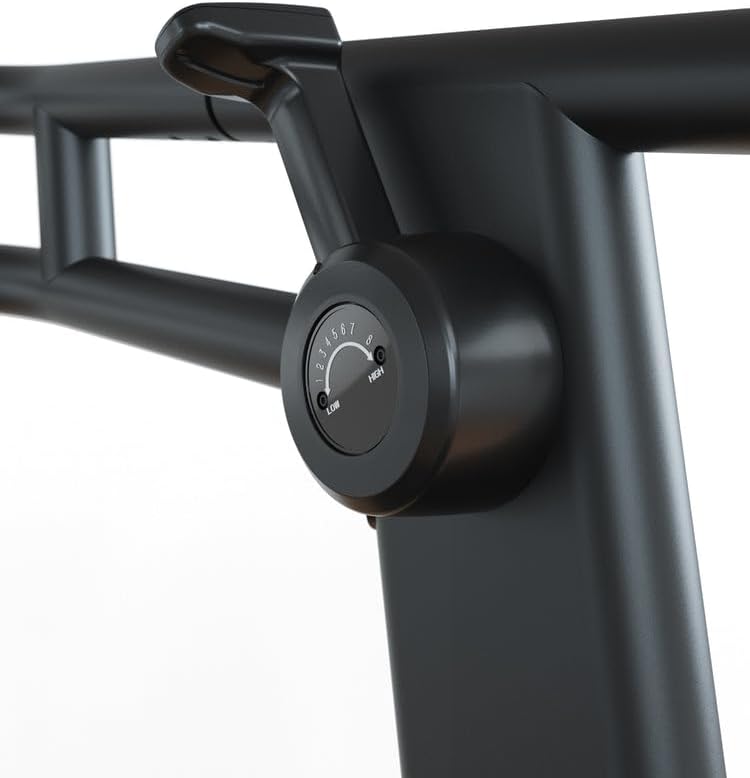
Figure 5: Resistance adjustment dial located on the treadmill frame.
- Locate the resistance adjustment dial on the side of the treadmill frame.
- Turn the dial to increase or decrease the magnetic resistance applied to the slats.
- Adjust resistance gradually to find your desired workout intensity.
5. Maintenance
Regular maintenance ensures the longevity and safe operation of your ATLETICA MagnaCurve Slat Treadmill.
- Cleaning: Wipe down the treadmill frame, handrails, and console with a damp cloth after each use. Avoid using abrasive cleaners or solvents.
- Slat Inspection: Periodically inspect the running slats for any signs of wear or damage. Ensure they move smoothly.
- Fastener Check: Regularly check all bolts, nuts, and screws to ensure they are tight. Tighten any loose fasteners.
- Storage: Store the treadmill in a dry, clean environment away from direct sunlight and extreme temperatures.
6. Troubleshooting
If you encounter issues with your MagnaCurve treadmill, refer to the following common troubleshooting steps:
- Treadmill not moving smoothly:
- Ensure the treadmill is on a level surface.
- Check for any obstructions under or around the slats.
- Verify that the resistance setting is not too high for your current effort.
- Console not displaying data:
- Check the console's power source (if battery-operated, replace batteries).
- Ensure all console cables are securely connected.
- Unusual noises during operation:
- Inspect the slats and frame for any loose parts or foreign objects.
- Ensure all assembly bolts are tight.
If problems persist after attempting these steps, please contact Atletica customer support.
7. Specifications
| Feature | Specification |
|---|---|
| Model Number | 555-2284 |
| Dimensions (L x W x H) | 195 cm x 95 cm x 156 cm |
| Maximum User Weight | 150 kg (330 lbs) |
| Material | Alloy Steel, Aluminum |
| Power Source | Manual (Motorless) |
| Display Type | 5-inch LCD |
| Connectivity | Bluetooth |
| Included Components | Control Console, Water Bottle Holder, Smartphone Holder, Height Adjustment |
| Assembly Required | Yes |
8. Warranty and Support
For detailed information regarding the product warranty, please consult your retailer or the official Atletica website. Warranty terms may vary by region and purchase location.
For technical support, service inquiries, or to order replacement parts, please refer to the contact information provided with your purchase or visit the official Atletica website for assistance.
9. Product Videos
No official product videos are available for embedding at this time.


