
Product Overview
The oneisall 4-in-1 Dog Grooming Kit is a versatile and efficient tool designed for comprehensive pet grooming. It combines a dog hair trimmer, paw trimmer, and nail grinder into a single rechargeable, cordless, and waterproof device. This kit is engineered for low noise operation to ensure a calm grooming experience for your pet, making it suitable for various hair types and sizes of dogs.
Key Features
- All-in-One Functionality: Replaces four tools for full-body grooming, including body coats, sensitive areas, face/ears, and nail grinding.
- Powerful Motor: Features a 7000RPM motor with 3 adjustable speeds (6000/6500/7000 RPM) for smooth cutting through various fur types.
- Extended Runtime: Equipped with a 1200mAh battery providing 2.5 hours of cordless use after a 1.5-hour USB-C charge.
- IPX7 Waterproof: Fully washable under running water for easy and hygienic cleaning.
- LED Battery Display: Clear digital display shows exact battery percentage (0-100%) for convenient power management.
Package Contents
Your oneisall 4-in-1 Dog Grooming Kit includes the following items:
- Main Grooming Device
- Standard Clipper Head
- Paw Trimmer Head
- Detailing Head (for face/ears)
- Nail Grinder Head
- Guide Combs (various sizes: 3mm, 6mm, 9mm, 12mm)
- Cleaning Brush
- Lubricating Oil
- USB-C Charging Cable

Image: All components included in the oneisall 4-in-1 Dog Grooming Kit.
Setup
Charging the Device
Before first use, fully charge the grooming device. Connect the provided USB-C charging cable to the device and a compatible USB power source (e.g., power bank, laptop, or wall adapter not exceeding 5V 1A). The LED display will show the battery percentage, indicating charging progress. A full charge typically takes about 1.5 hours and provides approximately 2.5 hours of cordless operation.

Image: The device connected via USB-C for charging, with the LED display showing battery status.
Attaching and Changing Heads
The oneisall grooming kit features interchangeable heads for different grooming tasks. To attach a head, align the head with the main body and gently push until it clicks into place. To remove a head, firmly grasp the head and pull it away from the main body. Ensure the device is turned off before changing heads.

Image: The main grooming device with its four distinct interchangeable heads.
Operating Instructions
General Operation
Press the power button to turn the device on or off. The device offers three speed settings (6000 RPM, 6500 RPM, 7000 RPM) to accommodate different grooming needs and pet sensitivities. Press the speed adjustment button to cycle through the available speeds. The current speed will be displayed on the LED screen.

Image: Demonstrating the three speed settings for various grooming tasks.
Body Grooming
Attach the standard clipper head for general body grooming. Select the appropriate guide comb (3mm, 6mm, 9mm, or 12mm) based on the desired hair length. For best results, groom in the direction of hair growth. The powerful 7000RPM motor ensures smooth and efficient cutting, even through thick coats.
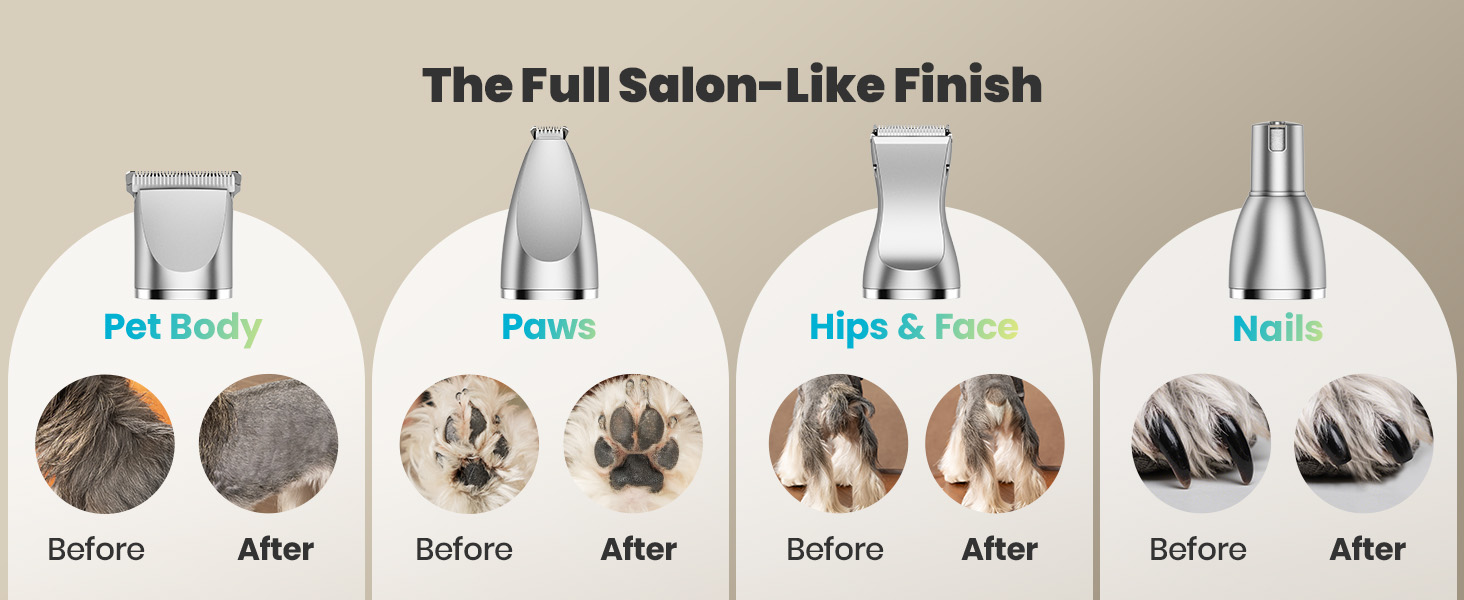
Image: Visual representation of grooming results for different areas using the kit.
Paw Trimming
Use the specialized paw trimmer head for sensitive areas like paws. Its compact size and R-shaped edge allow for precise and safe trimming around paw pads and between toes. This helps prevent matting and keeps paws clean.
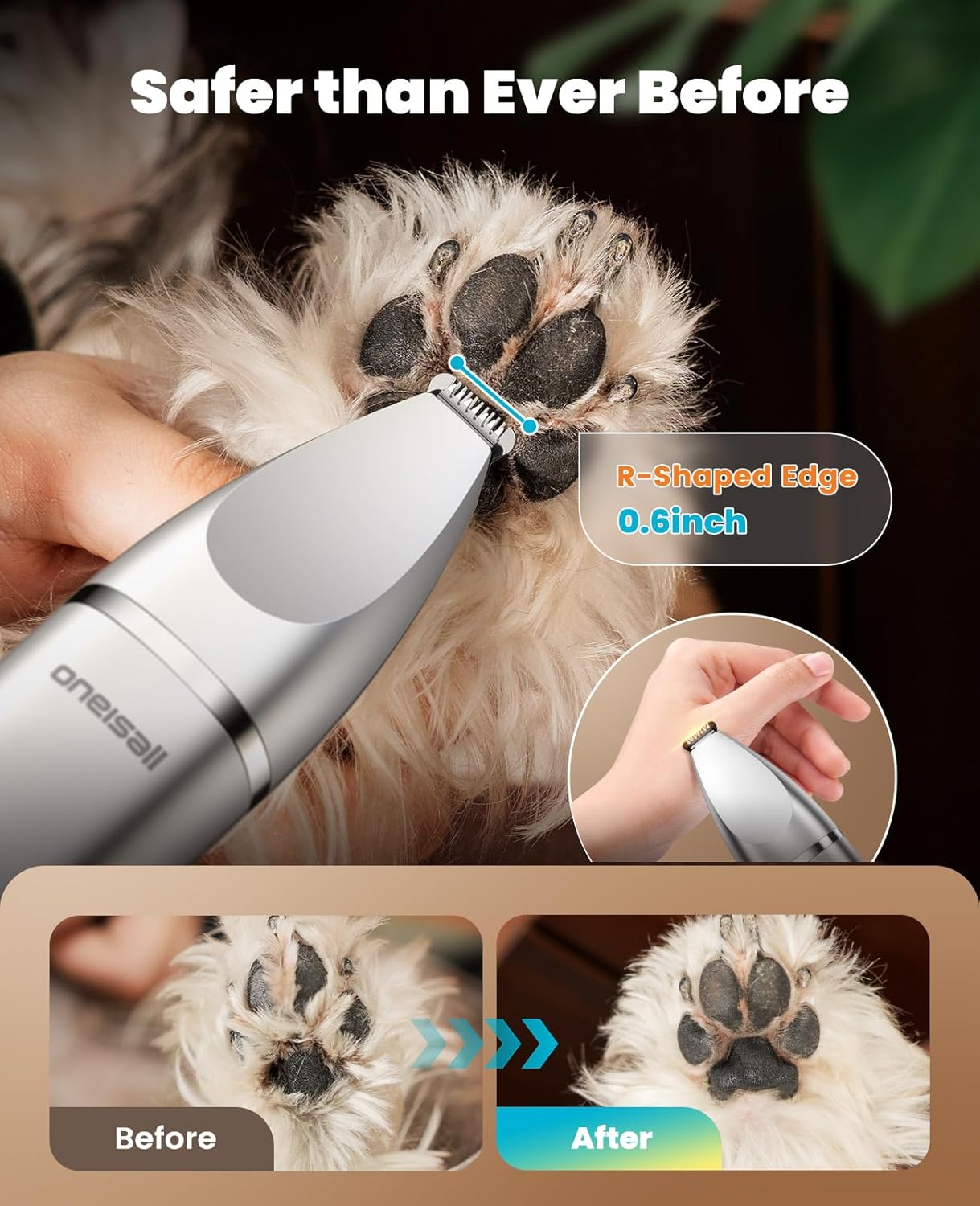
Image: The paw trimmer in action, demonstrating its safe and effective design.
Face and Ear Detailing
For delicate areas such as the face and ears, attach the detailing head. Its smaller size provides excellent control for precise trimming around the eyes, mouth, and ears, ensuring a neat and tidy appearance.
Nail Grinding
Replace the trimming head with the nail grinder head for safe and gentle nail care. The grinder features different size openings (Small, Medium, Large) to accommodate various nail sizes. Introduce your pet to the grinder gradually and grind nails in short bursts to avoid overheating and discomfort.

Image: The nail grinder in use, highlighting its adjustable grinding ports.
Low Noise Operation
The oneisall grooming kit is designed to operate at a low noise level (below 49dB). This significantly reduces stress and anxiety for pets during grooming sessions, making the experience more comfortable for both the pet and the owner.

Image: Visual comparison of the device's low noise output.
Maintenance
Care and Cleaning
Thanks to its IPX7 waterproof rating, the oneisall grooming device can be easily cleaned by rinsing it directly under running water. After each use, remove any accumulated hair from the blades and rinse the heads thoroughly. For optimal performance and longevity, apply a few drops of the provided lubricating oil to the blades after cleaning and drying. This helps maintain blade sharpness and smooth operation.

Image: The device being cleaned under running water.
Troubleshooting
Common Issues
- Device not turning on or charging: Ensure the USB-C cable is securely connected to both the device and the power source. Check the LED battery display for charge level. If the battery is completely depleted, it may take a few minutes for the display to activate.
- Poor cutting performance or pulling hair: This often indicates that the blades are clogged with hair or require lubrication. Turn off the device, remove the head, clean out any trapped hair with the brush, and apply a few drops of lubricating oil to the blades. Ensure the pet's fur is clean and untangled before grooming.
- Excessive noise or vibration: Verify that the attached head is securely clicked into place. If the issue persists after reattaching, ensure the blades are clean and lubricated.
Specifications
| Feature | Detail |
|---|---|
| Product Dimensions | 6.6 x 1.5 x 1.5 inches |
| Item Model Number | FC08 |
| Item Weight | 6 ounces |
| Batteries | 1 A battery required (included) |
| Manufacturer | oneisall |
| Color | Silver |
| Hair Type Compatibility | All |
| Recommended Uses | Body, Ear, Face, Feet, Legs, Nail, Paw |

Image: Detailed product dimensions and specifications.
Warranty and Support
For any questions regarding product warranty, technical support, or service, please contact oneisall customer support directly. Refer to the contact information provided in your product packaging or visit the official oneisall website for assistance.