
COLBOR CF5
COLBOR CF5 Portable Fog Machine User Manual
Model: CF5
1. Introduction
The COLBOR CF5 Portable Fog Machine is a compact and powerful device designed to produce atmospheric fog effects for various applications, including photography, film shoots, stage performances, parties, and events. Featuring a 40-watt output and a 12 ml oil chamber, it delivers significant smoke volume with precise control over density and flow. Its portable design, adjustable body, and remote control functionality offer versatility and ease of use.

Image: The COLBOR CineFlare CF5 Portable Fog Machine, highlighting its compact design and branding, with a subtle smoke effect in the background.
2. Safety Information
Please read and understand all safety instructions before operating the COLBOR CF5 Fog Machine. Failure to follow these instructions may result in injury or damage to the device.
- Use Approved Fog Liquid Only: The CF5 uses food-grade plant glycerin, which is colorless and odorless. Do not use any other liquids, as this may damage the machine or produce harmful fumes.
- Ventilation: Ensure adequate ventilation when operating the fog machine, especially in enclosed spaces.
- Temperature Control: The device features an intelligent temperature control sensor to prevent overheating. Do not obstruct air vents.
- Avoid Direct Contact: Do not touch the nozzle or emitted fog directly, as it may be hot.
- Keep Out of Reach of Children: This device is not a toy. Store it safely away from children and pets.
- Power Source: Use only the specified charging cable and power adapter.
- Storage: Store the fog machine and liquid in a cool, dry place, away from direct sunlight and extreme temperatures.
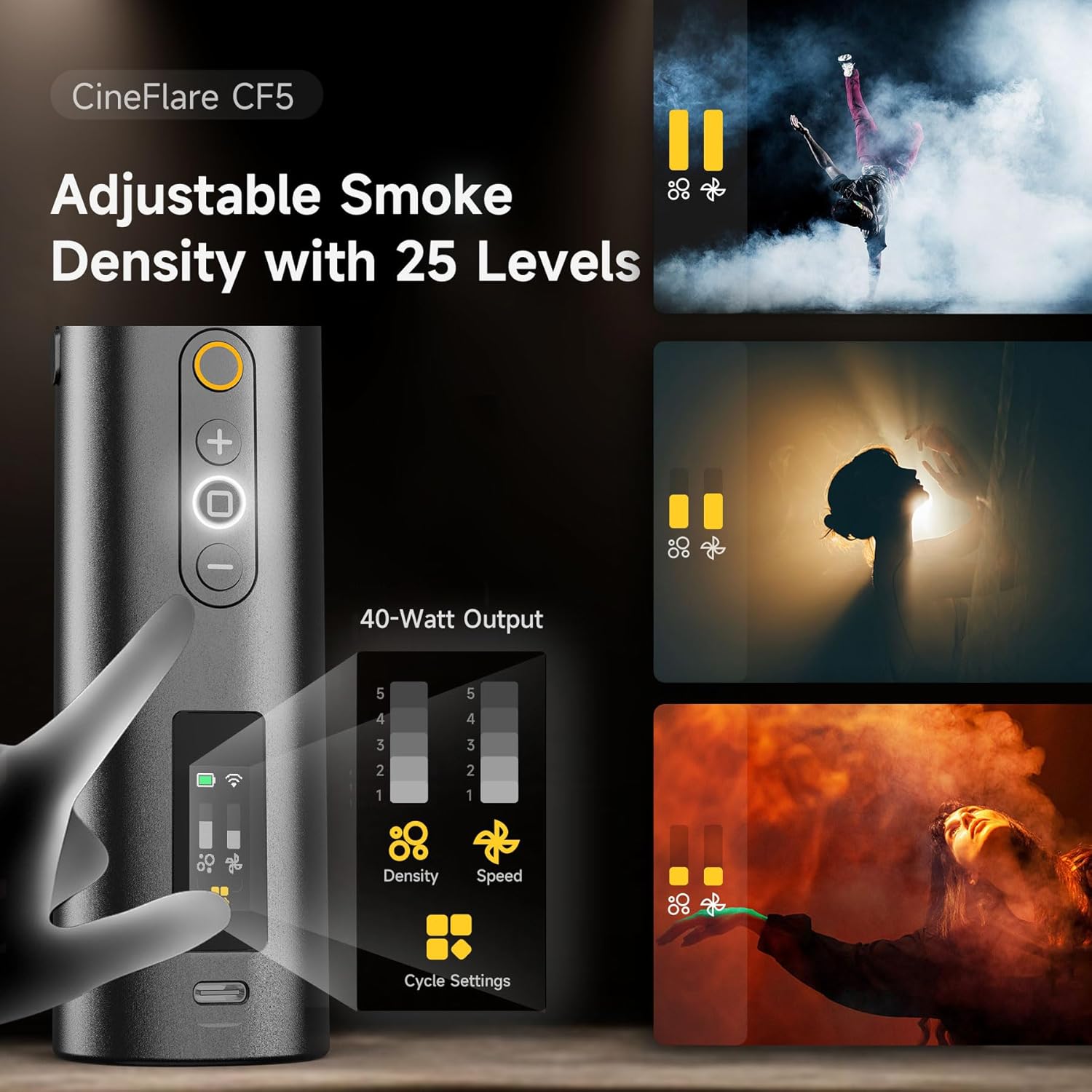
Image: The COLBOR CF5 Fog Machine demonstrating its built-in magnetic RGB light with 360-degree color ring adjustments and 3-level fan speed adjustment, crucial for safe and controlled operation.
3. Package Contents
Verify that all items are present in your COLBOR CF5 package:
- COLBOR CF5 Portable Fog Machine
- Wireless Remote Control
- Flexible Tube
- Nozzle Cover
- Various Adapters/Nozzles
- Bottle of Fog Liquid (Food-grade plant glycerin)
- USB Charging Cable
- Custom Carrying Case

Image: The COLBOR CF5 Portable Fog Machine displayed with its full set of accessories, including the remote control, various nozzles, flexible tube, and carrying case.
4. Product Overview
Familiarize yourself with the main components of the COLBOR CF5 Fog Machine:
- Main Unit: Contains the heating element, oil chamber, battery, and control panel.
- Adjustable Body: The main unit can be adjusted up to 60 degrees for precise smoke direction.
- Control Panel: Features buttons for power, density adjustment, fan speed, and cycle settings.
- Nozzle/Output Port: Where fog is emitted. Magnetic attachment for accessories.
- Magnetic RGB Light: Integrated light ring for adding color to fog effects.
- Magnetic Fan: Built-in fan with adjustable speed for shaping smoke flow.
- Oil Chamber: 12 ml capacity for fog liquid.
- USB-C Port: For charging the device.

Image: The COLBOR CF5 Fog Machine demonstrating its foldable and flexible body, which allows for a 60-degree angle adjustment to precisely direct smoke flow for various applications.
5. Setup
Follow these steps to set up your COLBOR CF5 Fog Machine for first use:
- Charge the Device: Before initial use, fully charge the CF5 using the provided USB charging cable. The charging indicator will show progress.
- Fill the Oil Chamber: Locate the oil chamber port. Carefully pour the food-grade fog liquid into the 12 ml chamber. Avoid overfilling.
- Attach Accessories: Depending on your desired effect, attach the appropriate nozzle, flexible tube, or nozzle cover to the magnetic output port. Ensure it is securely seated.
- Power On: Press and hold the power button on the control panel to turn on the device.
Image: A detailed view of the external accessories for the COLBOR CF5, including various adapters, a flexible tube for 360-degree smoke dispersion, and a nozzle cover, all designed for broader smoke control.
6. Operating Instructions
The COLBOR CF5 offers versatile control options for various fog effects.
6.1. Basic Operation
- Power On/Off: Press and hold the power button on the device or the remote control.
- Smoke Emission: Once powered on, press the dedicated smoke button to emit fog.
6.2. Adjusting Smoke Density and Fan Speed
The CF5 features 25 levels of smoke density and 3 levels of fan speed for precise control.
- Smoke Density: Use the '+' and '-' buttons on the control panel or remote to cycle through 25 density levels. Higher levels produce thicker fog.
- Fan Speed: Use the fan speed button to adjust the internal fan's intensity (3 settings). This influences how quickly and widely the fog disperses.

Image: The control panel of the COLBOR CF5, illustrating the 25 levels of adjustable smoke density and options for continuous smoke duration, interval timing, and number of smoke bursts.
6.3. Using the Remote Control
The included remote control allows wireless operation up to 10 meters, providing greater flexibility during use.
- Pairing: The remote is typically pre-paired. If not, refer to the full manual for pairing instructions.
- Functions: The remote mirrors the main control panel functions, allowing you to adjust smoke density, fan speed, and trigger smoke emission remotely.
6.4. RGB Light Function
The built-in magnetic RGB light offers 360-degree color ring adjustments to enhance your fog effects with vibrant hues.
- Activation: Press the light button on the device or remote to cycle through color options or turn off the light.
- Color Selection: Adjust colors to match your creative needs for photography, events, or stage lighting.
6.5. Advanced Cycle Settings
The CF5 supports custom settings for continuous smoke duration, interval timing, and the number of smoke bursts.
- Accessing Settings: Refer to the device's display and control panel for navigating these advanced options.
- Customization: Set specific durations for continuous fog, define intervals between bursts, and specify the number of bursts for automated effects.
7. Maintenance
Proper maintenance ensures the longevity and optimal performance of your COLBOR CF5 Fog Machine.
- Cleaning: After each use, especially if using different types of fog liquid (though only food-grade glycerin is recommended), run the machine with a small amount of distilled water to clear any residue.
- Exterior Cleaning: Wipe the exterior with a soft, dry cloth. Do not use abrasive cleaners or immerse the device in water.
- Storage: When not in use, store the CF5 in its custom carrying case in a cool, dry place. Ensure the oil chamber is empty or securely sealed to prevent leaks.
- Battery Care: For long-term storage, charge the battery to approximately 50% to prolong its lifespan. Recharge every few months if not in use.
8. Troubleshooting
If you encounter issues with your COLBOR CF5, refer to the following common problems and solutions:
| Problem | Possible Cause | Solution |
|---|---|---|
| No smoke emission | Oil chamber empty; Device not heated; Blocked nozzle. | Refill oil chamber; Allow device to heat up (indicator will show readiness); Check and clear nozzle. |
| Weak smoke output | Low smoke density setting; Low battery; Insufficient liquid. | Increase smoke density setting; Recharge device; Ensure sufficient liquid in chamber. |
| Remote control not working | Remote battery low/dead; Remote not paired; Obstruction. | Replace remote battery; Re-pair remote (refer to full manual); Ensure clear line of sight to device. |
| Device overheating | Air vents obstructed; Continuous prolonged use. | Ensure air vents are clear; Allow device to cool down between prolonged uses. |
If the problem persists after attempting these solutions, please contact COLBOR customer support for further assistance.
9. Specifications
- Model: CF5
- Output Power: 40 Watts
- Oil Chamber Capacity: 12 ml
- Smoke Density Levels: 25
- Fan Speed Settings: 3
- Remote Control Range: Up to 10 meters
- Battery Type: 1 Lithium Ion battery (included)
- Item Weight: 2 pounds
- Package Dimensions: 11.59 x 5.5 x 3.7 inches
- Manufacturer: COLBOR
- First Available: December 6, 2024
10. Warranty and Support
COLBOR products are manufactured to high-quality standards. For warranty information or technical support, please refer to the warranty card included with your product or visit the official COLBOR website. Please have your model number (CF5) and purchase details ready when contacting support.
Related documentsCF5


Ask a question about this manual
Ask about setup, troubleshooting, compatibility, parts, safety, or missing instructions. Manuals+ will review the question and use this page’s manual context to help answer it.