
1. Introduction
Thank you for choosing the Hiswelle 8L Smart Humidifier H786. This cool mist humidifier is designed to enhance your indoor air quality by maintaining optimal humidity levels in large rooms, bedrooms, offices, and living spaces. Featuring smart app control, a remote, touch controls, and an 8-liter capacity, it offers convenience and efficient humidification. Please read this manual thoroughly before use to ensure proper operation and maintenance.

Image: The Hiswelle 8L Smart Humidifier H786 operating in a spacious room, highlighting its large room humidification capability.
2. Important Safety Instructions
- Always place the humidifier on a flat, stable surface.
- Do not immerse the base unit in water or other liquids.
- Ensure the power cord is not damaged and is placed away from heat sources or high-traffic areas.
- Unplug the humidifier before filling, cleaning, or moving it.
- Do not add essential oils directly into the water tank; use the designated aromatherapy tray only.
- The humidifier features an automatic shut-off function when water levels are low or the tank is removed, ensuring safety.
- Keep out of reach of children and pets.

Image: A visual representation of key safety and convenience features, including water shortage protection and the water level window.
3. Product Components
The Hiswelle 8L Smart Humidifier H786 package includes:
- Smart Humidifier Unit (1)
- Remote Control (1)
- User Manual (1)
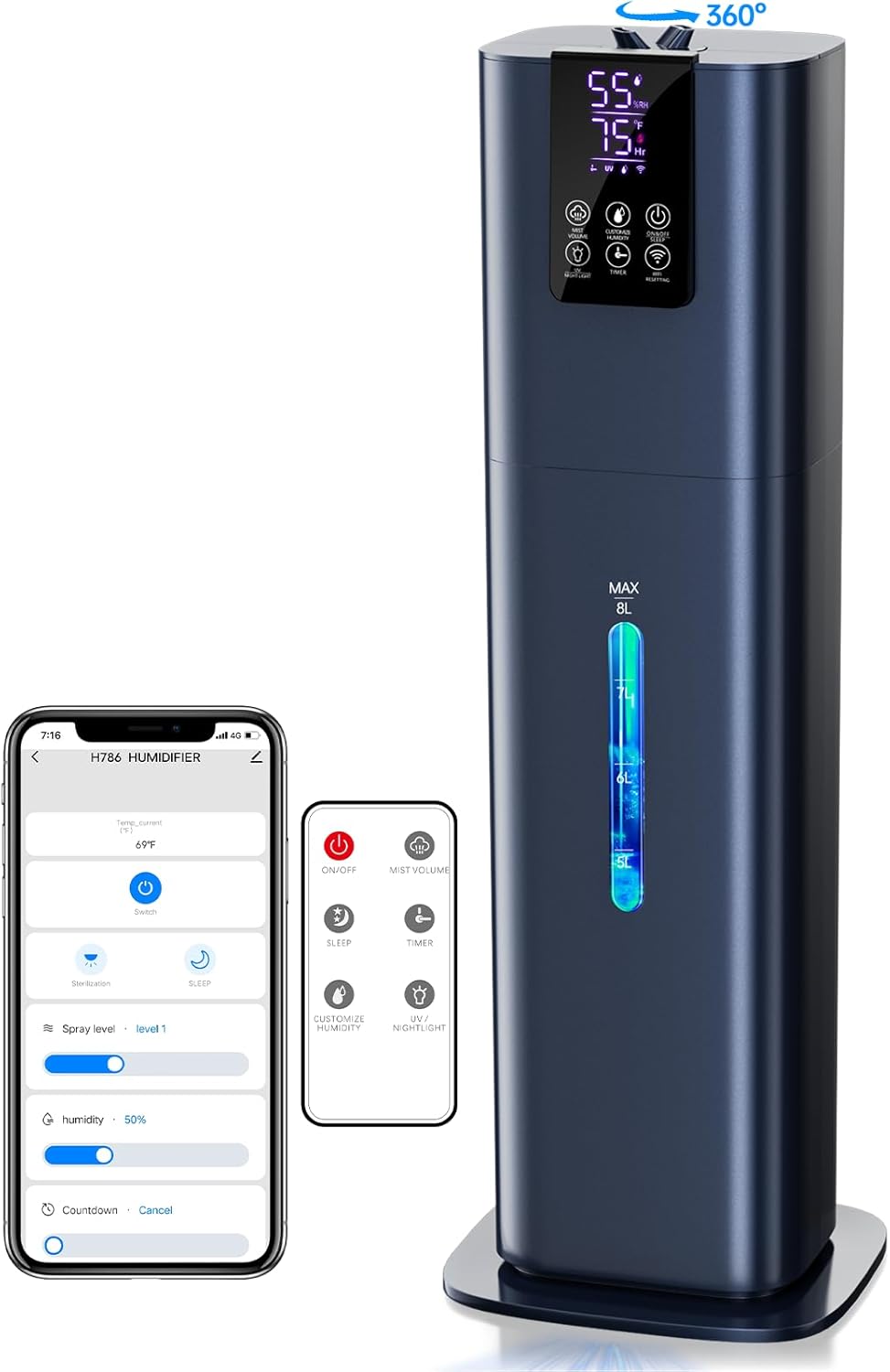
Image: The Hiswelle 8L Smart Humidifier H786, illustrating its sleek design and the included remote control and app interface.
4. Setup and First Use
4.1 Placement
Place the humidifier on a firm, flat, water-resistant surface at least 6 inches (15 cm) away from walls and furniture. Ensure the mist outlet is not obstructed.
4.2 Filling the Water Tank
- Ensure the humidifier is unplugged.
- Open the top cover of the water tank.
- Pour clean, cool tap water directly into the tank. Do not exceed the 'MAX' fill line. The 8L capacity allows for up to 40 hours of continuous operation.
- Close the top cover securely.

Image: Illustrates the simple top-fill design, making refilling convenient.
The clear water level window on the front allows you to monitor the water level easily. It also features a night light to illuminate the water level in the dark.

Image: A detailed view of the water level window, indicating the current water volume.
5. Connecting to the App (Tuya Smart)
The Hiswelle H786 humidifier can be controlled remotely via the Tuya Smart app. This allows for convenient management of settings from anywhere.
- Download the App: Scan the QR code in the physical user manual or search for "Tuya Smart" in the Apple App Store or Google Play Store.
- Register/Log In: Create an account or log in to your existing Tuya Smart account.
- Add Device: Follow the in-app instructions to add a new device. Ensure your smartphone is connected to a 2.4GHz Wi-Fi network during the initial pairing process. The humidifier only supports 2.4GHz Wi-Fi.
- Connect: The app will guide you through connecting the humidifier to your Wi-Fi network. Once connected, you can control the humidifier from your phone.

Image: The Hiswelle humidifier being controlled via the Tuya Smart app on a smartphone.

Image: Demonstrates the flexibility of controlling the humidifier via the app from various locations.
6. Operating the Humidifier
6.1 Control Methods
The humidifier can be operated using the touch control panel on the unit, the included remote control, or the Tuya Smart app.

Image: Remote control in use, highlighting the convenience of operating the humidifier from a distance.

Image: The touch control panel on the humidifier, displaying current settings and available functions.
6.2 Mist Modes and Humidity Settings
- Mist Levels: Choose from 3 mist volume levels to suit your preference and room size. The maximum mist output is 350ml/h, suitable for areas up to 505 square feet.
- Customized Humidity: Set your desired humidity level between 40% and 90% Relative Humidity (RH). The humidifier will automatically adjust its operation to maintain this level.

Image: Illustrates the adjustable mist output levels and the 360-degree rotating nozzle for even mist distribution.

Image: A graph demonstrating the customizable humidity range and suggested levels for different environments.
6.3 Aromatherapy Function
The humidifier includes a built-in aromatherapy function. Locate the fragrance pad on the back of the unit. Add 4-5 drops of your favorite essential oil to the pad. Do not add essential oils directly into the water tank.

Image: Instructions for using the aromatherapy function by adding essential oils to the designated tray.
6.4 Ambient Light
The humidifier features an ambient light with various colors that automatically changes in a breathing light pattern, adding to the room's atmosphere.
6.5 Timer Function
Set a timer for up to 12 hours of operation using the control panel, remote, or app. The humidifier will automatically turn off once the set time expires.
6.6 Sleep Mode
Activate sleep mode for ultra-quiet operation (as low as 35dB), ensuring a peaceful environment for rest. The display lights will dim in this mode.

Image: Illustrates the humidifier's quiet operation in a bedroom setting, with a noise comparison chart.
7. Maintenance and Cleaning
Regular cleaning is essential to prevent mineral buildup and ensure optimal performance and hygiene of your humidifier.
7.1 Daily Maintenance
- Empty and rinse the water tank daily.
- Refill with fresh, cool water.
7.2 Weekly Cleaning
- Unplug the humidifier.
- Empty any remaining water from the tank and base.
- Pour 1 cup of white vinegar into the water tank and base. Let it soak for 30 minutes to loosen mineral buildup.
- Use a soft brush or cloth to clean the inside of the tank and the ultrasonic transducer.
- Rinse all parts thoroughly with clean water until there is no vinegar smell.
- Wipe the exterior with a soft, damp cloth.
Video: Official Hiswelle guide on how to clean the H786 humidifier, demonstrating the steps for thorough maintenance.
8. Troubleshooting
| Problem | Possible Cause | Solution |
|---|---|---|
| No mist or low mist output | Low water level; mineral buildup on transducer; mist outlet blocked. | Refill water tank; clean the transducer with vinegar solution; ensure mist outlet is clear. |
| Humidifier leaks water | Overfilled water tank; tank not seated correctly; damaged tank. | Do not fill past the MAX line; ensure tank is properly aligned; contact support if damaged. |
| App connection fails | Incorrect Wi-Fi band (not 2.4GHz); incorrect password; humidifier too far from router. | Ensure 2.4GHz Wi-Fi; re-enter password; move humidifier closer to router. |
| Humidifier not turning on | No power; water tank not properly installed; safety shut-off activated. | Check power connection; ensure tank is correctly seated; refill water if low. |
| No change in room humidity | Room size too large for humidifier; doors/windows open; humidity setting too low. | Ensure humidifier is appropriate for room size; close doors/windows; increase desired humidity setting. |
9. Product Specifications
| Feature | Detail |
|---|---|
| Brand | Hiswelle |
| Model Name | H786 |
| Capacity | 8 Liters (2.1 Gallons) |
| Max Mist Output | 350 ml/h |
| Runtime | Up to 40 hours (on a single refill) |
| Coverage Area | Up to 505 square feet |
| Noise Level | Less than 35dB (in sleep mode) |
| Control Methods | App, Remote, Touch |
| Special Features | Customized Humidity (40%-90%), 3 Mist Modes, 7 Colors Ambient Light, Aromatherapy Diffuser, 12-Hour Timer, Auto Shut-Off, Low Water Indicator, Top Fill, UV Filter |
| Power Source | AC |
| Wattage | 25 watts |
| Dimensions (D x W x H) | 7.4" x 8.58" x 25" |
| Material | Plastic |
10. Warranty Information
The Hiswelle 8L Smart Humidifier H786 typically comes with a 30-day warranty from the date of purchase. Please refer to your purchase documentation for specific warranty terms and conditions. This warranty covers manufacturing defects under normal use.
11. Customer Support
For any questions, concerns, or technical assistance regarding your Hiswelle 8L Smart Humidifier H786, please contact our customer service team. Our team is committed to resolving any issues and ensuring your satisfaction.
Please refer to the contact information provided in your product packaging or on the official Hiswelle website for the most up-to-date support channels.