
qrcamule Rocker Switch
qrcamule Rocker Switch for Hampton Bay EST-534T-10 Legion Panoramic Infrared Stove User Manual
1. Introduction
This manual provides essential instructions for the safe and effective use of your qrcamule Rocker Switch, designed for compatibility with the Hampton Bay EST-534T-10 Legion Panoramic Infrared Stove. Please read this manual thoroughly before installation and operation, and retain it for future reference.
2. Safety Information
- Electrical Safety: Always disconnect power to the appliance before installing, removing, or servicing the switch. Failure to do so can result in electric shock or injury.
- Qualified Personnel: Installation and replacement should ideally be performed by a qualified technician to ensure proper wiring and safety.
- Compatibility: Ensure this rocker switch is the correct replacement part for your specific Hampton Bay EST-534T-10 stove model. Using an incompatible switch may cause malfunction or damage.
- Inspection: Before installation, inspect the switch for any visible damage. Do not install a damaged switch.
3. Product Overview
The qrcamule Rocker Switch is a replacement component for the Hampton Bay EST-534T-10 Legion Panoramic Infrared Stove. It features a red illuminated rocker for clear indication of its ON/OFF state and three electrical terminals for connection.
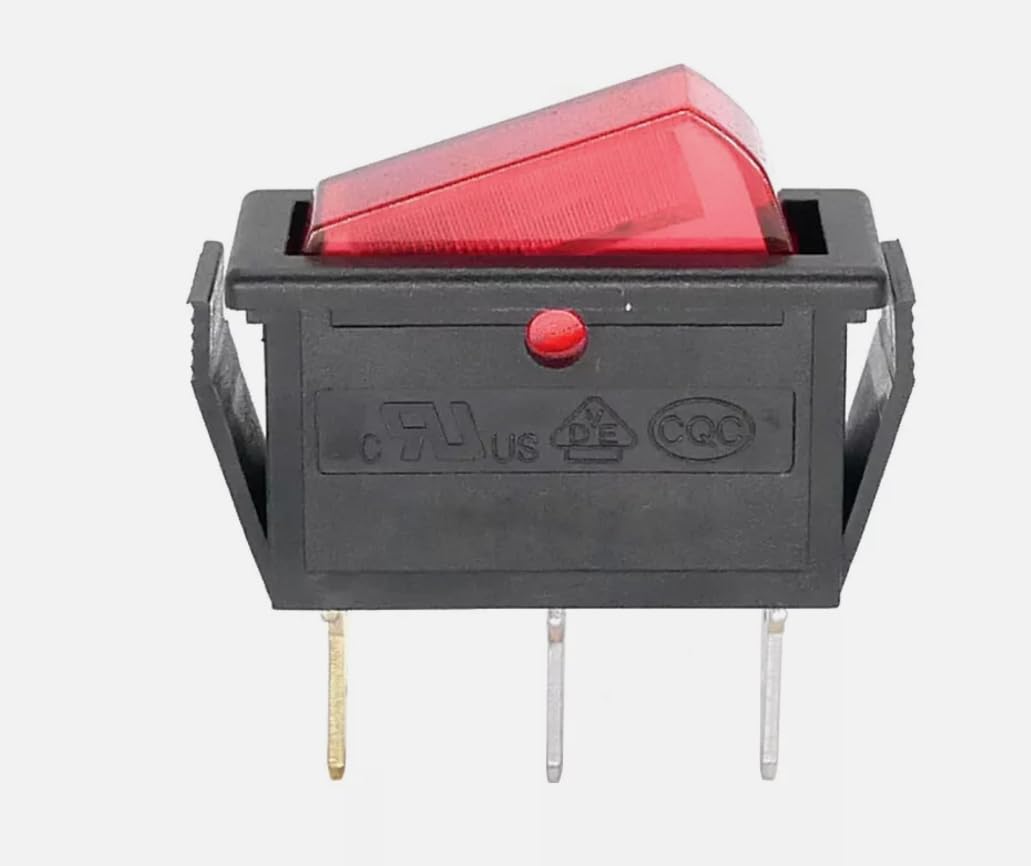
Figure 3.1: Front view of the qrcamule Rocker Switch. This image shows the red illuminated rocker button in the OFF position, housed within a black plastic body. Three metal terminals are visible at the bottom for electrical connections. Certifications like 'cULus' and 'CQC' are embossed on the side.

Figure 3.2: Rear view of the qrcamule Rocker Switch. This image displays the back of the switch, clearly showing the electrical ratings "15A 250V~" and "T85". The three terminals are numbered 1, 2, and 3, indicating their respective connection points for wiring.
4. Specifications
| Brand | qrcamule |
| Product Type | Rocker Switch |
| Compatibility | Hampton Bay EST-534T-10 Legion Panoramic Infrared Stove |
| Electrical Rating | 15A 250V~ (as shown on product) |
| Terminals | 3-pin |
| UPC | 763011448581 |
5. Setup and Installation
- Disconnect Power: Before beginning, ensure the Hampton Bay EST-534T-10 stove is completely unplugged from its power source or that the circuit breaker supplying power to the stove is switched off.
- Access the Old Switch: Carefully locate and access the existing rocker switch on your stove. This may involve removing a control panel or cover. Refer to your stove's specific service manual for detailed access instructions.
- Note Wiring Configuration: Before disconnecting any wires, take a clear photograph or draw a diagram of how the wires are connected to the old switch's terminals. This is crucial for correct re-installation.
- Remove Old Switch: Disconnect the wires from the old switch and then carefully remove the old switch from its mounting slot.
- Install New Switch: Insert the new qrcamule Rocker Switch into the mounting slot. Ensure it snaps securely into place.
- Connect Wires: Reconnect the wires to the new switch's terminals (1, 2, 3) exactly as they were connected to the old switch, using your photograph or diagram as a guide. Ensure all connections are firm and secure.
- Reassemble: Reattach any covers or panels that were removed to access the switch.
- Test Functionality: Restore power to the stove and test the new rocker switch to ensure it operates correctly (turns the stove ON/OFF and illuminates as expected).
Note: If you are unsure about any step of the installation process, it is highly recommended to consult a qualified electrician or appliance repair technician.
6. Operating Instructions
The qrcamule Rocker Switch functions as a simple ON/OFF control for your Hampton Bay EST-534T-10 Legion Panoramic Infrared Stove.
- To Turn ON: Press the rocker switch on one side (typically the side that causes the red indicator to illuminate) to activate the stove's power.
- To Turn OFF: Press the rocker switch on the opposite side to deactivate the stove's power. The red indicator light will turn off.
Refer to your Hampton Bay EST-534T-10 stove's primary user manual for specific operating procedures related to temperature settings, fan controls, and other features.
7. Maintenance
- Cleaning: If the switch surface becomes dirty, gently wipe it with a soft, dry cloth. Do not use abrasive cleaners, solvents, or excessive moisture, as these can damage the switch or cause electrical hazards.
- Inspection: Periodically inspect the switch for any signs of wear, damage, or loose connections. If any issues are observed, disconnect power and address them promptly.
- No User Serviceable Parts: The internal components of the rocker switch are not user-serviceable. Do not attempt to open or repair the switch. Replace the entire unit if it malfunctions.
8. Troubleshooting
| Problem | Possible Cause | Solution |
|---|---|---|
| Switch does not turn ON/OFF the stove. |
|
|
| Red indicator light does not illuminate. |
|
|
| Switch feels loose or wobbly. |
|
|
For issues not covered here, or if troubleshooting steps do not resolve the problem, contact a qualified technician.
9. Warranty and Support
Specific warranty information for this qrcamule Rocker Switch is not provided in this manual. Please refer to the product packaging or contact the retailer or manufacturer directly for warranty details and customer support.
For technical assistance or inquiries, please reach out to qrcamule customer service through their official channels.