Important Safety Information
Always unplug the vanity before assembly or disassembly. Be cautious of sharp edges and pinch points during assembly. Keep electrical components dry and away from heat sources. Do not exceed the weight limit of the vanity and stool. Always supervise children when using the vanity.
Product Overview
The CollaredEagle 43" W Vanity Desk is a modern makeup station designed for convenience and style. It features a large mirror with 11 adjustable LED lights, ample storage with 5 drawers, and a comfortable cushioned stool. A built-in charging station provides power for electronic devices.
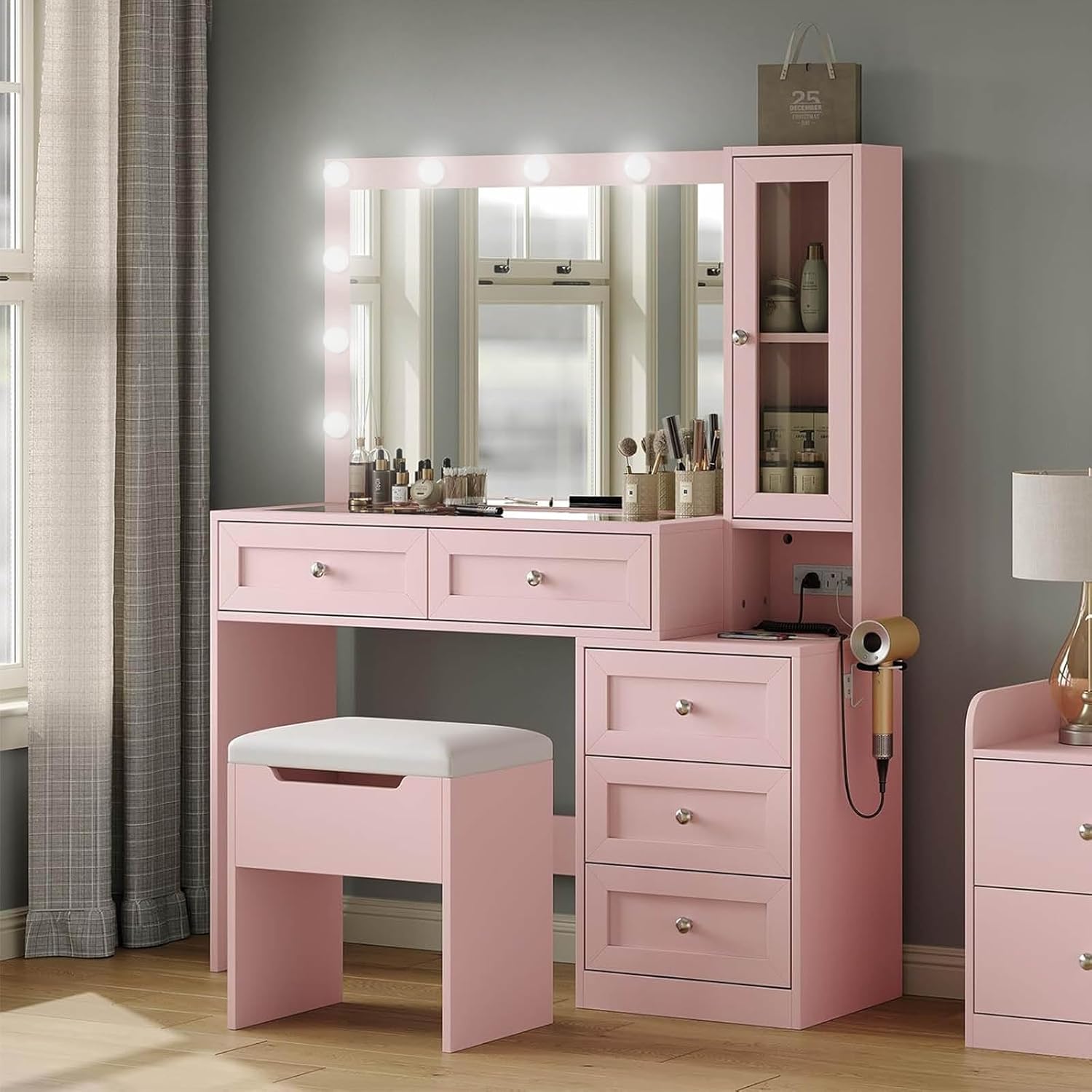
Figure 1: CollaredEagle 43" W Vanity Desk with Mirror and Stool.
Package Contents
Before assembly, verify that all components are present and undamaged. Refer to the included assembly manual for a detailed parts list. Typically, the package includes:
- Vanity Desk components (panels, hardware)
- Mirror with 11 LED light bulbs
- Cushioned Stool
- Built-in Charging Station unit
- Assembly Instructions
- Tools for assembly (usually an Allen wrench)

Figure 2: Detailed dimensions of the vanity desk and stool.
Setup & Assembly
Assembly of the vanity desk requires careful attention to the provided instructions. It is recommended to have two people for assembly, especially when handling larger components like the mirror.
- Unpack Components: Carefully remove all parts from the packaging. Lay them out on a clean, soft surface to prevent scratches.
- Identify Parts: Match each component with the parts list in the separate assembly manual.
- Assemble Frame: Follow the step-by-step diagrams to construct the main frame of the vanity desk. Ensure all screws are tightened securely but do not overtighten.
- Install Drawers: Assemble the 5 drawers according to the instructions. Pay close attention to the drawer slide orientation for smooth operation. (Note: Some users have reported issues with drawer track alignment; ensure tracks are installed correctly for proper drawer function.)
- Attach Mirror: Securely attach the mirror unit to the vanity desk. Connect the light bulb wiring as directed.
- Install Charging Station: Integrate the built-in charging station into its designated slot.
- Assemble Stool: Put together the cushioned stool.
- Final Check: Verify all connections are secure and the vanity is stable before use.

Figure 3: Overview of the vanity desk's storage capacity, including two large drawers, three small drawers, and extra side cabinets.
Operating Instructions
Mirror Lights Operation
The vanity mirror features 11 LED light bulbs with adjustable settings.
- Power On/Off: Locate the touch switch on the mirror. Tap once to turn the lights on or off.
- Change Lighting Mode: With the lights on, tap the touch switch repeatedly to cycle through the 3 color modes: Cold White, Warm White, and Warm Yellow.
- Adjust Brightness: To adjust brightness, press and hold the touch switch. The brightness will gradually increase or decrease. Release the switch when the desired brightness is reached.

Figure 4: Illustration of the 3 color lighting modes and brightness adjustment feature.
Built-in Charging Station
The vanity desk includes a convenient charging station to power your electronic devices.
- AC Outlets: Two standard 125V/25A AC outlets are provided for larger electronics like hair dryers or curling irons.
- USB Ports: One 5V/2A USB port is available for charging smartphones, tablets, and other USB-powered devices.
- Type-C Port: One 5V/2A Type-C port is included for modern devices requiring USB-C charging.
- Usage: Simply plug your device's power adapter or charging cable into the appropriate port. Ensure the vanity desk is plugged into a wall outlet for the charging station to function.

Figure 5: Detail of the integrated power strip with AC, USB, and Type-C outlets.
Maintenance
Proper care will extend the life and appearance of your vanity desk.
- Cleaning Surfaces: Wipe down all surfaces with a soft, damp cloth. For stubborn marks, use a mild, non-abrasive cleaner. Avoid harsh chemicals that may damage the finish.
- Mirror Care: Clean the mirror with a glass cleaner and a lint-free cloth. Do not spray cleaner directly onto the mirror; apply it to the cloth first.
- Drawer Maintenance: Periodically check drawer slides for smooth operation. If a drawer becomes stiff, a small amount of silicone lubricant can be applied to the slides.
- Electrical Components: Ensure the charging station and light wiring remain dry and free from dust. Do not attempt to repair electrical components yourself.
- Stool Care: Clean the cushioned stool fabric with a mild upholstery cleaner as needed.
Troubleshooting
| Problem | Possible Cause | Solution |
|---|---|---|
| Lights do not turn on. |
|
|
| Charging station not working. |
|
|
| Drawers do not close smoothly or are crooked. |
|
|
| Stool feels unstable. |
|
|
Specifications
| Feature | Detail |
|---|---|
| Brand | CollaredEagle |
| Model Number | VD001-GL-PK-CE5 |
| Product Dimensions (D x W x H) | 15" x 43.3" x 55.1" |
| Frame Material | Engineered Wood |
| Furniture Finish | Pink |
| Number of Drawers | 5 |
| Mirror Lights | 11 LED bulbs, 3 color modes, adjustable brightness |
| Charging Station | 2 AC Outlets (125V/25A), 1 USB Port (5V/2A), 1 Type-C Port (5V/2A) |
| Stool Dimensions (L x W x H) | 18.1" x 11.8" x 15.7" |
| Seat Material Type | Plastic (referring to the stool frame, cushion is sponge fabric) |
Warranty & Support
For warranty information or technical support, please refer to the documentation included with your purchase or contact CollaredEagle customer service. Keep your purchase receipt for warranty claims.
For further assistance, you may visit the CollaredEagle Store on Amazon.