Introduction
This manual provides comprehensive instructions for the setup, operation, and maintenance of your Alcatel Epure Design DECT 6.0 Cordless Phone. Please read this manual carefully before using your phone to ensure proper functionality and to familiarize yourself with all features.
Package Contents
Verify that your package contains the following items:
- 1x Handset
- 1x Base Station
- 1x Power Adapter
- 1x AAA Rechargeable Battery (pre-installed or separate)
- 1x Telephone Line Cord

Image: The Alcatel Epure cordless phone, showing the white base station with its integrated display and control buttons, and the matching white handset resting on top.
Setup
1. Battery Installation
- Locate the battery compartment on the back of the handset.
- Open the battery compartment cover.
- Insert the provided AAA rechargeable battery, observing the correct polarity (+ and -).
- Close the battery compartment cover securely.
2. Base Station Connection
- Connect one end of the telephone line cord to the LINE port on the base station.
- Connect the other end of the telephone line cord to your telephone wall jack.
- Connect the power adapter to the POWER port on the base station.
- Plug the power adapter into a standard electrical outlet.
- Place the handset on the base station to charge. The handset display will indicate charging. Allow at least 15 hours for the initial charge.
3. Handset Registration
Your handset is typically pre-registered to the base station. If the handset displays "Unregistered" or you are adding an additional handset, follow these steps:
- On the base station, press and hold the PAGE button (or registration button, refer to base diagram) for approximately 5 seconds until the registration indicator light flashes.
- On the handset, navigate to the MENU, then select REGISTRATION or REGISTER HANDSET.
- Enter the system PIN (default is usually 0000).
- The handset will display a confirmation message upon successful registration.
Operating Instructions
1. Basic Call Functions
- Making a Call: Press the CALL button, enter the number, then press CALL again. Alternatively, enter the number first, then press CALL.
- Answering a Call: Press the CALL button or any key (if auto-answer is enabled).
- Ending a Call: Press the END CALL button or place the handset back on the base.
- Adjusting Volume: During a call, use the UP/DOWN navigation keys to adjust the earpiece volume.
2. Answering Machine
The integrated answering machine has a recording capacity of approximately 30 minutes.
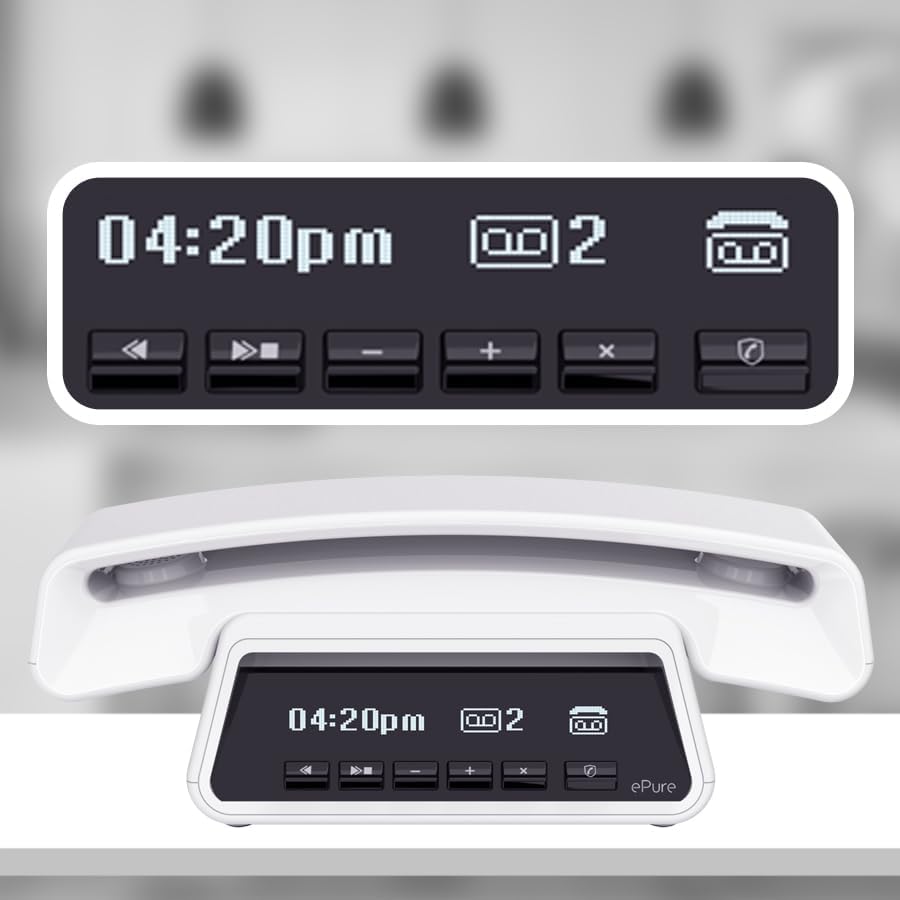
Image: A close-up of the base unit's display, showing the time (04:20pm), an icon indicating 2 new messages, and the answering machine control buttons below (play, skip, volume, delete, call block).
- Playing Messages (Base Unit): Press the PLAY button on the base station. Use the SKIP buttons to navigate between messages and VOLUME buttons to adjust playback volume.
- Playing Messages (Handset): Access the ANSWERING MACHINE menu on the handset to listen to messages. You can select specific messages from the list.
- Deleting Messages: Press the DELETE button on the base station during message playback, or use the handset menu.
- Setting Up Greeting: Refer to the handset menu for options to record a personalized outgoing message.
3. Call Blocking
The phone offers manual and automatic call blocking features to manage unwanted calls.

Image: A close-up of the base unit, highlighting the dedicated call blocking button with a shield icon, positioned next to the answering machine controls.
- Manual Call Blocking: During an incoming call or after a call from an unwanted number, press the dedicated CALL BLOCK button on the base station. You can store up to 100 numbers in the block list.
- Automatic Call Blocking: Configure settings in the handset menu to automatically block anonymous calls or calls from specific categories.
4. Directory Management
Store up to 100 names and numbers in the phone's directory.

Image: A close-up of the handset's display, showing a contact list with names like "CLAUDIA", "RICHARD", and "EMMA". Icons for signal strength, new messages, and battery are also visible.
- Adding a Contact: Navigate to the DIRECTORY menu on the handset, select ADD NEW, and enter the name and number.
- VIP Contacts: Assign distinctive ring tones to important contacts by marking them as VIP in the directory settings.
- Directory Synchronization: If multiple handsets are registered, the directory automatically copies to all registered handsets.
5. Hands-free Function
Engage the hands-free speakerphone for convenient conversations.

Image: The Alcatel Epure handset shown with a speakerphone icon, indicating its hands-free capability. Arrows suggest the handset can be rotated for comfortable use.
- Activating Hands-free: During a call, press the SPEAKER button on the handset to activate the speakerphone. Press it again to switch back to the earpiece.
- Adjusting Speaker Volume: Use the UP/DOWN navigation keys on the handset to adjust the speaker volume.
Maintenance
- Cleaning: Use a soft, damp cloth to clean the phone's surfaces. Avoid abrasive cleaners or solvents.
- Battery Care: Use only the specified rechargeable AAA battery. Do not dispose of batteries in fire. Replace batteries when talk time significantly decreases.
- Environmental Conditions: Avoid exposing the phone to direct sunlight, extreme temperatures, or high humidity.
Troubleshooting
| Problem | Possible Solution |
|---|---|
| No dial tone |
|
| Handset displays "Unregistered" |
|
| Poor call quality / Static |
|
| Answering machine not recording |
|
Specifications
- Model: Epure
- Telephone Type: Cordless DECT 6.0
- Answering System: Digital, approx. 30 minutes recording time
- Directory Capacity: 100 names and numbers
- Call Blocking Capacity: Up to 100 numbers
- Display: High-definition, white backlit, high contrast
- Power Source: Battery Powered (1x AAA rechargeable battery included)
- Material: Plastic
- Product Dimensions: 18.43 x 8.9 x 4.96 inches
- Item Weight: 1.15 pounds
- Compatible Devices: DECT Base Stations
- Talk Time: Up to 10 hours (approximate, with ECO Mode)

Image: The Alcatel Epure handset, displaying "16:03" on its screen, accompanied by icons indicating "10 hours talk time" and "ECO MODE" for energy efficiency.
Warranty and Support
For warranty information and technical support, please refer to the warranty card included in your product packaging or visit the official Alcatel support website. Keep your proof of purchase for warranty claims.
For further assistance, you may contact Alcatel customer service through their official channels.