
Airversa ANW
Airversa Scenta XL Waterless Essential Oil Diffuser Instruction Manual
Model: ANW
1. Setup
1.1 Unboxing and Package Contents
Upon opening the package, verify that all components are present. The Airversa Scenta XL diffuser package typically includes:
- Airversa Scenta XL Diffuser Unit
- 400mL Oil Bottle and Nozzle Set
- 2m Power Adapter
- Keys (for latch lock)
- Bottle Cap
- Wall Mount Hardware (screws, anchors)
- User Manual (this document)

Figure 1: Airversa Scenta XL Diffuser and included accessories.
1.2 Choosing a Location
The Airversa Scenta XL diffuser offers versatile placement options:
- Tabletop Placement: Place the unit on a flat, stable surface in your desired area. Ensure it is away from direct sunlight, heat sources, and out of reach of children and pets.
- Wall-Mounting: For optimal fragrance dispersal and space-saving, the diffuser can be wall-mounted. Use the provided wall mount hardware. Ensure the mounting surface is suitable and stable.

Figure 2: Examples of tabletop and wall-mounted placement.
1.3 Filling the Oil Bottle
- Unlock the latch lock on the top of the diffuser and open the front cover.
- Carefully remove the 400mL oil bottle and nozzle set.
- Unscrew the cap from the oil bottle.
- Fill the bottle with your preferred essential oil. For best results, use Airversa-branded premium essential oils. Avoid thick carrier oils or cheap fragrance blends as they may affect performance.
- Screw the cap back onto the oil bottle securely.
- Reinsert the oil bottle and nozzle set into the diffuser, ensuring it is properly seated.
- Close the front cover and secure the latch lock.
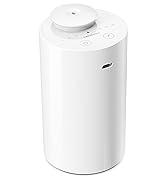
Figure 3: Internal components of the diffuser, illustrating the oil bottle and nozzle.
1.4 Powering On and App Connection
- Connect the 2m power adapter to the diffuser and plug it into a suitable power outlet.
- Download the "Sleekpoint" app from the Apple App Store (iOS) or Google Play Store (Android OS).
- Open the Sleekpoint app and follow the on-screen instructions to connect to your Airversa Scenta XL diffuser via Bluetooth. Ensure you are within 20 feet of the device for a stable connection.

Figure 4: The Airversa Scenta XL Diffuser and its accompanying Sleekpoint mobile application.
2. Operating Your Diffuser
2.1 Scent Diffusion Technology
The Airversa Scenta XL utilizes advanced cold diffusion technology. This method converts essential oils into nano-vapor particles without the use of heat or water. This preserves the oil's molecular structure, maintaining its therapeutic properties and ensuring a pure, lasting scent.

Figure 5: The diffuser's cold diffusion technology provides wide coverage.
2.2 App Controls and Scheduling
Manage your diffuser settings conveniently through the Sleekpoint app:
- Power ON/OFF: Easily turn the device or booster fan on/off directly from the app.
- Scheduling: Set up to 5 schedules/diffusing scenes for different times and days to meet your needs for various occasions.
- Diffusing Time: Adjust the duration of each scent burst from 3 seconds to 5 minutes.
- Pause Time: Set the interval between scent bursts from 5 seconds to 19 minutes.

Figure 6: Automate your fragrance with custom schedules in the Sleekpoint app.
2.3 Coverage Area
The Airversa Scenta XL is designed to cover large spaces, up to 2000 sq. ft. (180 m²), making it suitable for homes, offices, hotels, spas, retail spaces, cafes, and libraries.
3. Maintenance
3.1 Cleaning Instructions
Regular cleaning ensures optimal performance and longevity of your diffuser. It is strongly recommended to clean the scent diffuser once a month:
- Turn off and unplug the diffuser.
- Remove the oil bottle and nozzle set.
- Empty any remaining essential oil from the bottle.
- Fill the oil bottle with 90% or greater alcohol (isopropyl alcohol is recommended).
- Reinsert the bottle with alcohol into the diffuser.
- Run the diffuser for 10-15 minutes to clean the internal components.
- Remove the alcohol, rinse the bottle with water, and allow it to air dry completely before refilling with essential oil.
3.2 Oil Refill Frequency
The diffuser includes an ultra-large 400 mL (13.5 fl. oz) oil bottle, which means less frequent refills compared to smaller diffusers. The actual refill frequency will depend on your usage settings (diffusing time and pause time) and the type of essential oil used.
4. Troubleshooting
4.1 Common Issues and Solutions
| Issue | Possible Cause | Solution |
|---|---|---|
| No scent dispersal / Diffuser not spraying | Oil bottle empty or improperly installed; Nozzle clogged; Incorrect app settings. | Check oil level and ensure bottle is correctly seated. Perform monthly cleaning to clear nozzle. Verify diffusing time and schedule in the Sleekpoint app. |
| Bluetooth disconnection / App not connecting | Device out of Bluetooth range; App glitch. | Ensure you are within 20 feet of the diffuser. Close and reopen the Sleekpoint app. If issues persist, restart the diffuser by unplugging and replugging it. |
| Red light indicator is on, but no blue light/spray. | The red light indicates power. The blue light (or lack thereof) might indicate a specific operational status or a need for app interaction. | Ensure the diffuser is programmed via the app to spray. The red light indicates power, while the actual spray function is controlled by the app's schedule. If the app is not active, the diffuser may not spray even if powered on. |
| Weak scent output | Low oil level; Diffuser settings too low; Oil quality. | Refill oil bottle. Increase diffusing time or frequency in the app. Consider using higher quality or more concentrated essential oils. |
5. Specifications
| Feature | Detail |
|---|---|
| Brand | Airversa |
| Model Name | Scenta XL (ANW) |
| Color | 01white |
| Capacity | 400 Milliliters (13.5 fl. oz) |
| Coverage Area | Up to 2000 sq. ft. (180 m²) |
| Power Source | Corded Electric |
| Material | Plastic |
| Product Dimensions | 3.23"L x 7.81"W x 6.3"H |
| Item Weight | 1.63 Pounds |
| Special Features | Waterless Technology, Cold Diffusion, Custom Scheduling via App, Wall-Mounted or Tabletop Options, Built-in Booster Fan, Key-Lock Feature |
6. Warranty and Support
6.1 Product Support
For any operational questions, troubleshooting assistance, or technical support, please refer to the Sleekpoint app's help section or visit the official Airversa website. The Sleekpoint app provides comprehensive controls and may offer additional support resources.
6.2 Warranty Information
Please refer to the product packaging or the official Airversa website for detailed warranty information. Keep your proof of purchase for warranty claims.
Related documentsANW

Ask a question about this manual
Ask about setup, troubleshooting, compatibility, parts, safety, or missing instructions. Manuals+ will review the question and use this page’s manual context to help answer it.