
1. Introduction
Thank you for choosing the TRIUMPHKEY C69 Minimalist Desk with Shelves. This manual provides essential information for the safe assembly, operation, and maintenance of your new desk. Please read these instructions carefully before assembly and retain them for future reference.
2. Product Overview
The TRIUMPHKEY C69 Minimalist Desk is designed for functionality and modern aesthetics. It features a sturdy metal frame and a durable wood board, complemented by a 3-tier storage shelf for optimal organization. Its compact yet spacious design makes it suitable for various environments, including home offices, studies, and bedrooms.

Image: The TRIUMPHKEY C69 Minimalist Desk with its integrated 3-tier shelving unit, shown in a modern room setting.
3. Package Contents
Before beginning assembly, please ensure all parts are present and undamaged. If any parts are missing or damaged, please contact customer service.
- Desk Frame Components (Metal)
- Wood Board Panels (Desktop and Shelves)
- Assembly Hardware (Screws, bolts, nuts, etc.)
- Assembly Tools (e.g., Allen wrench)
- Illustrated Instruction Manual
4. Safety Instructions
- Read all instructions: Ensure you understand all assembly steps before proceeding.
- Use appropriate tools: Only use the tools provided or recommended for assembly.
- Assemble on a soft surface: To prevent scratches, assemble the desk on a carpet or soft cloth.
- Do not overtighten: Tighten screws firmly but do not overtighten to avoid damaging components.
- Weight limits: Do not exceed the recommended weight capacity for the desktop or shelves.
- Stability: Ensure the desk is placed on a level surface to prevent wobbling.
- Child safety: Keep small parts and packaging materials away from children.
- Rounded Corners: The desk features rounded corners to minimize injury from accidental bumps.

Image: Detail of the desk's rounded corners, designed for safety.
5. Setup and Assembly Instructions
The TRIUMPHKEY C69 desk is designed for easy self-assembly. Please refer to the detailed illustrated instructions included in your package for step-by-step guidance. Below is a general overview of the assembly process:
- Unpack and Identify Parts: Carefully remove all components from the packaging. Lay them out and compare them against the parts list in your instruction manual to ensure everything is present.
- Assemble the Metal Frame: Begin by connecting the main metal frame components. The desk features a sturdy metal frame with Y-shaped supports for enhanced stability.
- Attach the Desktop: Secure the main desktop panel to the assembled metal frame using the provided hardware.
- Install the Shelves: Attach the 3-tier storage shelves to the upper frame structure. Ensure they are level and securely fastened.
- Final Tightening: Once all components are in place, carefully go back and tighten all screws and bolts to ensure the desk is stable and secure.
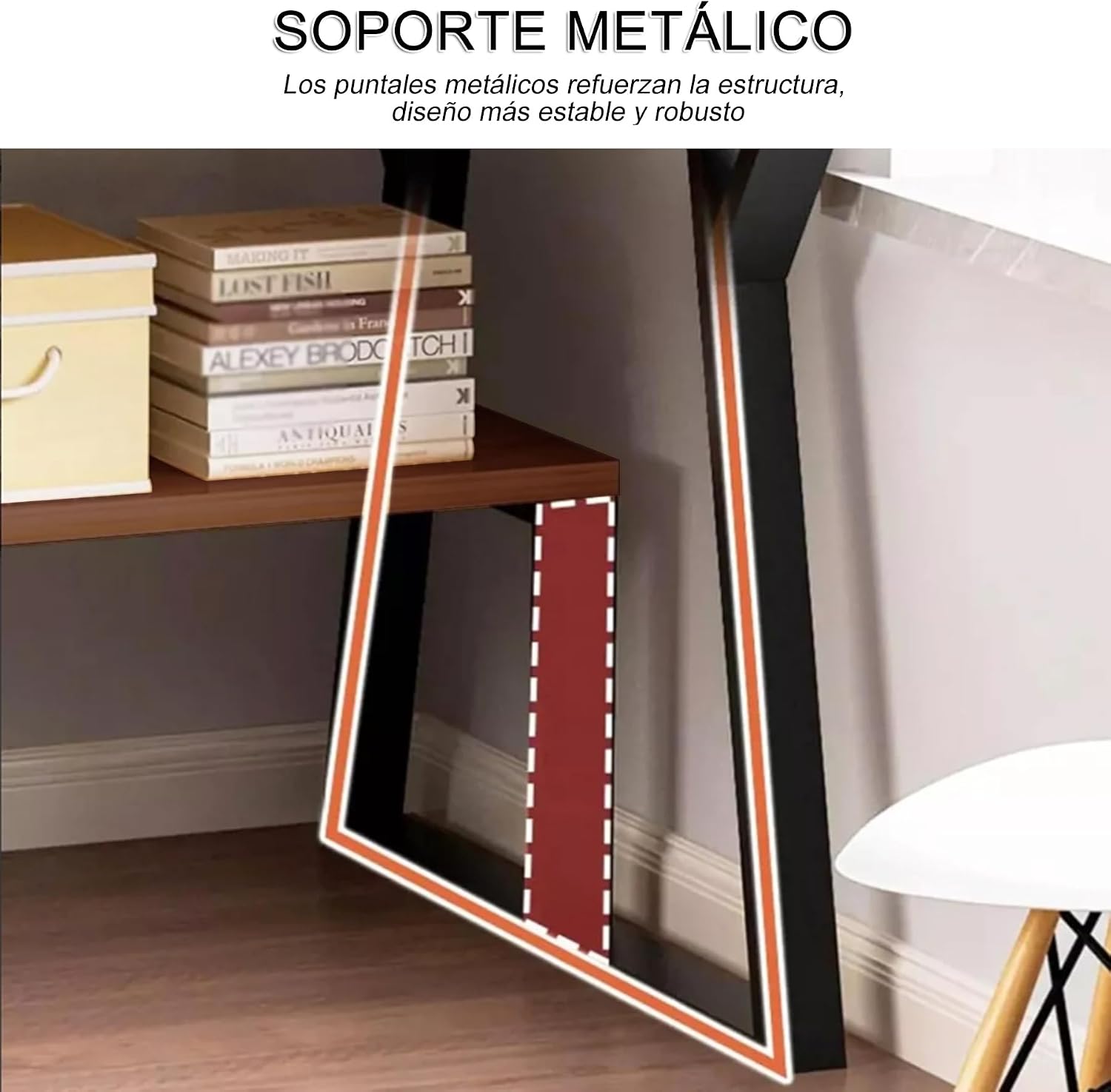
Image: Close-up view of the Y-shaped metal support, which enhances the desk's stability and load capacity.
If you encounter any difficulties during assembly, please consult the included manual or contact our customer support.
6. Operating Instructions
The TRIUMPHKEY C69 Minimalist Desk is designed for versatile use in various settings:
- Workstation: Use the spacious desktop for your computer, laptop, and other work essentials.
- Study Area: Organize books, stationery, and study materials on the 3-tier shelves.
- Creative Space: Ideal for drafting, drawing, or other creative projects.
- Storage: Utilize the shelves for displaying decorative items, storing office supplies, or keeping personal belongings tidy.

Image: The desk configured for various uses, showcasing its multifunctional design with books, a laptop, and decorative items.
7. Maintenance
- Cleaning: Wipe the desk surfaces with a soft, damp cloth. Avoid harsh chemicals or abrasive cleaners that could damage the finish.
- Spills: Clean up spills immediately to prevent staining or damage to the wood board.
- Inspection: Periodically check all screws and bolts to ensure they remain tight. Retighten if necessary.
- Avoid direct sunlight: Prolonged exposure to direct sunlight can cause fading or warping of the wood.
- Heat protection: Use coasters or protective pads under hot items to prevent damage to the desktop.
8. Troubleshooting
- Desk is wobbly:
- Ensure all screws and bolts are securely tightened. Check that the desk is placed on a level surface. Adjust floor glides if present.
- Missing or damaged parts:
- Refer to the package contents list in your instruction manual. Contact TRIUMPHKEY customer service immediately for assistance.
- Difficulty with assembly:
- Review the illustrated instruction manual carefully. If issues persist, contact customer service for guidance.
9. Specifications
| Feature | Detail |
|---|---|
| Brand | TRIUMPHKEY |
| Model | C69 |
| Dimensions (W x D x H) | 100 cm x 50 cm x 148 cm (39.4 in x 19.7 in x 58.3 in) |
| Weight | 16 Kilograms (35.3 lbs) |
| Material | Metal Frame, Density Board (Wood) |
| Color | Brown |
| Number of Shelves | 3 |
| Assembly Required | Yes (Tools and instructions included) |
| Recommended Uses | Writing, Studying, Drafting, Work |

Image: Detailed dimensions of the TRIUMPHKEY C69 Minimalist Desk, showing height, width, and depth measurements for all sections.
10. Warranty and Support
For warranty information, returns, or any product-related inquiries, please contact TRIUMPHKEY customer service. We are committed to providing solutions within 24 hours for any questions you may have during assembly or use.
- Customer Service: Refer to the contact information provided in your product packaging or on the TRIUMPHKEY official website.
- Returns: This product typically includes a 30-day free return policy. Please check your purchase details for specific terms.
- Extended Warranty: Optional extended warranty plans may be available through third-party providers.