
1. Setup
1.1 Package Contents
Verify that all items are present in the package:
- OUKITEL BT12 Smart Watch
- Charging Cable
- User Manual
1.2 Initial Charging
Before first use, fully charge the OUKITEL BT12 Smart Watch. Connect the charging cable to the watch's charging port and a USB power adapter (not included). The watch display will indicate charging status. A full charge typically takes approximately 2 hours.
1.3 App Download and Pairing
- Download the Companion App: Scan the QR code provided in the quick start guide or search for the official OUKITEL smart watch application in your smartphone's app store (compatible with Android and iOS).
- Enable Bluetooth: Ensure Bluetooth is enabled on your smartphone.
- Pair the Watch: Open the companion app, create an account if prompted, and follow the on-screen instructions to add a new device. Select 'BT12' from the list of available devices. Confirm the pairing request on both your phone and the watch.
Once paired, the watch will synchronize time and date settings with your smartphone.
2. Operation
2.1 Basic Navigation
- Touchscreen: Swipe up, down, left, or right to navigate through menus and notifications. Tap to select an option.
- Side Buttons: The watch features physical buttons for quick access to functions or to return to the home screen. Refer to the watch's on-screen prompts for specific button functionalities.
2.2 Making and Receiving Calls
The OUKITEL BT12 supports Bluetooth calls when connected to your smartphone.
- Answering Calls: When an incoming call is received, the watch will display the caller ID. Tap the green icon on the watch screen to answer.
- Making Calls: Access the dialer or contact list on the watch to initiate a call. The call will be routed through your connected smartphone.

Image: The watch interface showing call management and notification features.
2.3 GPS Functionality
The BT12 features built-in GPS with support for 6 satellite positioning systems (L1 and L5 signals) for accurate location tracking during outdoor activities. This allows for precise route tracking and navigation.

Image: GPS tracking in action, showing route and activity data.
2.4 Altitude, Pressure, and Compass
The watch includes an internal compass, altimeter, and barometer to display current altitude and barometric pressure, useful for outdoor enthusiasts.

Image: Watch displaying altitude, barometric pressure, and compass data.
2.5 Health Monitoring
The BT12 provides 24-hour health monitoring features:
- Heart Rate Monitor: Tracks your heart rate continuously.
- Blood Oxygen Monitor: Measures blood oxygen levels (SpO2).
- Sleep Tracker: Monitors sleep stages and duration.
- Calories Burned: Estimates calorie expenditure based on activity.

Image: Health monitoring data displayed on the watch.
2.6 Sports Modes
The watch offers over 150 built-in sports modes, including smart recognition for walking, running, cycling, and elliptical. It automatically detects and monitors your activity.

Image: Watch displaying various sports modes.
2.7 AI Voice Assistant
Utilize the integrated AI voice assistant for hands-free control and commands, especially convenient during driving or exercise.
2.8 Other Features
The OUKITEL BT12 includes additional practical features:
- Remote photo capture
- Music control
- Alarm clock
- Calculator
- Sedentary reminder
- Weather forecast
- Stopwatch
3. Maintenance
3.1 Water Resistance (5ATM)
The OUKITEL BT12 is 5ATM waterproof, meaning it can withstand immersion in water up to 50 meters deep. It is suitable for swimming, diving, and surfing. Avoid operating buttons underwater to prevent water ingress.

Image: Watch demonstrating 5ATM water resistance.
3.2 Cleaning
Regularly clean your watch and strap with a soft, damp cloth. Avoid using harsh chemicals or abrasive materials, which can damage the finish or sensors. Ensure the watch is dry before charging.
3.3 Battery Care
The watch is equipped with a 480mAh battery. To prolong battery life:
- Avoid extreme temperatures.
- Charge the watch before the battery is completely depleted.
- If storing for an extended period, charge the watch to approximately 50% and store in a cool, dry place.
3.4 Durability
The BT12 is manufactured to military standards (U.S. MIL-STD-810H Quality) and features a stainless steel unibody metal case, providing resistance against scratches, drops, and various environmental conditions including temperature extremes, dust, and salt spray.
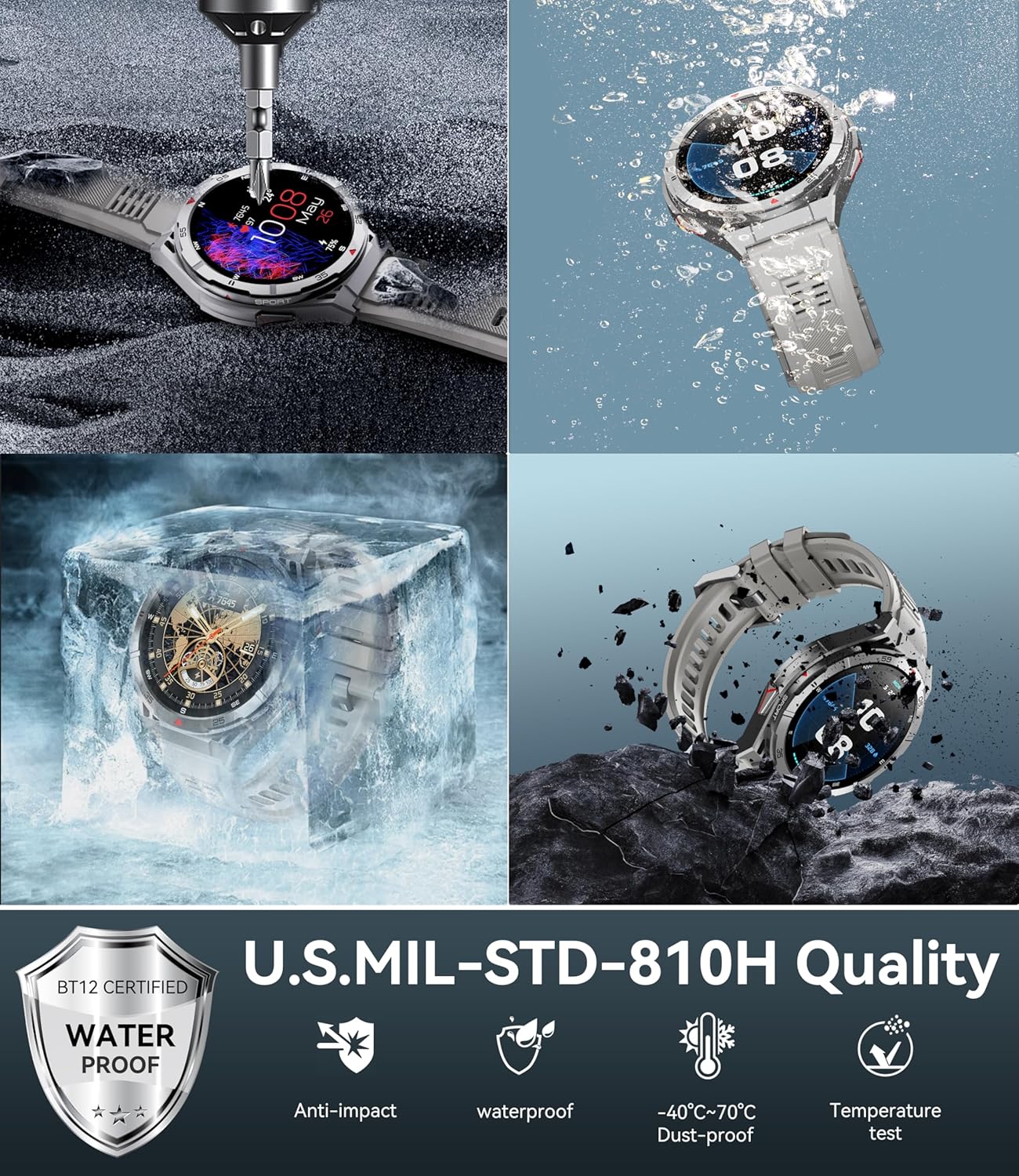
Image: Watch undergoing durability tests, showcasing military-grade quality.

Image: Watch display quality and military standard certification.
4. Troubleshooting
4.1 Watch Not Turning On
- Ensure the watch is fully charged. Connect it to the charger for at least 30 minutes.
- Press and hold the power button for 10-15 seconds to attempt a forced restart.
4.2 Connectivity Issues (Bluetooth)
- Verify Bluetooth is enabled on both your watch and smartphone.
- Ensure the watch is within the Bluetooth range of your phone (typically 10 meters).
- Restart both your watch and smartphone.
- Unpair the watch from your phone's Bluetooth settings and re-pair through the companion app.
4.3 Inaccurate Health Data
- Ensure the watch is worn snugly on your wrist, not too tight or too loose.
- Clean the sensor on the back of the watch.
- Avoid excessive movement during measurements.
4.4 App Synchronization Problems
- Check your internet connection on your smartphone.
- Ensure the companion app is updated to the latest version.
- Close and reopen the app.
4.5 Factory Reset
If issues persist, a factory reset may resolve them. This will erase all data on the watch and restore it to its original settings. Navigate to 'Settings' on your watch, then 'System' or 'General', and select 'Factory Reset' or 'Reset'.
5. Specifications
| Feature | Detail |
|---|---|
| Model Number | BT12 |
| Display | 1.43-inch AMOLED |
| Resolution | 256 x 144 (Note: Product description mentions 410x502, but specifications list 256x144. Please refer to official product page for clarification.) |
| Operating System | Wear OS |
| Battery Capacity | 480 mAh Lithium Polymer |
| Battery Life (Smartwatch Mode) | Up to 12 days |
| Battery Life (GPS Mode) | Up to 22 hours |
| Water Resistance | 5ATM (50 meters) / IP69K |
| GPS | Built-in GPS (6 Satellite Positioning Systems, L1 & L5) |
| Connectivity | Bluetooth |
| Sensors | Heart Rate Monitor, Blood Oxygen Monitor, Altimeter, Barometer, Compass |
| Durability Standard | U.S. MIL-STD-810H Quality |
| Compatible Devices | Android and iOS smartphones |
| Material | Stainless Steel (case) |
6. Warranty & Support
6.1 Warranty Information
The OUKITEL BT12 Smart Watch comes with a standard manufacturer's warranty. Please refer to the warranty card included in your product packaging or visit the official OUKITEL website for detailed warranty terms and conditions.
6.2 Customer Support
For technical assistance, troubleshooting, or product inquiries, please contact OUKITEL customer support through their official website or the contact information provided in your product documentation.
Website: www.oukitel.com (Example, please verify official website)
Email: support@oukitel.com (Example, please verify official support email)