
Introduction
This manual provides detailed instructions for the safe and efficient operation, setup, and maintenance of your KATOOL ME-620T Wheel Balancer. Please read this manual thoroughly before operating the machine to ensure proper usage and to prevent damage or injury. The KATOOL ME-620T is designed for precise balancing of car wheels, featuring robust construction and advanced balancing capabilities.
Safety Information
Always observe the following safety precautions:
- Ensure the machine is placed on a level, stable surface.
- Connect the machine to a grounded power outlet with the correct voltage (110V/1PH).
- Keep hands and clothing clear of moving parts during operation.
- Wear appropriate personal protective equipment (PPE), such as safety glasses.
- Do not operate the machine if any parts are damaged or missing.
- Refer to the warning labels on the machine for additional safety instructions.
Setup and Installation
Proper setup is crucial for accurate balancing and safe operation.
1. Unpacking and Placement
Carefully unpack all components. Position the wheel balancer on a firm, level floor. The machine's base is designed for stability, with an extension point to prevent tipping when handling larger tires.

Image 1: The KATOOL ME-620T Wheel Balancer shown with its included accessories, including the wheel clamp, measuring caliper, and various cones. The main unit is blue with a digital display and control panel.
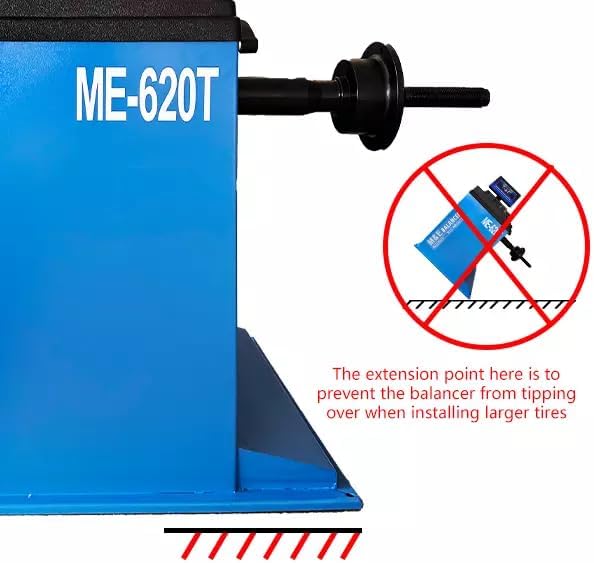
Image 2: A close-up view of the wheel balancer's base, highlighting the extension point designed to enhance stability and prevent the machine from tipping over when balancing larger or heavier wheels.
2. Power Connection
Connect the power cord to a 110V/1PH grounded electrical outlet. Ensure the power switch is in the OFF position before connecting.
3. Shaft and Cone Installation
The machine features a φ36mm shaft. Select the appropriate cone size for the wheel being balanced. The shaft is designed for high strength due to quenching treatment.
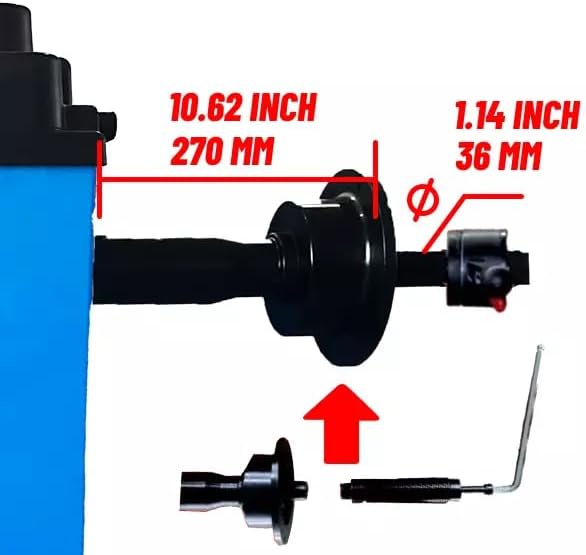
Image 3: This image illustrates the dimensions of the wheel balancer's shaft, showing a diameter of 1.14 inches (36 mm) and a length of 10.62 inches (270 mm). This detail is important for selecting the correct wheel adapters.

Image 4: A close-up view demonstrating the "reverse fitting" method for mounting a wheel onto the balancer's shaft. This technique is used for specific wheel types to ensure a secure and accurate fit.
Operating Instructions
1. Mounting the Wheel
- Clean the wheel and rim thoroughly.
- Select the appropriate mounting cone for the wheel's center bore.
- Mount the wheel securely onto the balancer shaft, ensuring it is centered and tightened with the quick-release nut.
2. Inputting Wheel Parameters
Use the control panel to input the wheel's dimensions. The machine supports unit selection (Ounce/Gram, MM/Inch).
- Rim Diameter: 10" to 24" (254mm to 610mm)
- Rim Width: 1.5" to 20" (38mm to 508mm)
- Use the measuring caliper to accurately determine the rim width and distance from the machine.

Image 5: A detailed view of the KATOOL ME-620T's control panel and digital display. The display shows "INNER VALUE" and "OUTER VALUE" for balance readings, along with graphical representations of the wheel. The control panel features buttons for various balance modes (A, B, C, D, F, ALU), unit selection (MM/INCH), and operation (START, STOP).

Image 6: A close-up showing the use of a measuring caliper to determine the distance from the wheel to the balancer. This measurement is critical for accurate data input into the machine.
3. Selecting Balance Mode
The ME-620T offers various balance modes to suit different rim types. Select the appropriate mode (e.g., ALU for alloy wheels) using the control panel buttons (A, B, C, D, F, ALU).
4. Starting the Balancing Cycle
Once parameters are set, press the "START" button. The wheel will rotate at 210rpm, and the balancing process will typically take 8-10 seconds. The display will show the required weight and its placement.
5. Applying Balance Weights
Apply the indicated balance weights to the rim at the positions shown on the display. Re-spin the wheel to verify the balance. The balancing precision is 1g.
Maintenance
- Cleaning: Regularly clean the machine, especially the shaft and sensor areas, to prevent debris from affecting accuracy.
- Calibration: The ME-620T has a built-in self-calibration program (double-side calibration). Perform calibration periodically or if accuracy issues arise.
- Inspection: Periodically inspect all cables, connections, and mechanical parts for wear or damage.
- Motor: The pure copper winding motor is designed for fast heat dissipation and long life. Ensure adequate ventilation around the machine.
- Computer Board: The advanced welding technology of the computer board makes it moisture-proof, dust-proof, and anti-static, contributing to a longer lifespan.
Troubleshooting
The ME-620T includes a built-in fault diagnosis program. If an issue occurs, consult the display for error codes or messages.
- Inaccurate Readings:
- Ensure wheel is clean and properly mounted.
- Verify correct wheel parameters have been entered.
- Perform self-calibration.
- Machine Not Starting:
- Check power connection and circuit breaker.
- Ensure safety guards are in place (if applicable).
- Excessive Vibration:
- Confirm the machine is on a stable, level surface.
- Check for loose components or damaged parts.
For issues not resolved by these steps, contact KATOOL customer support.
Specifications
| Feature | Specification |
|---|---|
| Model | ME-620T |
| Max Wheel Weight | 65 kg (144 lbs) |
| Motor Power | 250 W |
| Voltage | 110 V / 1 PH |
| Balancing Precision | 1 g |
| Rotation Speed | 210 rpm |
| Rim Diameter | 10" – 24" (254 mm – 610 mm) |
| Rim Width | 1.5" – 20" (38 mm – 508 mm) |
| Balancing Time | 8-10 seconds |
| Noise Level | < 70 dB(A) |
| Net Weight (N.W) | 105 kg |
| Outer Dimensions (L×W×H) | 1200 × 1400 × 1760 mm |
| Working Temperature | 0 – 50 ℃ |
| Shaft Thread Diameter | φ36 mm |
Warranty and Support
For warranty information, please refer to the documentation provided at the time of purchase or contact KATOOL customer service directly. Keep your purchase receipt as proof of purchase.
For technical support, parts, or service inquiries, please contact KATOOL through their official channels. Ensure you have your model number (ME-620T) and serial number ready when contacting support.


