
1. Introduction
Welcome to the PrettyCare W200 Cordless Stick Vacuum Cleaner user manual. This versatile, powerful, and smart vacuum cleaner is designed to make your cleaning tasks easier and more efficient, providing a clean, healthy, and comfortable home environment. Whether you're dealing with pet hair, crumbs, or general dirt, the W200 is engineered to deliver exceptional performance on various surfaces.
2. Important Safety Instructions
Please read all safety instructions carefully before using the appliance. Failure to follow these instructions may result in electric shock, fire, or serious injury.
- Always use the original power adapter provided to charge the battery.
- Ensure all components are correctly assembled and securely attached before operating the vacuum cleaner.
- Do not use the cordless vacuum cleaner to pick up water or any other liquids. This appliance is designed for dry vacuuming only.
- Store the vacuum cleaner and its charger in a cool, dry indoor location when not in use.
- Keep hair, loose clothing, fingers, and all parts of the body away from openings and moving parts.
- Do not pick up anything that is burning or smoking, such as cigarettes, matches, or hot ashes.
- Do not use without the dust cup and filters in place.
3. Package Contents
Carefully unpack your PrettyCare W200 and check that all items are present and in good condition:
- 1 x W200 Vacuum Cleaner Main Unit
- 1 x Rotating Brush Head (Floor Brush)
- 1 x Wall Mount
- 2 x HEPA Filters
- 1 x 2-in-1 Brush
- 1 x Crevice Nozzle
- 1 x Adjustable Metal Tube
- 1 x Power Adapter
- 1 x Instruction Manual
4. Product Overview
The PrettyCare W200 is designed for versatile cleaning with its modular components. Familiarize yourself with the main parts:
- Main Unit: Contains the motor, dustbin, battery, and control panel with LED display.
- Adjustable Metal Tube: Connects the main unit to the floor brush or other attachments, allowing for adjustable length.
- Floor Brush with LED Lights: Features a rotating brush for deep cleaning and four LED headlights to illuminate dark areas. It offers 180° lateral and 90° up/down rotation.
- 2-in-1 Brush: A versatile attachment for cleaning upholstery, curtains, and other delicate surfaces.
- Crevice Nozzle: Ideal for reaching tight spaces, corners, and edges.
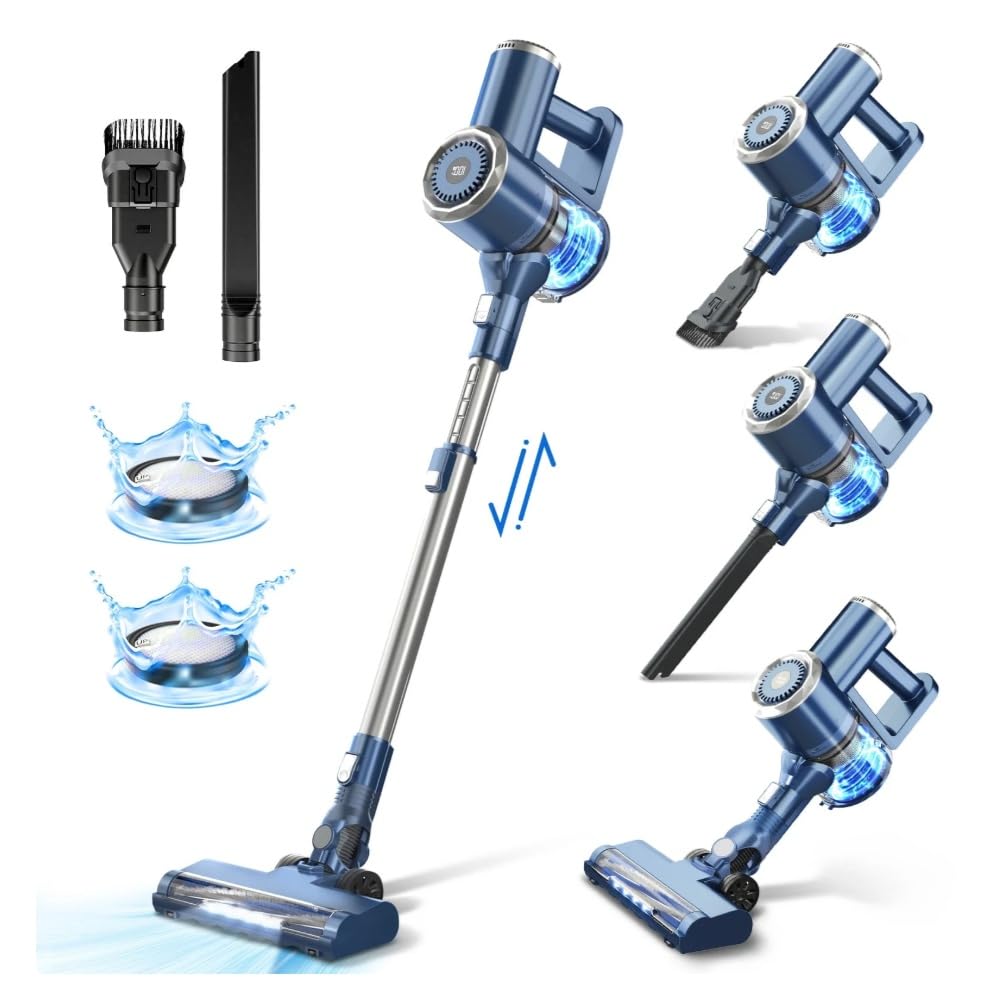
Image: PrettyCare W200 Cordless Stick Vacuum Cleaner and its various attachments. The image displays the main vacuum unit, the adjustable metal tube, the floor brush with LED lights, the 2-in-1 brush, and the crevice nozzle. Two washable filters are also shown with water splashes, indicating their cleanable nature. The vacuum is depicted in both upright and handheld configurations, highlighting its versatility.
5. Setup and Initial Use
5.1 Assembly
- Attach the Adjustable Metal Tube: Insert the top end of the metal tube into the main unit until it clicks into place.
- Attach the Floor Brush: Insert the bottom end of the metal tube into the floor brush until it clicks into place.
- Attach Accessories (Optional): For handheld use, you can directly attach the 2-in-1 brush or crevice nozzle to the main unit.
5.2 Charging the Battery
Before first use, fully charge the vacuum cleaner's battery. The LED display will indicate the charging status.
- Connect the power adapter to the charging port on the main unit.
- Plug the adapter into a wall outlet.
- A full charge typically takes 4-5 hours.
6. Operating Instructions
6.1 Power On/Off and Suction Modes
- Press the power button on the main unit to turn the vacuum cleaner on.
- The vacuum operates in two adjustable modes: a normal suction mode (15kPa) for up to 48 minutes of runtime, and a powerful suction mode (28Kpa) for tougher messes, offering approximately 20 minutes of runtime.
- Use the mode selection button to switch between suction levels. The LED display will show the current mode and battery status.
6.2 Using Attachments
- Floor Brush: Ideal for carpets, hard floors, marble, and tiles. The flexible head and LED lights help clean under furniture and in dark corners.
- 2-in-1 Brush: Attach directly to the main unit for cleaning stairs, curtains, window sills, sofas, and car interiors.
- Crevice Nozzle: Use for narrow gaps, edges, and hard-to-reach areas.
6.3 Storage
The W200 offers two convenient storage options:
- Self-Standing: The vacuum can stand upright on its own, allowing you to pause cleaning at any time.
- Wall Mount: Use the included wall mount to hang the vacuum for compact storage and charging.
7. Maintenance
Regular maintenance ensures optimal performance and extends the lifespan of your vacuum cleaner.
7.1 Emptying the Dustbin
- The 1.3L large capacity dustbin features a "one-button dust collection" design for easy emptying.
- Quickly empty the dust into a trash bin after each use to prevent suction attenuation.
7.2 Cleaning the Filters
The 6-stage filtration system, including HEPA filters, is washable and recyclable.
- Clean the filter and the black cylindrical sponge regularly, ideally after each use.
- Rinse the filters under running water until clean.
- Allow the filters to air dry completely for at least 24 hours before reinserting them into the vacuum. Ensure they are completely dry to prevent damage and maintain suction.
- Filters should be replaced regularly to maintain optimal performance.
8. Troubleshooting
If you encounter issues with your PrettyCare W200, refer to the common problems and solutions below:
| Problem | Possible Cause | Solution |
|---|---|---|
| Reduced Suction Power | Clogged filter, full dustbin, blocked nozzle/tube. | Empty the dustbin. Clean or replace the filters. Check the floor brush, metal tube, and attachments for blockages and remove any debris. |
| Vacuum Not Turning On | Battery is low or depleted, improper assembly. | Charge the battery fully. Ensure all components are correctly assembled and clicked into place. |
| Short Runtime | Battery not fully charged, operating in high power mode. | Ensure the battery is fully charged. Note that the 28Kpa mode has a shorter runtime (approx. 20 mins) compared to the 15kPa mode (approx. 48 mins). |
| Unusual Noise | Blockage in the brush roll or air path, foreign object. | Turn off and unplug the vacuum. Check the brush roll and air paths for any obstructions and remove them. |
If the problem persists after trying these solutions, please contact customer service for further assistance.
9. Specifications
| Feature | Detail |
|---|---|
| Battery | 6*2500 mAh Lithium-ion battery |
| Suction Power | Up to 28 Kpa |
| Filtration Method | 6-stage purification filtration (washable HEPA) |
| Max Runtime | 48 minutes (in normal mode) |
| Adjustable Metal Rod Length | 2.6 ft - 3.4 ft (aluminum) |
| Dust Tank Capacity | 1.3 L |
| Floor Brush Features | 180° lateral + 90° up/down rotation, 4 LED lights |
| Included Brush Heads | 2-in-1 brush, Crevice brush |
| Display | LED display |
| Storage Method | Wall-mounted and Upright |
| Product Weight | 5.4 pounds (main body) |
| Charging Time | 4-5 hours |
| Noise Level | ≤60dB |
| Recommended Use Area | Up to 1937.50 sq ft (180㎡) |
| Recommended Surfaces | Carpet, Hardwood, Marble, Tiles |
10. Customer Support
For any questions regarding the operation, maintenance, or troubleshooting of your PrettyCare W200 Cordless Stick Vacuum Cleaner, please do not hesitate to contact our customer service team. We are committed to providing professional support and assistance to ensure your satisfaction.
Please refer to the product packaging or the official PrettyCare website for specific contact information.


