
Introduction
The Jectse KM105F WiFi Battery Monitor is a sophisticated device designed for precise measurement and remote monitoring of battery parameters. It accurately measures voltage, current, power, discharge capacity, watt-hours, and time. Featuring a 2.4-inch HD color LCD and WiFi connectivity, this monitor allows real-time tracking of your battery's status via a mobile application, ensuring you stay informed and in control of your power usage.

Key Features
- Integrated Reminders: Set low capacity or low voltage reminders. An audible buzzer and pop-up alert will activate if values fall below predefined levels, keeping you informed of the device's status.
- Multiple Parameter Measurements: Measures voltage, current, power, discharge capacity, watt-hours, and time. Configure protection functions for over-voltage, under-voltage, over-current, over-power, over-temperature, and time-limited protections.
- Wide Battery Compatibility: Compatible with various battery types, including VRLA, LFP, Li-Ion, and Ni-MH, within a voltage range of 10V to 100V.
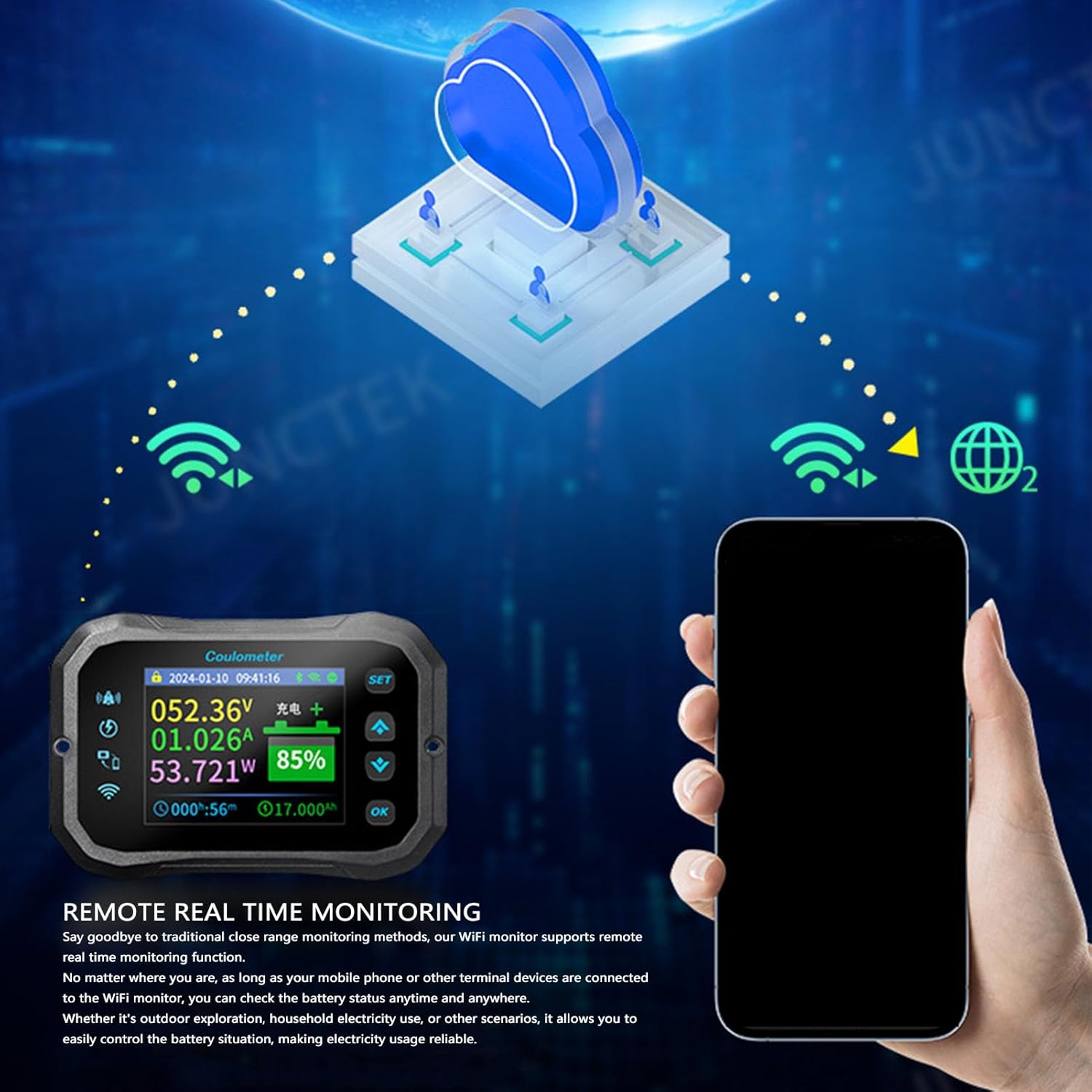
- Remote Monitoring: Supports real-time remote monitoring via WiFi connectivity and a dedicated mobile application. Track your battery's status anytime, anywhere from your smartphone or other devices.
- Enhanced User Interface: Features a 2.4-inch HD color LCD with an optimized interface, larger text, and clear display. Includes dark and light mode options for improved visibility. Silicone keys provide smooth operation and quick response.
- Data Retention: Built-in storage chip ensures power failure parameters are not lost during unexpected power outages. The device continues to operate according to settings before power loss.


Package Contents
Verify that all items listed below are present in your package:
- 1 x Jectse WiFi Battery Monitor (Main Display Unit)
- 1 x Shunt (for current measurement)
- 1 x 1-meter Red Positive Wire
- 1 x 5-meter Communication Wire
- 1 x User Manual (this document)
Setup Instructions
Follow these steps carefully to set up your Jectse WiFi Battery Monitor. Incorrect wiring can damage the device or your battery system.
- Identify Components: Familiarize yourself with the main display unit, the shunt, and the connecting wires.
- Connect the Shunt: The shunt is a critical component for current measurement. Connect it in series with the negative terminal of your battery system. Ensure secure connections.
- Connect Battery to Shunt: Connect the negative terminal of your battery to the "BATT-" terminal on the shunt.
- Connect Load/Charger to Shunt: Connect the negative terminal of your load (e.g., inverter, appliance) and charger to the "LOAD-" terminal on the shunt.
- Connect Positive Battery Terminal: Use the provided 1-meter red positive wire to connect the positive terminal of your battery to the V+ input on the shunt. This provides power to the monitor and measures battery voltage.
- Connect Communication Wire: Use the 5-meter communication wire to connect the shunt to the main display unit. Ensure the connectors are fully inserted.
- Power On: Once all connections are secure, the monitor should power on and display readings.
- Mobile App Installation: Download the official Jectse battery monitor application from your device's app store. Follow the in-app instructions to connect the monitor via WiFi.

Operating Instructions
This section details how to operate your Jectse WiFi Battery Monitor and interpret its readings.
Display Overview
The 2.4-inch LCD color screen provides real-time data. Key parameters displayed include:
- Voltage (V): Current battery voltage.
- Current (A): Current flowing into (charging) or out of (discharging) the battery.
- Power (W): Instantaneous power consumption or generation.
- Capacity (%): Remaining battery capacity as a percentage.
- Ampere-hours (Ah): Total accumulated charge/discharge.
- Watt-hours (Wh): Total accumulated energy.
- Time: Elapsed time for current charge/discharge cycle.
Button Functions
The silicone keys on the device allow for navigation and setting adjustments. Refer to the on-screen prompts for specific functions of each button (e.g., SET, OK, Up/Down arrows).
Remote Monitoring via Mobile App
The mobile application provides advanced features and remote access to your battery monitor.
- Connect to WiFi: Ensure your monitor is connected to a stable WiFi network.
- Pair with App: Open the Jectse app on your smartphone and follow the instructions to pair it with your battery monitor.
- View Real-time Data: The app displays all parameters available on the monitor, often with historical data and graphical representations.
- Configure Settings: Adjust protection parameters (over-voltage, under-voltage, etc.), set reminders, and manage screen settings directly from the app.

Setting Protection Parameters
Access the settings menu (via the device buttons or mobile app) to configure various protection thresholds:
- Over-voltage Protection: Set a maximum voltage limit.
- Under-voltage Protection: Set a minimum voltage limit to prevent deep discharge.
- Over-current Protection: Define a maximum current draw.
- Over-power Protection: Set a maximum power output.
- Over-temperature Protection: (If applicable, check device specifications for sensor).
- Time-limited Protection: Set operational time limits.
When a protection threshold is exceeded, the monitor will trigger an alarm.
Screen Timeout Settings
You can adjust the screen timeout duration to conserve power. Options include 10S, 20S, 30S, 40S, 50S, 60S, or AUTO. In AUTO mode, the screen remains on during discharge if the current (I) is ≥15mA and turns off when I <15mA for more than 20 seconds.
Maintenance
Proper maintenance ensures the longevity and accuracy of your battery monitor.
- Cleaning: Use a soft, dry cloth to clean the display and casing. Avoid abrasive cleaners or solvents.
- Connection Checks: Periodically inspect all wiring connections to ensure they are secure and free from corrosion. Loose connections can lead to inaccurate readings or device malfunction.
- Software Updates: Check the mobile application regularly for any available firmware or app updates to ensure optimal performance and access to new features.
- Environmental Conditions: Operate the monitor within its specified temperature and humidity ranges to prevent damage.
Troubleshooting
If you encounter issues with your Jectse WiFi Battery Monitor, refer to the following common problems and solutions.
| Problem | Possible Cause | Solution |
|---|---|---|
| Monitor does not power on. | Incorrect or loose power connection (V+ wire). | Check the 1-meter red positive wire connection from the battery's positive terminal to the shunt's V+ input. Ensure it is securely connected and receiving power. |
| Inaccurate voltage or current readings. | Loose shunt connections, incorrect wiring, or shunt not properly calibrated. | Verify all connections to the shunt (BATT-, LOAD-, V+). Ensure the shunt is correctly installed in series with the negative line. If issues persist, consult the app for calibration options or contact support. |
| WiFi connection issues or app not connecting. | Out of WiFi range, incorrect WiFi password, or app pairing issue. | Ensure the monitor is within 10 meters of your WiFi router. Double-check WiFi credentials in the app. Restart both the monitor and your smartphone, then attempt to re-pair. |
| Alarm constantly sounding. | Battery parameters (voltage, capacity) are outside set thresholds. | Check the current battery voltage and capacity on the display or app. Adjust the low/high voltage or capacity reminder settings if they are too sensitive, or address the underlying battery issue (e.g., charge the battery). |
| Display is blank or unresponsive. | Screen timeout, power issue, or device malfunction. | Press any button to wake the screen if screen timeout is active. Check power connections. If the issue persists after verifying power, contact customer support. |

Specifications
| Parameter | Value |
|---|---|
| Type d'article | WiFi Battery Monitor |
| Matériau | ABS |
| Modèle | KM105F |
| Taille de l'écran | 2.4 pouces |
| Méthode d'échantillonnage | Shunt |
| Plage de test de tension | 10-100 V |
| Plage de test de courant | 0-50 A |
| Résolution de courant | 0.001 A |
| Plage d'affichage de la capacité | 0-100 % |
| Plage de test de puissance | 0-5 kW |
| Résolution de puissance | 0.0001 W |
| Plage de test d'ampère-heure | 0-9999.9 Ah |
| Résolution de capacité | 0.001 Ah |
| Distance de connexion (Wireless) | Jusqu'à 10 mètres sans obstruction |
| Distance de connexion WiFi | Jusqu'à 10 mètres sans obstruction |
| Portée de connexion à distance | Global |
| Précision de tension | ±5 % + 0.02 V |
| Précision du courant | ±2 + 0.002 A |
| Taux d'échantillonnage | 5 fois/seconde |
| Consommation électrique de l'écran | 0.9 W |
| Temps d'arrêt de l'écran | 10S, 20S, 30S, 40S, 50S, 60S, AUTO |
| Dimensions du colis | 17 x 15 x 6 cm |
| Poids du colis | 331 grammes |
| Pays d'origine | Chine |

Warranty and Support
Specific warranty information for the Jectse KM105F WiFi Battery Monitor is typically provided with your product packaging or can be obtained directly from the manufacturer or your point of purchase. Please retain your proof of purchase for warranty claims.
For technical support, troubleshooting assistance beyond this manual, or warranty inquiries, please contact Jectse customer service through their official website or the contact information provided in your product documentation.