
1. Introduction
The COOLMOON SK1 ARGB 5V 3-Pin SATA LED Controller is designed to manage and customize the lighting effects of Addressable RGB (ARGB) devices in your computer system. This controller provides a convenient way to control your ARGB fans, LED strips, and other compatible components without requiring a motherboard with ARGB headers. It features direct SATA power connection and includes a remote control for easy adjustment of lighting modes, colors, and speeds.
2. Package Contents
- 1x COOLMOON SK1 ARGB Controller
- 1x Remote Control
3. Specifications
| Feature | Specification |
|---|---|
| Brand | COOLMOON |
| Model | CM-SK1-B |
| Cable Length | 490mm |
| Controller Dimensions | 46 x 22 x 9.5mm |
| LED Type | ARGB (Addressable RGB) |
| LED Connector | 3-Pin |
| LED Voltage | 5V |
| Power Supply | SATA |
| Material | Plastic, Metal, Gold-plated Connectors |
| Compatible Devices | Cooler Fans, LED Strips, ARGB Devices, Water Coolers |
| Connectivity Technology | Infrared (for remote control) |
4. Setup and Installation
Follow these steps to install your COOLMOON SK1 ARGB Controller:
- Power Connection: Connect the SATA power cable from the controller directly to an available SATA power connector from your computer's power supply unit (PSU). This controller does not require a motherboard connection for power.
- ARGB Device Connection: Connect your 5V 3-Pin ARGB devices (fans, LED strips, etc.) to the ARGB output port on the controller. Ensure the connectors are aligned correctly to avoid damage.
- Series Connection: Multiple ARGB devices can be connected in series to the controller. Connect the output of one ARGB device to the input of the next, and then connect the first device in the chain to the controller.
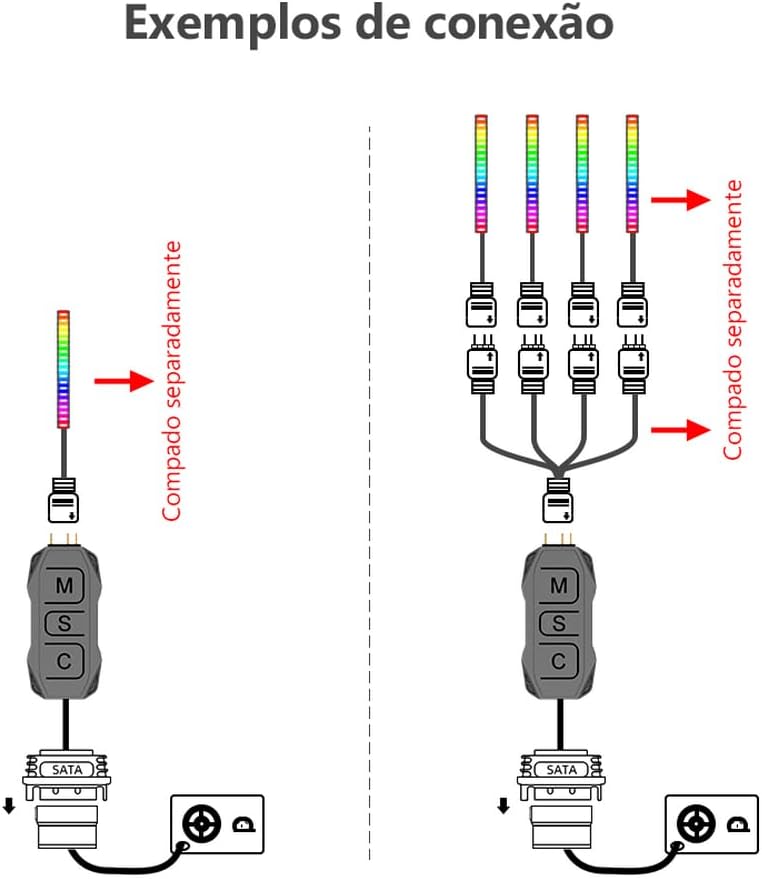

Note: This controller operates independently of the motherboard, receiving power directly from the computer's power supply via SATA.
5. Operating Instructions
5.1. Controller Buttons
The controller features three physical buttons for direct control:
- M (Mode): Press to cycle through different lighting effect modes.
- S (Speed/Power): Press to change the speed of the lighting effects. Press and hold for 4 seconds to turn the controller on or off.
- C (Color/Brightness): Press to change the color of the selected mode. Press and hold for 5 seconds to adjust the brightness intensity.

5.2. Remote Control
The included remote control offers comprehensive control over your ARGB lighting. Ensure the remote has a working CR2025 3V battery (included) and point it towards the controller for optimal signal reception.

Remote Control Functions:
- Power Button (Red): Turns the ARGB lighting on or off.
- Lock Mode: Locks and saves the last selected effect.
- Auto Mode (AUOT): Cycles through all available lighting effects automatically.
- Brightness (+/-): Increases or decreases the brightness of the LEDs.
- LED Speed (+/-): Adjusts the speed of dynamic lighting effects.
- Mode (+/-): Cycles through different lighting effects.
- Fixed Colors: Direct selection buttons for various static colors (e.g., Red, Green, Blue, Yellow, Orange, Cyan, Purple, White).
- Smart Effect (S-MODE +/-): Cycles through intelligent or pre-programmed effects.
- White and Monochromatic Colors: Dedicated buttons for white and other single-color options.

6. Maintenance
To ensure the longevity and proper functioning of your COOLMOON SK1 ARGB Controller:
- Keep the controller and remote control clean and free from dust. Use a soft, dry cloth for cleaning.
- Avoid exposing the devices to extreme temperatures or humidity.
- Do not attempt to disassemble the controller or remote control, as this may void the warranty.
- If the remote control stops responding, check and replace the CR2025 3V battery if necessary.
7. Troubleshooting
If you encounter issues with your ARGB controller, refer to the following common troubleshooting steps:
- No Power/Lights:
- Ensure the SATA power cable is securely connected to both the controller and the PSU.
- Verify that your PSU is providing power.
- Check if the controller is turned on using the 'S' button (hold for 4 seconds) or the remote control's power button.
- ARGB Devices Not Lighting Up:
- Confirm that the 3-Pin ARGB connectors from your devices are correctly and securely plugged into the controller.
- Ensure the ARGB devices are 5V compatible. This controller is not compatible with 12V RGB devices.
- Test individual ARGB devices if possible to rule out a faulty device.
- Remote Control Not Responding:
- Check the battery in the remote control and replace it if needed (CR2025 3V).
- Ensure there are no obstructions between the remote control and the controller's IR receiver.
- Point the remote directly at the controller.
- Incorrect Colors/Effects:
- Cycle through modes and colors using the controller buttons or remote to see if the issue persists across all settings.
- Ensure all ARGB devices are connected correctly and are not mixed with incompatible RGB devices.
If the problem persists after following these steps, please contact customer support for further assistance.
8. Warranty and Support
For warranty information and technical support, please refer to the documentation provided with your purchase or visit the official COOLMOON website. Keep your proof of purchase for warranty claims.