
1. Introduction
Thank you for purchasing the SUITU Handheld Vacuum Cleaner. This device is designed for versatile cleaning, offering both vacuuming and blowing functions. Its compact, cordless design and powerful suction make it ideal for cleaning various spaces, including vehicles, homes, and offices. Please read this manual carefully before use to ensure proper operation and maintenance.
2. Safety Instructions
- Do not operate the vacuum cleaner with wet hands or near water.
- Keep hair, loose clothing, fingers, and all body parts away from openings and moving parts.
- Do not vacuum flammable or combustible liquids, such as gasoline, or use in areas where they may be present.
- Do not vacuum burning or smoking materials, such as cigarettes, matches, or hot ashes.
- Ensure the filter is properly installed before use.
- Do not allow children to operate the vacuum cleaner.
- Use only the provided charging cable and adapter (if included) to charge the device.
- Do not attempt to blow and vacuum simultaneously.
- Store the device in a dry place when not in use.
3. Package Contents
Please check the package for the following items:
- SUITU Handheld Vacuum Cleaner Unit
- Long Mouth Blowing Nozzle
- Long Nozzle Sucker (Crevice Tool)
- Brush Nozzle
- Floor Brush
- Blow Nozzle
- USB Type-C Charging Cable
- Reusable Filters (2 included)
4. Product Overview
Familiarize yourself with the main components of your SUITU Handheld Vacuum Cleaner:
- Suction Port: Where vacuuming occurs.
- Blowing Port: Where air is expelled for blowing function.
- Power Button: To turn the device on/off.
- Dust Cup: Collects debris during vacuuming.
- Filter: Traps fine particles.
- USB Type-C Charging Port: For recharging the battery.
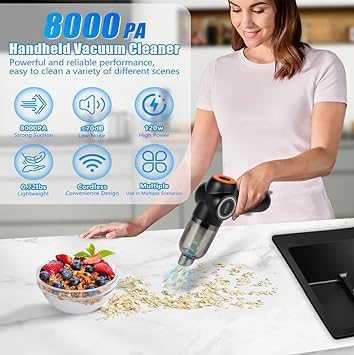
Image: Overview of the SUITU Handheld Vacuum Cleaner highlighting its features like 8000Pa suction, low noise, 120W power, lightweight design, cordless convenience, and multiple scenario use.
5. Setup
5.1 Charging the Device
- Before first use, fully charge the vacuum cleaner.
- Connect the USB Type-C charging cable to the charging port on the device.
- Plug the other end of the cable into a suitable USB power adapter (not included).
- The indicator light will show charging status. A green indicator light signifies that the battery is fully charged.
- Charging typically takes approximately 2.5 hours.
5.2 Attaching Accessories
The vacuum cleaner comes with various accessories for different cleaning tasks. To attach an accessory, align it with the suction or blowing port and push firmly until it clicks into place. To remove, pull it gently.
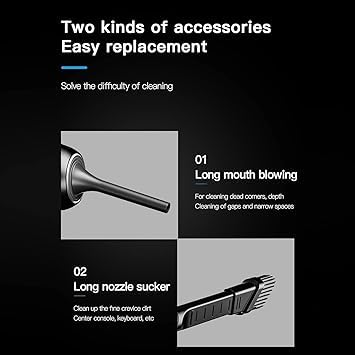
Image: Illustration of the 'Long mouth blowing' nozzle for cleaning dead corners and narrow spaces, and the 'Long nozzle sucker' for fine crevice dirt in areas like the center console or keyboard.
6. Operating Instructions
6.1 Vacuuming Function
- Ensure the dust cup and filter are correctly installed.
- Attach the desired suction nozzle (e.g., Long Nozzle Sucker, Brush Nozzle, or Floor Brush) to the suction port.
- Press the power button to turn on the vacuum cleaner.
- Move the nozzle over the surface to be cleaned.
- After cleaning, press the power button again to turn off the device.
6.2 Blowing Function
- Attach the desired blowing nozzle (e.g., Long Mouth Blowing Nozzle or Blow Nozzle) to the blowing port.
- Press the power button to turn on the device.
- Direct the airflow towards the area you wish to clear of dust or debris.
- After use, press the power button again to turn off the device.
Important Note: Do not operate the vacuuming and blowing functions simultaneously.
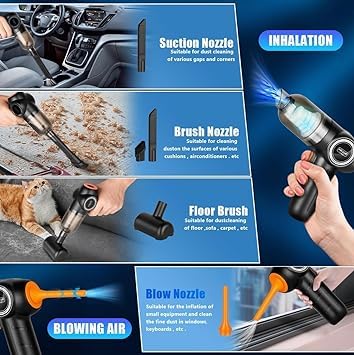
Image: Demonstrates the use of Suction Nozzle for dust cleaning, Brush Nozzle for cushions and air conditioners, Floor Brush for carpets, and Blow Nozzle for fine dust in windows and keyboards.
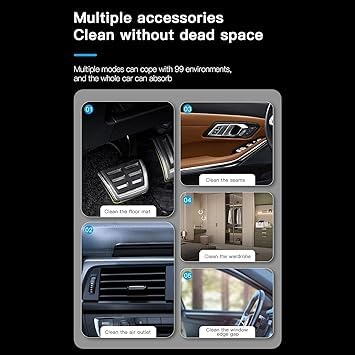
Image: Shows the versatility of the vacuum cleaner with different accessories for cleaning car floor mats, seams, air outlets, wardrobes, and window edge gaps.
7. Maintenance
7.1 Emptying the Dust Cup
Regularly empty the dust cup to maintain optimal suction power. To empty, twist or unlatch the dust cup from the main unit and discard the collected debris. Reattach securely.
7.2 Cleaning the Filter
The high-density multi-layer filter is washable and reusable. To maintain optimal suction and protect the motor, clean the filter regularly.
- Remove the dust cup and then carefully remove the filter.
- Rinse the filter under running water until clean.
- Allow the filter to air dry completely before reinserting it into the vacuum cleaner. Do not use the vacuum with a wet filter.
- The product includes 2 filters, allowing you to use one while the other dries.
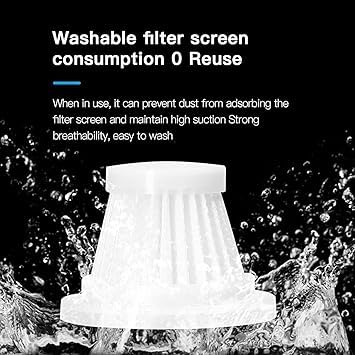
Image: A white filter screen being washed under running water, illustrating its washable and reusable nature to maintain high suction and breathability.
8. Troubleshooting
| Problem | Possible Cause | Solution |
|---|---|---|
| Low suction power | Dust cup is full Filter is clogged Battery is low | Empty the dust cup Clean or replace the filter Recharge the battery |
| Device does not turn on | Battery is depleted | Charge the device fully |
| Unusual noise during operation | Obstruction in nozzle or suction path | Turn off the device and check for blockages; remove carefully |
9. Specifications
- Brand: SUITU
- Model Name: Sui-2-in-1-VacuumAndBlower_White
- Form Factor: Handheld
- Colour: White
- Suction Power: 8000Pa
- Motor Power: 120W
- Noise Level: < 70dB
- Battery Capacity: 4000mAh
- Charging Time: Approximately 2.5 hours
- Operating Time: Up to 30 minutes
- Product Dimensions: 20L x 15W x 10H Centimeters
- Weight: Approximately 0.7 Lbs
10. Warranty and Support
For warranty information or technical support, please refer to the product packaging or contact your retailer. Keep your purchase receipt as proof of purchase.


