1. Introduction
The Acer Gadget Golf Rangefinder SW-RF700 is a precision optical instrument designed for accurate distance measurement in various outdoor activities, including golf, hunting, and archery. Featuring 6X magnification, anti-shake technology, flag pole locking with vibration, and slope compensation, this device provides reliable measurements to enhance your outdoor experience. This manual provides detailed instructions for proper setup, operation, and maintenance of your rangefinder.
2. Safety Information
- Laser Safety: This device uses a Class 1 laser. Do not stare directly into the laser beam or aim it at others.
- Eye Protection: Avoid direct eye exposure to the laser.
- Children: Keep the device out of reach of children.
- Battery Safety: Use only the specified USB-C charging cable. Do not attempt to disassemble or short-circuit the battery.
- Environmental: Do not expose the device to extreme temperatures or direct sunlight for prolonged periods.
3. Package Contents
- Acer Gadget Golf Rangefinder SW-RF700
- USB-C Charging Cable
- Cleaning Cloth
- Carrying Case
- User Manual
4. Product Overview
Familiarize yourself with the components of your Acer Gadget Golf Rangefinder.

Figure 1: Front view of the Acer Gadget Golf Rangefinder SW-RF700, showing the objective lens and laser apertures.
- Eyepiece: For viewing targets and adjusting focus.
- Power/Measure Button: Activates the device and initiates distance measurement.
- Mode Button (M): Switches between different measurement modes.
- Slope Switch: Toggles slope compensation on or off.
- USB-C Charging Port: For recharging the internal battery.
- Magnetic Stripe: Allows for secure attachment to metal surfaces.
5. Setup
5.1 Charging the Battery
The rangefinder is equipped with a rechargeable Lithium-Ion battery. Before first use, fully charge the device.
- Locate the USB-C charging port on the device.
- Connect the provided USB-C cable to the rangefinder and a compatible USB power source (e.g., computer, wall adapter).
- The charging indicator will illuminate. Once fully charged, the indicator will change or turn off.
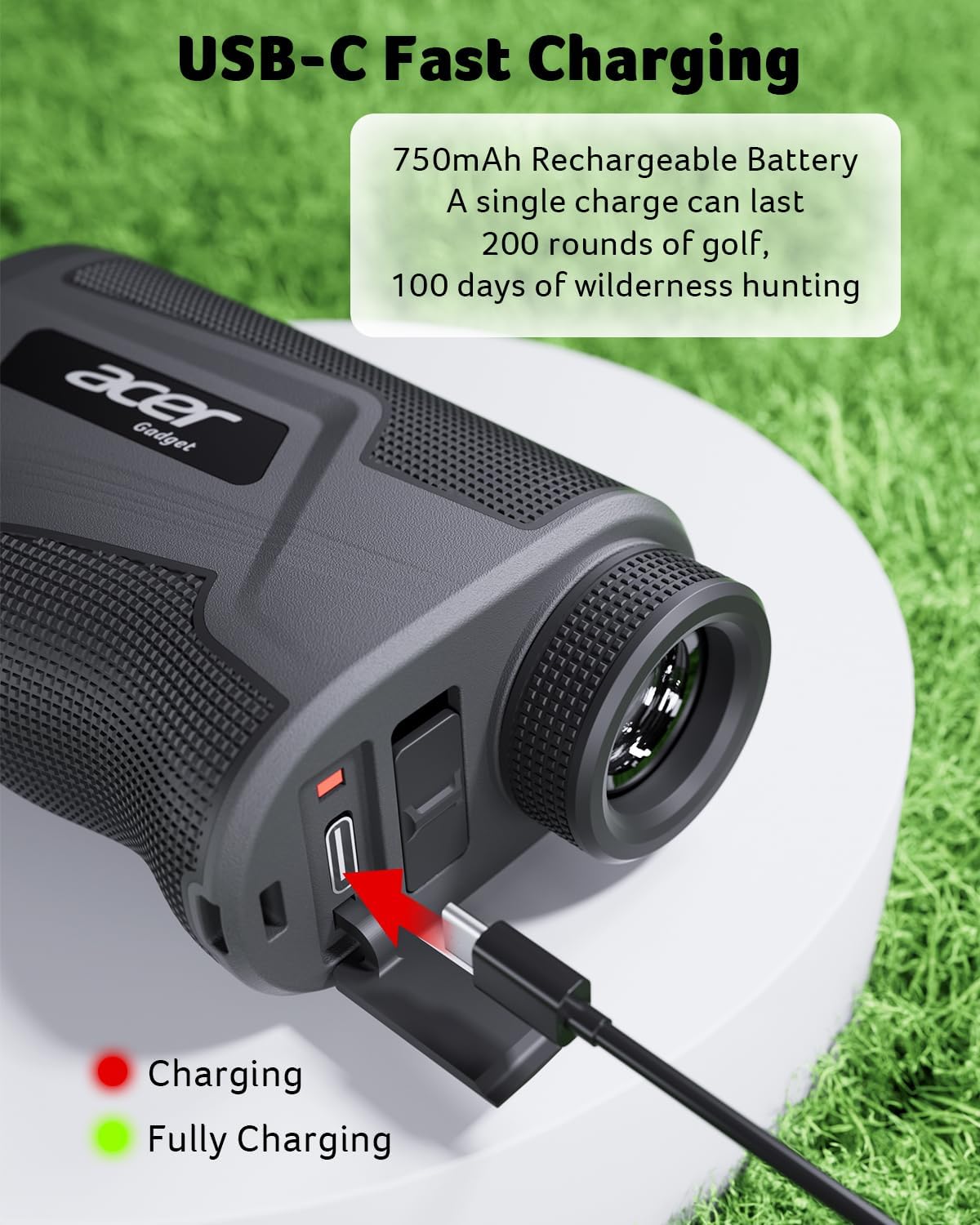
Figure 2: Illustration of the USB-C charging port and charging indicator lights.
5.2 Adjusting the Eyepiece
To ensure a clear view of the display and target, adjust the eyepiece:
- Look through the eyepiece.
- Rotate the eyepiece clockwise or counter-clockwise until the display and target appear sharp and in focus.
6. Operating Instructions
6.1 Power On/Off and Basic Measurement
- Press the Power/Measure Button once to turn on the device. The display will activate.
- Aim the crosshairs at your desired target.
- Press the Power/Measure Button again to take a measurement. The distance will be displayed instantly.
- The device will automatically power off after a period of inactivity to conserve battery.

Figure 3: View through the rangefinder showing 6X magnification and distance measurement up to 800 yards.
6.2 Mode Selection
Press the Mode Button (M) to cycle through the available measurement modes:
- Standard Mode: Measures direct line-of-sight distance.
- Flaglock with Vibration: Designed for golf, this mode locks onto the closest target (e.g., flagstick) and provides a short vibration to confirm acquisition.
- Slope Compensation Mode: Calculates the "play-as" distance, accounting for elevation changes. This feature can be toggled on/off for tournament play.
- Scan Mode: Press and hold the Power/Measure button to continuously scan and display distances to multiple targets as you pan across the landscape. Useful for hunting.
- Speed Mode: Measures the speed of a moving object.
- Angle Mode: Measures the angle of inclination or declination to the target.
- Vertical/Horizontal Distance Mode: Provides both vertical and horizontal distances to a target.

Figure 4: Key features for golf, including Slope Switch, Flag Lock, Vibration, Magnetic Stripe, Rechargeable battery, and Anti-shake technology.
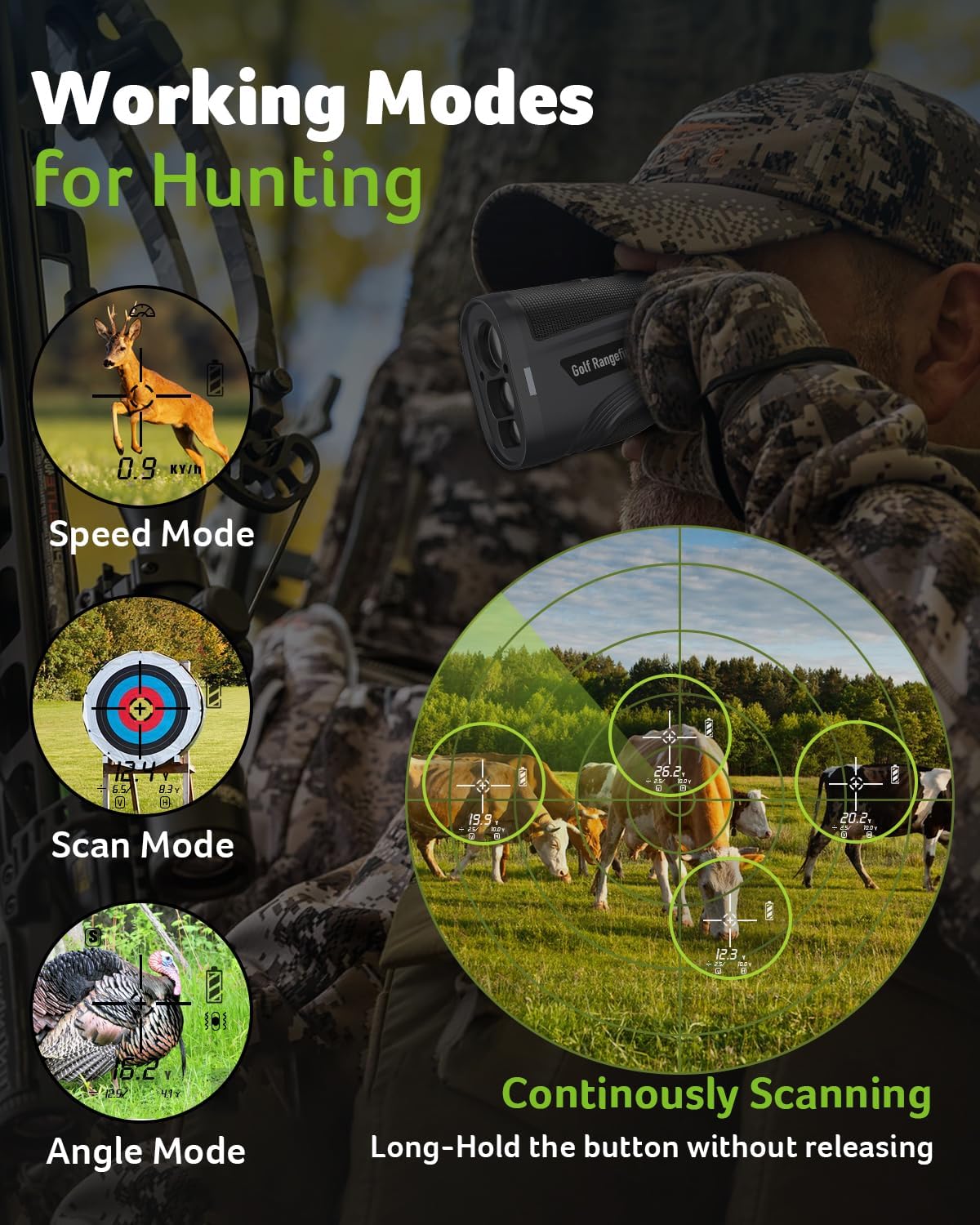
Figure 5: Various working modes suitable for hunting, such as Speed Mode, Scan Mode, Angle Mode, and Continuous Scanning.
6.3 Slope Compensation Feature
The slope compensation feature adjusts the measured distance based on the incline or decline to the target, providing a more accurate "play-as" distance for golf. This feature can be turned on or off using the dedicated slope switch on the side of the device.
- Slide the Slope Switch to the ON position to activate slope compensation.
- Slide the Slope Switch to the OFF position for tournament-legal play (disables slope compensation).

Figure 6: Explanation of the Slope Assist feature, demonstrating how it adjusts distances for sloped terrain.
6.4 Anti-Shake Technology
The integrated anti-shake technology helps stabilize the view and measurement, providing more consistent and accurate readings even with slight hand movements.

Figure 7: Visual comparison of readings with and without Anti-Shake technology, highlighting improved stability.
6.5 Changing Units of Measurement
The device can display measurements in yards or meters. Refer to the specific instructions in your quick start guide for changing units, typically by holding down the Mode button or a combination of buttons.
7. Maintenance
- Cleaning: Use the provided cleaning cloth to gently wipe the lenses and body of the rangefinder. Do not use abrasive materials or chemical cleaners.
- Storage: Store the device in its protective carrying case when not in use. Keep it in a cool, dry place away from direct sunlight and extreme temperatures.
- Battery Care: Recharge the battery regularly, even if the device is not used frequently, to maintain battery health. Avoid fully discharging the battery for extended periods.
8. Troubleshooting
- No Power: Ensure the battery is charged. Connect the USB-C cable and charge for at least 30 minutes.
- Inaccurate Readings:
- Ensure the eyepiece is properly focused.
- Check for obstructions between the device and the target.
- Verify that the correct measurement mode is selected.
- Flaglock Not Working: Ensure the flagstick is clearly visible and isolated from background objects. Try scanning the area around the flag.
- Display Unclear: Adjust the eyepiece focus. Clean the lenses with the provided cloth.
9. Specifications
| Brand | Acer Gadget |
| Model Number | SW-RF700 |
| Measuring Range | 800 yards |
| Magnification | 6X |
| Accuracy | ±0.5 yard |
| Battery Type | Rechargeable Lithium-Ion (USB-C) |
| Material | Polycarbonate (PC) |
| Water Resistance | Not Water Resistant |
| Product Dimensions | 10.67 x 6.35 x 3.81 cm |
| Item Weight | 322 g |
10. Warranty and Support
For warranty information, technical support, or service inquiries, please refer to the contact details provided with your product packaging or visit the official Acer Gadget website. Keep your purchase receipt as proof of purchase for warranty claims.


