
Introduction
Welcome to the Fitpolo W208 Plus Series Smart Watch user manual. This guide provides detailed instructions on how to set up, operate, maintain, and troubleshoot your new smart watch. Please read this manual thoroughly to ensure proper use and to maximize your device's features.
The Fitpolo W208 Plus is designed to integrate seamlessly into your daily life, offering health monitoring, fitness tracking, and smart communication features.
Setup
1. Initial Charging
Before first use, fully charge your Fitpolo W208 Plus smart watch. Connect the magnetic charging cable to the charging contacts on the back of the watch and plug the USB end into a power adapter (not included) or a computer's USB port. A full charge typically takes approximately 2.5 hours.
2. App Download and Pairing
- Download the "Veryfit" app from your smartphone's app store (available for Android and iPhone).
- Ensure Bluetooth is enabled on your smartphone.
- Open the "Veryfit" app and follow the on-screen instructions to create an account or log in.
- In the app, navigate to the device pairing section and select your Fitpolo W208 Plus smart watch from the list of available devices.
- Confirm the pairing request on both your watch and smartphone. The watch utilizes Bluetooth 5.3 for a stable connection.
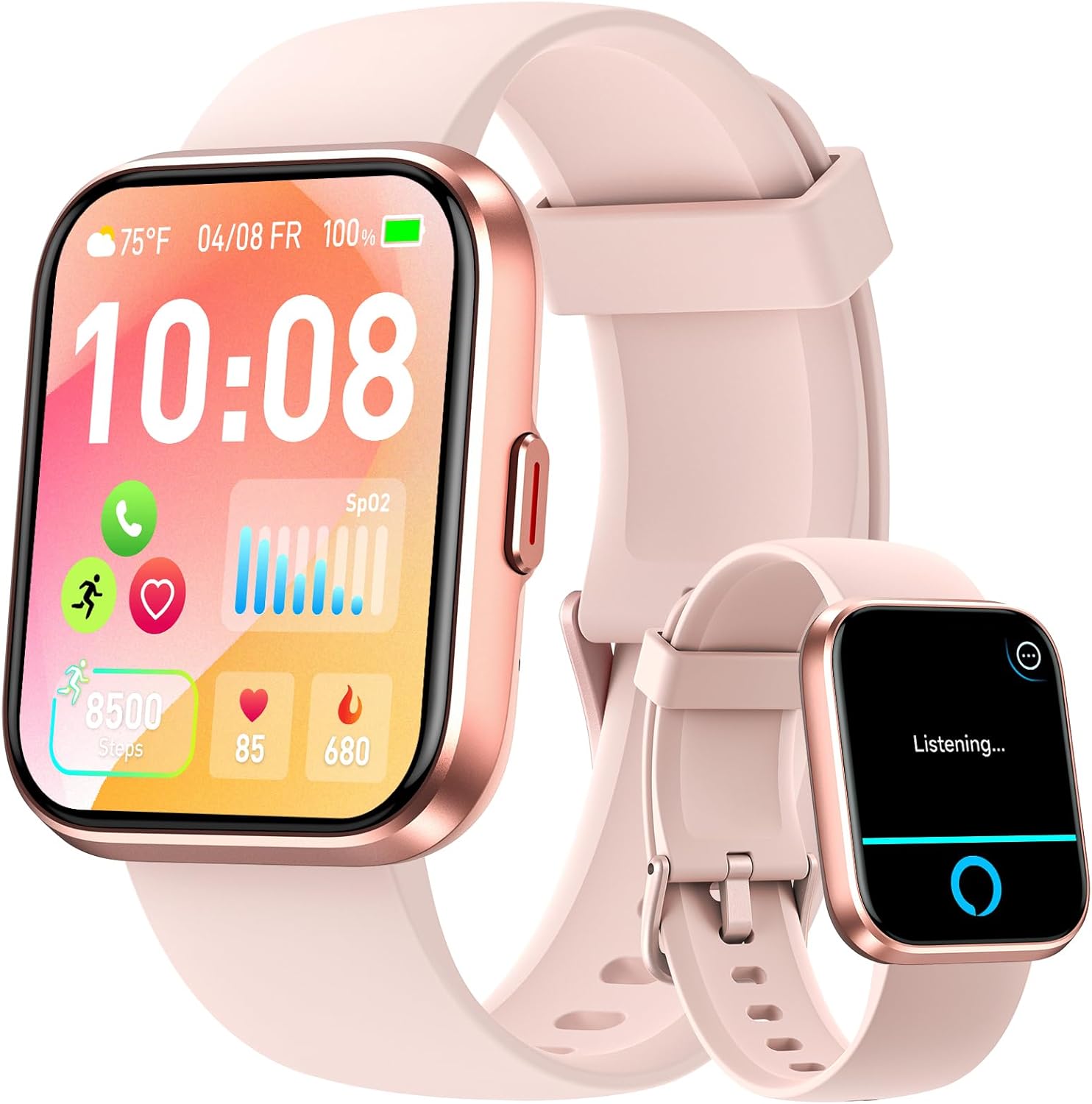
Image: The Fitpolo W208 Plus Smart Watch showing its main display with time, date, weather, steps, heart rate, and SpO2 levels. This image illustrates the watch's interface after successful setup.
Operating Instructions
Basic Navigation
- Touch Screen: Swipe left, right, up, or down to navigate through menus and features. Tap to select an option.
- Side Button: Press the side button to return to the home screen or to wake the display. A long press may activate specific functions depending on the context.
- Raise to Wake: The watch display will automatically turn on when you raise your wrist. This feature can be enabled or disabled in the watch settings or the "Veryfit" app.
Customizing Watch Faces
The Fitpolo W208 Plus features a 1.8-inch TFT-LCD colorful screen. You can personalize your watch by choosing from over 120 watch faces available through the "Veryfit" app. You can also set your favorite photo as a custom watch face.
- Open the "Veryfit" app on your smartphone.
- Navigate to the 'Watch Faces' or 'Dial Market' section.
- Browse the available watch faces and select your preferred design.
- To use a custom photo, select the 'Custom' option and choose an image from your phone's gallery.
- Synchronize the watch face to your device.

Image: The Fitpolo W208 Plus Smart Watch showcasing its 1.8-inch large LCD screen with a vibrant floral watch face. This highlights the display quality and customization options.
Health Monitoring
The Fitpolo W208 Plus smart watch is equipped with advanced sensors for continuous health monitoring throughout the day and night.
- Heart Rate Monitoring: Tracks your heart rate 24/7, providing insights into your cardiovascular health.
- SpO2 Monitoring: Measures your blood oxygen saturation levels.
- Stress Monitoring: Helps you understand your stress levels throughout the day.
- Sleep Tracking: Analyzes your sleep patterns, including deep sleep, light sleep, and awake times, to help improve sleep quality.
All recorded health data is synchronized to the "Veryfit" app on your smartphone for detailed analysis and historical trends. The watch can also vibrate to alert you if your health metrics fall outside of predefined healthy ranges.
Sports Modes
Your Fitpolo W208 Plus smart watch functions as a comprehensive fitness tracker, automatically counting steps, distance, and calorie consumption. It supports over 110 built-in sports modes to accurately track various physical activities.
Available Sports Modes include:
- Running
- Walking
- Hiking
- Badminton
- Basketball
- Boating
- Climbing
- Cycling
- Fitness
- Football
- Swimming
- Yoga
- And many more...
The watch has an IP68 waterproof rating, making it suitable for use during handwashing, face washing, and sweaty activities. It is not recommended for diving or high-pressure water activities.

Image: This image depicts two individuals engaged in outdoor running, with an overlay illustrating the Fitpolo W208 Plus Smart Watch's interface displaying activity data such as steps and calorie consumption, emphasizing its 110+ built-in sports modes.
Smart Features
Amazon Alexa Built-In
The Fitpolo W208 Plus features a built-in Amazon Alexa voice assistant. You can interact with Alexa directly from your watch to:
- Ask questions (e.g., "Alexa, how is the weather today?").
- Check the weather forecast.
- Set alarms and reminders (e.g., "Alexa, remind me at 10 o'clock").
- Control compatible smart home devices.

Image: A user is shown interacting with the Fitpolo W208 Plus Smart Watch, which displays a 'Listening...' prompt, demonstrating the integrated Alexa voice assistant functionality.
Bluetooth Calls & Notifications
With Bluetooth 5.3 connectivity, you can answer and make calls directly from your smart watch when your phone is within an 8-10 meter range. Please note that the watch cannot send messages or text back.
The watch also provides SMS and message notifications from various apps, including:
- Text Messages
- X (Twitter)
- Telegram
- Tiktok
- Skype
- And more...

Image: The Fitpolo W208 Plus Smart Watch is shown on a wrist, displaying an incoming call and a built-in dial pad. Below, icons for WhatsApp and SMS reminders are visible, illustrating its Bluetooth call and notification capabilities.
Other Functions
The Fitpolo W208 Plus also includes a variety of other useful features:
- Sedentary Reminder
- Flashlight
- Weather Forecasts
- Music Control
- Camera Control
- Alarms
- Stopwatch
- Timer
- Motion Recognition
- Breather Guide
- Find Your Phone
Maintenance
Cleaning Your Watch
Regularly clean your watch and strap to prevent skin irritation and maintain device functionality. Use a soft, damp cloth to wipe the screen and strap. Avoid using harsh chemicals or abrasive materials.
Water Resistance
The Fitpolo W208 Plus has an IP68 waterproof rating. This means it is resistant to dust and can withstand immersion in water up to 1.5 meters for up to 30 minutes. It is suitable for daily use, such as handwashing, showering (cold water), and light rain. Do not use it for swimming in hot water, diving, or exposing it to high-pressure water jets.
Battery Care
To prolong battery life, avoid fully discharging the watch frequently. Charge the watch using the provided magnetic charging cable. A full charge provides approximately 7 days of typical use.
Troubleshooting
- Watch not turning on: Ensure the watch is fully charged. Connect it to the charger for at least 10 minutes before attempting to power it on.
- Cannot pair with smartphone:
- Ensure Bluetooth is enabled on your phone.
- Make sure the watch is within the Bluetooth range (8-10 meters) of your phone.
- Restart both your watch and smartphone.
- Check if the "Veryfit" app is updated to the latest version.
- If previously paired, try unpairing the device from your phone's Bluetooth settings and then re-pairing through the app.
- Notifications not appearing:
- Ensure the watch is connected to your phone via Bluetooth.
- Check notification permissions for the "Veryfit" app in your phone's settings.
- Verify that notifications are enabled for specific apps within the "Veryfit" app settings.
- Ensure 'Do Not Disturb' mode is not active on either your watch or phone.
- Inaccurate health data: Ensure the watch is worn snugly on your wrist, about one finger's width above your wrist bone. Keep the sensor clean. For best results, avoid excessive movement during measurements.
- Short battery life:
- Frequent use of features like continuous heart rate monitoring, Alexa, and Bluetooth calls will consume more battery.
- Reduce screen brightness or screen-on time.
- Disable unnecessary notifications.
Specifications
| Model | W208 Plus |
| Display | 1.8-inch TFT-LCD Color Screen |
| Screen Resolution | 240*284 pixels |
| Bluetooth Version | 5.3 |
| Waterproof Rating | IP68 |
| Charging Time | Approx. 2.5 hours |
| Battery Life (Typical Use) | Up to 7 days |
| Compatibility | Android & iPhone |
| Voice Assistant | Amazon Alexa Built-in |
Warranty and Support
Fitpolo provides a 3-year after-sales service and warranty for the W208 Plus Series Smart Watch. This warranty covers manufacturing defects and ensures product reliability.
For technical support, warranty claims, or any questions regarding your Fitpolo W208 Plus smart watch, please contact Fitpolo customer service through the official Fitpolo website or the contact information provided with your purchase.
Please retain your proof of purchase for warranty purposes.


