
Introduction
Thank you for choosing the Mocado Travel Makeup Mirror. This double-sided mirror features 1X and 20X magnification, adjustable 3-color LED lighting, and a rechargeable battery, designed for convenience and precision in your daily beauty routine or while traveling. Please read this manual thoroughly before use to ensure proper operation and care.
Important Safety Information
- Handle with care to avoid breakage.
- Keep away from water. Do not use while bathing or near water.
- When using the 20X magnifying mirror, keep the mirror approximately 4 inches (10 cm) away from your face to prevent dizziness or distorted vision.
- Do not expose the mirror to direct sunlight or extreme temperatures.
Package Contents
Verify that all items are present in your package:
- Mocado Travel Makeup Mirror (1X/20X Magnifying)
- Type-C Charging Cable (1m)
- Cleaning Cloth
- Velvet Protective Bag
- User Manual

Image: The Mocado Travel Makeup Mirror and its accessories, including the Type-C charging cable, cleaning cloth, and velvet protective bag.
Product Features
- Double-Sided Mirror: Features a 1X HD mirror for general makeup application and a 20X magnifying mirror for detailed tasks.
- 3 Color Lighting Modes: Cool White, Natural White, and Warm White to suit various environments and makeup needs.
- Dimmable Brightness: Adjust brightness from 0-100% with a long press on the touch sensor.
- Rechargeable Battery: Equipped with a 1500mAh battery, providing 7-9 hours of use on a 120-minute charge.
- 300° Rotation: Allows for flexible adjustment to find the perfect viewing angle.
- Memory Function: Remembers the last used brightness setting.
- Portable Design: Slim and foldable (6x7 inches, 0.8 inch folded) for easy carrying in handbags, backpacks, or luggage.
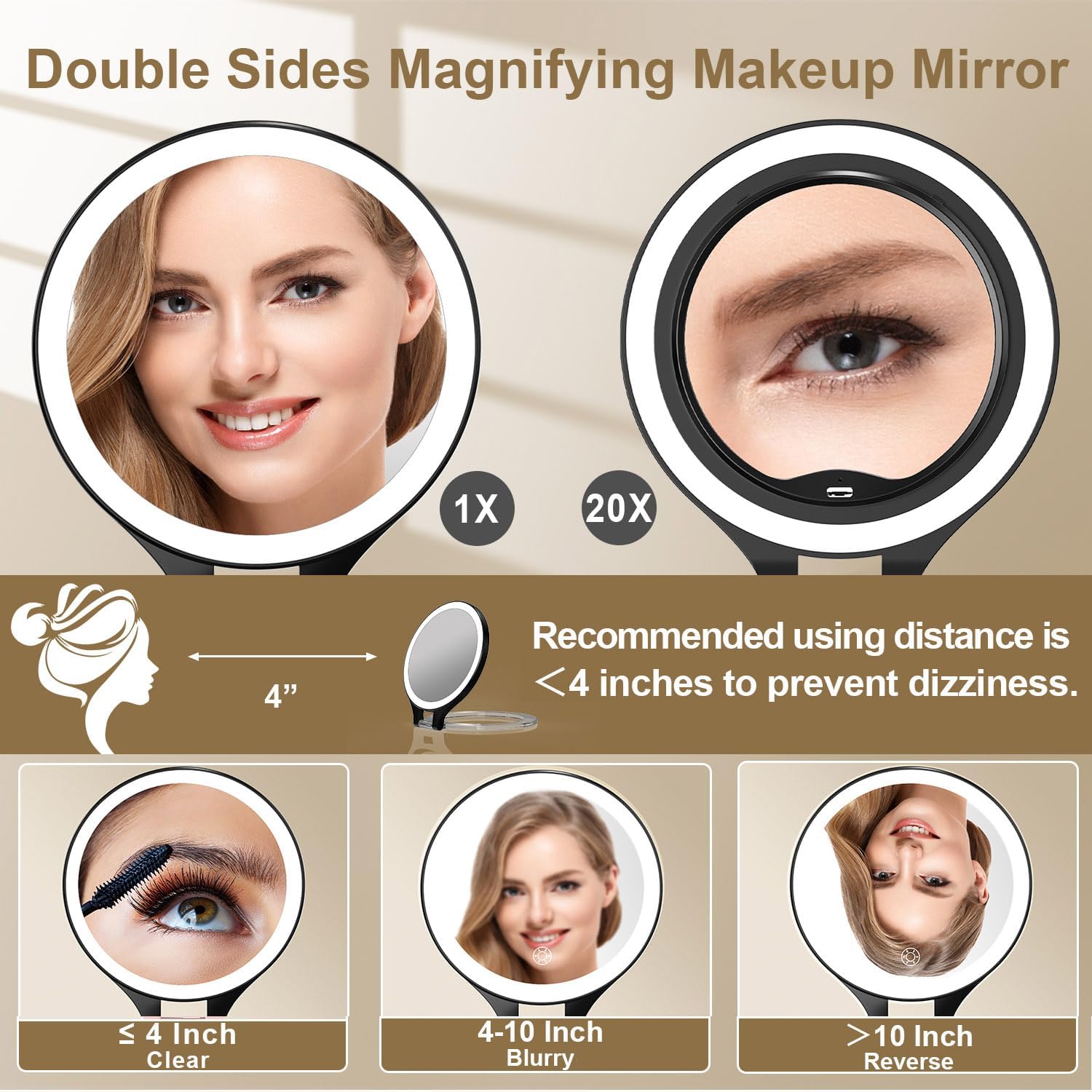
Image: The mirror displaying its 1X and 20X magnification sides, highlighting the clarity and recommended distance for the 20X side.
Setup
- Unfold the Mirror: Gently open the mirror from its folded position. The clear acrylic stand will extend to provide stability.
- Adjust the Angle: Tilt the mirror to your desired viewing angle. The 300° rotation allows for versatile positioning.
- Placement: Place the mirror on a stable, flat surface.
Video: A demonstration of unfolding the mirror, adjusting its angle, and using both the 1X and 20X magnifying sides for makeup application.
Operating Instructions
- Power On/Off: Locate the touch sensor button on the mirror's surface. Short press to turn the light on or off.
- Change Light Color: With the light on, short press the touch sensor button to cycle through the three light modes: Cool White, Natural White, and Warm White.
- Adjust Brightness: With the light on, long press and hold the touch sensor button to dim or brighten the light. Release when the desired brightness is reached. The mirror will remember your last brightness setting.
- Using Magnification: Use the 1X side for a standard reflection. For detailed tasks like applying mascara or eyebrow trimming, switch to the 20X magnifying side. Remember to keep your face approximately 4 inches from the 20X mirror to avoid distortion.

Image: The mirror illustrating the three distinct color lighting modes available for different makeup applications.
Charging
- Connect the Cable: Insert the Type-C charging cable into the charging port on the mirror. Connect the other end to a 5V1A adapter, laptop, power bank, or car charger.
- Charging Indicator: The indicator light will flash red while charging. It will turn green when charging is complete.
- Charging Time: A full charge takes approximately 120 minutes.
- Battery Life: A fully charged mirror provides 7-9 hours of continuous use, depending on the brightness and light mode selected.

Image: The mirror's charging port with a Type-C cable inserted, showing the red indicator for charging and green for fully charged.
Maintenance
- Cleaning: Use the provided cleaning cloth to gently wipe the mirror surfaces. Do not use abrasive cleaners or harsh chemicals.
- Storage: When not in use or for travel, fold the mirror and store it in the velvet protective bag to prevent scratches and damage.
- Battery Care: To prolong battery life, avoid fully discharging the battery frequently. Charge the mirror regularly, even if not in constant use.
Troubleshooting
| Problem | Possible Cause | Solution |
|---|---|---|
| Light does not turn on. | Battery is low or depleted. | Charge the mirror using the provided Type-C cable. |
| Light is too dim or too bright. | Brightness setting needs adjustment. | Long press the touch sensor button to adjust brightness. |
| Mirror image is blurry or distorted (20X side). | Too far or too close to the mirror. | Maintain a distance of approximately 4 inches (10 cm) from the 20X magnifying mirror. |
| Charging indicator not working. | Cable or power source issue. | Ensure the charging cable is securely connected and try a different power source. |
Specifications
| Feature | Detail |
|---|---|
| Brand | Mocado |
| Model Number | US-MCD-MM-0607B |
| Magnification | 1X / 20X |
| Lighting Modes | 3 Colors (Cool White, Natural White, Warm White) |
| Brightness Adjustment | 0-100% Dimmable Touch |
| Battery Capacity | 1500mAh |
| Charging Time | Approx. 120 minutes |
| Usage Time | 7-9 hours (depending on light mode/brightness) |
| Rotation Angle | 300° |
| Product Dimensions (Folded) | 7.13"L x 6.25"W x 0.8"H |
| Material | Glass, Polystyrene (PS) |
| Item Weight | 0.41 Kilograms (14.4 ounces) |
Warranty and Support
Mocado products are designed for quality and durability. For warranty information or technical support, please refer to the contact details provided on the product packaging or visit the official Mocado website. Please retain your proof of purchase for any warranty claims.